
Problem with moveit_commander interface; trying to plan trajectories for ur5 simulation with Gazebo

np0...@bristol.ac.uk
Hello,
I apologise in advance, for I am very new to programming with ROS.
I have been trying to connect to a simulated ur5 through gazebo and control it in python using the moveit_commander interface.
After attempting to write a simple script for controlling the ur5 gazebo simulation using moveit_commander interface I'm receiving the following errors, firstly in the script terminal window and secondly in the terminal running the moveit_planning _execution node:
[ WARN] [1456503113.598260823, 551.508000000]: Fail: ABORTED: No motion plan found. No execution attempted.
============ Waiting while RVIZ displays plan1...
============ Visualizing plan1
============ Waiting while plan1 is visualized (again)...
terminate called after throwing an instance of 'class_loader::LibraryUnloadException'
  what():  Attempt to unload library that class_loader is unaware of.
Aborted (core dumped)
All is well! Everyone is happy! You can start planning now!
[ INFO] [1456502653.160737839, 126.273000000]: Planning request received for MoveGroup action. Forwarding to planning pipeline.
[ INFO] [1456502653.162058984, 126.273000000]: No planner specified. Using default.
[ INFO] [1456502653.162381392, 126.273000000]: RRTConnect: Starting planning with 1 states already in datastructure
[ERROR] [1456502658.169349483, 130.953000000]: RRTConnect: Unable to sample any valid states for goal tree
[ INFO] [1456502658.170807752, 130.957000000]: RRTConnect: Created 1 states (1 start + 0 goal)
[ INFO] [1456502658.171010925, 130.957000000]: No solution found after 5.008731 seconds
[ INFO] [1456502658.209078107, 130.983000000]: Unable to solve the planning problem
[ INFO] [1456502658.216058459, 130.990000000]: Received new trajectory execution service request...
[ WARN] [1456502658.216106023, 130.991000000]: The trajectory to execute is empty
[ INFO] [1456503008.235511782, 473.390000000]: Planning request received for MoveGroup action. Forwarding to planning pipeline.
[ INFO] [1456503008.235972587, 473.390000000]: No planner specified. Using default.
[ INFO] [1456503008.236136625, 473.390000000]: RRTConnect: Starting planning with 1 states already in datastructure
[ERROR] [1456503013.247658046, 477.166000000]: RRTConnect: Unable to sample any valid states for goal tree
[ INFO] [1456503013.249219738, 477.172000000]: RRTConnect: Created 1 states (1 start + 0 goal)
[ INFO] [1456503013.249677542, 477.172000000]: No solution found after 5.013654 seconds
[ INFO] [1456503013.253513681, 477.174000000]: Unable to solve the planning problem
[ INFO] [1456503013.260155299, 477.178000000]: Received new trajectory execution service request...
[ WARN] [1456503013.260188972, 477.179000000]: The trajectory to execute is empty
[ INFO] [1456503108.575331207, 548.823000000]: Planning request received for MoveGroup action. Forwarding to planning pipeline.
[ INFO] [1456503108.575958594, 548.823000000]: RRTConnect: Starting planning with 1 states already in datastructure
[ERROR] [1456503113.584912230, 551.502000000]: RRTConnect: Unable to sample any valid states for goal tree
[ INFO] [1456503113.587574652, 551.504000000]: RRTConnect: Created 1 states (1 start + 0 goal)
[ INFO] [1456503113.591495319, 551.505000000]: No solution found after 5.015622 seconds
[ INFO] [1456503113.596049476, 551.507000000]: Unable to solve the planning problem
[ INFO] [1456503113.599612790, 551.508000000]: Received new trajectory execution service request...
[ WARN] [1456503113.599910654, 551.508000000]: The trajectory to execute is empty
^C[move_group-1] killing on exit
shutting down processing monitor...
... shutting down processing monitor complete
doneThe important parts of both of these consoles, I believe are
============ Generating plan 1
[ WARN] [1456503113.598260823, 551.508000000]: Fail: ABORTED: No motion plan found. No execution attempted.
and
[ERROR] [1456503113.584912230, 551.502000000]: RRTConnect: Unable to sample any valid states for goal treewhich are suggesting that something's not quite working with either setting the target trajectory/pose or generating the plan in my code??
#!/usr/bin/env python

import sys
import rospy
import moveit_commander
import moveit_msgs.msg
import geometry_msgs.msg

from std_msgs.msg import String

def test():

    ##initialize moveit_commander and rospy
    print "============ Starting test setup"
    moveit_commander.roscpp_initialize(sys.argv)
    rospy.init_node('test2', anonymous=True)


    ## Instantiate a RobotCommander object.  This object is an interface to
    ## the robot as a whole.
    robot = moveit_commander.RobotCommander()

    ## Instantiate a PlanningSceneInterface object.  This object is an interface
    ## to the world surrounding the robot.
    scene = moveit_commander.PlanningSceneInterface()

    ## Instantiate a MoveGroupCommander object.  This object is an interface
    ## to one group of joints.  In this case the group is the joints in the left
    ## arm.  This interface can be used to plan and execute motions on the left
    ## manipulator.
    group = moveit_commander.MoveGroupCommander("manipulator")


    ## We create this DisplayTrajectory publisher which is used below to publish
    ## trajectories for RVIZ to visualize.
    display_trajectory_publisher = rospy.Publisher(
                                      '/move_group/display_planned_path',
                                      moveit_msgs.msg.DisplayTrajectory, queue_size=10)

    ## Wait for RVIZ to initialize. This sleep is ONLY to allow Rviz to come up.
    print "============ Waiting for RVIZ..."
    rospy.sleep(10)
    print "============ Starting test "

    ## Getting Basic Information
    ## ^^^^^^^^^^^^^^^^^^^^^^^^^
    ##
    ## We can get the name of the reference frame for this robot
    print "============ Reference frame: %s" % group.get_planning_frame()

    ## We can also print the name of the end-effector link for this group
    print "============ Reference frame: %s" % group.get_end_effector_link()

    ## We can get a list of all the groups in the robot
    print "============ Robot Groups:"
    print robot.get_group_names()

    ## Sometimes for debugging it is useful to print the entire state of the
    ## robot.
    print "============ Printing robot state"
    print robot.get_current_state()
    print "============"

    ## Planning to a Pose goal
    ## ^^^^^^^^^^^^^^^^^^^^^^^
    ## We can plan a motion for this group to a desired pose for the
    ## end-effector

    print "============ Generating plan 1"
    pose_target = geometry_msgs.msg.Pose()
    pose_target.orientation.w = 1.0
    pose_target.position.x = 0.7
    pose_target.position.y = -0.05
    pose_target.position.z = 1.1
    group.set_pose_target(pose_target)
    ## Now, we call the planner to compute the plan
    ## and visualize it if successful
    ## Note that we are just planning, not asking move_group
    ## to actually move the robot
    plan1 = group.plan()

    ##execute the plan for gazebo the recieve
    group.execute(plan1)
    print "============ Waiting while RVIZ displays plan1..."
    rospy.sleep(5)


    ## You can ask RVIZ to visualize a plan (aka trajectory) for you.  But the
    ## group.plan() method does this automatically so this is not that useful
    ## here (it just displays the same trajectory again).
    print "============ Visualizing plan1"
    display_trajectory = moveit_msgs.msg.DisplayTrajectory()

    display_trajectory.trajectory_start = robot.get_current_state()
    display_trajectory.trajectory.append(plan1)
    display_trajectory_publisher.publish(display_trajectory);

    print "============ Waiting while plan1 is visualized (again)..."
    rospy.sleep(5)

if __name__=='__main__':
  try:
    test()
  except rospy.ROSInterruptException:
    pass
So, I think the problem is coming at either the set_pose_target(), or plan(), functions? Do I need to execute the generated plan using execute() for gazebo to receive the target pose? What do you guys think I might be doing wrong? I could have missed loads of stuff, in which case sorry!
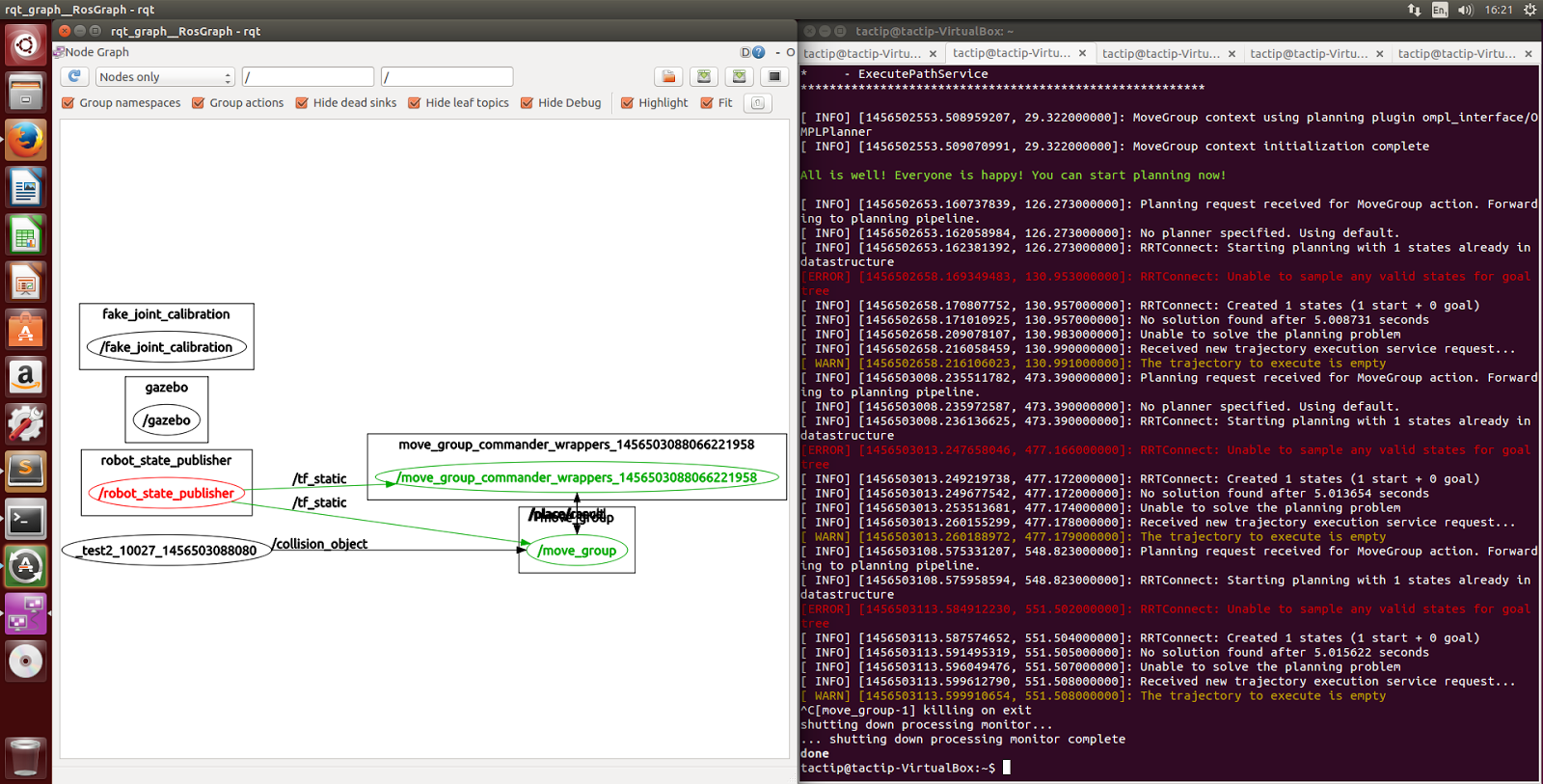
Here's an image of the ROS netwrok workflow from rqt_graph if it helps?
Just a little more background:
Initially, I'm setting up the ur5 gazebo, move_group, and rviz nodes using the following commands:
roslaunch ur_gazebo ur5.launch

roslaunch ur5_moveit_config ur5_moveit_planning_execution.launch sim:=true

roslaunch ur5_moveit_config moveit_rviz.launch config:=true
as described on the ur gitub readme doc.
using Ros indigo desktop full, on ubuntu 14.04 vm, with ur5 packages downloaded from here.
Thanks so much in advance!

Simon Schmeißer
np0...@bristol.ac.uk
np0...@bristol.ac.uk
| <!-- Kinematic model --> | |
| <!-- Properties from urcontrol.conf --> | |
| <!-- | |
| DH for UR5: | |
| a = [0.00000, -0.42500, -0.39225, 0.00000, 0.00000, 0.0000] | |
| d = [0.089159, 0.00000, 0.00000, 0.10915, 0.09465, 0.0823] | |
| alpha = [ 1.570796327, 0, 0, 1.570796327, -1.570796327, 0 ] | |
| q_home_offset = [0, -1.570796327, 0, -1.570796327, 0, 0] | |
| joint_direction = [-1, -1, 1, 1, 1, 1] | |
| mass = [3.7000, 8.3930, 2.2750, 1.2190, 1.2190, 0.1879] | |
| center_of_mass = [ [0, -0.02561, 0.00193], [0.2125, 0, 0.11336], [0.11993, 0.0, 0.0265], [0, -0.0018, 0.01634], [0, 0.0018,0.01634], [0, 0, -0.001159] ] | |
| --> |
Sorry but how do I find out if inverse kinematics is working in general? Is that what you mean by setting goals in RVIZ? I believe I've managed to set a goal and plan in RVIZ, execution is however not working. I'm getting the error; 'unable to find any controllers that can actuate the specified joints' in the moveit terminal.
Simon Schmeißer
If you can move around the goal robot in rviz, inverse kinematics work.
For the execution check that you have a controller plugin installed:
apt-get install ros-indigo-moveit-simple-controller-manager
...

Nick Pestell

G.A. vd. Hoorn - 3ME
> Hi Simon,
>
> Thanks again. Yes I do already have a controller manager installed. What
> exactly does the controller manager do?
>
> I have read somewhere that the there should be a joint_trajectory_action
> node for my robot which publishes information on the robot position? I do
> not seem to have this. From looking at the rqt graph it doesnt seem as
> though gazebo is communicating with any other nodes? How can this be?
I don't think you've described your setup for us completely in your
previous messages: which components do you use, how did you install
them, which nodes/launch files do you start and in which order?
For all packages, please also include where they came from if you
installed them from source (ie: cloned a git(hub) repository from
somewhere).
If you are using the ros-industrial/universal_robot packages, did you
follow the instructions in the README [1]? In particular the "Usage with
Gazebo Simulation" and "MoveIt! with a simulated robot" sections?
Gijs
[1]
https://github.com/ros-industrial/universal_robot/blob/indigo-devel/README.md
Nick Pestell
G.A. vd. Hoorn - 3ME
> Hi Gijs,
Hi Nick,
> I am using a ubuntu 14.04 virtual machine with ros indigo desktop full
> instillation, which I installed used the setup guide here:
>
>
> For universal robots package I cloned the repository exactly as described
> in the Readme file on the UR github page.
>
> And yes the nodes I've launched are as outline on the usage with gazebo
> simulation section of the readme file: firstly run the ur5.launch file in
> the gazebo package, secondly run ur5_moveit_planning_execution.launch and
> finally moveit_rviz.launch.
>
> After this I'm running my script using rosrun test test2.py. (all in
> separate terminal windows of course).
>
> Is that what you were after?
Two questions:
1. which version of gazebo are you running
2. can you tell us what you did /after/ you cloned the universal_robot
repository?
Gijs
Nick Pestell
ERROR: cannot launch node of type [controller_manager/controller_manager]: controller_manager
ROS path [0]=/opt/ros/indigo/share/ros
ROS path [1]=/home/tactip/URworkspace/src
ROS path [2]=/opt/ros/indigo/share
ROS path [3]=/opt/ros/indigo/stacks
ERROR: cannot launch node of type [controller_manager/controller_manager]: controller_manager
ROS path [0]=/opt/ros/indigo/share/ros
ROS path [1]=/home/tactip/URworkspace/src
ROS path [2]=/opt/ros/indigo/share
ROS path [3]=/opt/ros/indigo/stacks
Could this be because of the packages i had to install manually?
G.A. vd. Hoorn - 3ME
> Great!
>
> So my version of gazebo is v2.2.3.
>
> After I cloned universal_robot, I made sure that my cd was the workspace I
> created for the ur packages. I then ran catkin_make. Now this is where
> everything stopped going smoothly as I remember; there where two packages
> that catkin was unable to locate, I managed to download using sudo apt-get
> and then managed to successfully build the UR packages. Unfortunately, I
> can't remember which packages they were now. I realise now that this may
> lead logically onto my next point...
Only in rather rare circumstances you already have everything that is
needed on your machine.
Easiest is to try and run:
rosdep update
rosdep check --from-paths /home/tactip/URworkspace/src --ignore-src
This will tell you if you have everything that is needed. It will most
likely tell you that you're missing something related to the
controller_manager.
You can then either manually install that/those package(s), or run
rosdep again, but this time like this:
rosdep install --from-paths /home/tactip/URworkspace/src --ignore-src
That basically does the same, but now it will also try to install
missing things for you. I always run the check first, so I can see what
is going on and then decide whether to run the install variant.
Things will probably start to work after you've done this.
or by using rosdep shouldn't matter, as long as you're installing the
right things.
But based that error message, could you check your `.bashrc`, and make
sure you have only ONE line that does something like:
source /home/tactip/URworkspace/devel/setup.bash
and not something like:
source /home/tactip/URworkspace/devel/setup.bash
source /opt/ros/indigo/setup.bash
(or in a different order)
You only need to source a single 'setup.bash', unless you are chaining
workspaces, but then you need to make sure to use the correct order (but
really should still just source a single one, or use '--extend' properly).
Gijs
Nick Pestell
source /opt/ros/indigo/setup.bash
G.A. vd. Hoorn - 3ME
> Hi Gijs,
>
>
> After checking home/tactip/.bashrc, I can't find
> /URworkspace/devel/setup.bash anywhere in it. Is there something up here
> since I definitely sourced the file properly.
your disk, it only updates variables in the bash session that you ran
the command in. You are responsible for sourcing the required files
again in a new terminal.
> I have run 'echo $ROS_PACKAGE_PATH'
>
> This does return two setup files exactly as you suggested:
>
> source /home/tactip/URworkspace/devel/setup.bash
> source /opt/ros/indigo/setup.bash
but should contain a list of paths that ROS should check for packages.
Based on the output in the error message you posted earlier ("ROS path
[n]=.."), I don't think your ROS_PACKAGE_PATH contains the lines you
copy/pasted. Please verify what you write here, as things will get
confusing if you start mixing things up.
> I seem to remember when installing ros indigo I did some configuration that
> automatically sourced the /opt/ros/indigo/setup.bash file everytime a new
> terminal window is opened I guess by adding it to the .bashrc file, whereas
> manually sourcing with command line doesn't do this?
editing '.bashrc' manually is required if you want to automate that, yes.
> Can you explain why I should only have one setup.bash sourced? I thought i
> needed the opt/.../setup.bash to use ros commands etc. and in order to use
> the stuff in my URworkspace I'm required to source the setup file from
> there. Can you explain what you mean by chaining workspaces?
If you source multiple, later setup files will /overwrite/ values from
ones before it, not extend. So always only source the one that is at the
top of your workspace chain. Think of it as a layered cake, where lower
layers may be partially hidden by higher layers. Packages in lower
layers can be used by higher layers, but /not/ by layers below them.
'/opt/ros/indigo' is typically the lowest layer, and is automatically
included when you create your first workspace.
This is basically what workspace chaining is (or 'overlaying' as it is
also called). For some more info, see [1].
More extensive overlaying is typically considered a bit of an advanced
concept, and if you are just working on a single project in a single
workspace, you don't need it.
---
We can spend some time cleaning (and clearing) things up, or you can
just start fresh, with a new workspace (your ROS install is fine, we can
leave that).
Remove all additions to your '.bashrc' file except the 'source
/opt/ros/indigo/setup.bash' line, close any open terminals. Now start a
new one.
Then follow the steps in the answer to [2] (make sure to clone the
universal_robot repository, not the descartes one).
After 'catkin_make' (which should complete without any errors), source
the 'devel/setup.bash' and follow the instructions in the README of
universal_robot. It should then work.
---
Note that -- although I'm happy to help -- these are really more general
ROS workspace setup problems than anything ROS-Industrial or
universal_robot specific.
If you haven't already, I really recommend following the introductory
ROS tutorials [3] (especially the ones about the file system layout and
package management), and possibly get a book or two about ROS (agitr [4]
fi is free, and should get you up to speed with basic terminology quickly).
---
Also: you haven't told us what the results were of the 'rosdep check ..'
step.
Gijs
[1] http://wiki.ros.org/catkin/Tutorials/workspace_overlaying
[2]
http://answers.ros.org/question/208963/installing-package-from-source-in-indigo
[3] http://wiki.ros.org/ROS/Tutorials
[4] http://wiki.ros.org/Books/AGentleIntroductiontoROS (go to site,
download pdf)
Nick Pestell
/home/tactip/URworkspace/src:/opt/ros/indigo/share:/opt/ros/indigo/stacks.
I ran rosdep check and got:
apt ros-indigo-joint-state-controller
apt ros-indigo-joint-trajectory-controller
apt ros-indigo-gazebo-ros-control
apt ros-indigo-ros-controllers
apt ros-indigo-effort-controllers
I then ran rosdep update as you suggested.
I think perhaps I would have got a controller manager type of package as a missing package too but I had already justdownloaded and installed the simple_controller_manager as I think it was a known problem with UR packages I had installed, as described here;
https://github.com/ros-industrial/universal_robot/issues/225.
Thank you for your advice I will start from trying to download and install the UR packages as you have described again.
To tell you the truth I had done pretty much all of the beginner tutorials and found them helpful. I will look at the fourth reference too!
I am very grateful for your help!
Cheers,
Nick
G.A. vd. Hoorn - 3ME
> Apologies, you're correct I had pasted the wrong text for '$echo
> $ROS_PACKAGE_PATH' What I really get is:
>
> /home/tactip/URworkspace/src:/opt/ros/indigo/share:/opt/ros/indigo/stacks.
>
> I ran rosdep check and got:
>
> apt ros-indigo-joint-state-controller
> apt ros-indigo-joint-trajectory-controller
> apt ros-indigo-gazebo-ros-control
> apt ros-indigo-ros-controllers
> apt ros-indigo-effort-controllers
>
> I then ran rosdep update as you suggested.
matter that much.
Those packages are missing on your system. A `rosdep install ..` would
install them for you.
> I think perhaps I would have got a controller manager type of package as a
> missing package too but I had already justdownloaded and installed the
> simple_controller_manager as I think it was a known problem with UR
> packages I had installed, as described here;
>
> https://github.com/ros-industrial/universal_robot/issues/225.
it still won't work.
It is actually stated on the ur_gazebo wiki page [5].
> Thank you for your advice I will start from trying to download and install
> the UR packages as you have described again.
>
> To tell you the truth I had done pretty much all of the beginner tutorials
> and found them helpful. I will look at the fourth reference too!
>
> I am very grateful for your help!
Gijs
[5] http://wiki.ros.org/ur_gazebo
Nick Pestell
We can spend some time cleaning (and clearing) things up, or you can
just start fresh, with a new workspace (your ROS install is fine, we can leave that).
Remove all additions to your '.bashrc' file except the 'source
/opt/ros/indigo/setup.bash' line, close any open terminals. Now start a
new one.
I think the only addition was 'source /opt/ros/indigo/setup.bash' I'm slightly confused as to why I should leave this line since you were saying that you should only have one setup file sourced:
You only need one because it automatically includes the ones 'below' it.
If you source multiple, later setup files will /overwrite/ values from
ones before it, not extend. So always only source the one that is at the
top of your workspace chain.
If I leave this line in the .bashrc, I would think it automatically sources in every new window thus causing overwritting when I need to source my ur specific setup file? For now I have removed it, and am sourcing manually with 'source' command where necessary, because this how I understood the quoted section above, sorry if i'm incorrect.
Then follow the steps in the answer to [2] (make sure to clone the
universal_robot repository, not the descartes one).
This, I have successfully done. I just ran "git clone https://github.com/ros-industrial/universal_robot.git" in the src folder exactly as I did before. I've also installed the moveit_simple_controller manager by cloning the moveit_plugins repository into the src folder of my UR workspace and then using catkin_make on the workspace. Rosdep check says that I have all the required dependencies installed. Catkin make has worked without any errors.
I've a created a new package within the src/univeral_robot/ folder of my newly created workspace, using the 'catkin_create_package' command from following this tutorial. I copied my old test scripts into this new package. And finally run 'catkin_make' again on the workspace, with no errors.
I then follow the steps in the readme file of the universal robots repository. sourcing my UR_workspace/devel/setup.bash in each new window.
Unfortunately, I'm still getting the same error messages as in the initial question:
The important parts of both of these consoles, I believe are
============ Generating plan 1
[ WARN] [1456503113.598260823, 551.508000000]: Fail: ABORTED: No motion plan found. No execution attempted.
and
[ERROR] [1456503113.584912230, 551.502000000]: RRTConnect: Unable to sample any valid states for goal treewhich are suggesting that something's not quite working with either setting the target trajectory/pose or generating the plan in my code??

Do you have any other suggestions? Am I making any blindingly obvious mistakes in my set up? The test script itself; do you think this could be the problem? I'm thinking it's not the immediate problem, since I have tried a friends code for the ur10 which is very similar and known to work, however hers doesn't work on my set up either.
Sorry for the open ended questions. And I really appreciate the help you are giving me. I am really trying to find the solution, however at the moment I'm finding it very hard to find resources that can inform me of what my problem might be...
Thanks again,
Nick
G.A. vd. Hoorn - 3ME
> Hi again Gijs,
Hi Nick,
don't know if you've already solved your issues in the meantime, but
here are some additional comments.
>> We can spend some time cleaning (and clearing) things up, or you can
>> just start fresh, with a new workspace (your ROS install is fine, we can
>> leave that).
>
> I have deleted my old UR workspace and recreated a new one.
>
>
>> Remove all additions to your '.bashrc' file except the 'source
>> /opt/ros/indigo/setup.bash' line, close any open terminals. Now start a
>> new one.
>
>
> I think the only addition was 'source /opt/ros/indigo/setup.bash' I'm
> slightly confused as to why I should leave this line since you were saying
> that you should only have one setup file sourced:
>
>> You only need one because it automatically includes the ones 'below' it.
>> If you source multiple, later setup files will /overwrite/ values from
>> ones before it, not extend. So always only source the one that is at the
>> top of your workspace chain.
>>
>
> If I leave this line in the .bashrc, I would think it automatically sources
> in every new window thus causing overwritting when I need to source my ur
> specific setup file? For now I have removed it, and am sourcing manually
> with 'source' command where necessary, because this how I understood the
> quoted section above, sorry if i'm incorrect.
manually source the 'setup.bash' in '/opt/ros/$rosdistro' in every
terminal, so they leave that one in.
It is apparently 'safe' to always have your bashrc source the
distribution setup.bash, and then afterwards (manually) source the on in
your workspace. I write 'apparently', as I can't check it right now, and
I'm just repeating what I've read elsewhere.
Just remember that you always source the 'setup.bash' of the workspace
you want to work with /last/, and any workspaces on which that last
workspace depends /before that/, but always /in order/ (remember the
layers).
Really though, for your 'simple' setup, you probably only need one
workspace, so no workspace chaining.
>> Then follow the steps in the answer to [2] (make sure to clone the
>> universal_robot repository, not the descartes one).
>>
>
> This, I have successfully done. I just ran "git clone
> https://github.com/ros-industrial/universal_robot.git" in the src folder
> exactly as I did before. I've also installed the moveit_simple_controller
> manager by cloning the moveit_plugins repository into the src
> folder of my UR workspace and then using catkin_make on the workspace.
installing the binaries. No need to put the sources in your workspace,
unless you are going to edit them.
In general: don't install things from source, unless you have a very
good reason to do so (and know what you are doing).
> Rosdep check says that I have all the required dependencies installed.
> Catkin make has worked without any errors.
cause your setup to fail are /runtime dependencies/, and catkin is a
/build time/ tool ..
> I've a created a new package within the src/univeral_robot/ folder of my
> newly created workspace, using the 'catkin_create_package' command from
> following this tutorial
> the workspace, with no errors.
>
> I then follow the steps in the readme file of the universal robots
> repository. sourcing my UR_workspace/devel/setup.bash in each new window.
>
> Unfortunately, I'm still getting the same error messages as in the initial
> question:
>
> The important parts of both of these consoles, I believe are
>>
>>
>> ============ Generating plan 1
>> [ WARN] [1456503113.598260823, 551.508000000]: Fail: ABORTED: No motion plan found. No execution attempted.
>>
>> and
>>
>> [ERROR] [1456503113.584912230, 551.502000000]: RRTConnect: Unable to sample any valid states for goal tree
>>
>> which are suggesting that something's not quite working with either
>> setting the target trajectory/pose or generating the plan in my code??
management.
They simply tell you that what you are trying to do can't be done (for
whatever reason).
> It seems some progress has been made, however. since looking at my
> rqt_graph now suggests that at least move_group and gazebo are
> communicating with each other. Which wasn't happening with the old setup.
>
>
>
> Do you have any other suggestions? Am I making any blindingly obvious
> mistakes in my set up? The test script itself; do you think this could be
> the problem? I'm thinking it's not the immediate problem, since I have
> tried a friends code for the ur10 which is very similar and known to work,
> however hers doesn't work on my set up either.
>
> Sorry for the open ended questions. And I really appreciate the help you
> are giving me. I am really trying to find the solution, however at the
> moment I'm finding it very hard to find resources that can inform me of
> what my problem might be...
your commander scripts. I don't know. I'd suggest carefully debugging
your code, and trying to figure out what the difference(s) is (are)
between yours and your friends setup.
The screenshot you posted does indeed look like everything is connected
correctly.
Gijs
