
Current Bugs/Issues with integration of Piksi and Pixhawk

rai gohalwar
Hi,
I am a student engineer working with the Department of Agriculture of Canada. I was hired to work on developing a drone to take aerial pictures and IR readings using the autonomous capabilities of a quad/drone.
I have been working with getting the Piksi integrated with the Pixhawk because of the precision I need for some experiments.
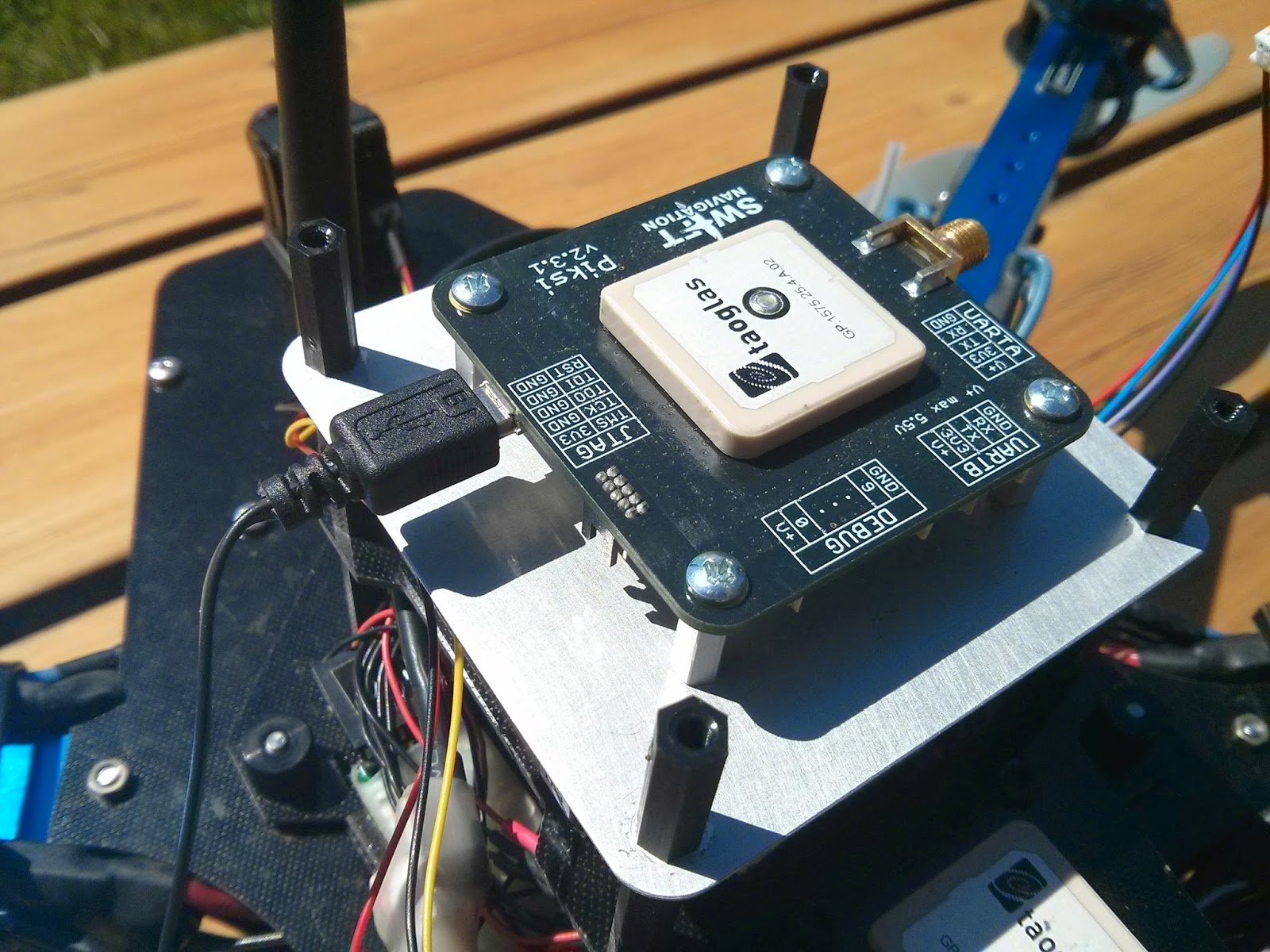
There are quite a few things that have gone right and a lot more that have gone wrong. I just want to point some things that I have noticed. Maybe this information could be helpful for the developers to make improvements.
Firstly, I have noticed that the latest version of Arducopter doesn't have the option to integrate the piksi. However, the arduplane does. The beta version of arducopter does have the option, but the beta version is not reliable yet. It had bugs related to way point missions (Tested- copter just flies away around third waypoint and circles without command).
I have noticed that the piksi looses a lot of satellite strength when other things are connected around it. Here is the satellite strength without anything plugged in compared to the pixhawk plugged in.

The strength drops down by 10 points. I am not sure about the units of the y-axis measurements. Similar behavior is seen when the 5.8ghz video transmitter is turned on.

I am aware that the rf noise from the pixhawk and other electronics on board affect the strength. That is why I have the metal plate under the piksi.

I have tried to move the board to different positions . I tried a bit forward. It is a bit better, but still not enough to get a solid gps coordinate.
As of now, there is a little jitter effect that is being caused by the piksi. (At least, that is what it seems like). Here is a log of the gps signal jittering.

That flight was a straight line flight, and for some reason the gps coordinates jumped from the original flight path to a similar error.
I have also come to notice that the piksi loses some strength when it is moved from its position. That is a problem since the copter is moving and vibrating. Here is a picture of strength when I moved it a little and also ran the copter.

One possible problem may be that the bottom is not in direct contact with the bottom metal plate. It is supported by metal stand offs.
I would love to know if someone else has had these issues.
-Rai Gohalwar
rai gohalwar

Colin Beighley
Thanks for the thorough explanation of your setup! It's true that the Piksi driver for absolute position is in the stable release of Arduplane and the dev branch of Arducopter. RTK drivers will be coming soon and should be merged into stable releases of both platforms soon.
We have also noticed that Pixhawk and other onboard electronics emit quite a bit of noise. We recommend using a large ground plane and placing Piksi as far away from any other onboard electronics as possible. The v1.0 firmware should increase robustness in poor signal quality environments quite a bit.
Could you explain in more detail what you mean by "the piksi loses some strength when it is moved from its position." Is this when you move it by hand, or when the drone is flown, or both?
Thanks,
Colin
I should add that next, I am going to try using an external antenna mounted in the center point with a 12 inch boom as recommenced on another thread of the swift-nav discussion group. :)-Rai Gohalwar
--
You received this message because you are subscribed to the Google Groups "swiftnav-discuss" group.
To unsubscribe from this group and stop receiving emails from it, send an email to swiftnav-discu...@googlegroups.com.
For more options, visit https://groups.google.com/d/optout.

LamorindaMarketing

rai gohalwar
rai gohalwar
Hi Colin,
LamorindaMarketing
Colin Beighley
Bill - the Arducopter drivers for Piksi are still incomplete - Niels has been working on them and has the RTK driver working on his quad quite well though, so it should only be a short amount of time before it gets merged into master.
--
rai gohalwar

Niels Joubert

Goh Guo Dong

LamorindaMarketing
rai gohalwar

Niels Joubert
Niels Joubert
On Wednesday, July 2, 2014 6:18:32 AM UTC-7, Goh Guo Dong wrote:
Goh Guo Dong
Goh Guo Dong
Regards
rai gohalwar
Goh Guo Dong

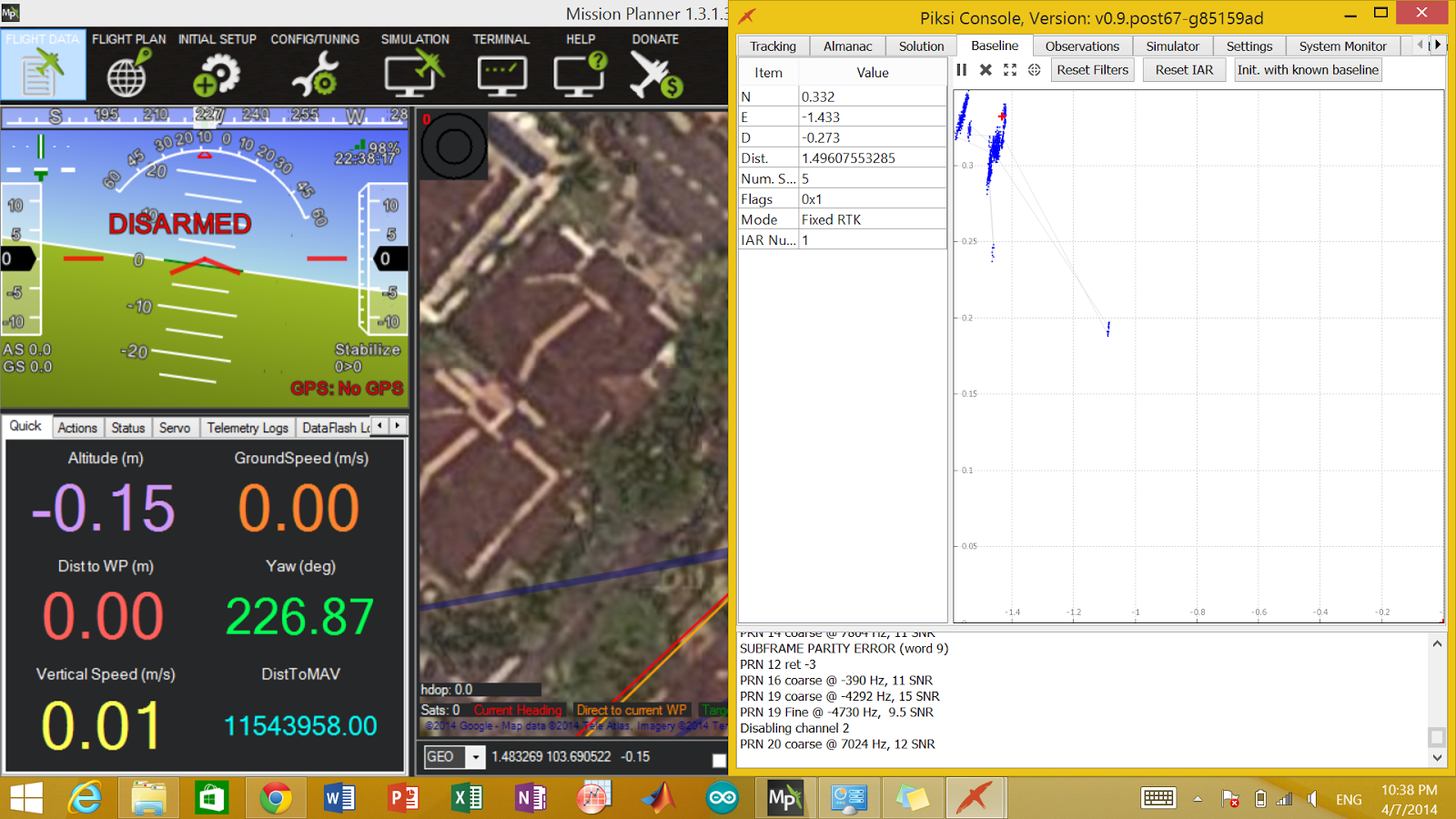
I couldn't capture the screen shot of the 3D rtk as it just appears in a split of a second. May I know why it is so? For your infomation, I am not using the latest version of MP, Could it be the reason for the No GPS issue?
Goh Guo Dong
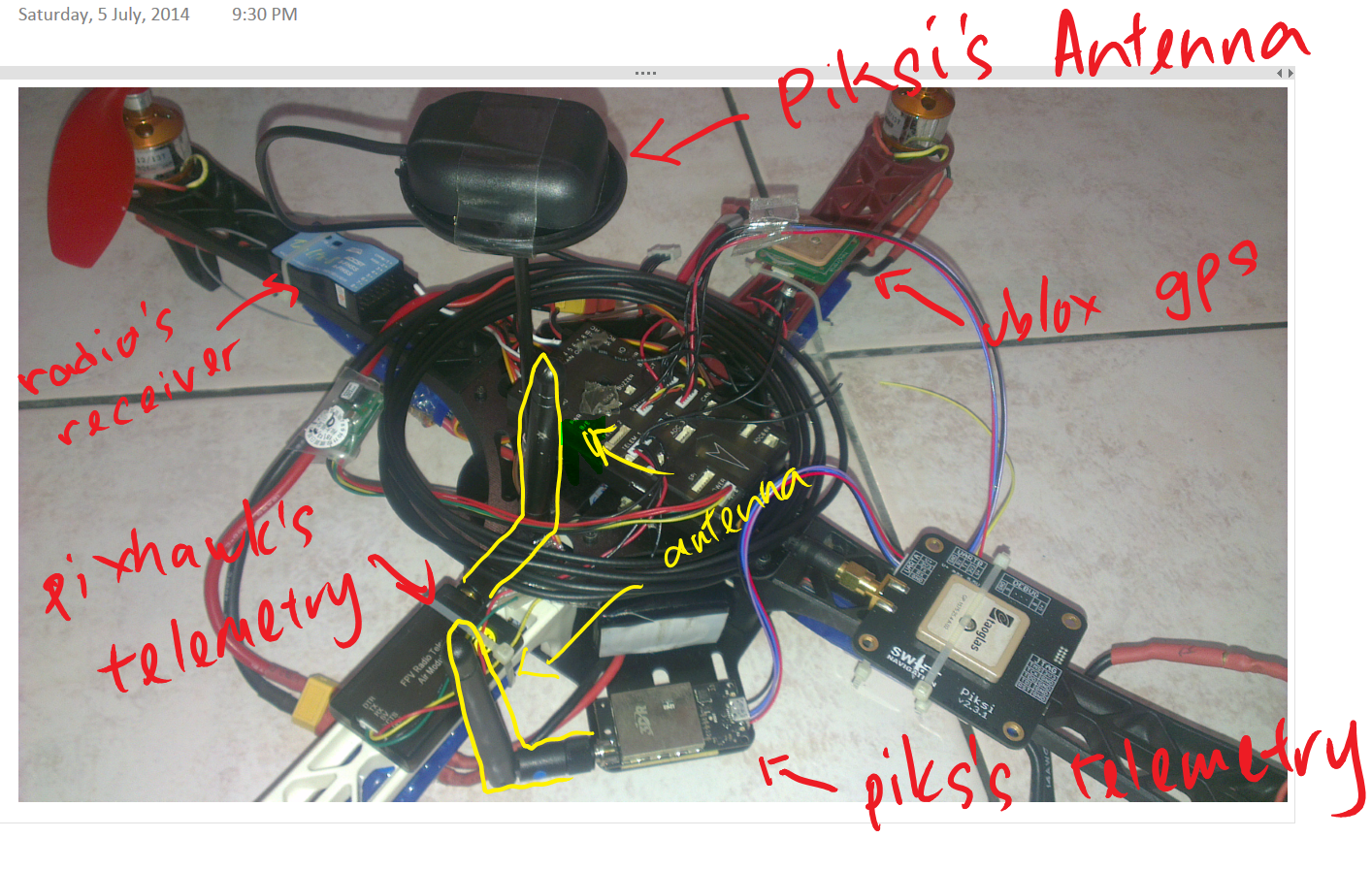
Interesting enough though, I didn't experience any interference even though the antennas of the telemetries were very close to the piksi's antenna. The picture below shows the signal strengths of the satellites that piksi managed to acquire in less than 5 minutes.

LamorindaMarketing
Niels Joubert
Goh Guo Dong
rai gohalwar
LamorindaMarketing
i'm running the latest rover firmware and i'm so confused with the different versions. so should i be able to get rtk with with he rover? is there any performance difference between the mission planner and the apm planner
thanks
robobill
rai gohalwar
Niels Joubert
Niels Joubert
LamorindaMarketing
rai gohalwar


Goh Guo Dong
LamorindaMarketing
Niels Joubert
Goh Guo Dong
On Thursday, July 10, 2014 3:12:23 AM UTC+8, rai gohalwar wrote:
Henry Hallam
I don't know anything about Pixhawk or Ardupilot but in a similar rtk-on-uav application we subtracted the known arm from the vehicle cg to the GPS antenna (using the vehicle attitude estimate).
--
You received this message because you are subscribed to the Google Groups "swiftnav-discuss" group.
To unsubscribe from this group and stop receiving emails from it, send an email to swiftnav-discu...@googlegroups.com.
For more options, visit https://groups.google.com/d/optout.
Goh Guo Dong
rai gohalwar
Niels Joubert
rai gohalwar
Goh Guo Dong
Niels Joubert
Niels Joubert
LamorindaMarketing
Goh Guo Dong
Niels Joubert
Goh Guo Dong

LamorindaMarketing
Niels Joubert
Niels Joubert
LamorindaMarketing
Goh Guo Dong
Goh Guo Dong
Niels Joubert
The 3 logs you sent me have some incredibly strange data in it. Are you running both the UBLOX and Piksi GPS I assume? Which one is GPS1 and which is GPS2?
Goh Guo Dong
Goh Guo Dong
Goh Guo Dong
rai gohalwar
LamorindaMarketing
Niels Joubert
Keep pushing, we'll get there! I, also, would like to graduate sometime soon haha!
On Wednesday, July 30, 2014 11:00:12 AM UTC-7, rai gohalwar wrote:
Niels Joubert
LamorindaMarketing
Yes I think I have... but I get this "message" from the console
acq: PRN 20 found @ -6243 Hz, 21 SNR
Disabling channel 4
Traceback (most recent call last):
File "c:\Documents and Settings\Fergus Noble\piksi_firmware\scripts\pyinstaller\build\console\out00-PYZ.pyz\serial_link", line 97, in run
File "c:\Documents and Settings\Fergus Noble\piksi_firmware\scripts\pyinstaller\build\console\out00-PYZ.pyz\system_monitor_view", line 104, in uart_state_callback
error: unpack requires a string argument of length 12
Did I do something wrong or what?
Thanks
RoboBill
Niels Joubert
Niels Joubert
Goh Guo Dong
Niels Joubert
Goh Guo Dong
Goh Guo Dong
Goh Guo Dong
LamorindaMarketing
rai gohalwar
rai gohalwar
LamorindaMarketing
Goh Guo Dong
Niels Joubert
Goh Guo Dong
Goh Guo Dong
rai gohalwar
LamorindaMarketing
Goh Guo Dong
rai gohalwar
Sorry for the confusion. By rover I meant the piksi(rover). It is actually mounted on a quadcopter!! I should have been more clear!!! Anyways, there is a drop in the signal to noise ratio mostly due to the movement of the piksi. Robustness is something is needed to be worked on and I sure the swift-nav team is on it. !!!!
LamorindaMarketing
Goh Guo Dong
Goh Guo Dong
Niels Joubert
Niels Joubert

goh dongliang

Andrew Tridgell
There is some hope on this. The work to support integer parameters has progressed over the last couple of days. It isn't there yet, but is closer.
You could also add a MAVLink message, perhaps called SET_RTK_HOME which takes two int32_t values and passes them to the GPS driver. It could even then set the parameters, bypassing the float interface, thus working around the issue.
Cheers, Tridge
Niels Joubert
LamorindaMarketing
Niels Joubert
--
You received this message because you are subscribed to a topic in the Google Groups "swiftnav-discuss" group.
To unsubscribe from this topic, visit https://groups.google.com/d/topic/swiftnav-discuss/z34YTh-4Mvw/unsubscribe.
To unsubscribe from this group and all its topics, send an email to swiftnav-discu...@googlegroups.com.
For more options, visit https://groups.google.com/d/optout.
