
Anyone able to use Sunnto PC Interface successfully with Windows 10 and Suunto Solution Nitrox
457 views
Skip to first unread message

Mike Atk
Sep 2, 2019, 6:25:33 PM9/2/19
to Subsurface Divelog
Hello
Windows 10 cannot see the Suunto PC Interface on any of the COM Ports
I have a Suunto Solution Nitrox dive computer and have just dug out my Suunto PC-Interface to download my log book.
I've bought a USB cable to fit the serial port on the PC Interface so I can connect to Windows 10 computer.
Windows 10 automatically set up the drivers for the USB cable and assigned COM3
Software Suunto Dive Manager version 1.6 will not find the PC Interface COM whether I set the correct COM or not. :-
"The Suunto PC Interface was not found on any of the COM Ports"
I have tried with and without a coin on the TIME/MODE and PLAN/ON contacts (which are rubber) as described in the Test PC Interface SetUp menu
My intention is to download onto the Subsurface platform since the Solution Nirtox is one of the compatible dive computers (which also gives a Dive Data Import Error when I try to download. Presumably for the same reason
Any help greatly appreciated
Kind regards
Mike

Lars Dennert
Sep 2, 2019, 7:02:47 PM9/2/19
to Subsurface Divelog
DM 1.6 is ancient. Uninstall it. All the DM software is junk. Ironic that it is so flakey with their computers. Reinstall the latest Subsurface. Some Suunto's have a specific PC XFER mode in the memory logbook menu. Others will sense the connection in the Logbook mode. The connection from the cable to the dive computer is often poor. Make sure to clean the contacts. The right angle connection body slots only one way with the body across the back of the computer. I have three Suunto's currently. One gives me trouble with the connection of the cable. The correct COM port should disappear when you unplug the cable from your PC and appear when you plug it in. It will be a Prolific driver I think.

Grey Wolf
Sep 3, 2019, 12:04:02 AM9/3/19
to subsurfac...@googlegroups.com
hi
i think the solution is a little tricky, but for the most suunto-adapters it should work.
both, subsurface and suunto dm, expect a port called "suunto usb port" or similar. the only important thing is, it has to have the word "suunto" as the first word in the name of the port.
so just plug in your adapter-cable and go to the hardware-manager. there should be a device called like your cable/adapter and it should you show the com-port (in my case it was com3).
open the registry-editor, search for the com-port and rename all entry from "XxX-adapter" to "Suunto-XxX-adapter".
thats it - should work like charme.....
--
You received this message because you are subscribed to the Google Groups "Subsurface Divelog" group.
To unsubscribe from this group and stop receiving emails from it, send an email to subsurface-dive...@googlegroups.com.
To view this discussion on the web visit https://groups.google.com/d/msgid/subsurface-divelog/6a7788fc-f6c5-4b68-9be1-e3601c2e8318%40googlegroups.com.
Mike Atk
Sep 3, 2019, 7:15:24 PM9/3/19
to Subsurface Divelog
Hi Gray Wolf
Thanks for responding. Looked at the Device Manager for the Ports (COM & LPT)
Following Lars Dennert above pulling the USB and replacing does indeed identify the port as "USB-SERIAL CH340 (COM3)" Looking at properties I can find no method of changing its name to Suunto... The Driver Provider is wch.cn if that is any help.
I have never meddled with the Registry Editor before. However a search for CH340 produced the following
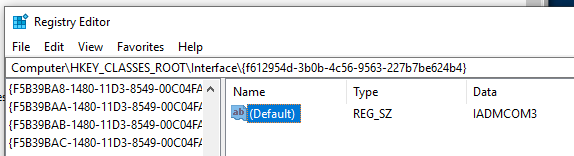
Again I could find no method of changing the name, ( I clicked on the name - Default which opened a window edit string Name Default and Value string IADMCOM3 Changing the name to start with Suunto response was Cannot edit: Error writing the value's new contents.)
So I'm stuck
Any help greatly appreciated
Mike
On Tuesday, September 3, 2019 at 5:04:02 AM UTC+1, Grey Wolf wrote:
hii think the solution is a little tricky, but for the most suunto-adapters it should work.both, subsurface and suunto dm, expect a port called "suunto usb port" or similar. the only important thing is, it has to have the word "suunto" as the first word in the name of the port.so just plug in your adapter-cable and go to the hardware-manager. there should be a device called like your cable/adapter and it should you show the com-port (in my case it was com3).open the registry-editor, search for the com-port and rename all entry from "XxX-adapter" to "Suunto-XxX-adapter".thats it - should work like charme.....
Lars Dennert xxxx schrieb am Di., 3. Sep. 2019, 01:02:
DM 1.6 is ancient. Uninstall it. All the DM software is junk. Ironic that it is so flakey with their computers. Reinstall the latest Subsurface. Some Suunto's have a specific PC XFER mode in the memory logbook menu. Others will sense the connection in the Logbook mode. The connection from the cable to the dive computer is often poor. Make sure to clean the contacts. The right angle connection body slots only one way with the body across the back of the computer. I have three Suunto's currently. One gives me trouble with the connection of the cable. The correct COM port should disappear when you unplug the cable from your PC and appear when you plug it in. It will be a Prolific driver I think.--
On Monday, September 2, 2019 at 3:25:33 PM UTC-7, Mike Atk wrote:HelloWindows 10 cannot see the Suunto PC Interface on any of the COM PortsI have a Suunto Solution Nitrox dive computer and have just dug out my Suunto PC-Interface to download my log book.I've bought a USB cable to fit the serial port on the PC Interface so I can connect to Windows 10 computer.Windows 10 automatically set up the drivers for the USB cable and assigned COM3Software Suunto Dive Manager version 1.6 will not find the PC Interface COM whether I set the correct COM or not. :-"The Suunto PC Interface was not found on any of the COM Ports"I have tried with and without a coin on the TIME/MODE and PLAN/ON contacts (which are rubber) as described in the Test PC Interface SetUp menuMy intention is to download onto the Subsurface platform since the Solution Nirtox is one of the compatible dive computers (which also gives a Dive Data Import Error when I try to download. Presumably for the same reasonAny help greatly appreciatedKind regardsMike
You received this message because you are subscribed to the Google Groups "Subsurface Divelog" group.
To unsubscribe from this group and stop receiving emails from it, send an email to subsurface-divelog+unsub...@googlegroups.com.
Lars Dennert
Sep 3, 2019, 7:49:09 PM9/3/19
to Subsurface Divelog
If the PC responds and you know the com port, then the issue is at the connection to the dive computer as they are very flakey or the dive computer is not in download mode. Try holding the cable very still at slightly different angles on the connection to the DC. That's how one of my Suunto's is.
Grey Wolf
Sep 4, 2019, 12:43:33 AM9/4/19
to subsurfac...@googlegroups.com
hi
ok - using regedit is a little bit tricky (and english is not my first language-sry)....
in regedit (i think under "edit") is the search....
try to search the name of the port by klicking "enter" in the search dialog - to continue the search you just have to press "f3".....
you just need the results of (i think)....
Friendly Name
DeviceDesc
DisplayName
these values can be changed for shure.....
keep on howling
grey
To unsubscribe from this group and stop receiving emails from it, send an email to subsurface-dive...@googlegroups.com.
To view this discussion on the web visit https://groups.google.com/d/msgid/subsurface-divelog/6a7788fc-f6c5-4b68-9be1-e3601c2e8318%40googlegroups.com.
--
You received this message because you are subscribed to the Google Groups "Subsurface Divelog" group.
To unsubscribe from this group and stop receiving emails from it, send an email to subsurface-dive...@googlegroups.com.
To view this discussion on the web visit https://groups.google.com/d/msgid/subsurface-divelog/5cb35934-22ff-4ef6-bd49-d7990e292bdc%40googlegroups.com.

Jef Driesen
Sep 4, 2019, 5:50:59 AM9/4/19
to subsurfac...@googlegroups.com, Grey Wolf
On 2019-09-03 06:03, Grey Wolf wrote:
> i think the solution is a little tricky, but for the most
> suunto-adapters
> it should work.
> both, subsurface and suunto dm, expect a port called "suunto usb port"
> or
> similar. the only important thing is, it has to have the word "suunto"
> as
> the first word in the name of the port.
> so just plug in your adapter-cable and go to the hardware-manager.
> there
> should be a device called like your cable/adapter and it should you
> show
> the com-port (in my case it was com3).
> open the registry-editor, search for the com-port and rename all entry
> from
> "XxX-adapter" to "Suunto-XxX-adapter".
> thats it - should work like charme.....
This is not necessary. Subsurface doesn't care about the name of the
> i think the solution is a little tricky, but for the most
> suunto-adapters
> it should work.
> both, subsurface and suunto dm, expect a port called "suunto usb port"
> or
> similar. the only important thing is, it has to have the word "suunto"
> as
> the first word in the name of the port.
> so just plug in your adapter-cable and go to the hardware-manager.
> there
> should be a device called like your cable/adapter and it should you
> show
> the com-port (in my case it was com3).
> open the registry-editor, search for the com-port and rename all entry
> from
> "XxX-adapter" to "Suunto-XxX-adapter".
> thats it - should work like charme.....
serial port. You just need to select the correct port. There is
absolutely no need to mess with the registry.
The Suunto DM application does autoconnect to the correct port. That
detection may indeed be based on the name of the USB device.
Jef
Mike Atk
Sep 6, 2019, 3:42:05 PM9/6/19
to Subsurface Divelog
Hello again to Gray Wolf, Lars Dennert and Jef Driesen
The com-port now communicates with Subsurface but not DM 1.6. (I'm not interested taking that further thanks especially following Lars advice)
Thanks to each of you, you all played a part of getting it to work. Happy days.
I found I could rename the com ports having had a little more time and realising the search of the regedit required next or F3 to be repeatedly tried until the correct folder was found. So I did rename with Suunto com3
I also started from scratch checked everything including re clean contacts with an eraser. Trouble is I'm not sure which process produced the result since I was trying DM as well as Subsurface.
I am now sad to find the solution has only remembered the last 19 dives, but I suppose there is only a limited memory.
So I can at lest update as I dive going forward.
Many thanks again to you all.
Mike
Lars Dennert
Sep 6, 2019, 5:42:18 PM9/6/19
to Subsurface Divelog
Glad you got it going! That's great. If you have any previous dives in dm, you can move them to subsurface. The other thing you can do is look at date stamps from pictures you took on trips to recreate stuff if that happens to help manually log some things.
Grey Wolf
Sep 6, 2019, 6:06:14 PM9/6/19
to subsurfac...@googlegroups.com
happy to hear that it has worker
keep on howling
Lars Dennert <larsd...@gmail.com> schrieb am Fr., 6. Sep. 2019, 23:42:
Glad you got it going! That's great. If you have any previous dives in dm, you can move them to subsurface. The other thing you can do is look at date stamps from pictures you took on trips to recreate stuff if that happens to help manually log some things.
--
You received this message because you are subscribed to the Google Groups "Subsurface Divelog" group.
To unsubscribe from this group and stop receiving emails from it, send an email to subsurface-dive...@googlegroups.com.
To view this discussion on the web visit https://groups.google.com/d/msgid/subsurface-divelog/7a897357-509e-4357-b607-dae49aef5e76%40googlegroups.com.
Reply all
Reply to author
Forward
0 new messages