
Multi partition a USB flash drive in Windows

AJS
[Tips and Tricks]
Multi partition a USB flash drive in Windows
Hi Folks!
Ever wondered how to set up more than one partition on a USB flash drive using Windows XP? In the following tutorial, I'll show you how to do just that. But first, let me explain how it works. By default, a USB flashdrive is detected by Windows XP/Vista as removable media and thus will not display more than one partition. In addition, Windows will not allow you to multi partition removable media. However, if we can make Windows see the USB flashdrive as a fixed drive, Windows will then allow us to create multiple USB flashdrive partitions. Windows will also detect and display those multiple USB flashdrive partitions.
In order for this to happen, we need to flip the Removable Media Bit (RMB) on the USB Device. This will tell Windows that the flashdrive is a fixed disk and not removable media. After successfully flipping the bit, you'll be able to multi partition the flashdrive and Windows will display all partitions.
How to Flip the Flashdrive Removable Media Bit:
Warning: This tool will not work on all flashdrives and it could potentially mess up your drive. No warranty is being offered, USE AT YOUR OWN RISK! backup all information from your USB device before proceeding.
- Download the BootIt tool and extract to your PC
- Plugin your flashdrive and run BootIt.exe
- Select the option to Flip Removable Bit:

- Then, remove and reinsert your flashdrive. Your flashdrive should now be detected by Windows as a fixed disk (not a removable disk). You can check this by right clicking the device and checking the device properties
How to setup multiple flashdrive partitions in Windows:
The following assumes that you have already Flipped the Removable Media Bit
- Navigate to Start -> Run and type diskmgmt.msc in the dialog box then click Ok
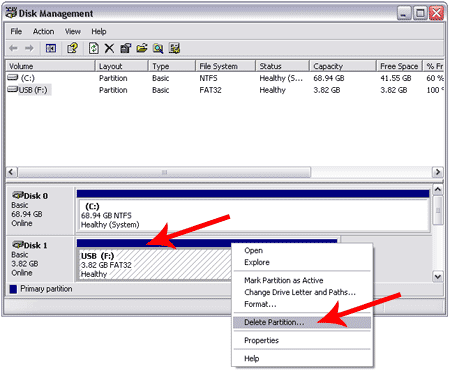
- From the disk management window, right click your
flashdrive and select the option to Delete Partition:
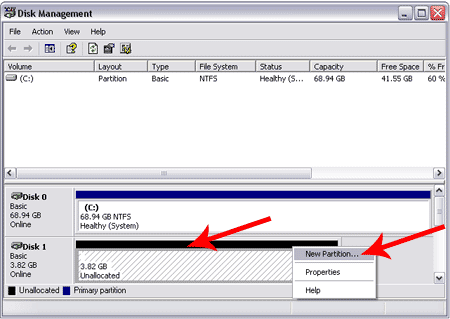
- Right Click your flashdrive again and select the New
Partition option:
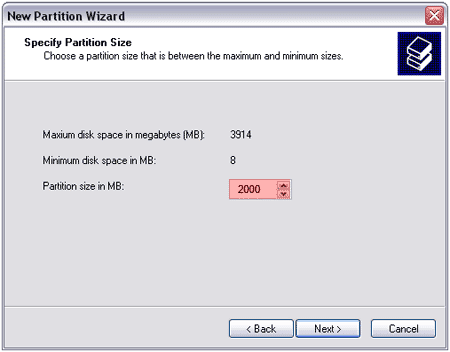
- Follow the New Partition Wizard and create a
"Primary Partition". Once you get to the dialog box to set the
Partition Size, be sure to set the Size to be smaller than the drives
capacity to leave free space for the next partition:
- Continue through the Wizard, giving your device a drive letter and formating the partition. I recommend a Fat32 partition.
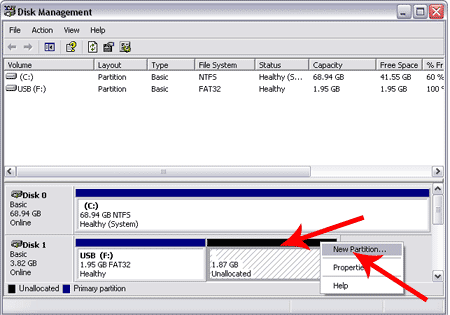
- After you have created the first partition, you
can create additional partitions using step 3-5 on the unallocated empty
space that remains on the drive:
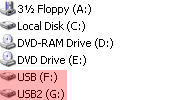
- Once finished, you should have multiple
partitions on your USB flash drive that are detected and usable in Windows
as separate drives:
Enjoy!!!
--
Posted By Amarjit Singh to Amarjit
Singh's Website at 3/07/2009 11:02:00 AM