
spReticle Maya 2015 lights interfere with text
74 views
Skip to first unread message

gavin
Dec 4, 2015, 2:54:03 PM12/4/15
to spReticle Developers
Has anyone encountered/fixed this issue?....
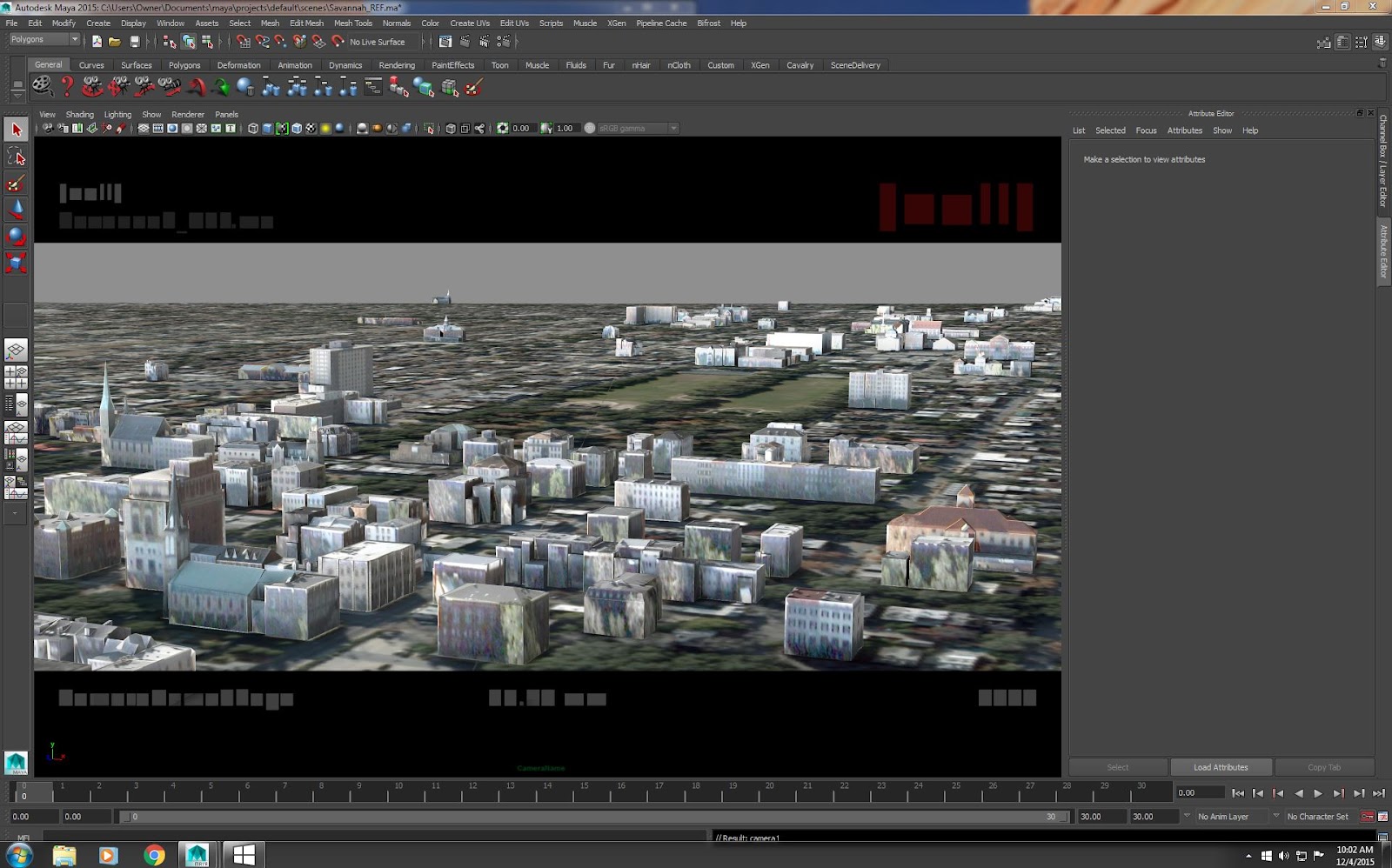
spReticle is working well in Maya 2015 viewport2.0 with the lights turned off or hidden, but with the lights turned on, the text turns blocky and illegible. The jpgs below illustrate the problem. There seem to be some other transparency issues with the Reticle as well. I noticed the vp2.0 ambient occlusion is appearing on top of the reticle.
Lights OFF

Lights ON....

hvera
Dec 6, 2015, 10:26:12 AM12/6/15
to spReticle Developers
I have not seen it on my side. What appears to be happening is that the texture for the font texture-atlas isn't being bound for some reason. This potentially could be because there is not enough texture memory available or there has been a change to the OpenGL settings. I couldn't immediately tell if you were using viewport 2.0 or the original viewport. You can try attaching a sample scene and I'll take a look.
Here is my example from an Asus gaming laptop with NVidia Geforce GTX 970M, running Maya 2015 SP6 in Viewport 2.0 mode on Windows 8.1.
Lights disabled (default light mode)

With lights and shadows enabled (excuse Maya's crappy shadow map quality)


Luke Harris
Dec 21, 2015, 1:11:19 PM12/21/15
to spReticle Developers
Did you ever figure out what this was? We're getting it also.
- only in VP2
- only when textures are displayed
- viewport lighting on/off makes no difference
- both windows and linux. Maya 2015 ext 1 sp6
- may be aggravated when the scene is complex and takes ~1sec to evaluate a frame with rigs and VP2.
- may be triggered by textured assets when in view, see gif. Have to zoom out for nda blah (the text border is our own edit to spReticle, but we get this behavior even with the standard plugin)

- only in VP2
- only when textures are displayed
- viewport lighting on/off makes no difference
- both windows and linux. Maya 2015 ext 1 sp6
- may be aggravated when the scene is complex and takes ~1sec to evaluate a frame with rigs and VP2.
- may be triggered by textured assets when in view, see gif. Have to zoom out for nda blah (the text border is our own edit to spReticle, but we get this behavior even with the standard plugin)
Message has been deleted
Luke Harris
Dec 21, 2015, 1:13:59 PM12/21/15
to spReticle Developers
Sorry my gif didn't attach right, see this http://recordit.co/2L0w1piscO

Armin Bruderlin
Dec 21, 2015, 5:59:19 PM12/21/15
to spReti...@googlegroups.com
I seem to remember having seen this before in VP 2.0 when using more than one light and having "Lighting->Use All Lights" set. It went away when I set "Lighting->Use Default Lighting". Of course, this is not a solution or even work-around, but might point us in the right direction. I have not had a chance to look at the code for a possible fix.
--
You received this message because you are subscribed to the Google Groups "spReticle Developers" group.
To unsubscribe from this group and stop receiving emails from it, send an email to spReticle-de...@googlegroups.com.
To post to this group, send email to spReti...@googlegroups.com.
Visit this group at https://groups.google.com/group/spReticle-dev.
For more options, visit https://groups.google.com/d/optout.
Armin Bruderlin
Mar 2, 2016, 5:18:08 PM3/2/16
to spReti...@googlegroups.com
HI,
I just fixed this issue (text is illegible with multiple lights in ViewPort 2.0 Maya 2015 on linux) after getting useful feedback from the Autodesk dev team.
I can't update svn on google code for now, so this is only helpful if you downloaded the source code and can compile it, but here is what fixed it for me. Make these two changes to OpenGLRenderer.cpp:
1. Add these two lines at the top of the file:
#define GL_GLEXT_PROTOTYPES
#include "GL/glext.h"
2. Add this line as the last line/statement to function void OpenGLRenderer::prepareForDraw():
glActiveTextureARB( GL_TEXTURE0_ARB );
Cheers,
Armin

Blazej Floch
Jan 6, 2017, 9:15:41 AM1/6/17
to spReticle Developers
Hi,
I'm not sure if this is related to this issue but we found in Maya 2014+ with the non-MUI VP 2.0 implementation that the reticle is being drawn in shadow passes making it appear e.g. as shadow in a spot light.
The workaround we found is to check for colorPass via
http://help.autodesk.com/view/MAYAUL/2016/ENU/?guid=__cpp_ref_class_m_h_w_render_1_1_m_pass_context_html
... prior to drawing.
Hope that makes sense. I could try coming up with a PR once we verified there are no side-effects.
I'm not sure if this is related to this issue but we found in Maya 2014+ with the non-MUI VP 2.0 implementation that the reticle is being drawn in shadow passes making it appear e.g. as shadow in a spot light.
The workaround we found is to check for colorPass via
http://help.autodesk.com/view/MAYAUL/2016/ENU/?guid=__cpp_ref_class_m_h_w_render_1_1_m_pass_context_html
... prior to drawing.
Hope that makes sense. I could try coming up with a PR once we verified there are no side-effects.
Reply all
Reply to author
Forward
0 new messages