
Newbie: can I combine dynamic data to one page?
476 views
Skip to first unread message

Jan
Mar 28, 2018, 3:45:44 AM3/28/18
to sphinx-users
I'm trying to understand sphinx, and I'm thoroughly not understanding how to implement even some basic concepts. I've created a sphinx project linked to my readthedocs account. Everything works to generate my basic index.rst file in read the docs. I'm trying to follow the ideas of adding dynamic input to a specific page within my project, as mentioned here: http://ericholscher.com/blog/2016/jul/25/integrating-jinja-rst-sphinx/
My objective is to setup my sphinx project so that whenever a specific text file changes in my /docs folder, it updates my ReadTheDocs content dynamically/automatically.
My /docs folder has these key elements:
parsethisfile.txt
conf.py
index.rst
Database.rst
...
The "schema_list_out" is a list (or I could make a dictionary) which contains elements for a database schema, such as table names, comments, column names and column parameters.
More importantly, I'm trying to create nice looking tables for the items in my "schema_list_out" list. The only way I've been able to do that is using the python tabulate module (in my conf.py), where I generate the table within python, output as rst, and save it as a list element object within my "schema_list_out". If I use the right control structure in my rst, I generate a nice looking table in rst format that looks correct in my sphinx generated output:
In my conf.py I've added some python which parses a txt file, and then creates references to the object:
def rstjinja(app, docname, source):    """    Render our pages as a jinja template for fancy templating goodness.    """    # Make sure we're outputting HTML    if app.builder.format != 'html':        return    src = source[0]    rendered = app.builder.templates.render_string(        src, app.config.html_context    )    source[0] = rendered
def setup(app):    app.connect("source-read", rstjinja)
html_context = {    #'outputschema': schema_list_out}
The "schema_list_out" is a list (or I could make a dictionary) which contains elements for a database schema, such as table names, comments, column names and column parameters.
If I wanted to generate dynamic ReadTheDocs pages, I've successfully been able to add some variables to my Database.rst file like this:
{% for schema_item in outputschema %}**Schema Name: {{ schema_item["name"] }}**{% endfor %}and sphinx correctly creates a Database.html file that shows this:
Schema Name: buildingsMore importantly, I'm trying to create nice looking tables for the items in my "schema_list_out" list. The only way I've been able to do that is using the python tabulate module (in my conf.py), where I generate the table within python, output as rst, and save it as a list element object within my "schema_list_out". If I use the right control structure in my rst, I generate a nice looking table in rst format that looks correct in my sphinx generated output:
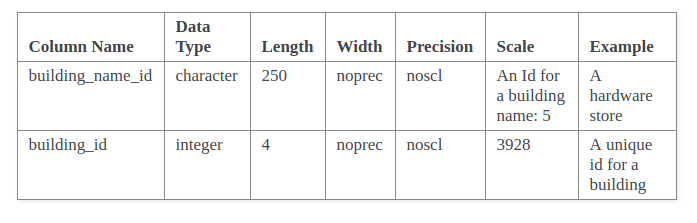
But the problem here is I have no way of controlling how this looks inside the rst file because it's RST, and I can't add HTML, css or anything else to control how the table looks (like table width, color etc). reST markup doesn't seem to offer enough control over a table.
How do I create dynamically created tables which can be formatted nicely, in RST? If I could create the tables easily in my Database.html, I'd do that, but it's not a template, it's generated by sphinx from my Database.rst. I can't figure out how to create my Database.html myself, with the jinja control structures inside of it. How do do that?

Peter Burdine
Mar 28, 2018, 9:50:00 PM3/28/18
to sphinx-users
A few things:
1) You may want to consider another jinja extension to sphinx: https://pypi.python.org/pypi/sphinx-jinja. We use YAML as the datasource, though it could be anything maps to Python lists/dicts (json, xml, etc). You can then either reference the a file with the jinja template, or you can embed the jinja code in your .rst files. We have found it is easiest to make list tables for this. You can use to setup your table headers.
2) The builder controls the output formatting not the reST input (unless you use tablularcolumns for LaTeX, but that is another story). Have you tried: https://stackoverflow.com/questions/23462494/how-to-add-a-custom-css-file-to-sphinx
1) You may want to consider another jinja extension to sphinx: https://pypi.python.org/pypi/sphinx-jinja. We use YAML as the datasource, though it could be anything maps to Python lists/dicts (json, xml, etc). You can then either reference the a file with the jinja template, or you can embed the jinja code in your .rst files. We have found it is easiest to make list tables for this. You can use
{% if loop.first %}2) The builder controls the output formatting not the reST input (unless you use tablularcolumns for LaTeX, but that is another story). Have you tried: https://stackoverflow.com/questions/23462494/how-to-add-a-custom-css-file-to-sphinx
Jan
Apr 6, 2018, 2:46:23 AM4/6/18
to sphinx-users
I ended up trying something which gets me part of what I'm looking for, but still leaves me without the structure I'm looking for.
After uploading to my repo, Sphinx automatically generated my ReadTheDocs docs and created a very nice looking index.html page with my tables formatted correctly, and using the css I needed.
To get a nice looking html table which I could control formatting with a custom CSS, I placed a "custom.css" file in a "_static" folder. I also placed a "page.html" file in a "_templates" folder. That page html file looks like this:
{% extends "!page.html" %}{{ super() }}
{% block body %}{% filter upper %}	<b><font size="+2">Schema: {{ schema_gen["name"] }} </font></b><br/>{% endfilter %}<b><font size="+1">Description: {{ schema_gen["comment"] }} </font></b><br/>
<p>{% for item in outputschema  %}	<b><p>Table Name: {% filter upper %} {{ item["table_nam"] }} {% endfilter %}<br/></b>	<b>Description: {{ item["table_comment"] }}<br/></b>	{% if item["table_columns"] %}				<table>		<tbody>			<thead>				<tr>					<th>Column Name</th>					<th>Data Type</th>					<th>Length</th>					<th>Precision</th>					<th>Scale</th>					<th>Description</th>				</tr>			</thead>		{% for columns in item["table_columns"] %}			<tr>			{% for column in columns %}							 <td>{{ column }}</td>				 			{% endfor %}			</tr>		{% endfor%}		</tbody>		</table>			{% endif %}	</p>{% endfor %}</p>

{% endblock %}I'm still confused because this created my tables in my INDEX page. How do I leave my index page intact (containing other ReStructureText content) without my inherited "page.html" content, but have a sub-page listed in my index page toctree with this new html content (ie schema1) ?
My index.rst:
.. toctree::
schema1
schema2
I want my schema1.html file to contain my tables as I've dynamically generated them in the code block above.
I'm quite confused about how I can potentially use the inheritance templating to work in a single subpage only, rather than in my index page.
I tried putting a file named schema1.html in my "_templates" folder, but that didn't do anything.
I must be missing something quite fundamental to inheritance in Sphinx.
What am I not understanding?
What am I not understanding?
Jan
Apr 6, 2018, 9:44:23 PM4/6/18
to sphinx-users
I've figure out that if I add:to my conf.py, I can get my schema1.html file located in my _templates folder to appear and work correctly with the dynamic content.
html_additional_pages = { 'schema1': 'schema1.html' }However, I don't seem to be able to link to it from my toctree in my index.rst file.
Is it possible to link to an html file in "_templates" folder from an item in my toctree?
Reply all
Reply to author
Forward
0 new messages