
Save and Restore Linux Processes with CRIU

Charles Christian Miers
Save and Restore Linux Processes with CRIU
On Ice
Some maintenance work can only be done when no production software is running, but admins cannot terminate processes at will; otherwise, they risk losing data and time-consuming computations that will have to restart from scratch. The remedy on Linux systems is a small tool named "Checkpoint/Restore In Userspace," or CRIU.
CRIU freezes the current state of a process and saves it on the hard disk. Later, you can bring the process back to life; it then continues working at the point where CRIU froze it. For virtual machines, this is known as creating snapshots.
Freezing is not useful just to allow maintenance. Suspended processes can be moved to other computers and continue to run there. This live migration helps, for example, in load balancing scenarios: If a computer is just twiddling its thumbs, you can use a script to transfer a process to it. You can also freeze suspicious processes and analyze them on another system at your leisure. If you integrate CRIU in your system's startup scripts, it backs up processes automatically when you shut down and brings them back up on the next boot. In this way, you not only save the state before switching off but also shorten the boot process.
Numbers
Development is proceeding quickly. The first CRIU version appeared less than two years ago. When I first started writing this article, only the first release candidate of the 1.1 version was at available; v1.1-rc2 and v1.1 followed soon after. Two more versions followed quickly, and when this article went to press, v1.3-rc2 was the most recent release. The following comments are based on the v1.1 release candidate. Other versions are available in the release archive [1].
CRIU indeed works completely in userspace, but it imposes several requirements on the running system. First, the program only works on systems with ARM or x86_64 architecture; in the latter case, you must be running 64-bit Linux. Version 1.3-rc1 added AArch64. Furthermore, CRIU requires Linux kernel version 3.11 or greater. Current desktop distributions satisfy this condition, but popular Linux distributions on servers, Debian 7, and CentOS 6.5 do not. The use of CRIU on these systems thus would require a kernel upgrade.
The running kernel must also provide the information required
by the CRIU functions. Table 1 lists the settings
you need to enable when you compile the kernel. CRIU checks the
kernel's compatibility with criu check.
Table 1
Required Kernel Functions
| Variables | Enable in the Configuration Menu |
|---|---|
CONFIG_EMBEDDED
|
General setup | Embedded system |
CONFIG_EXPERT
|
General setup | Configure standard kernel features (expert users) |
CONFIG_EVENTFD
|
General setup | Configure standard kernel features (expert users) | Enable eventfd() system call |
CONFIG_EPOLL
|
General setup | Configure standard kernel features (expert users) | Enable eventpoll support |
CONFIG_CHECKPOINT_RESTORE
|
General setup | Checkpoint/restore support |
CONFIG_NAMESPACES
|
General setup | Namespaces support |
CONFIG_PID_NS
|
General setup | Namespaces support | PID Namespaces |
CONFIG_FHANDLE
|
General setup | Open by fhandle syscalls |
CONFIG_INOTIFY_USER
|
File systems | Inotify support for userspace |
CONFIG_IA32_EMULATION
|
Executable file formats | Emulations | IA32 Emulation |
CONFIG_UNIX_DIAG
|
Networking support | Networking options | Unix domain sockets | UNIX: socket monitoring interface |
CONFIG_INET_DIAG
|
Networking support | Networking options | TCP/IP networking | INET: socket monitoring interface |
CONFIG_INET_UDP_DIAG
|
Networking support | Networking options | TCP/IP networking | INET: socket monitoring interface | UDP: socket monitoring interface |
CONFIG_PACKET_DIAG
|
Networking support | Networking options | Packet socket | Packet: sockets monitoring interface |
CONFIG_NETLINK_DIAG
|
Networking support | Networking options | NETLINK: socket monitoring interface |
CONFIG_MEM_SOFT_DIRTY
|
Processor type and features | Track memory changes |
Because of the detailed requirements for the operating system kernel, the CRIU developers previously provided a suitable kernel. Since kernel 3.11, however, Linux possesses all the features necessary, so the old CRIU kernel is no longer needed and no longer recommended.
If the kernel meets all the requirements, you also need
Google's Protocol Buffers library [2] [3], which is available in the
repositories of most distributions. Besides the library itself,
you need the corresponding development packages, the C bindings
and the Protobuf C compiler. On Ubuntu and Debian the
appropriate packages go by the names libprotobuf-c0-dev
and protobuf-c-compiler; look out for similar
names on other distributions.
CRIU also relies on iproute2 – at least version 3.5.0 from August 2012. This tool is also on board with most recent distributions. If not, as is the case for Debian 7, you will find the source code online [4].
Test Run
To build CRIU, you need the sources [5], the Make tool, and a C
compiler. After unpacking the archive and compiling with make,
a system-wide installation of the tool is neither intended nor
necessary.
Before you deep freeze the first processes, a CRIU test is recommended. To do this, run this command as the root user:
criu check --ms
When done, CRIU should output Looks good (see Figure 1). Otherwise, the
tool tells you which function is missing. Older versions of the
tool still went by the name of crtools. Therefore,
some instructions still circulating on the Internet refer to
this command name.

Figure 1: If CRIU reports "Looks good," the kernel provides all the features required by the tool.
The next test step takes place in the CRIU test
subdirectory. Call the zdtm.sh script as root to
start a test suite that starts multiple processes and freezes
them for test purposes. A complete cycle takes a few minutes,
during which the system can freeze repeatedly. If a problem
occurs, the test suite aborts and tells you the root cause.
After a successful run, you will only see the results of the
last test (Figure 2).

Figure 2: The test suite checks to see whether the system meets all requirements for running CRIU.
Sandman
To freeze a process after successful tests, CRIU requires only
the process ID and location. The following command backs up the
process with the PID of 2238 in the checkpoint
subdirectory below the user's home folder:
criu dump --images-dir ~/checkpoint --tree 2238
The criu command is always followed by the action
to be executed – in this case, it creates a backup, or dump
image, if you prefer. --images-dir (or -D)
is the directory and --tree (or -t)
the process ID. CRIU requires root privileges for all actions.
Freezing fails, however, if the process to be stored shares
resources with the parent or any other process. In this case,
CRIU cancels the action just to be on the safe side. For
processes started from a shell, such resource sharing often
cannot be avoided. You have three options here: Move a process
into the background, start it in a separate session, or pass
CRIU the additional --shell-job parameter (Figure 3):
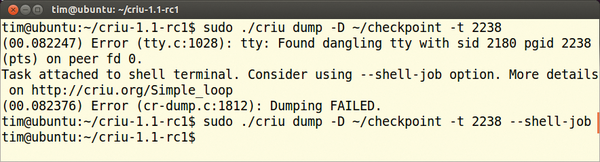
Figure 3: The Top process, with ID 2238, can be only dumped with the --shell-job parameter.
criu dump -D ~/checkpoint -t 2238 --shell-job
In the target directory (e.g., ~/checkpoint) CRIU
creates several files for a backed-up process. Each file
contains the state of a resource used by the process (Figure 4). CRIU overwrites
existing files without warning.
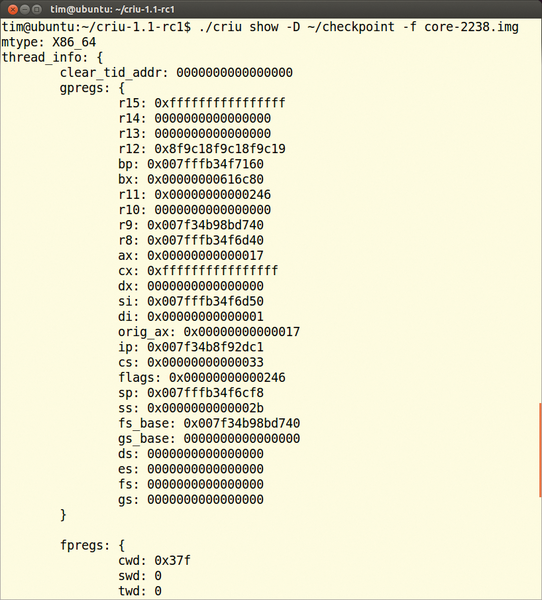
Figure 4: CRIU provides insight into the contents of a stored process.
After the process is backed up, CRIU then terminates it. The
latest output is sent to the terminal, unformatted as shown in Figure 5, if necessary. The
CRIU --leave-running parameter ensures that CRIU
can continue to run the stored process.

Figure 5: The Top process backed up by CRIU leaves its last output in the terminal.
Reanimation
To wake up a stored process, use the command:
criu restore -D ~/checkpoint --restore-detached
The --restore-detached parameter ensures that
CRIU terminates after the restore. The reanimated process
then has init as its parent process and keeps the same
process ID as before the freeze. If this PID has been
reassigned in the meantime, the restore quits with an error.
You can remedy this using the --namespaces or
-n option, which means the task is assigned a
new PID by the system and only retains its old ID internally
in a virtual process namespace.
If you backed up the process using --shell-job,
this same parameter is mandatory for the restore (Figure
6). The process then starts up in the shell in which you
called criu. Under certain circumstances, it
takes a moment for the process to actually start working.

Figure 6: Restoring a process backed up with, but restored without, --shell-job fails without stating the reason.
When you restore, the backup remains in the checkpoint
directory. You can thus revive the process in the same place
at any time.
To wake up the stored process on another system, you copy
the complete directory with the backup to the other computer
and revive the process there with criu restore.
However, the new environment must match the old one and
contain the necessary files in the same directory paths.
Ideally, the new system will be a clone. Another option is
to use a distributed filesystem such as NFS to provide the
files. In any case, administrators should run through live
migrations for test purposes to find missing libraries,
configuration files, and documents and put them in place.
Looking Ahead
CRIU lets you prepare a backup process then accelerate it
with the pre-dump parameter:
criu pre-dump -t 2369 -D ~/checkpoint/pre
Processes continue to run normally after this step. A new
call to the command at any time updates the backup (Figure 7) by pointing to
the pre-dump with the --prev-images-dir
parameter,

Figure 7: A preliminary backup with pre-dump speeds up the storage process.
criu dump -t 2369 -D ~/checkpoint/dump --prev-images-dir ../pre
which expects a path relative to the directory specified by
-D. In the example above, the pre-dump output
ends up in ~/checkpoint/pre, with the dump in
~/checkpoint/dump. Restoring with
criu restore -D ~/checkpoint/dump --restore-detached
works like any other restore command.
Thrifty Repetition
If you want create multiple snapshots for a process, you
can save time and storage space with an incremental backup.
To do this, first create a dump as usual, but leave the
process running with the --leave-running
parameter:
criu dump -t 2334 -D ~/checkpoint/1/ --leave-running --track-mem
The first backup ends up in the ~/checkpoint/1/
directory. Thanks to the --track-mem
parameter, CRIU can tell the kernel to watch the main memory
area of the process. A second dump accelerates its
information:
criu dump -t 2334 -D ~/checkpoint/2/ --leave-running --track-mem \
  --prev-images-dir ../1/
In this example, --prev-images-dir reveals
the location of the first backup, again creating the
directory relative to the path defined by -D.
Following the same principle, you then create additional
backups. For the last dump, abandoning the --leave-running
and --track-mem parameters terminates the
process. The subsequent recovery is the same as before:
criu restore -D ~/checkpoint/2/ --restore-detached
A directory normally contains a complete backup. On
request, CRIU saves space by storing only the changes that
happened since the last dump. This is the task of the
deduplication feature, which you call with the --auto-dedup
parameter:
criu dump -t 2334 -D ~/checkpoint/2/ --leave-running --track-mem \
  --prev-images-dir ../1/ --auto-dedup
CRIU will now delete all unnecessary data in the previous
backup, but not in the new one, so you now have a complete
dump in ~/checkpoint/2; ~/checkpoint/1
only keeps the delta to the second backup. If you already
have incremental backups, the dedup action,
criu dedup -D ~/checkpoint/2/
retroactively reduces them to the delta.
Pitfalls
"Freezing and thawing" does not work for some processes. The CRIU developers offer a short list of officially supported software [6]; it includes programs such as Make. GCC, Tar, Git, Apache, MySQL, SSH, and MongoDB. You can never freeze processes that are accessing a hardware device – whether block or character – for two reasons: The precise functions of the device are hidden from CRIU, and when restoring a process, the device could be missing.
Because CRIU uses the same interfaces as a debugger, the tool
cannot freeze any processes that are already being monitored
by Strace or GDB.Also, CRIU does not back up processes that
hold file locks, because CRIU cannot determine whether another
process is allowed access to the file in question. However,
the optional --file-locks parameter forces CRIU
to back up the lock, too. Furthermore, version 1.1 of CRIU
cannot cope with the Btrfs filesystem, although the developers
are working on a solution.
Additionally, some values can change after restoring a
process, including the IDs of mountpoints, sockets, and the
process start time; cat /proc/1234/stat (e.g.,
for a process with an ID of 1234 in field 22) unveils the
start time.
On the Network
CRIU freezes programs that communicate over a TCP connection with the help of the Linux kernel. To do so, it closes the socket and blocks the TCP connection with additional firewall rules. CRIU thus ensures that the connection remains in the same state when saved. Therefore, this firewall rule must still be in the Netfilter table when you restore the process.
To trigger the use of a TCP connection, you pass CRIU the --tcp-established
parameter for the backup and restore. Such a process can only
be frozen and restored exactly once. Any further attempt will
fail, because the TCP connection then has a different state.
The CRIU wiki describes the technical background in detail [7].
CRIU not only freezes the process, but for safety's sake, its child processes and any dependent processes, as well. If two programs talk through a pipe or a Unix socket, CRIU therefore needs to freeze both simultaneously.
In some situations, however, CRIU can only freeze one of the
two processes; in this case, CRIU refuses to continue and
outputs an external socket is used error
message. Using the --ext-unix-sk parameter for
the backup and restore, you can still persuade CRIU at least
to back up a process. When restoring, however, you must then
ensure that the remote site already exists.
Conclusions
CRIU provides extremely useful functionality, and many fixes have been made since the version used in this article [8], but caution is advised in production use. Extensive pretesting with the proposed setup is therefore an essential requirement. CRIU development is progressing at a rapid pace, and anyone who wants to freeze and migrate processes should keep CRIU in mind (see also the "Remote Control" box). Further information, including insight into CRIU techniques, is provided by the extensive wiki [5].
Remote Control
CRIU can also be started as a daemon and then remotely controlled by RPC calls:
criu service --daemon -o logdatei.txt
The --daemon option starts CRIU as precisely
that; -o names the logfile to which CRIU
writes its output. The tool then waits for RPC requests on
the Unix socket SOCK_SEQPACKET below /var/run/criu-service.socket.
Client programs output messages there using the CRIU-RPC
protocol. Their detailed structure is described by the CRIU
wiki [9]; sample programs for C
and Python are found in the CRIU source code directory below
test/rpc. C programmers can alternatively use
the libcriu library, which provides wrapper
functions for the corresponding RPC calls [10].
Infos:
- Release archive: http://criu.org/Releases
- Google Protocol Buffers: http://code.google.com/p/protobuf/
- C bindings for Google's Protocol Buffers: https://github.com/protobuf-c/protobuf-c
- iproute2: https://www.kernel.org/pub/linux/utils/net/iproute2/
- CRIU: http://criu.org/
- Supported programs: http://criu.org/What_software_is_supported
- Freezing TCP connections: http://criu.org/TCP_connection
- Recent CRIU versions: http://criu.org/Releases#v._1.3-rc2
- CRIU-RPC: http://criu.org/RPC
- libcriu: http://criu.org/C_API
Source: http://www.admin-magazine.com/Archive/2014/22/Save-and-Restore-Linux-Processes-with-CRIU
--

===========================================
Charles Christian Miers
ccm...@gmail.com
===========================================

ALERTA: A informação contida nesta mensagem é confidencial, e destinada ao uso exclusivo do destinatário. Caso essa correspondência tenha sido recebida por equívoco, notifico que sua divulgação é proibida por lei, e solicito que o remetente seja comunicado imediatamente, via e-mail.  Obrigado.

NOTICE:  This transmittal and/or attachments may be a privileged or confidential information. If you are not the intended recipient, you are hereby notified thar you have received this transmittal in error. Any review, dissemination, distribution or copying of this transmittal is strictly prohibited. If you have received this message in error, please notify sender by return e-mail.