
Reset energy counter in Shelly 2.5

Whabby
- EnergyToday 0

Philip Knowles
What are the configuration settings? Have you updated recently or is it a new flash?
What do you mean by ‘fantasy values’?
Regards
Phil K
Sent from Mail for Windows
--
You received this message because you are subscribed to the Google Groups "TasmotaUsers" group.
To unsubscribe from this group and stop receiving emails from it, send an email to sonoffusers...@googlegroups.com.
To view this discussion on the web, visit https://groups.google.com/d/msgid/sonoffusers/31edf374-5f3c-4880-a1b6-b4b5af195d5fn%40googlegroups.com.
Whabby
Philip Knowles
It’s a lot easier to take a screenshot of the module configuration page so we don’t need to work out what each code means.
The mapping of GPIO changed from V9.1 and, according to Blakadder, the configuration should be
{"NAME":"Shelly 2.5","GPIO":[320,0,32,0,224,193,0,0,640,192,608,225,3456,4736],"FLAG":0,"BASE":18}
Not promising that this will fix it though.
To view this discussion on the web, visit https://groups.google.com/d/msgid/sonoffusers/f1447b89-cef4-40f9-9b1f-7b6f7a87e9e6n%40googlegroups.com.
Whabby
- Template {"NAME":"Shelly 2.5","GPIO":[320,0,32,0,224,193,0,0,640,192,608,225,3456,4736],"FLAG":0,"BASE":18}
- Module 0

Main menu is like this:
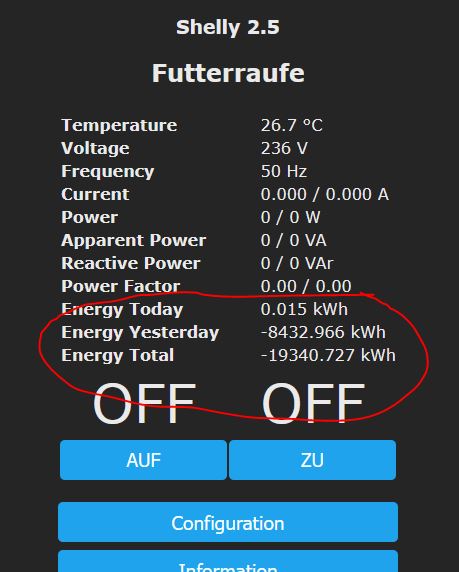 M
MEntered commands:

Main menu values are the same as above :-(
Philip Knowles
Remember that you have 2 energy readings (for Relay1 and Relay 2).
I suspect that you need to enter EnergyTotal 0,0 to reset both.
Regards
Phil K
Sent from Mail for Windows
From: Whabby
Sent: 24 November 2021 12:38
To: TasmotaUsers
Subject: Re: Reset energy counter in Shelly 2.5
Well, changed Tempülate:
- Template {"NAME":"Shelly 2.5","GPIO":[320,0,32,0,224,193,0,0,640,192,608,225,3456,4736],"FLAG":0,"BASE":18}
- Module 0
After, looks like this:
Main menu is like this:
M
Entered commands:
To view this discussion on the web, visit https://groups.google.com/d/msgid/sonoffusers/76c42d5c-4e3b-4e4c-9c1e-77321abb80c8n%40googlegroups.com.
Whabby
In Tasmota 10.0.0 the syntax is
... and so on