First Tasmota flash - MagicHome 5ch - ESP8285 Modulo Conversor Usb Ttl Rs232

735 views
Skip to first unread message

vinicius chaves

unread,
Aug 14, 2018, 7:57:38 PM8/14/18
to SonoffUsers
Hello everyone. It's my first flash with Tasmota.
Try connecting the module to a USB with the Wifi driver already soldered, but it does not work. The Usb Ttl Rs232  and Wifi Controller lights blink only once and all lights go out. I do not know what is normal.
Has anyone solved this or something?
How photos are attached

I forgot to mention that my computer did not recognize the Usb Ttl Rs232. (Windows 7 x64)

Thanks
Traseira.jpg
frente.jpg

rgl...@gmail.com

unread,
Aug 14, 2018, 8:23:45 PM8/14/18
to vinicius chaves, SonoffUsers

First order of business is to get Windows to recognize you USB device.  You must be able to plug the USB device into your computer (leave ESP device aside for now) and have the USB device show up as a COM port.  If it does not, you need to locate the needed drivers and install them.  Once you get the USB device being seen by Windows, then try again.


Regarding your wiring connections and such, the only thing I did not see (or know) is how you put the ESP devices in “flash mode”.  May need to research that as well.

--
You received this message because you are subscribed to the Google Groups "SonoffUsers" group.
To unsubscribe from this group and stop receiving emails from it, send an email to sonoffusers...@googlegroups.com.
For more options, visit https://groups.google.com/d/optout.

vinicius chaves

unread,
Aug 14, 2018, 8:31:28 PM8/14/18
to SonoffUsers
Thaks Ron,

vinicius chaves

unread,
Aug 15, 2018, 12:32:22 PM8/15/18
to SonoffUsers
Now i can see my "ttl232" with "COM" port, i found the driver and the name is CH340G and the website is http://www.wch.cn/download/CH341SER_EXE.html 
I will test some configuration today and if i have some more questions i return..
Thanks everyone...


Em terça-feira, 14 de agosto de 2018 20:57:38 UTC-3, vinicius chaves escreveu:
Capturar.PNG

vinicius chaves

unread,
Aug 24, 2018, 7:36:41 AM8/24/18
to SonoffUsers
olá pessoal, comprei um novo ttl. seu nome é Prolific 2303 e eu instalei o driver no meu pc, eu tive sucesso. Agora meu Prolific 2303 está pronto para se comunicar com o controlador wifi.
Eu nunca flash tosmota com "arduino ide" e eu preciso saber passo a passo quantos arquivos eu preciso copiar e colar e onde no meu pc, o ide arduino já está instalado.
Eu tenho mais uma pergunta. Meu controlador wifi é 5ch magic wifi, como a imagem mais antiga. Este link fala sobre algum botão wifi ( https://community.openhab.org/t/wifi-led-tasmota-flash-and-configuration/46303 ), e eu sou um pouco confuso. Este botão é o único botão que vejo? Somebody could help me?
Muito obrigado.

Em terça-feira, 14 de agosto de 2018 20:57:38 UTC-3, vinicius chaves escreveu:
Olá a todos. É o meu primeiro flash com o Tasmota.
Tente conectar o módulo a um USB com o driver Wifi já soldado, mas não funciona. As luzes Usb Ttl Rs232 e Wifi Controller piscam apenas uma vez e todas as luzes se apagam. Eu não sei o que é normal.
Alguém já resolveu isso ou algo assim?
Como as fotos são anexadas

Esqueci de mencionar que meu computador não reconheceu o Usb Ttl Rs232. (Windows 7 x64)

obrigado
20180824_083009.jpg
20180824_083031.jpg

Phil

unread,
Aug 24, 2018, 10:20:40 AM8/24/18
to SonoffUsers
Hi,  I hope this translates ok.

In order to perform an initial physical flash with tasmota firmware using a usb/ftdi, the sonoff device needs to be started up/powered up with its gpio-0 pin pulled down to ground.
Most sonoff devices have the button wired to the soc gpio-0 pin so holding the button down while you plug in the usb/ftdi connected to your sonoff is generally all the preparation needed. 
However Not all devices are wired exactly the same..  check the wiki for examples....

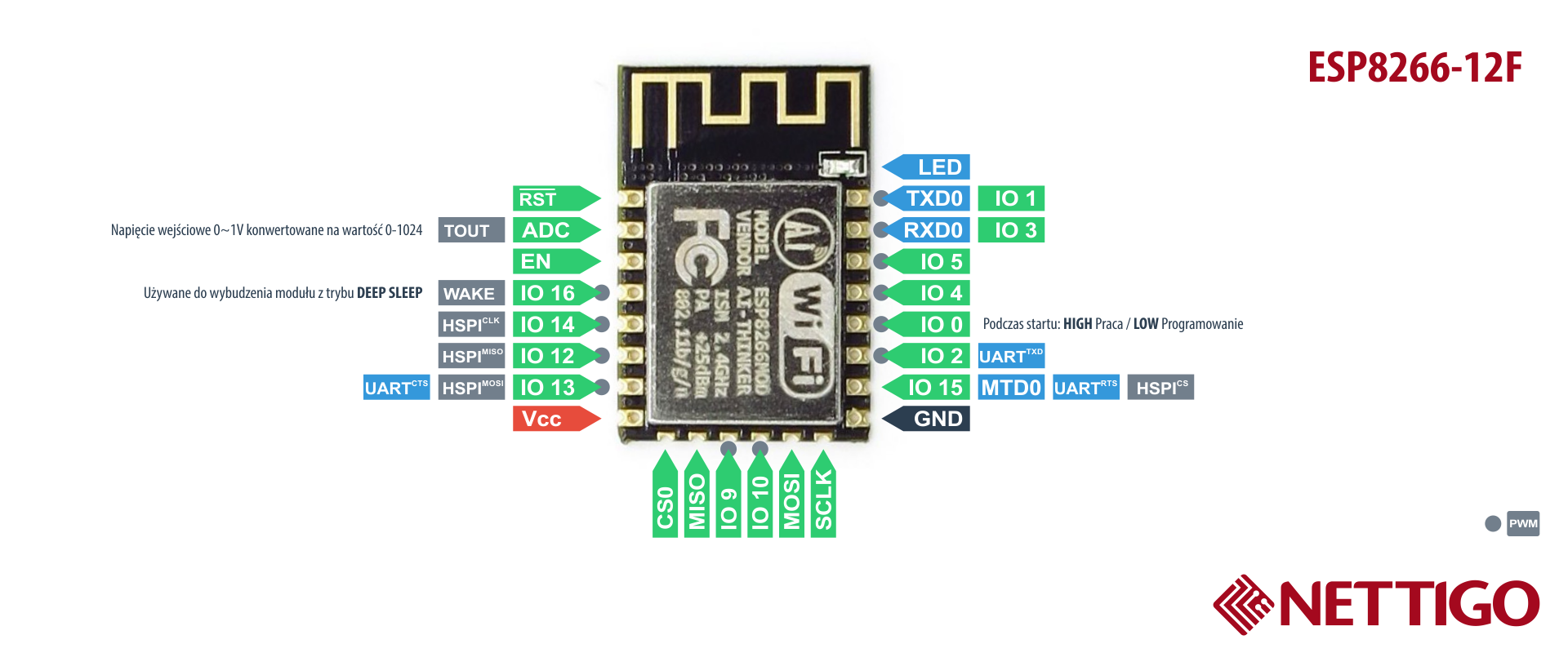
If you have difficulty flashing your device may be wired differently with another gpio pin connected to the button?  in which case it looks very much like a standard esp8266-12 module as pictured here


in which case you may need to use a little wire to short a ground connection to gpio-0   (bottom right side solderpad and the 4th pad up from it also on the right hand side just while you power the unit up.

once powered on you dont need to hold the button or short the contacts any longer..  

For flashing there is a very easy to follow (for english speakers) video using the platform io ide which imho is an easier route than compiling with the arduino ide.  https://youtu.be/n4MDRm2yAJg

However you do not need to compile the code, you can just download and flash the compiled binary file. 
The benefit of compiling your own version of the code is that you can edit the user_config.h file to include your wifi credentials, mqtt server address, module type etc..

Even though i have used the arduino ide quite a bit for other projects i have found that the platform io ide route to flashing a sonoff compatible device quite a bit easier.. 

vinicius chaves

unread,
Aug 25, 2018, 10:48:49 AM8/25/18
to SonoffUsers
Em terça-feira, 14 de agosto de 2018 20:57:38 UTC-3, vinicius chaves escreveu:
brightness variation only 1v. When i change brightness on console the voltage not change, only 1v.

Tnks

vinicius chaves

unread,
Aug 25, 2018, 11:22:56 AM8/25/18
to SonoffUsers
Em terça-feira, 14 de agosto de 2018 20:57:38 UTC-3, vinicius chaves escreveu:
Sorry.
I flashed tasmota. GPIo configured, but when i change tbe brightness... the variation is only 1v. I used console to send dimmer, the dimmer changed but the variation is very short

vinicius chaves

unread,
Aug 26, 2018, 10:05:31 AM8/26/18
to SonoffUsers
Hello everyone.
I need to control voltage rgbww magic home. I configurated on/off is already work. I use an interface android java to control.
Everything works fine and all those buttons to on/off works fine, on(12,21v) off(0v), but when i change the dimmer the voltage not change only to 11,98 when selected on minimun (dark).

I seted setoption15 1

Somebody could help me?

Tnks

Em terça-feira, 14 de agosto de 2018 20:57:38 UTC-3, vinicius chaves escreveu:

vinicius chaves

unread,
Aug 26, 2018, 10:22:28 AM8/26/18
to SonoffUsers
i resolved this problem tks everyone


Em terça-feira, 14 de agosto de 2018 20:57:38 UTC-3, vinicius chaves escreveu:
Reply all
Reply to author
Forward
0 new messages