
tasmota not showing DS18b20 status

Rosanna Viano
- pin 1 connected to GND
- pin2 (DATA) connected to GPIO02
- pin3 connected to 3.3V
- 4.7k resistor between 3.3V anda DATA

Philip Knowles
Sent: Sunday, October 10, 2021 9:52:19 PM
To: TasmotaUsers <sonof...@googlegroups.com>
Subject: tasmota not showing DS18b20 status
You received this message because you are subscribed to the Google Groups "TasmotaUsers" group.
To unsubscribe from this group and stop receiving emails from it, send an email to sonoffusers...@googlegroups.com.
To view this discussion on the web, visit https://groups.google.com/d/msgid/sonoffusers/bea435bb-ef0e-439f-a370-ce9a82149887n%40googlegroups.com.

Tom Munnecke
Rosanna Viano
Philip Knowles
Which version of Tasmota are you using (not 9.5 but the flavour).
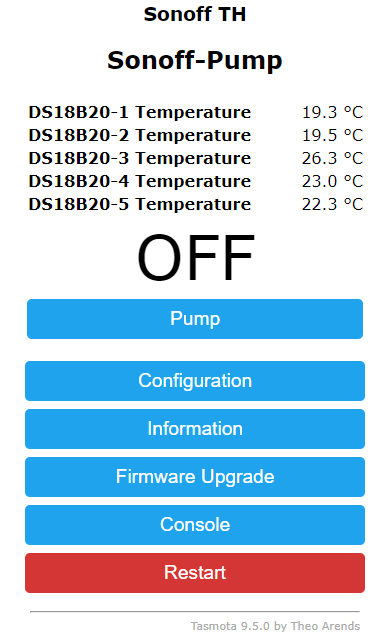
It does work on Sonoff Devices.
There maybe 2 LEDs the LED on GPIO13 may be the relay LED not the status LED.
Can you post the Configure Module screen?
Regards
Phil K
Sent from Mail for Windows
From: Rosanna Viano
Sent: 11 October 2021 08:33
To: Philip Knowles
Cc: TasmotaUsers
Subject: Re: tasmota not showing DS18b20 status
I do not have colors I have the DS18b20 sensor in the package that resembles a transistor, not the "sealed waterproof" version
and on Sonoff S26 GPIO02 is apparently unused.. the led is on GPIO13..
Anyway, if I set a different sensor, at least the web interface shows the few lines relevant to the sensor itself, while with DS18B2, it shows nothing
In any case, yesterday I tried with GPIO04, and the result is the same: no indication at all
Il giorno lun 11 ott 2021 alle ore 00:41 Philip Knowles <knowles...@gmail.com> ha scritto:
What colour wires are connected to each pin? Red 3V3, Black 0V, Yellow GPIO.
GPIO2 is not a good choice because it's connected to the onboard LED.
Regards
Phil K

From: sonof...@googlegroups.com <sonof...@googlegroups.com> on behalf of Rosanna Viano <rosann...@gmail.com>
Sent: Sunday, October 10, 2021 9:52:19 PM
To: TasmotaUsers <sonof...@googlegroups.com>
Subject: tasmota not showing DS18b20 status
Hi everyone
I have modified a Sonosff S26 with Tasmota, connecting a DS18b20 temperature sensor as per instruction:
- pin 1 connected to GND
- pin2 (DATA) connected to GPIO02
- pin3 connected to 3.3V
- 4.7k resistor between 3.3V anda DATA
In the web interface, in the "model setting", GPIO02 has been set as DS18x20
unfortunately, no information on the reading f the sensor is provided in the home page, neither the "/tele/%topic%/status 10" command shows anything, apart for date and time
it seems that the sensor is not detecd... but if I set the GPIO02 to DHT11, even if I do not connect anything to the GPIO2, the web page shows the indications for temp and humidity (obviously saying "null" because nothing is connected)
in other words seems that the sensor is not supported, in spite of being listed in the model settings
my tasmota version is 9.5.0
any help will be appreciated!!!
Rosanna Viano
Philip Knowles
There was an issue with 9.3 of the DS1B20 not working on some devices. I’ve had 5 DS18B20s on my Sonoff TH since 2018 (Version 6.1.1) with no issues – mine are on GPIO14 – so it should work.
Rosanna Viano
Philip Knowles
No, you’ve misunderstood I’m on 9.5 now and it has worked all the way from Version 6.1. I have just tried a DS18B20 on a spare ESP8266. When the DS18B20 is disconnected nothing appears in the UI. I suspect it’s a wiring issue. Gnd should be LH and 3V3 RH when looking towards the flat face of the package.
Rosanna Viano
Philip Knowles
The wiring may be correct but it isn’t communicating with the ESP8266. You may have a faulty sensor or an issue with the Sonoff.
I would try Reset 1 to see if there is corruption of the flash memory.
rosanna viano
Rosanna Viano
Philip Knowles
Can you post a screenshot of this page

From: Rosanna Viano
Sent: 15 October 2021 21:10
To: TasmotaUsers
Subject: Re: tasmota not showing DS18b20 status
update: I've tried to connect different devices to the sonoff S26 (like leds, buttons, relays etc),, setting different configurations, but in no case it worked! it seems that the sonoff is stuck in its standard configuration, with no possibility to change any behaviour.
For example, I tried to change GPIO13 from Led_i to Led, in order to invert the "ON" led functionality... but also this simple modification didn't work..
I tried to re-flash the firmware.... no change
I do not know what else to try
Il giorno martedì 12 ottobre 2021 alle 18:58:43 UTC+2 Rosanna Viano ha scritto:
reset 1 didn't solve the issue
I've tried also on GPIO05: no luck
I'm starting to think thaat the sensor is faulty.. I will try with a new sonoff and a new sensor
On 11/10/21 22:08, Philip Knowles wrote:
The wiring may be correct but it isn’t communicating with the ESP8266. You may have a faulty sensor or an issue with the Sonoff.
I would try Reset 1 to see if there is corruption of the flash memory.
Regards
Phil K
Sent from Mail for Windows
--
You received this message because you are subscribed to the Google Groups "TasmotaUsers" group.
To unsubscribe from this group and stop receiving emails from it, send an email to sonoffusers...@googlegroups.com.
To view this discussion on the web, visit https://groups.google.com/d/msgid/sonoffusers/d2f50379-eea4-48f5-af84-4819ad6c816en%40googlegroups.com.
rosanna viano

but I do not understand how this can help..
the DS18b20 is set on GPIO5, on the "MODEL CONFIGURATION" page; but anyway, hte issue is more severe, as written in the last post: I'm not able to change anything, in hte configuration: for example, if I set GPIO13 to LED 1, instead of LED_i 1, the behaviour of the on/off led DOES NOT change (even if the setting itself has been memorized on the configuration)
by the way: I have 3 Sonoff S26... on the first 2, I have the same behaviour, with apparently no effect of any change in the config... while the third responds properly to the changes.. I still have to try to connect the DS18b20 sdensor to this last device
(as you can see in the snapshot, I dowgraded also to tasmota
7.2.0, but no change at all)
Philip Knowles
You can’t randomly upgrade or downgrade Tasmota. You must follow the upgrade path on the Releases page
Migration Information
This version removes support for direct migration from versions before v8.1.0 (Doris)
See migration path for instructions how to migrate to a major version. Pay attention to the following version breaks due to dynamic settings updates:
- Migrate to Sonoff-Tasmota 3.9.x
- Migrate to Sonoff-Tasmota 4.x
- Migrate to Sonoff-Tasmota 5.14
- Migrate to Sonoff-Tasmota 6.7.1 (http://ota.tasmota.com/tasmota/release-6.7.1/)
- Migrate to Tasmota 7.2.0 (http://ota.tasmota.com/tasmota/release-7.2.0/)
--- Major change in parameter storage layout ---
- Migrate to Tasmota 8.5.1 (http://ota.tasmota.com/tasmota/release-8.5.1/)
--- Major change in internal GPIO function representation ---
- Migrate to Tasmota 9.1 (http://ota.tasmota.com/tasmota/release-9.1.0/)
If you have upgraded or downgraded without following the path you need to restore the original version and then follow the path.
You originally stated that the DS18B20 doesn’t work with Tasmota. Well it does but there is something wrong with either the sensor, the device or the way that you flashed/upgraded the device. It is not Tasmota.
The Module Configuration Page does not show a DS18B20 on GPIO5 because it’s not there in the screenshot. You MAY have set it in the Template page but it’s not the same thing. You may be having a conflict between the Template and the Configuration. Go to Configure Other. If the Activate box is ticked below Template untick it then try changing the Tipo modulo to Generic (18) and set
GPIO0 to Button 1
GPIO12 to Relay 1
GPIO13 to LED1
Set GPIO5 to DS18B20 and see what happens.
Rosanna Viano
Philip Knowles
Reflashing with a previous version still needs to follow the path because the flash memory layout changed between some of the major versions.
Personally I think templates cause more trouble than they are worth as people make changes there not realising that they don’t always replicate in the Configuration.
Hopefully it will work now.
From: Rosanna Viano
Sent: 17 October 2021 16:13
To: TasmotaUsers
Subject: Re: tasmota not showing DS18b20 status
probably I explained myself in the wrong wa.... what I meant is: "I reflashed the device with a previous version" (so no downgrade)
by the way: I have 3 Sonoff S26... on the first 2, I have the same behaviour, with apparently no effect of any change in the config.. while the third responds properly to the changes.. I still have to try to connect the DS18b20 sdensor to this last device
To view this discussion on the web, visit https://groups.google.com/d/msgid/sonoffusers/c8dcde13-f991-41e8-8fa5-fa533371f3adn%40googlegroups.com.
rosanna viano
Philip Knowles
great
Sent from Mail for Windows
From: rosanna viano
Sent: 17 October 2021 18:55
To: Philip Knowles; TasmotaUsers
Subject: Re: tasmota not showing DS18b20 status
success! the DS18b20 is now working as expected.. the trick, in the end, was to "activate" the template in the "configure other" page.. thanks for the hint!
the reflashing with an old version was not the issue, at list on device number 1.. now I will try on device number 2
thanks a lot!!!
Rosanna
Il 17/10/21 17:19, Philip Knowles ha scritto:
Reflashing with a previous version still needs to follow the path because the flash memory layout changed between some of the major versions.
Personally I think templates cause more trouble than they are worth as people make changes there not realising that they don’t always replicate in the Configuration.
Hopefully it will work now.
Regards
Phil K
Sent from Mail for Windows
From: Rosanna Viano
Sent: 17 October 2021 16:13
To: TasmotaUsers
Subject: Re: tasmota not showing DS18b20 status
probably I explained myself in the wrong wa.... what I meant is: "I reflashed the device with a previous version" (so no downgrade)
on the other side, I know that there is a mismatch between the modul page and the model configuration.. it is what I'm trying to explain: all the modifications that I try to implement, are "memorized" in the relevant setting page, but actually they are not activated... so on the 1st and 2nd Sonoff I have, for example, if I set GPIO05 as "user", in the model configuration page, when I go to the module setting, the GPIO5 IS NOT listed...and so on... if I set the led on gPIO13 in inverted mode, the system DOES NOT change the led behaviour.... instead, on the 3rd device, everything chages as required
anyway, thanks to your advice, I went to the "configure other" page, and I 've found that the "template" was not activated... I tried to activate it, and now at least I'm able to cheage the lead behaviour, and to have GPIO05 listed in the module setting page (after having set it as "user" on the model setting page)..
So, now I will try to connect the DS18b20 again on gPIO05.... finger crossed.. I'll let you know! :)
Il giorno domenica 17 ottobre 2021 alle 16:47:40 UTC+2 knowles..@gmail.com ha scritto:
You can’t randomly upgrade or downgrade Tasmota. You must follow the upgrade path on the Releases page
Migration Information
This version removes support for direct migration from versions before v8.1.0 (Doris)
See migration path for instructions how to migrate to a major version. Pay attention to the following version breaks due to dynamic settings updates:
1. Migrate to Sonoff-Tasmota 3.9.x
2. Migrate to Sonoff-Tasmota 4.x
3. Migrate to Sonoff-Tasmota 5.14
4. Migrate to Sonoff-Tasmota 6.7.1 (http://ota.tasmota.com/tasmota/release-6.7.1/)
5. Migrate to Tasmota 7.2.0 (http://ota.tasmota.com/tasmota/release-7.2.0/)
--- Major change in parameter storage layout ---
1. Migrate to Tasmota 8.5.1 (http://ota.tasmota.com/tasmota/release-8.5.1/)
--- Major change in internal GPIO function representation ---
1. Migrate to Tasmota 9.1 (http://ota.tasmota.com/tasmota/release-9.1.0/)