
I can't access to the webui
1,186 views
Skip to first unread message

Fabian
Oct 26, 2018, 8:55:50 AM10/26/18
to SonoffUsers
Hello everyone!.
I have the next problem with a couple of sonoff basic:
1. I flash sonoff.bin using esptool --> OK
2. Press 4 times the button and I can connect to the AP of sonoff --> OK
3. I set up the Wifi network on sonoff with tasmota --> OK
4. then restart the module and see in my router the assigned ip --> OK
5. ..... but, I can't access the ip via web browser.
This happened with the two modules I have tested.
One of them after retrying many times and pressing for 4 seconds the button this work fine, but the second module not yet.
Have you had that problem?
Thank you very much!

Colin Law
Oct 26, 2018, 9:00:05 AM10/26/18
to sonof...@googlegroups.com
Can you ping it?
Colin--
You received this message because you are subscribed to the Google Groups "SonoffUsers" group.
To unsubscribe from this group and stop receiving emails from it, send an email to sonoffusers...@googlegroups.com.
For more options, visit https://groups.google.com/d/optout.
Fabian
Oct 26, 2018, 9:09:44 AM10/26/18
to SonoffUsers
Hello Colin!
The ping doesn't answer.
Destination host unreachable.
The strange thing is that I see the ip assigned to the router.

Philip Knowles
Oct 26, 2018, 9:18:50 AM10/26/18
to Fabian, SonoffUsers
It may be MQTT not being setup and the device constantly tries to contact the broker
Regards
Phil K
Sent from Mail for Windows 10
Fabian
Oct 26, 2018, 9:24:14 AM10/26/18
to sonof...@googlegroups.com
Hi Philip, thanks for your answer.
The problem is that when flashing directly with esptool the sonoff.bin, there is no option to configure MQTT, only Wifi. Or maybe I'm confused.
Fabián
Philip Knowles
Oct 26, 2018, 10:12:46 AM10/26/18
to Fabian, SonoffUsers
What I do is, after flashing, connect to the device using ESPlorer. I have set up a code snippet to set the wifi SSID and password and setup MQTT (using backlog) followed by a Reset 1.
Sent from Mail for Windows 10
From: Fabian
Sent: 26 October 2018 14:24
To: SonoffUsers
Subject: Re: I can't access to the webui
Hey, Phill, thanks for your answer.
Fabian Brussa
Oct 26, 2018, 10:44:55 AM10/26/18
to knowles...@gmail.com, sonof...@googlegroups.com
mmm, this seems very advanced for me.
I'm going to try another option to flash.
thanks you Phil
Philip Knowles
Oct 26, 2018, 2:13:42 PM10/26/18
to Fabian Brussa, sonof...@googlegroups.com
It's very simple. ESPlorer talks to the same serial port which you used for ESPflasher. You then type commands as you would into console. You can save the commands as snippets so that you can re-use them with one click.
Sent from my Windows 10 device

Michael Ingraham
Oct 26, 2018, 2:28:52 PM10/26/18
to SonoffUsers
Fabian,
When you flash the device with TASMOTA, are you doing that using the serial interface to upload the firmware to the device? If so, you can configure the device through the serial interface as well rather than putting the device into Wi-Fi Manager mode (via four button presses). After you upload the TASMOTA firmware, before disconnecting the serial line used for flashing, send the following command to set the Wi-Fi and MQTT parameters:
Backlog SSID1 <wifiSSID>;Password1 <wifiPassword>; MQTTHost <mqttHost>; MQTTUser <mqttUserID>; MQTTPassword <mqttPassword>
You can also make any other configuration settings you desire this way... or you can wait to do it via the web interface after you have the Wi-Fi connection set up. Using a terminal via the serial interface is equivalent to using the web interface Console. You can use something like Termite over the serial connection as the terminal interface to the device.
Mike
Fabian Brussa
Oct 26, 2018, 2:34:37 PM10/26/18
to Philip Knowles, sonof...@googlegroups.com
Great Phil, I can try that.
Again, thank you for your support.
Fabian Brussa
Oct 27, 2018, 1:50:15 PM10/27/18
to Philip Knowles, sonof...@googlegroups.com
Hello!.
I'm still unlucky. Do you see anything wrong here?
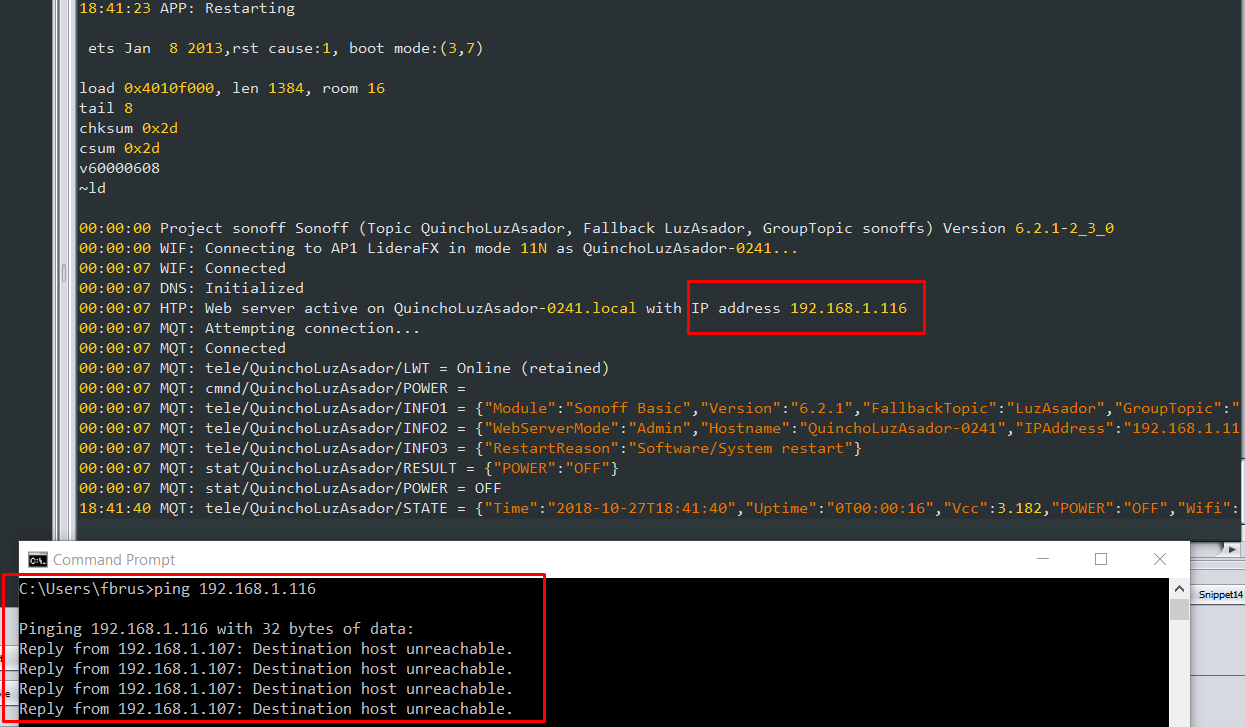
Michael Ingraham
Oct 27, 2018, 4:22:11 PM10/27/18
to fbr...@gmail.com, Philip Knowles, sonof...@googlegroups.com
Please reboot again with the serial adapter connected. Once it's finished starting up, type STATUS 0 in the terminal and post the complete STATUS 0 output here.
Fabian
Oct 27, 2018, 8:56:17 PM10/27/18
to SonoffUsers
Hi Michael !
Using the serial port I can configure the module with the backlog. (like you and and phil told me)
I set up domiticz (with backlog commands) and the module works perfectly.
The strange is that the webui still does not work.
Here the output for the STATUS 0 command:
01:45:03 MQT: stat/QuinchoLuzAsador/STATUS = {"Status":{"Module":1,"FriendlyName":["Sonoff"],"Topic":"QuinchoLuzAsador","ButtonTopic":"0","Power":0,"PowerOnState":3,"LedState":1,"SaveData":1,"SaveState":1,"ButtonRetain":0,"PowerRetain":0}}01:45:03 MQT: stat/QuinchoLuzAsador/STATUS1 = {"StatusPRM":{"Baudrate":115200,"GroupTopic":"sonoffs","OtaUrl":"http://sonoff.maddox.co.uk/tasmota/sonoff.bin","RestartReason":"Power on","Uptime":"0T00:00:30","StartupUTC":"2018-10-28T00:44:33","Sleep":0,"BootCount":18,"SaveCount":64,"SaveAddress":"F4000"}}01:45:03 MQT: stat/QuinchoLuzAsador/STATUS2 = {"StatusFWR":{"Version":"6.2.1","BuildDateTime":"2018-09-09T16:50:26","Boot":31,"Core":"2_3_0","SDK":"1.5.3(aec24ac9)"}}01:45:04 MQT: stat/QuinchoLuzAsador/STATUS3 = {"StatusLOG":{"SerialLog":2,"WebLog":2,"SysLog":0,"LogHost":"","LogPort":514,"SSId":["LideraFX","LideraFX"],"TelePeriod":300,"SetOption":["00008009","55818000","00000000"]}}01:45:04 MQT: stat/QuinchoLuzAsador/STATUS4 = {"StatusMEM":{"ProgramSize":471,"Free":532,"Heap":16,"ProgramFlashSize":1024,"FlashSize":1024,"FlashMode":3,"Features":["00000809","0FDAE794","000003A0","23B617CE","00000000"]}}01:45:04 MQT: stat/QuinchoLuzAsador/STATUS5 = {"StatusNET":{"Hostname":"QuinchoLuzAsador-0241","IPAddress":"192.168.1.202","Gateway":"192.168.1.1","Subnetmask":"255.255.255.0","DNSServer":"192.168.1.1","Mac":"BC:DD:C2:0F:60:F1","Webserver":2,"WifiConfig":2}}01:45:04 MQT: stat/QuinchoLuzAsador/STATUS6 = {"StatusMQT":{"MqttHost":"192.168.1.100","MqttPort":1883,"MqttClientMask":"LuzAsador","MqttClient":"LuzAsador","MqttUser":"fabian.brussa","MqttType":1,"MAX_PACKET_SIZE":1000,"KEEPALIVE":15}}01:45:04 MQT: stat/QuinchoLuzAsador/STATUS7 = {"StatusTIM":{"UTC":"Sun Oct 28 00:45:04 2018","Local":"Sun Oct 28 01:45:04 2018","StartDST":"Sun Mar 25 02:00:00 2018","EndDST":"Sun Oct 28 03:00:00 2018","Timezone":1,"Sunrise":"07:30","Sunset":"17:37"}}01:45:04 MQT: stat/QuinchoLuzAsador/STATUS10 = {"StatusSNS":{"Time":"2018-10-28T01:45:04"}}01:45:04 MQT: stat/QuinchoLuzAsador/STATUS11 = {"StatusSTS":{"Time":"2018-10-28T01:45:04","Uptime":"0T00:00:31","Vcc":3.126,"POWER":"OFF","Wifi":{"AP":1,"SSId":"LideraFX","RSSI":100,"APMac":"C0:C1:C0:EE:C3:4F"}}}
Michael Ingraham
Oct 27, 2018, 9:49:16 PM10/27/18
to Fabian Brussa, sonof...@googlegroups.com
Fabian,
I'm surprised to see that the IP address for the device changed from the previous screenshot to this reboot. Usually the DHCP server won't refresh it's table so quickly. This makes me a bit suspicious about what might be going on with your network.
Do you set a unique MQTT Client and ClientMask for each of your devices?
It looks like you flashed the latest release of the software. I know that there have been several Wi-Fi related tweaks in the development branch. To eliminate any possible issues related to the 6.2.1 master, could you flash the latest development version (http://thehackbox.org/tasmota/) to see if this resolves your issue?
Mike
Mike
Fabian Brussa
Oct 28, 2018, 3:42:09 PM10/28/18
to MEIng...@charter.net, sonof...@googlegroups.com
Hi Mike.
The Ip change is because I assigned that ip on the router for the sonoff mac address.
It was one of the many tests I was doing.
Right now I'm flashing with the version you tell me and then I comment on the result.
Thank you
Fabian Brussa
Oct 28, 2018, 3:57:26 PM10/28/18
to MEIng...@charter.net, sonof...@googlegroups.com
Mike,
Everything's the same.
Everything works, except the we bui. I can change the status of the module via mqtt (even from homebridge).
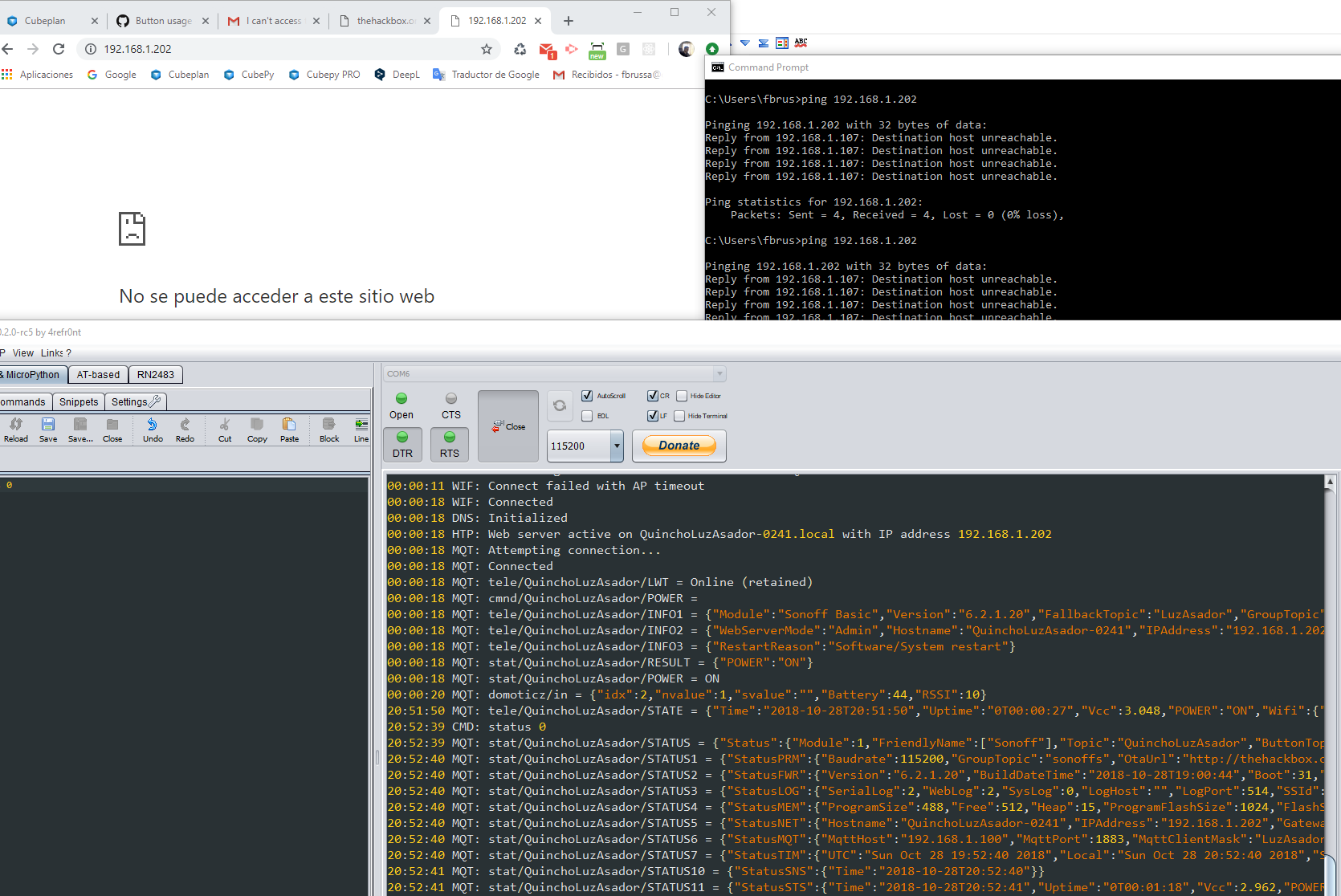
Michael Ingraham
Oct 28, 2018, 5:31:02 PM10/28/18
to Fabian Brussa, sonof...@googlegroups.com
I am out of ideas. I'm just grasping at straws at this point.
What does your router configuration look like (gateway, subnet mask, dns, etc.)?
Have you tried accessing the web gui using the hostname (http://QuichoLuzAsador-0241.local or
http://QuichoLuzAsador-0241.lan)?
Fabian Brussa
Oct 28, 2018, 5:54:49 PM10/28/18
to Michael Ingraham, sonof...@googlegroups.com
Ha ha, this is really very strange.
I see this happens with two modules (the only ones I have), so some router configuration may be the problem.
I am preparing to flahsear the third.
I'm using dhcp, the subnet mask is 255.255.255.0, mix mode: (N,B,G). gateway:192.168.1.1
..later I'll tell you what happened to the third.
Colin Law
Oct 28, 2018, 6:03:58 PM10/28/18
to sonof...@googlegroups.com, fbr...@gmail.com
What happens if, in a terminal, you run
wget http://192.168.1.202or whatever the ip is at the moment.
Colin
Fabian Brussa
Oct 28, 2018, 6:21:44 PM10/28/18
to cla...@gmail.com, sonof...@googlegroups.com
Hello Colin... and thank you !
proving what you tell me I see wget does his job.
in short: if i try to connect via LAN, they work (my mac mini , my notebook)
if I try to connect via WIFI, it doesn't work (from the phone, from the notebook without lan)
I assume it's a router configuration problem.
It's working anyway.
Thank you very much to all for your support!
Cheers
Colin Law
Oct 29, 2018, 4:46:40 AM10/29/18
to sonof...@googlegroups.com
Do you mean that, when the PC (or whatever) is using the wifi, ping works but the browser doesn't? Very odd.
ColinMichael Ingraham
Oct 29, 2018, 8:05:07 AM10/29/18
to Colin Law, sonof...@googlegroups.com
Is your notebook/laptop connected via wired Ethernet? Can you disconnect it from the Ethernet and connect your laptop via Wi-Fi and see if that allows you to ping the Sonoff and get to the web admin?
Can you describe your network topology? By that I mean, do you have more than one router/switch/hotspot? If so, only one has DHCP server enabled? Are all on the same subnet (both Wi-Fi and LAN)?
Michael Ingraham
Spartanburg, SC
Michael Ingraham
Spartanburg, SC
Fabian
Oct 29, 2018, 11:21:20 AM10/29/18
to SonoffUsers
Hello Michael, Colin.
I have a single router, a single dhcp. wifi and lan on the same subnet.
I record a video to make it look better

Piotr Antczak
Oct 29, 2018, 11:38:06 AM10/29/18
to sonof...@googlegroups.com
On some routers (there is such settings on MikroTik) there has to be "client to client forwarding" option checked to allow communication between two clients connected to the same WIFI network.
Piotr Antczak
Fabian
Oct 29, 2018, 11:57:37 AM10/29/18
to SonoffUsers
Hi Priotr,
I not found that option in my router , but:
In the router change the "AP Isolation" option from enabled to disbled and then now all works fine!
Again, thank you all so much!
Cheers!
Reply all
Reply to author
Forward
Message has been deleted
0 new messages