
SonarLint is not showing all Sonarqube rules in Eclipse IDE
4,233 views
Skip to first unread message

harikrishn...@gmail.com
Nov 2, 2017, 6:57:31 AM11/2/17
to SonarLint
Hi all,
IDE : Eclipse
Plugin : SonarLint 3.2
Server : SonarQube 6.3
When I connect the sonarlint with sonarqube server, some of the issues based on certain rules in sonarqube server are not shown in the Eclipse IDE.
Is there any way to make all the rules in the sonarqube server to reflect in the sonarlint?
Thanks,
Hari Krishna
IDE : Eclipse
Plugin : SonarLint 3.2
Server : SonarQube 6.3
When I connect the sonarlint with sonarqube server, some of the issues based on certain rules in sonarqube server are not shown in the Eclipse IDE.
Is there any way to make all the rules in the sonarqube server to reflect in the sonarlint?
Thanks,
Hari Krishna

Julien HENRY
Nov 6, 2017, 2:31:42 AM11/6/17
to harikrishn...@gmail.com, SonarLint
Hi Hari,
Can you give some example of such missing rules key? Like squid:xxxx.
Note that only the rules of SonarSource analyzers are executed by SonarLint. Rules coming from third-party plugins are not supported.
++
--
You received this message because you are subscribed to the Google Groups "SonarLint" group.
To unsubscribe from this group and stop receiving emails from it, send an email to sonarlint+unsubscribe@googlegroups.com.
To view this discussion on the web visit https://groups.google.com/d/msgid/sonarlint/f4f8b5d4-8ae6-4214-a611-18de69fbb65c%40googlegroups.com.
For more options, visit https://groups.google.com/d/optout.

sfm...@gmail.com
Nov 7, 2017, 9:02:47 AM11/7/17
to SonarLint
Julien,

We are seeing the same issue. It seems that some informational level messages are not shown locally. For example, the following issue is reported on the server but not locally:
Add public modifier to a method in an Interface class then SONAR does not report it as an issue locally, but raises info level issue on sonar server.
Thanks,
Steve
Julien HENRY
Nov 7, 2017, 9:31:23 AM11/7/17
to Steven Marvin, SonarLint
Hi Steve,
The issue is closed as fixed, so this is expected to not see it in SonarLint. Also check that the rule come from SonarJava and not from a third party plugin (or give me the rule key).
++
--
You received this message because you are subscribed to the Google Groups "SonarLint" group.
To unsubscribe from this group and stop receiving emails from it, send an email to sonarlint+unsubscribe@googlegroups.com.
To view this discussion on the web visit https://groups.google.com/d/msgid/sonarlint/df33533e-99eb-4aff-8d27-682d823be585%40googlegroups.com.
sfm...@gmail.com
Nov 7, 2017, 1:44:27 PM11/7/17
to SonarLint
OK, It looks like SONARLint is not showing this issue because this is a PMD issue. I did not realize that SONARLint does not evaluate using any of the third party plugins (PMD, Findbugs, OWASP and Checkstyle).
We were hoping this was not the case because we had asked developers to make sure they have no SONAR issues before committing to the repository. We force a build break if SONAR issues are found. Developers may now be the cause of a build break even though SONARLint showed no issues in their local environment. They do not have a way to know before committing. This did not seem to be an issue with the previous SONARQube Eclipse plugin we were using last year.
It would be nice to have an option to run these third party plugins, even though it may add to the analysis time, but I guess we will have to live with it for now.
Thanks,
Steve
To unsubscribe from this group and stop receiving emails from it, send an email to sonarlint+...@googlegroups.com.

hp200...@gmail.com
Nov 8, 2017, 4:44:49 AM11/8/17
to SonarLint
Actually those rules are from third party plugin julien, and so far we found no issues with sonar rules if found will report it.
Thanks,
Hari Krishna
Thanks,
Hari Krishna

jordan....@gmail.com
Nov 16, 2017, 3:52:24 AM11/16/17
to SonarLint
Hi,
I have a comparable issue on PhpStorm, I enabled binding to a remote SonarQube server and correctly see the projects.
Everything seems to be OK for PHP but not for TypeScript.
I use the "Sonar way recommended" quality profile for TypeScript but on PhpStorm the issues are missing :
- typescript:S113 : file should end with a new line
- typescript:S1440 : == should be ===
- typescript:S3512 : Template strings should be used instead of concatenation
Any clue to solve this ?
Thank you
Jordan
Julien HENRY
Nov 16, 2017, 4:10:22 AM11/16/17
to jordan....@gmail.com, SonarLint
Hi Jordan,
Typescript is not supported by SonarLint currently.
++
--
You received this message because you are subscribed to the Google Groups "SonarLint" group.
To unsubscribe from this group and stop receiving emails from it, send an email to sonarlint+unsubscribe@googlegroups.com.
To view this discussion on the web visit https://groups.google.com/d/msgid/sonarlint/52ac6184-cfe6-4580-a939-bbd2fe16864b%40googlegroups.com.

aninha...@gmail.com
Nov 17, 2017, 8:35:37 AM11/17/17
to SonarLint
Hi Julien,
My code violates the rule squid:S2333. However, the violation is not shown by executing SonarLint. The violation is only shown in the SonarQube server.
Any suggestion what it could be?
Thanks in advance.
My code violates the rule squid:S2333. However, the violation is not shown by executing SonarLint. The violation is only shown in the SonarQube server.
Any suggestion what it could be?
Thanks in advance.
Em segunda-feira, 6 de novembro de 2017 04:31:42 UTC-3, Julien HENRY escreveu:
Hi Hari,Can you give some example of such missing rules key? Like squid:xxxx.Note that only the rules of SonarSource analyzers are executed by SonarLint. Rules coming from third-party plugins are not supported.++
2017-11-02 11:57 GMT+01:00 <harikrishn...@gmail.com>:
Hi all,
IDE : Eclipse
Plugin : SonarLint 3.2
Server : SonarQube 6.3
When I connect the sonarlint with sonarqube server, some of the issues based on certain rules in sonarqube server are not shown in the Eclipse IDE.
Is there any way to make all the rules in the sonarqube server to reflect in the sonarlint?
Thanks,
Hari Krishna
--
You received this message because you are subscribed to the Google Groups "SonarLint" group.
To unsubscribe from this group and stop receiving emails from it, send an email to sonarlint+...@googlegroups.com.

Duarte Meneses
Nov 17, 2017, 8:45:33 AM11/17/17
to aninha...@gmail.com, SonarLint
Hi,
That rule should be picked up by SonarLint.
Are you using the connected mode in SonarLint, and is your project in the IDE bound to the correct project in SonarQube?
To unsubscribe from this group and stop receiving emails from it, send an email to sonarlint+unsubscribe@googlegroups.com.
To view this discussion on the web visit https://groups.google.com/d/msgid/sonarlint/b90d133f-6a25-482b-a47c-4947b930a60b%40googlegroups.com.
Ana Paula Carvalho
Nov 17, 2017, 8:51:07 AM11/17/17
to Duarte Meneses, SonarLint
Hi Duarte,
I've already checked the project key and the project is linked with SonarQube server (I've already used the option "Update all project bindings".--
Ana Carvalho
Ana Paula Carvalho
Nov 17, 2017, 9:49:45 AM11/17/17
to Duarte Meneses, SonarLint
Hi all,
This rule is not enabled in quality profile Sonar way. If I enable the rule, the violation is shown in SonarLint.However, the project is using a custom quality profile. I've tried setting this custom profile as default, but it is not working.
I've also setted my preferences in org.sonarlint.eclipse.core.prefs, but it is not working too.
autoEnabled=true
eclipse.preferences.version=1
extraProperties=sonar.profile=Custom
moduleKey=myprojectkey
serverId=myprojectserver
autoEnabled=true
eclipse.preferences.version=1
extraProperties=sonar.profile=Custom
moduleKey=myprojectkey
serverId=myprojectserver
Any idea?
Thanks.
On 17 November 2017 at 10:51, Ana Paula Carvalho <aninha...@gmail.com> wrote:
AnaThanks,Hi Duarte,I've already checked the project key and the project is linked with SonarQube server (I've already used the option "Update all project bindings".
--
Ana Carvalho
duarte.meneses
Nov 20, 2017, 11:24:11 AM11/20/17
to SonarLint
Hi Ana,
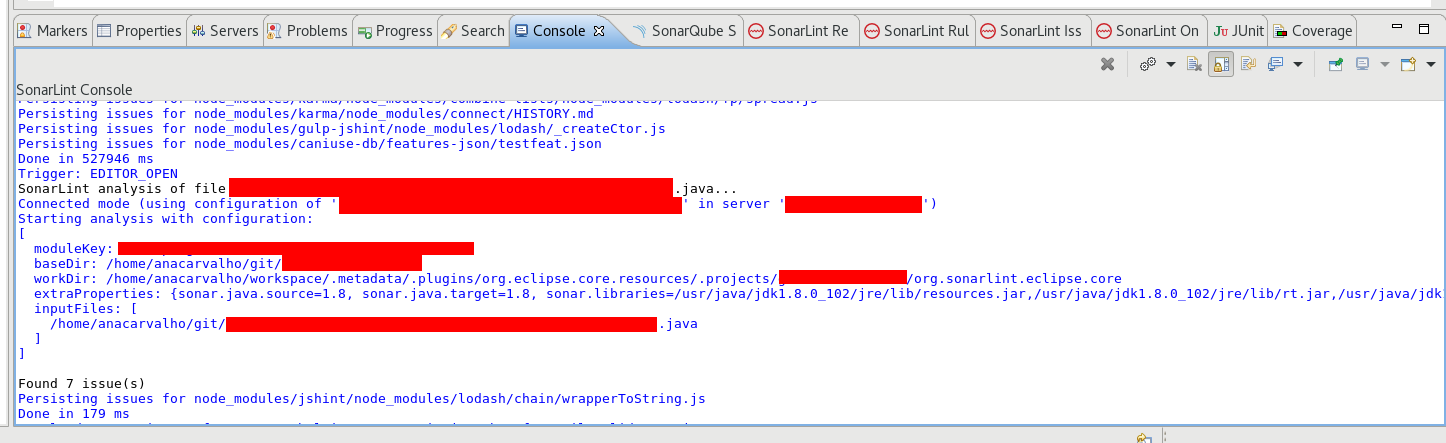
If you open the SonarLint console and enable verbose logs, when analyzing a file, you should see which project in SonarQube the project in the IDE is bound to:
SonarLint analysis of file /sonar-csharp-plugin/src/main/java/org/sonar/plugins/csharp/CSharpSensor.java...
Connected mode (using configuration of 'org.sonarsource.dotnet:sonar-csharp-plugin' in server 'xxx')
Starting analysis with configuration:
It will also list the quality profiles that are being used for each language. These should be the quality profiles assigned in SonarQube to the project key listed above.
Quality profiles:
* c: c-sonarsource-xxx (161 rules)
* java: java-default-with-xxx-27339 (352 rules)
Could you please have a look to see if you get any clues about what's wrong?
On Friday, 17 November 2017 15:49:45 UTC+1, Ana Paula Carvalho wrote:
Hi all,This rule is not enabled in quality profile Sonar way. If I enable the rule, the violation is shown in SonarLint.However, the project is using a custom quality profile. I've tried setting this custom profile as default, but it is not working.I've also setted my preferences in org.sonarlint.eclipse.core.prefs, but it is not working too.
autoEnabled=true
eclipse.preferences.version=1
extraProperties=sonar.profile=Custom
moduleKey=myprojectkey
serverId=myprojectserverAny idea?Thanks.
On 17 November 2017 at 10:51, Ana Paula Carvalho <aninha...@gmail.com> wrote:
AnaThanks,Hi Duarte,I've already checked the project key and the project is linked with SonarQube server (I've already used the option "Update all project bindings".
To view this discussion on the web visit https://groups.google.com/d/msgid/sonarlint/b90d133f-6a25-482b-a47c-4947b930a60b%40googlegroups.com.
--
--Ana Carvalho
--Ana Carvalho
Ana Paula Carvalho
Nov 21, 2017, 7:09:12 AM11/21/17
to duarte.meneses, SonarLint
Hi Duarte,
With your help, I've found the SonarLint console and enabled verbose logs and analysis logs.The project in the Eclipse is bound to the project in SonarQube correctly, but the quality profiles are not shown in the Console.
Also, the project is analysing JavaScript files that I had already added in the exclusion files, both in the SonarQube server and in the Eclipse properties.
Thanks a lot,
Ana


Hi Ana,
If you open the SonarLint console and enable
verbose logs, when analyzing a file, you should see which project in
SonarQube the project in the IDE is bound to:
SonarLint analysis of file /sonar-csharp-plugin/src/main/java/org/sonar/plugins/csharp/CSharpSensor.java...
Connected mode (using configuration of 'org.sonarsource.dotnet:sonar-csharp-plugin' in server 'xxx')
Starting analysis with configuration:
It
will also list the quality profiles that are being used for each
language. These should be the quality profiles assigned in SonarQube to
the project key listed above.
Quality profiles:
* c: c-sonarsource-xxx (161 rules)
* java: java-default-with-xxx-27339 (352 rules)
Could you please have a look to see if you get any clues about what's wrong?
--
You received this message because you are subscribed to a topic in the Google Groups "SonarLint" group.
To unsubscribe from this topic, visit https://groups.google.com/d/topic/sonarlint/Bi3xkvreu4E/unsubscribe.
To unsubscribe from this group and all its topics, send an email to sonarlint+unsubscribe@googlegroups.com.
To view this discussion on the web visit https://groups.google.com/d/msgid/sonarlint/44f7155a-cf94-4b77-a23a-7deb06edf7a9%40googlegroups.com.
--
Ana Carvalho
Ana Paula Carvalho
Nov 21, 2017, 9:44:04 AM11/21/17
to duarte.meneses, SonarLint
Hi Duarte,
Just to let you know, I use Eclipse Oxygen.1 Release (4.7.1) and SonarLint 3.2.0.201706271328.On 21 November 2017 at 09:09, Ana Paula Carvalho <aninha...@gmail.com> wrote:
Hi Duarte,
With your help, I've found the SonarLint console and enabled verbose logs and analysis logs.The project in the Eclipse is bound to the project in SonarQube correctly, but the quality profiles are not shown in the Console.Also, the project is analysing JavaScript files that I had already added in the exclusion files, both in the SonarQube server and in the Eclipse properties.Thanks a lot,Ana
Hi Ana,If you open the SonarLint console and enable verbose logs, when analyzing a file, you should see which project in SonarQube the project in the IDE is bound to:SonarLint analysis of file /sonar-csharp-plugin/src/main/java/org/sonar/plugins/csharp/CSharpSensor.java...
Connected mode (using configuration of 'org.sonarsource.dotnet:sonar-csharp-plugin' in server 'xxx')
Starting analysis with configuration:It will also list the quality profiles that are being used for each language. These should be the quality profiles assigned in SonarQube to the project key listed above.Quality profiles:
* c: c-sonarsource-xxx (161 rules)
* java: java-default-with-xxx-27339 (352 rules)Could you please have a look to see if you get any clues about what's wrong?


--
Ana Carvalho

ronnand...@gmail.com
Nov 28, 2017, 7:09:19 PM11/28/17
to SonarLint
Hi Julien,
Will it be possible for thirdparty plugin rules to be supported?
Ronn
On Monday, November 6, 2017 at 6:31:42 PM UTC+11, Julien HENRY wrote:
Hi Hari,Can you give some example of such missing rules key? Like squid:xxxx.Note that only the rules of SonarSource analyzers are executed by SonarLint. Rules coming from third-party plugins are not supported.++
2017-11-02 11:57 GMT+01:00 <harikrishn...@gmail.com>:
Hi all,
IDE : Eclipse
Plugin : SonarLint 3.2
Server : SonarQube 6.3
When I connect the sonarlint with sonarqube server, some of the issues based on certain rules in sonarqube server are not shown in the Eclipse IDE.
Is there any way to make all the rules in the sonarqube server to reflect in the sonarlint?
Thanks,
Hari Krishna
--
You received this message because you are subscribed to the Google Groups "SonarLint" group.
To unsubscribe from this group and stop receiving emails from it, send an email to sonarlint+...@googlegroups.com.
Ana Paula Carvalho
Nov 30, 2017, 9:43:14 AM11/30/17
to Duarte Meneses, SonarLint
Hi Duarte,
Thanks for your answer. SonarLint is now working as expected. I think network instability was causing problems when acessing the SonarQube Server.On 29 November 2017 at 05:44, Duarte Meneses <duarte....@sonarsource.com> wrote:
Hi Ana,Sorry for the late reply.It looks like the option "Analysis logs" in the console was disabled - it's missing the analysis logs, including the listing of quality profiles.
On 21 November 2017 at 15:44, Ana Paula Carvalho <aninha...@gmail.com> wrote:
AnaHi Duarte,Just to let you know, I use Eclipse Oxygen.1 Release (4.7.1) and SonarLint 3.2.0.201706271328.
On 21 November 2017 at 09:09, Ana Paula Carvalho <aninha...@gmail.com> wrote:
Hi Duarte,With your help, I've found the SonarLint console and enabled verbose logs and analysis logs.The project in the Eclipse is bound to the project in SonarQube correctly, but the quality profiles are not shown in the Console.Also, the project is analysing JavaScript files that I had already added in the exclusion files, both in the SonarQube server and in the Eclipse properties.Thanks a lot,Ana
Hi Ana,If you open the SonarLint console and enable verbose logs, when analyzing a file, you should see which project in SonarQube the project in the IDE is bound to:SonarLint analysis of file /sonar-csharp-plugin/src/main/java/org/sonar/plugins/csharp/CSharpSensor.java...
Connected mode (using configuration of 'org.sonarsource.dotnet:sonar-csharp-plugin' in server 'xxx')
Starting analysis with configuration:It will also list the quality profiles that are being used for each language. These should be the quality profiles assigned in SonarQube to the project key listed above.Quality profiles:
* c: c-sonarsource-xxx (161 rules)
* java: java-default-with-xxx-27339 (352 rules)Could you please have a look to see if you get any clues about what's wrong?


--Ana Carvalho
--
Ana Carvalho
Duarte Meneses
Dec 1, 2017, 3:00:31 AM12/1/17
to Ana Paula Carvalho, SonarLint
Hi Ana,
Sorry for the late reply.
It looks like the option "Analysis logs" in the console was disabled - it's missing the analysis logs, including the listing of quality profiles.
On 21 November 2017 at 15:44, Ana Paula Carvalho <aninha...@gmail.com> wrote:
AnaHi Duarte,Just to let you know, I use Eclipse Oxygen.1 Release (4.7.1) and SonarLint 3.2.0.201706271328.
On 21 November 2017 at 09:09, Ana Paula Carvalho <aninha...@gmail.com> wrote:
Hi Duarte,With your help, I've found the SonarLint console and enabled verbose logs and analysis logs.The project in the Eclipse is bound to the project in SonarQube correctly, but the quality profiles are not shown in the Console.Also, the project is analysing JavaScript files that I had already added in the exclusion files, both in the SonarQube server and in the Eclipse properties.Thanks a lot,Ana
Hi Ana,If you open the SonarLint console and enable verbose logs, when analyzing a file, you should see which project in SonarQube the project in the IDE is bound to:SonarLint analysis of file /sonar-csharp-plugin/src/main/java/org/sonar/plugins/csharp/CSharpSensor.java...
Connected mode (using configuration of 'org.sonarsource.dotnet:sonar-csharp-plugin' in server 'xxx')
Starting analysis with configuration:It will also list the quality profiles that are being used for each language. These should be the quality profiles assigned in SonarQube to the project key listed above.Quality profiles:
* c: c-sonarsource-xxx (161 rules)
* java: java-default-with-xxx-27339 (352 rules)Could you please have a look to see if you get any clues about what's wrong?


--Ana Carvalho
Reply all
Reply to author
Forward
0 new messages