
Stroke and fill path with different colors?
2,819 views
Skip to first unread message

brad...@gmail.com
May 28, 2013, 4:22:01 PM5/28/13
to skia-d...@googlegroups.com
Is there a way to draw a path in a single pass using different colors for the stroke and fill? I found kStrokeAndFill_Style, but that seems to render both using the same color.
I tried rendering the path in two passes, and that works except when I blur the path. If I fill then stroke then the blurred result is biased toward the stroke. If I stroke then fill then the result is too heavy with the fill. I'd like to have something more SVG-ish, where the stroke and fill seem to be blended together a bit more evenly.
I tried rendering the path in two passes, and that works except when I blur the path. If I fill then stroke then the blurred result is biased toward the stroke. If I stroke then fill then the result is too heavy with the fill. I'd like to have something more SVG-ish, where the stroke and fill seem to be blended together a bit more evenly.

Edison Nica
May 31, 2013, 8:26:49 AM5/31/13
to skia-d...@googlegroups.com
You are correct, we use the same paint for both stoke and fill with kStrokeAndFill_Style. The only way is to do two draws, two paints.
Can you send a png with your desired result please? I would like to see what kind of effect you wish to obtain, as I am not aware of how SVG deals with fill and path.
I can't promise anything, but SkPaint has some advanced capabilities which could be used to create a special blending (SkDrawLooper, SkMaskFilter, SkPathEffect, ...). If I understand exactly what you wish I could recommend a solution, or I can implement a few draft classes that would implement the effect, but I need clear examples of what you wish to accomplish.
Regards,
Edi
On Tue, May 28, 2013 at 4:22 PM, <brad...@gmail.com> wrote:
Is there a way to draw a path in a single pass using different colors for the stroke and fill? I found kStrokeAndFill_Style, but that seems to render both using the same color.
I tried rendering the path in two passes, and that works except when I blur the path. If I fill then stroke then the blurred result is biased toward the stroke. If I stroke then fill then the result is too heavy with the fill. I'd like to have something more SVG-ish, where the stroke and fill seem to be blended together a bit more evenly.
--
You received this message because you are subscribed to the Google Groups "skia-discuss" group.
To unsubscribe from this group and stop receiving emails from it, send an email to skia-discuss...@googlegroups.com.
To post to this group, send email to skia-d...@googlegroups.com.
Visit this group at http://groups.google.com/group/skia-discuss?hl=en.
For more options, visit https://groups.google.com/groups/opt_out.
brad...@gmail.com
May 31, 2013, 11:15:40 AM5/31/13
to skia-d...@googlegroups.com
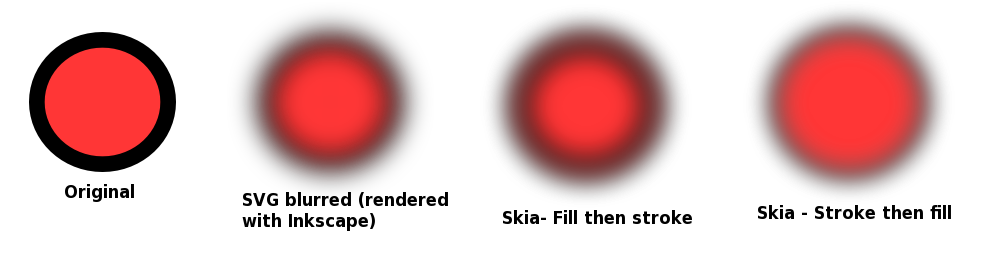
Ben Wagner
May 31, 2013, 11:38:27 AM5/31/13
to skia-d...@googlegroups.com
Have you tried doing a saveLayer, then fill, then stroke, then restore?
brad...@gmail.com
May 31, 2013, 3:39:48 PM5/31/13
to skia-d...@googlegroups.com
I just tried it, and it didn't seem to have any effect.
Edison Nica
Jun 4, 2013, 11:48:10 AM6/4/13
to skia-d...@googlegroups.com
Easy: The blur has a blur radius, that you can play with. You can also change the transparency of the stroke. You can also change the stroke width.
Right: Blur math is complex and there are many trade offs between desired appearance and performance. Look at SkBlurMask* and related classes and you could build your own blur, but you will need to know what formulas SVG is using for blurring to get exactly the same effect. If there are no published formulas, then you can reverse engineer by drawing a black line on white background, and estimate their formulas.
Again, getting your pixel perfect blur in Skia like in SVG will be a challenging work to get it right with good performance.
Edi

jingc...@gmail.com
Nov 23, 2017, 10:51:55 PM11/23/17
to skia-discuss
hi! I want to draw many paths with same paint. when drawing each path i use "canvas.drawPath(path, paint) " . Does the skia have the function i use to draw many paths with same paint one time rather than mang times.
在 2013年6月1日星期六 UTC+8上午3:39:48,brad...@gmail.com写道:
在 2013年6月1日星期六 UTC+8上午3:39:48,brad...@gmail.com写道:

Shawn Riordan
Nov 24, 2017, 12:24:50 AM11/24/17
to skia-discuss
Why wouldn't drawing the path twice (once with fill and once with stroke) with a blur filter achieve the result you are looking for?
Or, as others have said, draw the fill and stroke to an off-screen layer image and then blur the layer image on restore?
Reply all
Reply to author
Forward
0 new messages