
Passing parameters to a Shiny app
7,774 views
Skip to first unread message

Laszlo Szakacs
Nov 26, 2012, 11:45:27 AM11/26/12
to shiny-...@googlegroups.com
Hi! Is it possible to pass parameters to a Shiny app (like HTTP GET/POST)? (My workaround at the moment is embedding the Shiny app in an iframe and get values from the PHP-generated parent with postMessage.) Thanks.

Joe Cheng
Nov 26, 2012, 3:21:46 PM11/26/12
to shiny-...@googlegroups.com
If you just need them in JavaScript, you can parse window.location.search. If you need them in your Shiny server logic then you'd need to get them up to the server using a custom input component. There would be no way to get the values into ui.R, since that code runs independently of any specific request.
On Mon, Nov 26, 2012 at 8:45 AM, Laszlo Szakacs <coci...@gmail.com> wrote:
Hi! Is it possible to pass parameters to a Shiny app (like HTTP GET/POST)? (My workaround at the moment is embedding the Shiny app in an iframe and get values from the PHP-generated parent with postMessage.) Thanks.
--
Laszlo Szakacs
Nov 26, 2012, 5:56:11 PM11/26/12
to shiny-...@googlegroups.com
Thanks. However, could you give an example for window.location.search with Shiny? The HTML UI example http://glimmer.rstudio.com/szakacs/test1/ does not work with http://glimmer.rstudio.com/szakacs/test1/index.html (and not with e.g. http://glimmer.rstudio.com/szakacs/test1/index.html?i=1).
![Joe Cheng [RStudio]'s profile photo](http://lh3.googleusercontent.com/a-/ALV-UjVqfaUaTd2_krhrbdVriEUodBRGVOSlt2Sxl6CiqFo76WU9xb8y=s40-c)
Joe Cheng [RStudio]
Nov 26, 2012, 6:14:37 PM11/26/12
to shiny-...@googlegroups.com
You're right, it looks like we need to beef up our URL parsing code for the server. In the meantime you could use window.location.hash instead and substitute # for ?, I suppose...
--
Laszlo Szakacs
Nov 26, 2012, 6:41:47 PM11/26/12
to shiny-...@googlegroups.com, j...@rstudio.org
http://glimmer.rstudio.com/szakacs/test1/#i=1&j=2 did the trick, thanks.

Yihui Xie
Nov 28, 2012, 12:59:19 AM11/28/12
to Shiny - Web Framework for R
I was just about to ask the same question and had a vague memory that
this was asked yesterday in the mailing list. The hack works, and I'm
using jQuery to bind the value of window.location.hash to an
input#app_hash in ui.R:
tags$head(
tags$script("
$(document).ready(function() {
$('#app_hash').val(window.location.hash);
});",
type = 'text/javascript')
)
)
tags$input(id = 'app_url', type = 'text', style = 'display:none;')
Then I can use input$app_hash in server.R.
Yihui
On Nov 26, 5:41 pm, Laszlo Szakacs <cocine...@gmail.com> wrote:
> http://glimmer.rstudio.com/szakacs/test1/#i=1&j=2did the trick, thanks.
this was asked yesterday in the mailing list. The hack works, and I'm
using jQuery to bind the value of window.location.hash to an
input#app_hash in ui.R:
tags$head(
tags$script("
$(document).ready(function() {
$('#app_hash').val(window.location.hash);
});",
type = 'text/javascript')
)
)
tags$input(id = 'app_url', type = 'text', style = 'display:none;')
Then I can use input$app_hash in server.R.
Yihui
On Nov 26, 5:41 pm, Laszlo Szakacs <cocine...@gmail.com> wrote:
> http://glimmer.rstudio.com/szakacs/test1/#i=1&j=2did the trick, thanks.
>
>
>
>
>
>
>
> On Tuesday, November 27, 2012 12:14:58 AM UTC+1, Joe Cheng [RStudio] wrote:
>
> > You're right, it looks like we need to beef up our URL parsing code for
> > the server. In the meantime you could use window.location.hash instead and
> > substitute # for ?, I suppose...
>
> > On Mon, Nov 26, 2012 at 2:56 PM, Laszlo Szakacs <coci...@gmail.com<javascript:>
>
>
>
>
>
>
> On Tuesday, November 27, 2012 12:14:58 AM UTC+1, Joe Cheng [RStudio] wrote:
>
> > You're right, it looks like we need to beef up our URL parsing code for
> > the server. In the meantime you could use window.location.hash instead and
> > substitute # for ?, I suppose...
>
> > > wrote:
>
> >> Thanks. However, could you give an example for window.location.search
> >> with Shiny? The HTML UI examplehttp://glimmer.rstudio.com/szakacs/test1/doesnot work with
> >>http://glimmer.rstudio.com/szakacs/test1/index.html(and not with e.g.
>
> >> Thanks. However, could you give an example for window.location.search
> >> with Shiny? The HTML UI examplehttp://glimmer.rstudio.com/szakacs/test1/doesnot work with
> >>http://glimmer.rstudio.com/szakacs/test1/index.html?i=1).
>
> >> On Monday, November 26, 2012 9:22:08 PM UTC+1, Joe Cheng [RStudio] wrote:
>
> >>> If you just need them in JavaScript, you can parse
> >>> window.location.search. If you need them in your Shiny server logic then
> >>> you'd need to get them up to the server using a custom input component<http://rstudio.github.com/shiny/tutorial/#building-inputs>.
>
> >> On Monday, November 26, 2012 9:22:08 PM UTC+1, Joe Cheng [RStudio] wrote:
>
> >>> If you just need them in JavaScript, you can parse
> >>> window.location.search. If you need them in your Shiny server logic then
Joe Cheng [RStudio]
Nov 30, 2012, 12:54:56 PM11/30/12
to shiny-...@googlegroups.com
OK, this bug is fixed in Shiny 0.2.3, so you should be able to use real "?" style URL parameters now. (From JavaScript, I mean.)
Yihui Xie
Nov 30, 2012, 1:19:14 PM11/30/12
to shiny-...@googlegroups.com
Awesome. So it is window.location.search instead of location.hash now.
Regards,
Yihui
--
Yihui Xie <xiey...@gmail.com>
Phone: 515-294-2465 Web: http://yihui.name
Department of Statistics, Iowa State University
2215 Snedecor Hall, Ames, IA
Regards,
Yihui
--
Yihui Xie <xiey...@gmail.com>
Phone: 515-294-2465 Web: http://yihui.name
Department of Statistics, Iowa State University
2215 Snedecor Hall, Ames, IA

Brian Bolt
Jan 15, 2013, 7:54:51 PM1/15/13
to shiny-...@googlegroups.com
I am having trouble figuring out how to pull back the GET parameters without a working example. Do any of you have an example of how to do this up on git that I can take a look at?
Thanks
Yihui Xie
Jan 15, 2013, 8:18:43 PM1/15/13
to shiny-...@googlegroups.com
One thing I have never mentioned in my knitr notebook is that you can
actually load any Rmd files on Github, e.g.
http://glimmer.rstudio.com/yihui/knitr/?https://api.github.com/repos/yihui/knitr-examples/contents/049-cars-demo.Rmd
http://glimmer.rstudio.com/yihui/knitr/?https://api.github.com/repos/yihui/knitr-examples/contents/007-text-output.Rmd
See https://github.com/yihui/knitr/blob/master/inst/shiny/assets/ace-shiny.js
for the actual implementation.
Regards,
Yihui
--
Yihui Xie <xiey...@gmail.com>
Phone: 515-294-2465 Web: http://yihui.name
Department of Statistics, Iowa State University
2215 Snedecor Hall, Ames, IA
actually load any Rmd files on Github, e.g.
http://glimmer.rstudio.com/yihui/knitr/?https://api.github.com/repos/yihui/knitr-examples/contents/049-cars-demo.Rmd
http://glimmer.rstudio.com/yihui/knitr/?https://api.github.com/repos/yihui/knitr-examples/contents/007-text-output.Rmd
See https://github.com/yihui/knitr/blob/master/inst/shiny/assets/ace-shiny.js
for the actual implementation.
Regards,
Yihui
--
Yihui Xie <xiey...@gmail.com>
Phone: 515-294-2465 Web: http://yihui.name
Department of Statistics, Iowa State University
2215 Snedecor Hall, Ames, IA
Brian Bolt
Jan 15, 2013, 8:51:57 PM1/15/13
to shiny-...@googlegroups.com
I think I might be a little slow on the uptake due to my bad knowledge of javascript.
I am trying to figure out how to get a GET parameter into an R variable so that I can use it as a default value in my UI. Does your example show that? If so can you tell me where the hand off between JS and R is taking place?
Thanks for the help
> --
>
>
I am trying to figure out how to get a GET parameter into an R variable so that I can use it as a default value in my UI. Does your example show that? If so can you tell me where the hand off between JS and R is taking place?
Thanks for the help
>
>
Yihui Xie
Jan 15, 2013, 9:05:02 PM1/15/13
to shiny-...@googlegroups.com
At the moment I do not think it is straightforward. All I can think of
is to use JavaScript to bind the value of window.location.search to an
HTML element, and get its value in server.R as the input object. That
is tricky and completely hack.
Regards,
Yihui
--
Yihui Xie <xiey...@gmail.com>
Phone: 515-294-2465 Web: http://yihui.name
Department of Statistics, Iowa State University
2215 Snedecor Hall, Ames, IA
is to use JavaScript to bind the value of window.location.search to an
HTML element, and get its value in server.R as the input object. That
is tricky and completely hack.
Regards,
Yihui
--
Yihui Xie <xiey...@gmail.com>
Phone: 515-294-2465 Web: http://yihui.name
Department of Statistics, Iowa State University
2215 Snedecor Hall, Ames, IA

Aaron Mackey
Jan 16, 2013, 12:11:02 PM1/16/13
to shiny-...@googlegroups.com
not that tricky, here's the necessary JavaScript:
var names = window.location.search.match(/names=([^&]+/);
if (names) { $("#names").val(names[1]); }
Assuming a shiny-bound input element with named "names". works for me ;)
-Aaron
Yihui Xie
Jan 16, 2013, 12:36:35 PM1/16/13
to shiny-...@googlegroups.com
You are right. I just mean it is not straightforward. Thanks for sharing!
Regards,
Yihui
--
Yihui Xie <xiey...@gmail.com>
Phone: 515-294-2465 Web: http://yihui.name
Department of Statistics, Iowa State University
2215 Snedecor Hall, Ames, IA
Regards,
Yihui
--
Yihui Xie <xiey...@gmail.com>
Phone: 515-294-2465 Web: http://yihui.name
Department of Statistics, Iowa State University
2215 Snedecor Hall, Ames, IA

Vincent
Jan 16, 2013, 1:58:07 PM1/16/13
to shiny-...@googlegroups.com
This looks very interesting. Could this be used as input to a condition statement in ui.R?
Any chance you could share a (simple) gist so those with less js knowledge (including myself) can see how this works?
Thanks
Brian Bolt
Jan 17, 2013, 12:07:18 PM1/17/13
to shiny-...@googlegroups.com
Yes, I think a simple example of this would go a long way (lots of views on this one).
--
Brian Bolt
Jan 17, 2013, 5:33:35 PM1/17/13
to shiny-...@googlegroups.com
Here is my attempt:
You should be able to run it locally:
library(shiny)
runApp("path/to/getParameters.shiny")
Then go to:
...etc.
Vincent
Jan 17, 2013, 6:10:41 PM1/17/13
to shiny-...@googlegroups.com
Very nice! Thanks Brian.

Alex Brown
Feb 7, 2013, 2:35:24 PM2/7/13
to shiny-...@googlegroups.com
Run using:
On Thursday, January 17, 2013 2:33:35 PM UTC-8, Brian Bolt wrote:
library(shiny)
runGitHub("rShinyApps","brianbolt",subdir="getParameters.shiny")
On Thursday, January 17, 2013 2:33:35 PM UTC-8, Brian Bolt wrote:
Vincent
Feb 7, 2013, 3:34:33 PM2/7/13
to shiny-...@googlegroups.com
I made a few edits to Brian's app.
I'll contact brian to see it he would like to add my edits to his example.
1. Added a default value for sbin so you will won't see an error message
2. An important appeal of this approach, for me at least, is that it would allow me to use bootstrap dropdown menus (with sub-menus). I added an example to control the number of bins.
To see it in action:
I'll contact brian to see it he would like to add my edits to his example.
Vincent
Feb 7, 2013, 5:53:18 PM2/7/13
to shiny-...@googlegroups.com
I got Brian's setup working in a navbar. This works very nicely and saves some space as well. However, when you change tools it seems like the entire app 'resets'. This was not the case when tool selection was done in a selectInput in ui.R.
Any ideas how to avoid that happening? It slows things down quite a bit.
Joe Cheng
Feb 7, 2013, 6:57:05 PM2/7/13
to shiny-...@googlegroups.com
You could make the navbar itself a Shiny input (i.e. write an InputBinding for Bootstrap navbars), whose value is the most recently selected menu item plus a unique number (the latter to prevent selecting the same item twice in a row from being a no-op the second time).
Maybe something like this:
You'd make sure the div.navbar itself had an id attribute, then all of the <a> tags that want to be Shiny inputs would also need id attributes (you could change that though to refer to a different attribute, maybe data-value instead).
Note that I haven't tested this. Seems like it should be close to correct though.
--
You received this message because you are subscribed to the Google Groups "Shiny - Web Framework for R" group.
To unsubscribe from this group and stop receiving emails from it, send an email to shiny-discus...@googlegroups.com.
For more options, visit https://groups.google.com/groups/opt_out.
Vincent
Feb 7, 2013, 7:22:33 PM2/7/13
to shiny-...@googlegroups.com
So right now I have bunch of <a>'s that look like this: <li><a href="?tool=regression">Linear (OLS)</a></li> in a file called navbar.html
All the <a>'s want to set the value for the 'tool' attribute.
in ui.R i have
getTool <- function(inputId, selected = 'dataview') {
print(inputId)
tagList(
singleton(tags$head(tags$script(src = "js/getTool.js"))),
tags$input(id = inputId, class = "tool", value = selected),
tags$style(type='text/css', "#tool { display:none; }")
)
}
If I put your function in getTool.js how would I change the <a>'s (and your example code) to get the right value for tool?

Hideyoshi Maeda
Feb 8, 2013, 5:17:34 AM2/8/13
to shiny-...@googlegroups.com
Yi Hui, this knitr notebook example is amazing, very cool indeed! i.e. having just the Rmd file on github, that you end up calling, and then having both the Rmd file and the html output side by side, whilst having the functionality that will allow editing of the Rmd and re-kniting to html! that's truely truely impressive!!! very well done!!!
just two basic questions?
1) what did you need to leave in the `~/ShinyApps/knitr` folder on your glimmer server to be able to run that (i.e. the link...http://glimmer.rstudio.com/yihui/knitr/?https://api.github.com/repos/yihui/knitr-examples/contents/049-cars-demo.Rmd )? was it just the ace-shiny.js file? or were there some other bits too?
2) is it possible so to run an Rmd file such that after editing a small part of one chunk in the left hand Rmd file, to be able to run just that chunk, so that it updates just that part of the html/md file that relates to that chunk?, i.e. not needing to re-knit the whole document but just a specific part of it....hope that makes sense....If not do you think this kind of functionality might be introduced in the future?
Thanks and very well done again! Truely impressed with all your work!
HLM
Joe Cheng
Feb 8, 2013, 5:49:14 AM2/8/13
to shiny-...@googlegroups.com
Here's an example:
Note that the top div now has id="tool", and that the <a> tags have changed--the hrefs are now disregarded, and data-value contains the value that will be assigned to input$tool. I actually changed my previous gist too, please pick up the updated version.
Vincent
Feb 8, 2013, 9:10:45 PM2/8/13
to shiny-...@googlegroups.com
Can't quite get this working yet. No response when I click on a navbar-dropdown entry. When starting the app: Error in if (input$tool == "singleMean") { : argument is of length zero
navbar.html:
<div class="navbar navbar-fixed-top navbar-inverse" id="tool">
...
<li><a href="#" data-value="singleMean">Single mean</a></li>
...
in ui.R before shinyUI(
getTool <- function(inputId, selected = 'dataview') {
tagList(
singleton(tags$head(tags$script(src = "js/getTool.js"))),
tags$html(includeHTML('www/navbar.html'))
)
}
in ui.R after sidebarPanel(
getTool("tool"),
getTool.js:
var navbarBinding = new Shiny.InputBinding();
$.extend(navbarBinding, {
unique: 0,
find: function(scope) {
return $(scope).find(".navbar");
},
getValue: function(el) {
return $(el).data("navbarBinding-lastClick");
},
setValue: function(el, value) {
$(el).text(value);
},
subscribe: function(el, callback) {
var self = this;
// $(el).on("click.navbarBinding", "a[data-view]", function(e) {
$(el).on("click.navbarBinding", "a[data-value]", function(e) {
if (e.target.id) {
$(el).data("navbarBinding-lastClick", {
link: $(e.target).data("view"),
unique: self.unique++
});
e.preventDefault();
callback();
}
});
},
unsubscribe: function(el) {
$(el).off(".navbarBinding");
}
});
Shiny.inputBindings.register(navbarBinding, "navbarBinding");
Vincent
Feb 11, 2013, 5:24:48 PM2/11/13
to shiny-...@googlegroups.com
Joe, there must be something wrong with the way I am calling the javascript and navbar. Suggestions?
getTool <- function(inputId, selected = 'dataview') {
tagList(
singleton(tags$head(tags$script(src = "js/getTool.js"))),
tags$html(includeHTML('www/navbar.html'))
)
}
Alex Brown
Feb 13, 2013, 4:34:23 PM2/13/13
to shiny-...@googlegroups.com
While the navbar stuff is great, it's off-topic for this question, which is - how does R hacker take URL parameters (or other parts of URL) and use them in ui.R or server.R as values.
-Alex
Vincent
Feb 13, 2013, 6:12:30 PM2/13/13
to shiny-...@googlegroups.com
Perhaps. Joe suggested an alternative approach which passes values more directly to the app from a UI element (e.g., a drop-down button). I see it more as an extension or even a better approach to achieve the same goal since it wouldn't not do a complete refresh of the page ... even though I haven't figure out how to make it work yet :) If I can make it work I hope to share the information with the list so others can use this alternative approach to a related problem it they like. I do see your point of view as well however.
Alex Brown
Feb 15, 2013, 5:05:22 PM2/15/13
to shiny-...@googlegroups.com
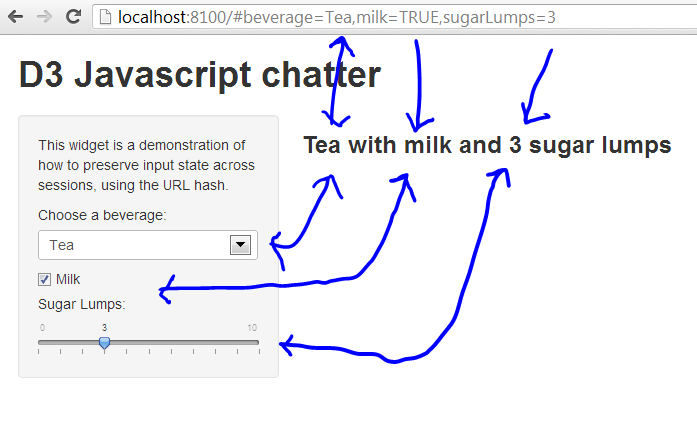
Here's my GIST example of (HTML5) how to link URL elements to input elements bi-directionally.
You can edit the page or the URL, and both are updated. No refresh required. Also you can bookmark or email the link and it will configure the inputs.
To test,
require(shiny)
runGist("6e77383b48a044191771")
-Alex
Brian Bolt
Feb 15, 2013, 5:08:07 PM2/15/13
to shiny-...@googlegroups.com
Thats awesome.
Alex Brown
Feb 15, 2013, 5:36:39 PM2/15/13
to shiny-...@googlegroups.com
My solution (see WAY below) doesn't actually pass parameters by get/post but uses the URL # component and some javascript to inject parameters into the inputs. The server also updates the URL # in response to input changes.
Message has been deleted
Brian Bolt
Feb 19, 2013, 12:22:20 PM2/19/13
to shiny-...@googlegroups.com
Alex,
Is it possible to make this function as initial parameters? This only works for me right now if a session has already been started.
-Brian
Alex Brown
Feb 26, 2013, 6:33:14 PM2/26/13
to shiny-...@googlegroups.com
It should work as initial parameters. Please try the current version, and let me know what browser/OS/R/Shiny versions you are using.
-Alex
Brian Bolt
Feb 27, 2013, 1:29:18 PM2/27/13
to shiny-...@googlegroups.com
Yes, thank you, updating to your latest url.js fixed the issue I was seeing.

Scott Stern
Jul 15, 2013, 6:03:13 PM7/15/13
to shiny-...@googlegroups.com
Agreed that Alex's implementation is great for the time being (so thanks a bunch for that/great work)... is there any plans to incorporate this into Shiny more formally? I would think that the standard use case would be to want this behavior, as it is currently how any other web app would behave?
Aaron Mackey
Jul 31, 2013, 3:28:33 PM7/31/13
to shiny-...@googlegroups.com
first, I changed the URL.js and server.R so that parameters key-value pairs are separated by ";" and not "," so that multi-valued inputs (multiselects) could still work with comma-separated values; this also reflects the usual URL parameter encoding.
but second, while the code is working to set the input widgets when the page loads, the outputs are not updating. Note that I have a submit button so that outputs only update when there have been changes to inputs, and these initial changes are not considered "new" values. Suggestions to make this work with a submit button in play?
browser: Chrome on Mac OS X 10.8
> sessionInfo()
R version 3.0.1 (2013-05-16)
Platform: x86_64-apple-darwin10.8.0 (64-bit)
locale:
[1] en_US.UTF-8/en_US.UTF-8/en_US.UTF-8/C/en_US.UTF-8/en_US.UTF-8
attached base packages:
[1] stats graphics grDevices utils datasets methods base
other attached packages:
[1] shiny_0.6.0
loaded via a namespace (and not attached):
[1] bitops_1.0-5 caTools_1.14 digest_0.6.3 httpuv_1.0.6.3 RJSONIO_1.0-3
[6] xtable_1.7-1
-Aaron
Reply all
Reply to author
Forward
Message has been deleted
Message has been deleted
0 new messages