
Selenide - problem with PageObjects and fields
266 views
Skip to first unread message

Michał Paszek
Jan 18, 2017, 7:06:03 AM1/18/17
to sele...@googlegroups.com
Hi,
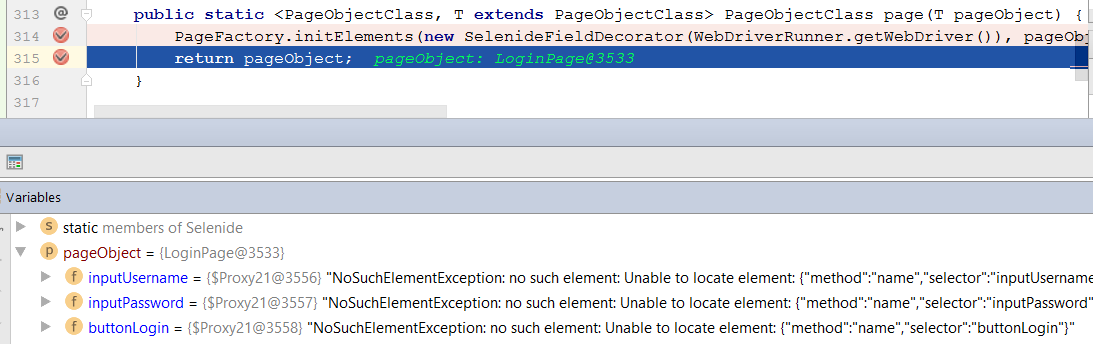
I started using Selenide not that long time ago and I faced an issue (not sure if this is a bug or not, so haven't created one on github).
1) I have PageObject - LoginPage, with some fields:
private SelenideElement inputUsername = $("input[qxid='UserName']");
private SelenideElement inputPassword = $("input[qxid='PwField']");
private SelenideElement buttonLogin = $("*[qxid='LoginBtn']");
There are also respecitve standard getters in LoginPage and only default constructor.
So this is something like a mix of Selenide and classic PO pattern.
According to Selenide documentation:
Defining SelenideElement doesn’t trigger the search in DOM yet, so you can save the locators in variables for later use at any place
so nothing should be wrong with my approach.
2) Then I have a test class LoginTest, with following test methods:
@Test
public void test1() {
    LoginPage loginPage = open("/", LoginPage.class);
    loginPage.getInputUsername().waitUntil(appears, 30000);
}

@Test
public void test2() {
    open("/");
    LoginPage loginPage = page(LoginPage.class);
    loginPage.getInputUsername().waitUntil(appears, 30000);
}

@Test
public void test3() {
    open("/");
    LoginPage loginPage = new LoginPage();
    loginPage.getInputUsername().waitUntil(appears, 30000);
}
test1 and test2 fail, only test3 works.
3) Stacktrace:
Element not found {by id or name "inputUsername"}Expected: visibleScreenshot: [...]Timeout: 30 s.Caused by: NoSuchElementException: no such element: Unable to locate element: {"method":"name","selector":"inputUsername"}at com.codeborne.selenide.impl.WebElementSource.createElementNotFoundError(WebElementSource.java:33)at com.codeborne.selenide.impl.ElementFinder.createElementNotFoundError(ElementFinder.java:82)at com.codeborne.selenide.impl.WebElementSource.checkCondition(WebElementSource.java:61)at com.codeborne.selenide.commands.Should.should(Should.java:35)at com.codeborne.selenide.commands.Should.execute(Should.java:29)at com.codeborne.selenide.commands.Should.execute(Should.java:12)at com.codeborne.selenide.commands.Commands.execute(Commands.java:142)at com.codeborne.selenide.impl.SelenideElementProxy.dispatchAndRetry(SelenideElementProxy.java:86)at com.codeborne.selenide.impl.SelenideElementProxy.invoke(SelenideElementProxy.java:62)at com.sun.proxy.$Proxy21.waitUntil(Unknown Source)[...]at com.intellij.rt.execution.application.AppMain.main(AppMain.java:147)Caused by: org.openqa.selenium.NoSuchElementException: no such element: Unable to locate element: {"method":"name","selector":"inputUsername"}(Session info: chrome=55.0.2883.87)(Driver info: chromedriver=2.27.440174 [...])(WARNING: The server did not provide any stacktrace information)Session ID: [...]*** Element info: {Using=name, value=inputUsername}at sun.reflect.GeneratedConstructorAccessor18.newInstance(Unknown Source)at sun.reflect.DelegatingConstructorAccessorImpl.newInstance(DelegatingConstructorAccessorImpl.java:45)at java.lang.reflect.Constructor.newInstance(Constructor.java:423)at org.openqa.selenium.remote.ErrorHandler.createThrowable(ErrorHandler.java:206)at org.openqa.selenium.remote.ErrorHandler.throwIfResponseFailed(ErrorHandler.java:158)at org.openqa.selenium.remote.RemoteWebDriver.execute(RemoteWebDriver.java:678)at org.openqa.selenium.remote.RemoteWebDriver.findElement(RemoteWebDriver.java:363)at org.openqa.selenium.remote.RemoteWebDriver.findElementByName(RemoteWebDriver.java:461)at org.openqa.selenium.By$ByName.findElement(By.java:303)at org.openqa.selenium.support.ByIdOrName.findElement(ByIdOrName.java:50)at org.openqa.selenium.remote.RemoteWebDriver.findElement(RemoteWebDriver.java:355)at com.codeborne.selenide.impl.WebElementSelector.findElement(WebElementSelector.java:28)at com.codeborne.selenide.impl.ElementFinder.getWebElement(ElementFinder.java:56)at com.codeborne.selenide.impl.WebElementSource.checkCondition(WebElementSource.java:46)... 36 more
I tried to do some debugging and find the root cause but I wasn't able to...
I thought maybe the problem lays somewhere in SelenideFieldDecorator , as for below method we see first:

and later:
4) Interesting thing is that when I change the fields (everything else stays the same) to look like this:
@FindBy(how = How.CSS, using = "input[qxid='UserName']")
private SelenideElement inputUsername;

@FindBy(how = How.CSS, using = "input[qxid='PwField']")
private SelenideElement inputPassword;

@FindBy(how = How.CSS, using = "*[qxid='LoginBtn']")
private SelenideElement buttonLogin;
test1 and test2 pass.
test3 fails but that's different issue (PageFactory.initElements() problem, discussed/described here: http://selenide.org/documentation/page-objects.html).
EDIT: Hmm is it? Is it different issue and not something related...?
5) Tools:
I am using Selenide 4.0 but with 4.2 it's the same. Selenium in version 2.53.
Tested on Chrome 55 (shouldn't matter).
So, I think that's all and I hope I described the problem well enough.
Let me know if you need any more details.
PS. There are of course some workarounds that can be applied for my issue (there always are) but that's not the point I guess :).
Pozdrawiam / Regards,
Michal Paszek

Andrei Solntsev
Jan 26, 2017, 5:52:59 PM1/26/17
to Michał Paszek, sele...@googlegroups.com
Hi Michal!
This is the problem described and fixed in pull request #443:
Shortly: since you use SelenideElement, you don't need to use open("/", LoginPage.class nor page(LoginPage.class) methods.
Please upgrade to Selenide 4.2.1 - it contains the fix.
Andrei Solntsev
--
You received this message because you are subscribed to the Google Groups "selenide" group.
To unsubscribe from this group and stop receiving emails from it, send an email to selenide+unsubscribe@googlegroups.com.
For more options, visit https://groups.google.com/d/optout.
Michał Paszek
Feb 3, 2017, 5:45:56 AM2/3/17
to selenide, michael...@gmail.com
Hi Andrei,
Thanks for the answer.
Will consider upgrading to 4.2.1 but probably I'll simply drop using open and page methods..
Regards,
Michal
Andrei Solntsev
To unsubscribe from this group and stop receiving emails from it, send an email to selenide+u...@googlegroups.com.
Reply all
Reply to author
Forward
0 new messages