
Promiscuous Mode - VMware Workstation 12
1,192 views
Skip to first unread message

Hank Foss
Feb 19, 2018, 6:05:41 AM2/19/18
to security-onion
Everyone,
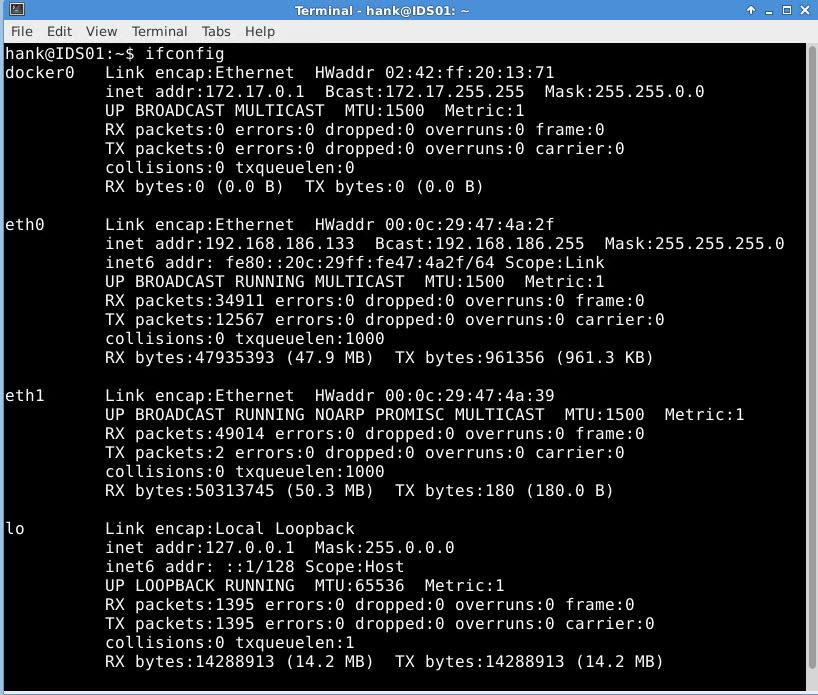
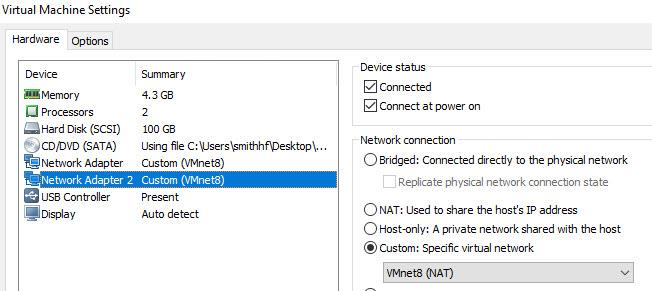
I've been at this configuration an *unprecedented* amount of time, and I've pretty much beat this to death, but I haven't yet been able to get my additional Security Onion NIC (which is NIC2 / eth1) in promiscuous mode.
I know this because I've compared Wireshark captures from the physical machine (VM host - which is Windows 10 with current updates and Symantec Endpoint) to the Wireshark captures on the Security Onion VM, and it's quite obvious it is not seeing what's on the network. I'm attaching a couple of pics that might assist you in shedding some light on my issue here, and I welcome any and all input.
I've heard a lot of great things about SO, and watched multiple Doug Burks videos, and I believe the image has a lot to offer, but I have not been able to set this up. Security Onion has Internet access, can ping hosts on the network (e.g. production DC, production DHCP servers, joined PCs) without issue. But when it comes to listening to traffic on the VLAN, no luck.
Again, guys, your input is much appreciated.
Thanks,
Hank
I've been at this configuration an *unprecedented* amount of time, and I've pretty much beat this to death, but I haven't yet been able to get my additional Security Onion NIC (which is NIC2 / eth1) in promiscuous mode.
I know this because I've compared Wireshark captures from the physical machine (VM host - which is Windows 10 with current updates and Symantec Endpoint) to the Wireshark captures on the Security Onion VM, and it's quite obvious it is not seeing what's on the network. I'm attaching a couple of pics that might assist you in shedding some light on my issue here, and I welcome any and all input.
I've heard a lot of great things about SO, and watched multiple Doug Burks videos, and I believe the image has a lot to offer, but I have not been able to set this up. Security Onion has Internet access, can ping hosts on the network (e.g. production DC, production DHCP servers, joined PCs) without issue. But when it comes to listening to traffic on the VLAN, no luck.
Again, guys, your input is much appreciated.
Thanks,
Hank

Doug Burks
Feb 19, 2018, 6:16:58 AM2/19/18
to securit...@googlegroups.com
Hi Hank,
Looking at your screenshot for NIC2, it shows it connected to "VMNet8
(NAT)". Have you tried connecting it to a bridged network instead of
NAT?
> --
> Follow Security Onion on Twitter!
> https://twitter.com/securityonion
> ---
> You received this message because you are subscribed to the Google Groups "security-onion" group.
> To unsubscribe from this group and stop receiving emails from it, send an email to security-onio...@googlegroups.com.
> To post to this group, send email to securit...@googlegroups.com.
> Visit this group at https://groups.google.com/group/security-onion.
> For more options, visit https://groups.google.com/d/optout.
--
Doug Burks
Looking at your screenshot for NIC2, it shows it connected to "VMNet8
(NAT)". Have you tried connecting it to a bridged network instead of
NAT?
> Follow Security Onion on Twitter!
> https://twitter.com/securityonion
> ---
> You received this message because you are subscribed to the Google Groups "security-onion" group.
> To unsubscribe from this group and stop receiving emails from it, send an email to security-onio...@googlegroups.com.
> To post to this group, send email to securit...@googlegroups.com.
> Visit this group at https://groups.google.com/group/security-onion.
> For more options, visit https://groups.google.com/d/optout.
--
Doug Burks


Mark W. Jeanmougin
Feb 19, 2018, 8:59:22 AM2/19/18
to securit...@googlegroups.com
Hey guys,
I'm fighting this battle at work, so it is a pet peeve of mine. :)
VMware Workstation 12 goes EOL on Feb 25, 2018.
Sorry to be the bearer of bad news.
MJ
On Mon, Feb 19, 2018 at 11:16 AM, Doug Burks <doug....@gmail.com> wrote:
Hi Hank,
Looking at your screenshot for NIC2, it shows it connected to "VMNet8
(NAT)". Have you tried connecting it to a bridged network instead of
NAT?
On Sun, Feb 18, 2018 at 9:43 PM, Hank Foss <hank...@gmail.com> wrote:
> Everyone,
>
> I've been at this configuration an *unprecedented* amount of time, and I've pretty much beat this to death, but I haven't yet been able to get my additional Security Onion NIC (which is NIC2 / eth1) in promiscuous mode.
>
> I know this because I've compared Wireshark captures from the physical machine (VM host - which is Windows 10 with current updates and Symantec Endpoint) to the Wireshark captures on the Security Onion VM, and it's quite obvious it is not seeing what's on the network. I'm attaching a couple of pics that might assist you in shedding some light on my issue here, and I welcome any and all input.
>
> I've heard a lot of great things about SO, and watched multiple Doug Burks videos, and I believe the image has a lot to offer, but I have not been able to set this up. Security Onion has Internet access, can ping hosts on the network (e.g. production DC, production DHCP servers, joined PCs) without issue. But when it comes to listening to traffic on the VLAN, no luck.
>
> Again, guys, your input is much appreciated.
>
> Thanks,
> Hank
>
> --
> Follow Security Onion on Twitter!
> https://twitter.com/securityonion
> ---
> You received this message because you are subscribed to the Google Groups "security-onion" group.
> To unsubscribe from this group and stop receiving emails from it, send an email to security-onion+unsubscribe@googlegroups.com.
> To post to this group, send email to security-onion@googlegroups.com.
> Visit this group at https://groups.google.com/group/security-onion.
> For more options, visit https://groups.google.com/d/optout.
--
Doug Burks
--
Follow Security Onion on Twitter!
https://twitter.com/securityonion
---
You received this message because you are subscribed to the Google Groups "security-onion" group.
To unsubscribe from this group and stop receiving emails from it, send an email to security-onion+unsubscribe@googlegroups.com.
To post to this group, send email to security-onion@googlegroups.com.
Hank Foss
Feb 19, 2018, 10:23:59 AM2/19/18
to security-onion
Thanks, Doug.
Yep, shortly after I posted I fixed my own issue (argggh! figures!). But my post didn't make it up fast enough for me to say "nevermind."
Yes, bridging the network worked! Now it's time to actually use Security Onion, so the real work is beginning since I can now see all traffic on the VLAN.
Much appreciated,
Hank
Reply all
Reply to author
Forward
0 new messages