
Port mirroring
552 views
Skip to first unread message

Leon Russell
Jun 2, 2014, 2:12:33 PM6/2/14
to securit...@googlegroups.com
i want to play with security onion on my home network, I was thinking that if i run my SO box,cable modem and router to a switch and then port mirror the cable modem port to the SO box port i should catch everything, Does anyone see any draw backs? or a better way to catch all network traffic?

Matt Gregory
Jun 2, 2014, 3:50:48 PM6/2/14
to securit...@googlegroups.com
Hi Leon,
Yes, if you mirror the switch port where your cable modem is connected to the port where SO is connected, SO will see all traffic coming into and leaving your network (not any traffic between machines on your network).However, in this setup you have no firewall, not even a simple home NAT device, between the Internet and your internal network, which leaves your network quite vulnerable. In fact, security issues aside, you may have network problems this way because your modem only provides a single public facing IP address and probably doesn't provide internal DHCP functionality, so your internal machines may not be able to communicate. Even if it did work, you would also get a lot of broadcast traffic on the WAN side, which is probably not what you want.
I recommend placing at simple router (a home router/switch/wireless AP all-in-one will do - you don't have to use the wireless functionality) between your modem and the switch. Connect the modem to the WAN port (might be marked "Internet" on a home model) on the home router and then connect a switch port on the home router to your other switch. You could then mirror the trunk port between the switch and the router and get the same effect.
On Mon, Jun 2, 2014 at 2:12 PM, Leon Russell <lrusse...@gmail.com> wrote:
i want to play with security onion on my home network, I was thinking that if i run my SO box,cable modem and router to a switch and then port mirror the cable modem port to the SO box port i should catch everything, Does anyone see any draw backs? or a better way to catch all network traffic?
--
You received this message because you are subscribed to the Google Groups "security-onion" group.
To unsubscribe from this group and stop receiving emails from it, send an email to security-onio...@googlegroups.com.
To post to this group, send email to securit...@googlegroups.com.
Visit this group at http://groups.google.com/group/security-onion.
For more options, visit https://groups.google.com/d/optout.
Leon Russell
Jun 2, 2014, 4:07:20 PM6/2/14
to securit...@googlegroups.com
since im experimenting with this at home most connections are wireless, so i need to catch those packets 2, if i add another wireless router to the switch in your scenario, and enable wireless on that one, then i should be able to catch all wireless and 10/100 packets associated with the switch. correct ? now should i allow the first router inline to assign the ip's to the LAN or should the 2nd router with wireless enabled assign the ip's ? note: that the only 10/100 connection i would be using is the SO box. If i add 10/100 connections id add them to switch or 2nd router
Matt Gregory
Jun 2, 2014, 6:10:58 PM6/2/14
to securit...@googlegroups.com
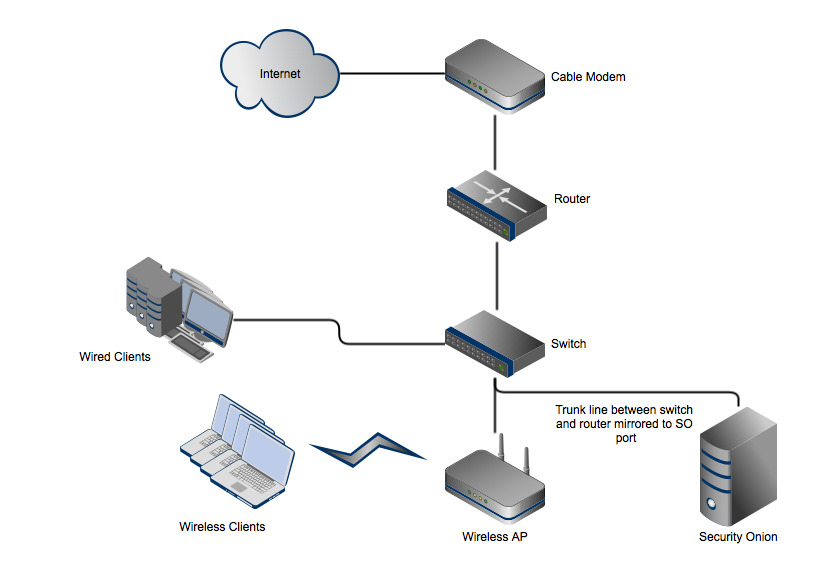
See the attached diagram. In this example, the router could be a home router/switch/wireless AP, but you'd only use the routing function (modem connected to the WAN/Internet port; one LAN port connected to the switch). The switch could also be a combo device, provided it has port mirroring functionality; if you use a combo device for the switch, you would not use the routing functionality (i.e., nothing would be connected to the WAN port). You could use the router as the DHCP server, or you could connect another server, access point, etc. that offers that functionality.
In this topology, the SO box would see all traffic between wireless clients and the Internet and between wired clients and the Internet, but not between any of the clients themselves. To see the traffic between wired clients, you would need to mirror those ports to SO. To see traffic between a wired client and a wireless client, you would have to mirror the wired client port(s) and/or the wireless AP port. Note that you still wouldn't see any traffic between two wireless clients unless the AP had port mirroring functionality and you mirrored the traffic to another SO interface.
Have I confused you? Let me know if there's still something you don't understand. I recommend starting with only monitoring Internet-bound traffic, as this topology does, just to keep it simple. You can expand your lab to cover other scenarios as you get a handle on things.In this topology, the SO box would see all traffic between wireless clients and the Internet and between wired clients and the Internet, but not between any of the clients themselves. To see the traffic between wired clients, you would need to mirror those ports to SO. To see traffic between a wired client and a wireless client, you would have to mirror the wired client port(s) and/or the wireless AP port. Note that you still wouldn't see any traffic between two wireless clients unless the AP had port mirroring functionality and you mirrored the traffic to another SO interface.
On Mon, Jun 2, 2014 at 4:07 PM, Leon Russell <lrusse...@gmail.com> wrote:
since im experimenting with this at home most connections are wireless, so i need to catch those packets 2, if i add another wireless router to the switch in your scenario, and enable wireless on that one, then i should be able to catch all wireless and 10/100 packets associated with the switch. correct ? now should i allow the first router inline to assign the ip's to the LAN or should the 2nd router with wireless enabled assign the ip's ? note: that the only 10/100 connection i would be using is the SO box. If i add 10/100 connections id add them to switch or 2nd router
Leon Russell
Jun 2, 2014, 9:21:32 PM6/2/14
to securit...@googlegroups.com
Matt ,
I think I would simply put all the clients on a wireless router at the end, that way id get wired , wireless and wan and lan, I need to put the so box on the switch with a connection between switch and a lan port on wireless router, and port mirror the ports on switch ,so box and the 10/100 from the last wireless access router
Reply all
Reply to author
Forward
0 new messages