
Can't upload/download files to/from Seahub Webinterface (HTTP)
6,582 views
Skip to first unread message

KingofCool
Nov 6, 2013, 7:05:43 AM11/6/13
to sea...@googlegroups.com

i use the HTTP Seahub webserver (not Apache/ngix...) to connect to the Seafile webinterface via my DynDNS account.
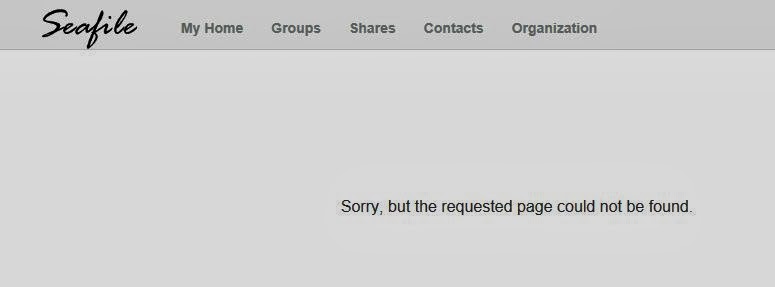
The sync via the clients works perfectly, but when i try to download a file over the webinterface (or generating a link) i get the following message: "Sorry, but the requested page could not be found."
If I want to upload a file via the webinterface, i get the following message, after the upload completed: "Error NOT FOUND"
To sum up, I can say that the upload/download with the clients works, but the webserver doesn't works correctly.
my ccnet.conf
[General]
USER_NAME = Seafile
ID = XXXXXXXXXXXXXXXXXXXXXXXXXXXXXXXXXXXX
NAME = Seafile
SERVICE_URL = http://my.dyndns:8000
[Network]
PORT = 10001
[Client]
PORT = 13418
[network]Anyone who can help me? (sorry for bad english)
port=12001
[httpserver]
port=8082
[history]
keep_days = 10
thanks in advance

ZhengXie
Nov 7, 2013, 12:29:32 AM11/7/13
to sea...@googlegroups.com
Can you paste you seahub_settings.py ?
--
You received this message because you are subscribed to the Google Groups "seafile" group.
To unsubscribe from this group and stop receiving emails from it, send an email to seafile+u...@googlegroups.com.
To post to this group, send email to sea...@googlegroups.com.
Visit this group at http://groups.google.com/group/seafile.
For more options, visit https://groups.google.com/groups/opt_out.
KingofCool
Nov 7, 2013, 5:27:52 AM11/7/13
to sea...@googlegroups.com
Hi ZhengXie,
my seahub_settings.py
my seahub_settings.py
SECRET_KEY = "XXXXXXXXXXXXXXXXXXXXXXXXXX"
EMAIL_USE_TLS = False
EMAIL_HOST = 'smtp.mail.yahoo.com' #smtp server
EMAIL_PORT = '25'
EMAIL_HOST_USER = 'mye...@yahoo.com' # username and domain
EMAIL_HOST_PASSWORD = 'password' # password
DEFAULT_FROM_EMAIL = 'mye...@yahoo.com'
SERVER_EMAIL = 'mye...@yahoo.com'
SITE_NAME = 'Seafile'
SITE_TITLE = 'Seafile'
SITE_BASE = 'http://my.dyndns:8000'
INIT_PASSWD = 'XXXXXX'
HTTP_SERVER_ROOT = 'http://my.dyndns:8000'

Lingtao Pan
Nov 7, 2013, 8:50:53 PM11/7/13
to sea...@googlegroups.com
Remve HTTP_SERVER_ROOT = 'http://my.dyndns:8000' or change it to HTTP_SERVER_ROOT = 'http://my.dyndns:8082' can solve it.
KingofCool
Nov 8, 2013, 6:04:54 AM11/8/13
to sea...@googlegroups.com

if i remove HTTP_SERVER_ROOT or change the Port, i get following error, before it uploads any content: "Error True".
I tried it with Internet Explorer and Firefox - same error, so i think its not a browser problem.
Lingtao Pan
Nov 8, 2013, 9:12:42 PM11/8/13
to sea...@googlegroups.com
This may be caused by firewall settings. Do you open port 8082?
KingofCool
Nov 10, 2013, 6:26:46 AM11/10/13
to sea...@googlegroups.com
I installed Seafile on my Raspberry Pi and the firewall (iptables) allows all connections and ports by default.
So i think the problem is caused by another reason
So i think the problem is caused by another reason
Lingtao Pan
Nov 10, 2013, 10:57:02 PM11/10/13
to sea...@googlegroups.com
Can you try debug with firebug for Firefox or Chrome's debug mode?
Lingtao Pan
Nov 11, 2013, 12:41:38 AM11/11/13
to sea...@googlegroups.com
What's the setting of SERVICE_URL in your ccnet.conf?
KingofCool
Nov 11, 2013, 4:24:36 AM11/11/13
to sea...@googlegroups.com
The SERVICE_URL contains my dyndns:PORT.
I will post the debug log later.
I will post the debug log later.
Lingtao Pan
Nov 11, 2013, 9:52:09 PM11/11/13
to sea...@googlegroups.com
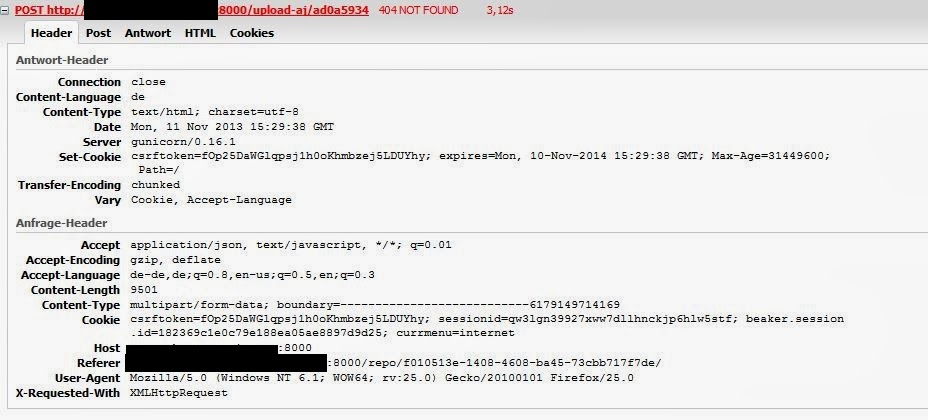
The URL for the POST address is not right. It is still the problem caused by the setting of HTTP_SERVER_ROOT.
HTTP_SERVER_ROOT should be http://<your-domain>:8082
If you do not specify HTTP_SERVER_ROOT. Seafile will guess it from the domain from SERVICE_URL and the port from seafile.conf. Can you post your seafile.conf?
Hi,
you find the log attached.
--
You received this message because you are subscribed to a topic in the Google Groups "seafile" group.
To unsubscribe from this topic, visit https://groups.google.com/d/topic/seafile/_rjaABKYX6s/unsubscribe.
To unsubscribe from this group and all its topics, send an email to seafile+u...@googlegroups.com.
Lingtao Pan
Nov 11, 2013, 10:42:16 PM11/11/13
to sea...@googlegroups.com
The URL for the POST address is not right. It is still the problem caused by the setting of HTTP_SERVER_ROOT.
HTTP_SERVER_ROOT should be http://<your-domain>:8082
If you do not specify HTTP_SERVER_ROOT, Seafile will guess the domain part from SERVICE_URL and the port part from seafile.conf. Can you post your seafile.conf?
On Tuesday, 12 November 2013 10:52:09 UTC+8, Lingtao Pan wrote:
The URL for the POST address is not right. It is still the problem caused by the setting of HTTP_SERVER_ROOT.HTTP_SERVER_ROOT should be http://<your-domain>:8082If you do not specify HTTP_SERVER_ROOT. Seafile will guess it from the domain from SERVICE_URL and the port from seafile.conf. Can you post your seafile.conf?
2013/11/11 KingofCool <>
Hi,
you find the log attached.
--
You received this message because you are subscribed to a topic in the Google Groups "seafile" group.
To unsubscribe from this topic, visit https://groups.google.com/d/topic/seafile/_rjaABKYX6s/unsubscribe.
To unsubscribe from this group and all its topics, send an email to seafile+unsubscribe@googlegroups.com.
Lingtao Pan
Nov 11, 2013, 10:42:26 PM11/11/13
to sea...@googlegroups.com
The URL for the POST address is not right. It is still the problem caused by the setting of HTTP_SERVER_ROOT.
HTTP_SERVER_ROOT should be http://<your-domain>:8082
If you do not specify HTTP_SERVER_ROOT, Seafile will guess the domain part from SERVICE_URL and the port part from seafile.conf. Can you post your seafile.conf?
On Tuesday, 12 November 2013 10:52:09 UTC+8, Lingtao Pan wrote:
The URL for the POST address is not right. It is still the problem caused by the setting of HTTP_SERVER_ROOT.HTTP_SERVER_ROOT should be http://<your-domain>:8082If you do not specify HTTP_SERVER_ROOT. Seafile will guess it from the domain from SERVICE_URL and the port from seafile.conf. Can you post your seafile.conf?
2013/11/11 KingofCool <>
Hi,
you find the log attached.
--
You received this message because you are subscribed to a topic in the Google Groups "seafile" group.
To unsubscribe from this topic, visit https://groups.google.com/d/topic/seafile/_rjaABKYX6s/unsubscribe.
To unsubscribe from this group and all its topics, send an email to seafile+unsubscribe@googlegroups.com.
KingofCool
Nov 12, 2013, 1:26:41 PM11/12/13
to sea...@googlegroups.com
Hi Lingtao Pan,
changed the HTTP_SERVER_ROOT to http://<your-domain>:8082 and opened Port 8082 in my Router.
Now it works!
Thank your really much :)
changed the HTTP_SERVER_ROOT to http://<your-domain>:8082 and opened Port 8082 in my Router.
Now it works!
Thank your really much :)

Vitaly Korabelnikov
Dec 8, 2014, 2:23:25 PM12/8/14
to sea...@googlegroups.com
Check Your http server address in seahub.conf
Reply all
Reply to author
Forward
0 new messages