[SciPy-User] memory errors when using savemat

Tyrel Newton
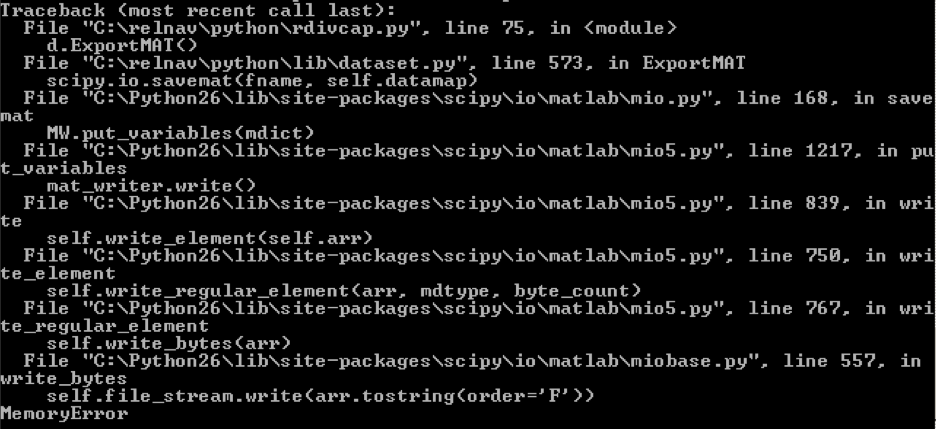
File "C:\Python26\lib\site-packages\scipy\io\matlab\miobase.py", line 557 in write_bytes
self.file_stream.write(arr.tostring(order='F'))
I'm running this on Windows under Python 2.6.
Does anybody know of a way to deal with this type memory error? Either increasing python's available memory or telling scipy to break apart the export into chunks . . .
Thanks in advance for any suggestions.
Tyrel
_______________________________________________
SciPy-User mailing list
SciPy...@scipy.org
http://mail.scipy.org/mailman/listinfo/scipy-user

David Cournapeau
> I'm trying to use scipy.io.savemat to export a very large set of data to a .mat file. The dataset contains around 20 million floats. When I try to export this to a .mat file, I get a MemoryError. The specific MemoryError is:
>
> File "C:\Python26\lib\site-packages\scipy\io\matlab\miobase.py", line 557 in write_bytes
> self.file_stream.write(arr.tostring(order='F'))
>
> I'm running this on Windows under Python 2.6.
Could you give us a small script which reproduces the error ? 20
million is pretty small, I suspect something else or a bug in scipy,
cheers,
David
Tyrel Newton
> million is pretty small, I suspect something else or a bug in scipy,
Not really, but I think I can list off the important parts.
1) Once I know the length, I declare an empty array with:
dataarr = numpy.empty(length, dtype=numpy.dtype(float))
2) I then populate the array with values, potentially out-of-order (which is I was a declare a large empty array first). The arrays are populated with something like:
dataarr[index] = float(datavalue)
3) I then create a dict object with multiple of these large float-type arrays, usually less than 6 arrays total. Each array is the same length, in this case 20M samples.
4) To this dict object, I add a few single-entry float arrays and strings that represent metadata for the large arrays. These are used to automatically process the data in MATLAB. Examples of creating the numpy types:
dataarr = numpy.empty(1, dtype=numpy.dtype(float))
dataarr[0] = datavalue
strdata = numpy.core.defchararray.array(str)
5) I then export the entire dict object in a single call:
scipy.io.savemat(fname, datadict)
Hope that's enough to explain what's going on.
Thanks,
Tyrel
Pauli Virtanen
> I'm trying to use scipy.io.savemat to export a very large set of data to
> a .mat file. The dataset contains around 20 million floats. When I try
> to export this to a .mat file, I get a MemoryError. The specific
> MemoryError is:
>
> File "C:\Python26\lib\site-packages\scipy\io\matlab\miobase.py", line
> 557 in write_bytes
> self.file_stream.write(arr.tostring(order='F'))
What is the complete error message? -- It typically indicates the
specific part in C code the error originates from. (The full traceback,
thanks!)
On the other hand, along that code path it seems the only source of a
MemoryError can really be a failure to allocate memory for the tostring.
Your data apparently needs 160 MB free for this to succeed -- which is
not so much. So the question comes to what is the memory usage of the
code when saving, compared to the available free memory?
--
Pauli Virtanen
Tyrel Newton
On Jul 25, 2010, at 9:49 AM, Pauli Virtanen wrote:
> Sat, 24 Jul 2010 10:37:33 -0700, Tyrel Newton wrote:
>> I'm trying to use scipy.io.savemat to export a very large set of data to
>> a .mat file. The dataset contains around 20 million floats. When I try
>> to export this to a .mat file, I get a MemoryError. The specific
>> MemoryError is:
>>
>> File "C:\Python26\lib\site-packages\scipy\io\matlab\miobase.py", line
>> 557 in write_bytes
>> self.file_stream.write(arr.tostring(order='F'))
>
> What is the complete error message? -- It typically indicates the
> specific part in C code the error originates from. (The full traceback,
> thanks!)
Attached is a Windows command line screenshot my colleague captured.
>
> On the other hand, along that code path it seems the only source of a
> MemoryError can really be a failure to allocate memory for the tostring.
> Your data apparently needs 160 MB free for this to succeed -- which is
> not so much. So the question comes to what is the memory usage of the
> code when saving, compared to the available free memory?
>
Yeah, my theory is that the tostring process is basically trying to duplicate the memory usage by creating a string that is then written to the file. This seems like an inefficient way to do it, but my understanding of the code is limited, so I'm probably missing something.