
How to handle file in Sage

Santanu Sarkar
A1 = load("/Desktop/abc.txt")
Traceback (most recent call last):
  File "<stdin>", line 1, in <module>
  File "_sage_input_49.py", line 10, in <module>
    exec compile(u'open("___code___.py","w").write("# -*- coding: utf-8 -*-\\n" + _support_.preparse_worksheet_cell(base64.b64decode("QTEgPSBsb2FkKCIvRGVza3RvcC9hYmMudHh0Iik="),globals())+"\\n"); execfile(os.path.abspath("___code___.py"))
  File "", line 1, in <module>

  File "/tmp/tmpgD_ocu/___code___.py", line 2, in <module>
    exec compile(u'A1 = load("/Desktop/abc.txt")
  File "", line 1, in <module>

  File "sage_object.pyx", line 862, in sage.structure.sage_object.load (sage/structure/sage_object.c:9317)
IOError: [Errno 2] No such file or directory: '/Desktop/abc.txt.sobj' 
Dominique Laurain
with a dot just fefore first slash
PS : I don't use load() but import or preparse in my SAGE cells, for Python souce

William Stein
<sarkar.sa...@gmail.com> wrote:
> I have a text file abc.txt in Desktop where I have written A=[1,2,3,4]. Is
> it possible
> to call this array A from Sage notebook?
>
> When I write the following in notebook,
>
> A1 = load("/Desktop/abc.txt")
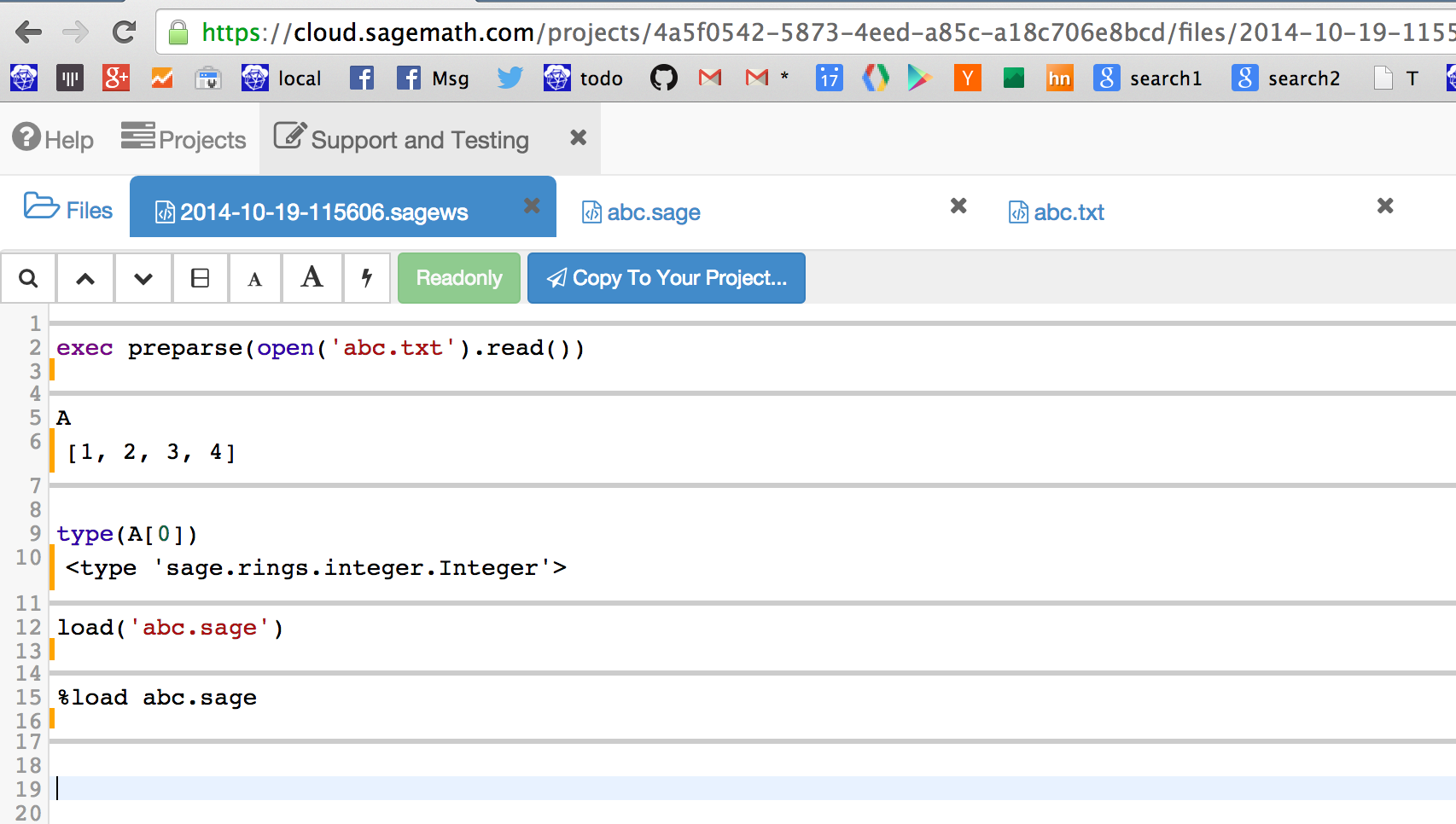
exec preparse(open('/Desktop/abc.txt').read())
or name your file abc.sage and do
load('/Desktop/abc.sage')
in the notebook (maybe), or
%execfile /Desktop/abc.sage
on the command line. (That one has to use %execfile and %load doesn't
work continues to be a change that I am unhappy with.)
Published example (requires login still):
https://cloud.sagemath.com/projects/4a5f0542-5873-4eed-a85c-a18c706e8bcd/files/2014-10-19-115550-load/
-- William
>
> getting
>
> Traceback (most recent call last):
> File "<stdin>", line 1, in <module>
> File "_sage_input_49.py", line 10, in <module>
> exec compile(u'open("___code___.py","w").write("# -*- coding: utf-8
> -*-\\n" +
> _support_.preparse_worksheet_cell(base64.b64decode("QTEgPSBsb2FkKCIvRGVza3RvcC9hYmMudHh0Iik="),globals())+"\\n");
> execfile(os.path.abspath("___code___.py"))
> File "", line 1, in <module>
>
> File "/tmp/tmpgD_ocu/___code___.py", line 2, in <module>
> exec compile(u'A1 = load("/Desktop/abc.txt")
> File "", line 1, in <module>
>
> File "sage_object.pyx", line 862, in sage.structure.sage_object.load
> (sage/structure/sage_object.c:9317)
> IOError: [Errno 2] No such file or directory: '/Desktop/abc.txt.sobj'
>
>
> You received this message because you are subscribed to the Google Groups
> "sage-support" group.
> To unsubscribe from this group and stop receiving emails from it, send an
> email to sage-support...@googlegroups.com.
> To post to this group, send email to sage-s...@googlegroups.com.
> Visit this group at http://groups.google.com/group/sage-support.
> For more options, visit https://groups.google.com/d/optout.
--
William Stein
Professor of Mathematics
University of Washington
http://wstein.org

John Cremona
> On Sun, Oct 19, 2014 at 4:52 AM, Santanu Sarkar
> <sarkar.sa...@gmail.com> wrote:
>> I have a text file abc.txt in Desktop where I have written A=[1,2,3,4]. Is
>> it possible
>> to call this array A from Sage notebook?
>>
>> When I write the following in notebook,
>>
>> A1 = load("/Desktop/abc.txt")
>
> You could do this:
>
> exec preparse(open('/Desktop/abc.txt').read())
>
> or name your file abc.sage and do
>
> load('/Desktop/abc.sage')
>
> in the notebook (maybe), or
>
> %execfile /Desktop/abc.sage
>
> on the command line. (That one has to use %execfile and %load doesn't
> work continues to be a change that I am unhappy with.)
works fine, that is what I use all the time. The extension has to be
sage or py (or pyx or spyx or m but the would be read / parsed
differently)
John
William Stein
On Oct 20, 2014 1:20 AM, "John Cremona" <john.c...@gmail.com> wrote:
>
> On 19 October 2014 20:02, William Stein <wst...@gmail.com> wrote:
> > On Sun, Oct 19, 2014 at 4:52 AM, Santanu Sarkar
> > <sarkar.sa...@gmail.com> wrote:
> >> I have a text file abc.txt in Desktop where I have written A=[1,2,3,4]. Is
> >> it possible
> >> to call this array A from Sage notebook?
> >>
> >> When I write the following in notebook,
> >>
> >> A1 = load("/Desktop/abc.txt")
> >
> > You could do this:
> >
> > exec preparse(open('/Desktop/abc.txt').read())
> >
> > or name your file abc.sage and do
> >
> > load('/Desktop/abc.sage')
> >
> > in the notebook (maybe), or
> >
> > %execfile /Desktop/abc.sage
> >
> > on the command line. (That one has to use %execfile and %load doesn't
> > work continues to be a change that I am unhappy with.)
>
> %runfile abc.sage
>
> works fine, that is what I use all the time. The extension has to be
> sage or py (or pyx or spyx or m but the would be read / parsed
> differently)
Thanks - I meant %runfile not %execfile. I find it hard to remember, which is yet another reason I am against removal of the more memorable %load that we had for years.

kcrisman
> differently)
Thanks - I meant %runfile not %execfile. I find it hard to remember, which is yet another reason I am against removal of the more memorable %load that we had for years.
>
William Stein
-- William
Santanu Sarkar

slelievre
.py, .sage, .sobj
and maybe a few others.
If the file name does not have an extension in that short list,
'load' will add the extension .sobj.
William Stein
> 'load' is expecting filenames with extension among
>
> .py, .sage, .sobj
>
> and maybe a few others.
>
> If the file name does not have an extension in that short list,
> 'load' will add the extension .sobj.
>
A1 = open("./Documents/program21.txt").read()