
Ansible integration in Rundeck [SSH Authentication] and node source

Iohannes Nerevar
I would like to integrate Ansible with Rundeck as well as use the inventory file as a source for my nodes, and there are things I don't understand.
First of all, in "Project Settings/Edit Configuration/Default Node Executor/Ansible Ad-Hoc Node Executor, my first question is about the SSH Connection part.
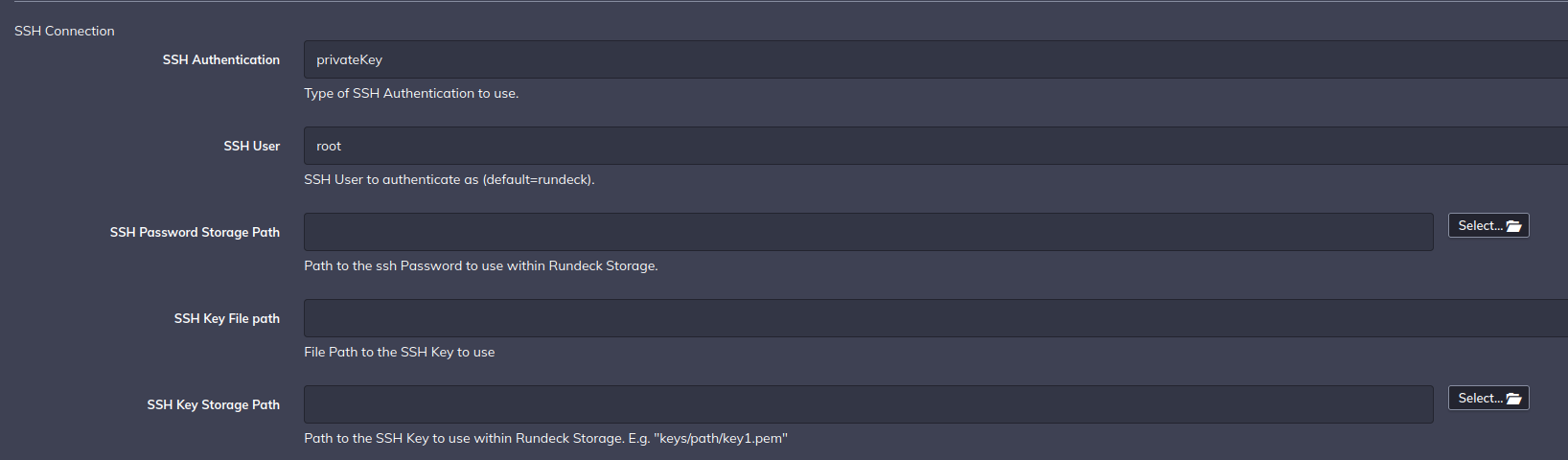
My second question therefore concerns the use of the inventory to generate the nodes. I wonder if the fact that it doesn't work is not a result of the misconfiguration and my previously cited misunderstanding.
Here is the configuration:

@IP
[Prod]
@IP
I hope I have been clear enough in my explanation, I remain available to discuss.
Thanks in advance

rac...@rundeck.com
Hi Iohannes,
In that case, I think that the best approach is to “delegate” the authentication on the Ansible side. In my case, I followed this way:
Ansible Inventory (you can use the “vars” section to define specific users and extra stuff to groups or nodes, you have an excellent explanation here):
[the_farm] 192.168.56.20 192.168.56.21 192.168.56.22 [the_farm:vars] ansible_user=vagrantNote: These remote nodes are already configured to receive access from the rundeck host via private key.
Ansible Config (the ansible.cfg file):
[defaults] inventory = /home/user/ansible/config/hosts nocows = 1Node Executor Config: first part and the SSH config (also, the privilege escalation section).
Model Source Config: first part and the SSH config.
Nodes (you will see something like this on your Rundeck service.log file).
Also, consider this if you have the localhost (Rundeck instance node) included in the inventory file. In certain environments, this solves a node discovering issues.
Hope this helps!
Iohannes Nerevar
Thank you for your answer.
The servers declared in the Ansible hosts file now show up correctly as nodes in Rundeck.
On the other hand, I still cannot reach these servers via a simple command (UNREACHABLE! => {"changed": false,"msg": "Failed to connect to the host via ssh: user@remoteserver: Permission denied ( publickey,password).","unreachable": true).
However, the content of the Rundeck server's id-rsa.pub file is indeed declared in an authorized_keys file on the target server. Furthermore, the user@remoteserver connection works correctly without requiring a password.
I have the impression that I am not far from the solution, after having tried a certain number of things, whether in terms of the Ansible inventory or the Rundeck configuration.
rac...@rundeck.com
Hi Iohannes,
Have you tried using Ansible directly first? Something like: ansible all -i your_inventory_file -m ping (also, you can test it on the rundeck’s command page to check if the rundeck user can reach the ansible config/inventory and remote nodes).
Greetings.
Iohannes Nerevar
Yes, I've used several playbooks directly using Ansible.
The command ansible all -i your_inventory_file -m ping works correctly from the server:
SUCCESS => {
"ansible_facts": {
"discovered_interpreter_python": "/usr/bin/python3"
On the other hand, I still get the same error when executing the same command from Rundeck
UNREACHABLE! => {
"changed": false,
"msg": "Failed to connect to the host via ssh: root@IP: Permission denied (publickey,password).",
"unreachable": true
For the moment, I'm using the root user for my tests.
Iohannes Nerevar
- by copying id_rsa in /var/lib/rundeck/.ssh
- by setting SSH Authentication, SSH User and SSH Key File path in the Ansible Ad-Hoc Node Executor section
- by setting host_key_checking = False in ansible.cfg