
Blender - Render all RenderLayers at once with RR
279 views
Skip to first unread message

Giuseppe Garone
Apr 3, 2019, 11:09:18 AM4/3/19
to Royal Render Knights Tavern
Hi,
I have a Blender scene with 2 RenderLayers, but when I submit the scene via rrSubmitter plugin, RR renders only the active RenderLayer (i.e. the selected RenderLayer in the Layers panel). Is there a way to render all RenderLayers by submitting only once the scene? I tried to set the field "Layer" manually in the rrSumbitter panel, but it's still rendering only the selected layer. Notice that in Blender all RenderLayers are enabled, but you can select only one layer at a time.
Kind regards,
Giuseppe

RR support, Acampora
Apr 3, 2019, 12:26:48 PM4/3/19
to Royal Render Knights Tavern
Hi Giuseppe,
Is there a way to render all RenderLayers by submitting only once the scene
RR blender jobs should render all the enabled render layers. In fact, we are not touching the Render Layer settings at all, as they are not supported in the blender command line. I will make some tests to make sure it still works this way, I have used blender + RR regularly in the past months and I had all my render layers delivered
Since we arent' doing any layer operation, currently the Layer field in rrSubmitter does not affect the job. Is it possible to have a look at an empy version of one your scenes? Would you please upload it either here as an attachment, or via www.RoyalRender.de/upload_r.php
Kind regards,
Paolo
Giuseppe Garone
Apr 4, 2019, 4:33:30 AM4/4/19
to Royal Render Knights Tavern
Hi Paolo,
thanks for the reply. I tried to launch job with different options (such as Local scene copy), but the result is still the same (only the selected Render Layer is rendered). I'm using a basic scene with some textures and animation just to test the RR setup in my network. I've attached this scene in this reply, so you can have a look at it.
I.e.: if I select the "suzanne" Render Layer, my output renders only include the suzanne object. If I select the "torus" Render Layer, only the torus object will be rendered. But both Render Layers are enabled.
I think the problem could be this: the job renders the selected Render Layers first and save images, then tries to render the next Render Layer but, since the output path is the same, the job execution finishes because there are already images in that location, and they are not overwritten with the new ones. That's my suppose.
Kind regards,
Giuseppe
RR support, Acampora
Apr 4, 2019, 6:22:44 AM4/4/19
to Royal Render Knights Tavern
Hi,
since the output path is the same, the job execution finishes because there are already images in that location
I think there is a rather simpler explanation, which is due to how blender handles layers and output in the first place:
as you mention there is only one render path in blender, and despite all the enabled layers being rendered, only what you see in the image viewer is saved. You can see what happens if you click Render Animation in the render panel: you will be able to switch layers in the picture viewer toolbar, yet only the active render layer has been saved to disk.
To my knowledge the standard way to deal with multiple output in blender is via the compositor File Output node:
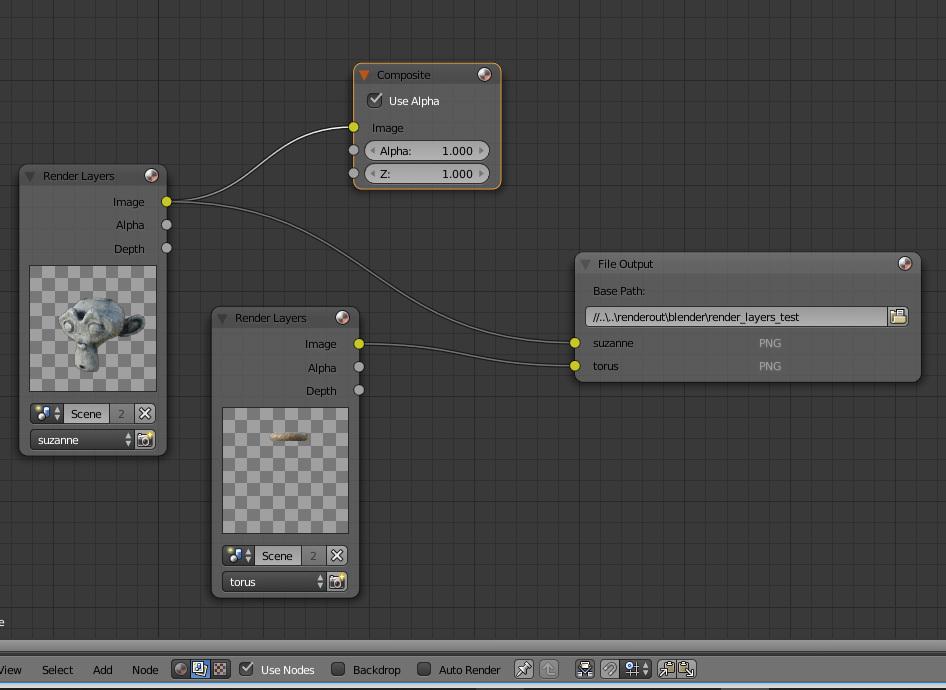
- In the node editor, please activate compositing (middle icon) and enable the Use Nodes checkbox
- Add another render layer, you can duplicate the default node and change the layer in the drop down at the bottom
- Create a File Output node. In the sidebar add an input for each of the layers you want to save to disk
- Connect the Image output of each render layer to one of the image handles of the output node. You can rename the handles accordingly so that the saved filename makes sens
Optionally, you can use separate image nodes with different base paths, or save channels of a render layer to file using the same logic. Royal Render will still display the main output, but you will be able to save all your layers to disk. Unfortunately the way blender rendering is designed makes it difficult for us to implement a consistent render layers logic. We are waiting for blender 2.8 to add some RL management to our blender configuration, but you are very welcome to give us some input on how a good blender workflow could be implemented
Hope this helps, kind regards
Paolo
Giuseppe Garone
Apr 4, 2019, 9:10:16 AM4/4/19
to Royal Render Knights Tavern
Hi,
I was thinking about using Blender Compositor, but I expected RR had a system to manage Render Layers via Submitter (i.e. the Layer field or similar). An alternative I tested just before is to render OpenEXR MultiLayer format instead of PNG (it depends on the project specs of course).
Anyway, I understand that Blender implements different logic in the rendering phase, but with Compositor everything works fine. I used to render images via custom scripts, that manage Render Layers accordingly to the project specs we are working on, and not by using Compositor.
I'm currently using Blender 2.79b, but the next step is to use RR with Blender 2.8, so I'll keep in mind to contact you and give some useful input while testing. Right now Blender 2.8 is in beta phase, but we use yet it for small projects.
Thank you for support, was very helpful.
Kind regards
Giuseppe
Reply all
Reply to author
Forward
0 new messages