
Exception when using date filter
40 views
Skip to first unread message

Thietbi Hanoi
Aug 17, 2022, 7:17:30 AM8/17/22
to Rosi Delphi Components
Hello,
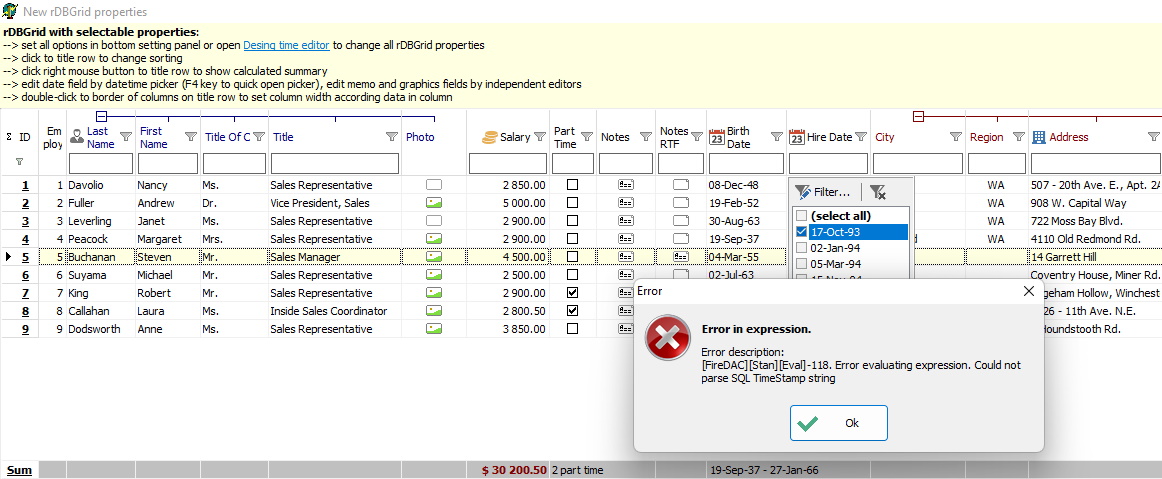
I am using your demo but got the error of parse SQL datetime string after filtering the date field:
Please kindly advise.
Thank you in advance for your assistance.

Tomas Rosinsky
Aug 17, 2022, 2:37:44 PM8/17/22
to Rosi Delphi Components
Hello,
it is cause by default date format set by system which is not supported by FireDac driver.
You have to set following global setting defined in the unit RosiCompGlobalCfg to the format expected by used dataset, probably dd.mm.yyyy or yyyy.mm.dd
RosiCompConfig.rDBFilterCfg.DateFormat
So in the OnCreate event of the datamodule or main form add following:
uses RosiCompGlobalCfg ;
Procedure OnCreate...
begin
RosiCompConfig.rDBFilterCfg.DateFormat:='yyyy.mm.dd'; // or 'dd.mm.yyyy'
end;
I hope it helps
Tomas
Dne středa 17. srpna 2022 v 13:17:30 UTC+2 uživatel hung1...@gmail.com napsal:
Thietbi Hanoi
Aug 18, 2022, 6:00:02 AM8/18/22
to Rosi Delphi Components
Good day Tomas,
Thank you very much for your great advice as usual.
I have tried several times failed before getting it works.
The point is we have to set the format string based on the local date format, e.g. when the Windows shows 22/08/18 at the low right corner then we have to declare the format string 'yy/mm/dd' accordingly.
The only case still failed is when the system date has the format of dd-mmm-yy (e.g. 18-Aug-22).
Anyhow, thanks again for your assistance.
Reply all
Reply to author
Forward
0 new messages