
Anyone explain gmapping tutorial
1,555 views
Skip to first unread message

tam
Jan 22, 2014, 3:16:10 PM1/22/14
to ros-by-...@googlegroups.com
Well, I have Hokuyo i will build my map but i don't have real robot it's unnecessary. I follow the step by step but not work for me. So i doubt step2 rosbag "record -O mylaserdata /base_scan /tf" and "rosbag play <name of the bag that you downloaded / created in step 2>"
i have video http://www.youtube.com/watch?v=OPSZVpQiXWE&feature=youtu.be I think i make mistakes like skip step. please explain to me please

Patrick Goebel
Jan 24, 2014, 7:33:37 PM1/24/14
to ros-by-...@googlegroups.com
Hi Tam,
Are you saying you are not using a robot with your Hokuyo? So you are just moving the scanner around by hand? I don't think gmapping can make a map without having odometry info while it is collecting data. However, you might want to look at this question on ROS Answers for methods that don't require odometry.
--patrick
Are you saying you are not using a robot with your Hokuyo? So you are just moving the scanner around by hand? I don't think gmapping can make a map without having odometry info while it is collecting data. However, you might want to look at this question on ROS Answers for methods that don't require odometry.
--patrick
On 01/22/2014 12:16 PM, tam wrote:
Well, I have Hokuyo i will build my map but i don't have real robot it's unnecessary. I follow the step by step but not work for me. So i doubt step2 rosbag "record -O mylaserdata /base_scan /tf" and "rosbag play <name of the bag that you downloaded / created in step 2>"i have video http://www.youtube.com/watch?v=OPSZVpQiXWE&feature=youtu.be I think i make mistakes like skip step. please explain to me please
--
You received this message because you are subscribed to the Google Groups "ros-by-example" group.
To unsubscribe from this group and stop receiving emails from it, send an email to ros-by-exampl...@googlegroups.com.
Visit this group at http://groups.google.com/group/ros-by-example.
For more options, visit https://groups.google.com/groups/opt_out.
tam
Mar 14, 2014, 1:20:13 PM3/14/14
to ros-by-...@googlegroups.com
Thank you Patrick for your answer it's make me understand,
เมื่อ วันเสาร์ที่ 25 มกราคม ค.ศ. 2014, 7 นาฬิกา 33 นาที 37 วินาที UTC+7, Pi Robot เขียนว่า:
So I think I must to make real small robot. my country can't find to buy Arbotix robotcontroller but i have arduino and VNH2SP30 motor drive. From these can i make real robot?
Finally, can you guide the ways or anything which i make please?
เมื่อ วันเสาร์ที่ 25 มกราคม ค.ศ. 2014, 7 นาฬิกา 33 นาที 37 วินาที UTC+7, Pi Robot เขียนว่า:
Patrick Goebel
Mar 15, 2014, 9:48:00 PM3/15/14
to ros-by-...@googlegroups.com
Hi Tam,
You can certainly make a robot using an Arduino. I'm no expert on motor drivers and the only one I have used is the Pololu Dual VNH5019 Motor Driver Shield for Arduino. This motor driver shield is supported by the ROS Arduino Bridge package. To do regular gmapping, you would still need encoders on your wheels or motors. I use these motors with integrated encoders. And then you have to connect the encoder output to your Arduino. The only solution I have tried is to use the Robogaia Mega Encoder Shield for Arduino but note that this board only works with an Arduino Mega, not an Uno.
The other option is to get a pre-built robot base with everything you need to run ROS. I have heard good things about the Kobuki (a.k.a. the TurtleBot 2). You can get just the base for $350.
Hope that helps.
--patrick
You can certainly make a robot using an Arduino. I'm no expert on motor drivers and the only one I have used is the Pololu Dual VNH5019 Motor Driver Shield for Arduino. This motor driver shield is supported by the ROS Arduino Bridge package. To do regular gmapping, you would still need encoders on your wheels or motors. I use these motors with integrated encoders. And then you have to connect the encoder output to your Arduino. The only solution I have tried is to use the Robogaia Mega Encoder Shield for Arduino but note that this board only works with an Arduino Mega, not an Uno.
The other option is to get a pre-built robot base with everything you need to run ROS. I have heard good things about the Kobuki (a.k.a. the TurtleBot 2). You can get just the base for $350.
Hope that helps.
--patrick

Kristof Robot
Mar 16, 2014, 3:35:58 AM3/16/14
to ros-by-...@googlegroups.com
Hi Tam,
I am using the same motors as Patrick, with an Arduino Uno and Pololu
Dual MC33926 Motor Driver Shield for Arduino.
I am not using a separate encoder shield, I am connecting the
integrated encoders directly to the Arduino, doing the encoder
counting on the Arduino using an extension of the ROS Arduino Bridge
package of Patrick ([1]).
See the full BoM of my robot here: [2].
Cheers,
Kristof
[1] https://github.com/KristofRobot/ros_arduino_bridge
[2] https://github.com/KristofRobot/frobo/blob/master/hardware/RobotBom_eng.ods
I am using the same motors as Patrick, with an Arduino Uno and Pololu
Dual MC33926 Motor Driver Shield for Arduino.
I am not using a separate encoder shield, I am connecting the
integrated encoders directly to the Arduino, doing the encoder
counting on the Arduino using an extension of the ROS Arduino Bridge
package of Patrick ([1]).
See the full BoM of my robot here: [2].
Cheers,
Kristof
[1] https://github.com/KristofRobot/ros_arduino_bridge
[2] https://github.com/KristofRobot/frobo/blob/master/hardware/RobotBom_eng.ods
> --
> You received this message because you are subscribed to the Google Groups
> "ros-by-example" group.
> To unsubscribe from this group and stop receiving emails from it, send an
> email to ros-by-exampl...@googlegroups.com.
> Visit this group at http://groups.google.com/group/ros-by-example.
> For more options, visit https://groups.google.com/d/optout.
> You received this message because you are subscribed to the Google Groups
> "ros-by-example" group.
> To unsubscribe from this group and stop receiving emails from it, send an
> email to ros-by-exampl...@googlegroups.com.
> Visit this group at http://groups.google.com/group/ros-by-example.
Sathaporn Piansiri
Mar 16, 2014, 3:59:47 PM3/16/14
to ros-by-...@googlegroups.com
Thank you Patrick and Kristof for guides
Now i have chipkit uno32 compatible arduino and VNH2SP30 Motor Driver i am not sure it work with your package.
First thing, I do want to drive the motor by ROS, which i to use Arduino Bridge package of Patrick right?
I'm so sorry for english skill
Tam
Kind regrads
Patrick Goebel
Mar 17, 2014, 7:57:49 PM3/17/14
to ros-by-...@googlegroups.com
Hello Tam,
The way the ROS Arduino Bridge package is written, even simple motor commands utilize a PID loop to maintain a target speed. This in turn requires encoders and a way to read them. So to use this package, you would still need encoders and since you don't have an Arduino Mega, you cannot use the Robogai encoder shield. Instead, you might want to look at Kristoff's fork to see how he reads encoder counts directly via the Arduino.
--patrick
The way the ROS Arduino Bridge package is written, even simple motor commands utilize a PID loop to maintain a target speed. This in turn requires encoders and a way to read them. So to use this package, you would still need encoders and since you don't have an Arduino Mega, you cannot use the Robogai encoder shield. Instead, you might want to look at Kristoff's fork to see how he reads encoder counts directly via the Arduino.
--patrick
tam
Mar 18, 2014, 1:21:34 PM3/18/14
to ros-by-...@googlegroups.com
it's work with iRobot Create(TurtleBot 1) for begin ROS?
เมื่อ วันอาทิตย์ที่ 16 มีนาคม ค.ศ. 2014, 8 นาฬิกา 48 นาที 00 วินาที UTC+7, Pi Robot เขียนว่า:
เมื่อ วันอาทิตย์ที่ 16 มีนาคม ค.ศ. 2014, 8 นาฬิกา 48 นาที 00 วินาที UTC+7, Pi Robot เขียนว่า:
Patrick Goebel
Mar 18, 2014, 7:07:51 PM3/18/14
to ros-by-...@googlegroups.com
Hi Tam,
The TurtleBot 1 still works with ROS, even with ROS Hydro. I used a TurtleBot 1 to test much of the code in ROS By Example. Also, as you probably know, you don't need the Arduino at all with a TurtleBot if you just want to drive it around or do navigation.
--patrick
The TurtleBot 1 still works with ROS, even with ROS Hydro. I used a TurtleBot 1 to test much of the code in ROS By Example. Also, as you probably know, you don't need the Arduino at all with a TurtleBot if you just want to drive it around or do navigation.
--patrick
tam
Mar 22, 2014, 4:21:16 PM3/22/14
to ros-by-...@googlegroups.com
HI Patrick
I get eddiebot but i build robot body by myself and i try build mapping use gmapping with hokuyo,kinect it's have problem i think mapping overlap
same this video https://www.youtube.com/watch?v=9_8IsbOEUEg&feature=youtu.be
can you tell me about cause and factor what happen ? guide me please
Thank you again
TAM
kind regrads
เมื่อ วันพุธที่ 19 มีนาคม ค.ศ. 2014, 6 นาฬิกา 7 นาที 51 วินาที UTC+7, Pi Robot เขียนว่า:


Patrick Goebel
Mar 25, 2014, 10:56:27 AM3/25/14
to ros-by-...@googlegroups.com
Hi Tam,
Nice robot! Can you please give us some more information about your setup? We will need to see all the launch files you use to run your robot, gmapping, the laser scanner and the Kinect. We will also need to see the .yaml files you use for move_base; e.g. base_local_planner_params.yaml, etc.
Also, you will get a better view in RViz if you set the fixed frame to odom--it looks like you might have it set to base_link or map.
--patrick
Nice robot! Can you please give us some more information about your setup? We will need to see all the launch files you use to run your robot, gmapping, the laser scanner and the Kinect. We will also need to see the .yaml files you use for move_base; e.g. base_local_planner_params.yaml, etc.
Also, you will get a better view in RViz if you set the fixed frame to odom--it looks like you might have it set to base_link or map.
--patrick
--
You received this message because you are subscribed to the Google Groups "ros-by-example" group.
To unsubscribe from this group and stop receiving emails from it, send an email to ros-by-exampl...@googlegroups.com.
Visit this group at http://groups.google.com/group/ros-by-example.
For more options, visit https://groups.google.com/d/optout.
tam
Mar 27, 2014, 12:09:36 PM3/27/14
to ros-by-...@googlegroups.com
Hello Patrick
เมื่อ วันอังคารที่ 25 มีนาคม ค.ศ. 2014, 21 นาฬิกา 56 นาที 27 วินาที UTC+7, Pi Robot เขียนว่า:
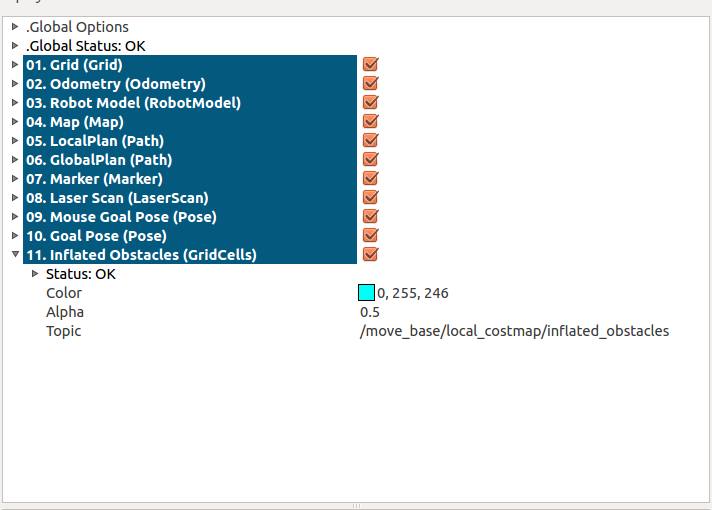
I try 'rosrun rviz rviz -d `rospack find rbx1_nav`/amcl.rviz' example 8.5.4 But when i Add inflated obtacles RVIZ is error and closed
I need you to know my robot use eddiebot package i don't build package by myself my robot is not look like Pi robot such as hardware (e.g. Motor Driver, Encoder) it make me doubt i must build some package by myself. that mean totally unusable, Right ?
build map success thank you that pic is my class room
Finally thank you again for all response
TAM
Best Regards
เมื่อ วันอังคารที่ 25 มีนาคม ค.ศ. 2014, 21 นาฬิกา 56 นาที 27 วินาที UTC+7, Pi Robot เขียนว่า:

Patrick Goebel
Mar 29, 2014, 9:39:44 AM3/29/14
to ros-by-...@googlegroups.com
Hi Tam,
Nice map! As for the inflated obstacles problem, there is a bug in the current version of RViz (1.94) that is fixed in version 1.95 but version 1.95 has not yet been released into the public repos. (It shouldn't be long though.)
If you are using the eddiebot package, it sounds like you are all set and you do not need the ros_arduino_bridge at all.
--patrick
Nice map! As for the inflated obstacles problem, there is a bug in the current version of RViz (1.94) that is fixed in version 1.95 but version 1.95 has not yet been released into the public repos. (It shouldn't be long though.)
If you are using the eddiebot package, it sounds like you are all set and you do not need the ros_arduino_bridge at all.
--patrick
tam
Apr 3, 2014, 1:22:52 PM4/3/14
to ros-by-...@googlegroups.com
Hi Patrick
เมื่อ วันเสาร์ที่ 29 มีนาคม ค.ศ. 2014, 20 นาฬิกา 39 นาที 44 วินาที UTC+7, Pi Robot เขียนว่า:
Thank for every answer
In example 8.4 i have some question
below this is my step for build map
Connect robot
roslaunch eddiebot_bringup minimal.launch
roslaunch rbx1_bringup fake_laser.launch (it's need to use this command if i have hokuyo)
Collecting and Recording Scan Data
roslaunch rbx1_nav gmapping_demo.launch
rosrun rviz rviz -d `rospack find rbx1_nav`/gmapping.rviz
roslaunch eddiebot_teleop keyboard_teleop.launch
rosbag record -O my_scan_data /scan /tf
rosbag record -O my_scan_data /scan /tf
These steps i apply use for eddiebot, its's right? Now, i have one problem sometime when i building map it will overlap (look from Rviz), Therefore i need you help look these step. Cause i think this problem robot can't localization. ***Encoder it's important for build map?
Please help me or explain anything for my foolish?
TAM
Best Regards
เมื่อ วันเสาร์ที่ 29 มีนาคม ค.ศ. 2014, 20 นาฬิกา 39 นาที 44 วินาที UTC+7, Pi Robot เขียนว่า:
Patrick Goebel
Apr 6, 2014, 11:00:13 AM4/6/14
to ros-by-...@googlegroups.com
Hi Tam,
Those steps look correct to me. And yes, good odometry is important for creating the map using gmapping. Can you post a screen capture from RViz that illustrates the overlap you are talking about?
Here are some links with ideas on how you can test your odometry:
http://wiki.ros.org/navigation/Troubleshooting
Those steps look correct to me. And yes, good odometry is important for creating the map using gmapping. Can you post a screen capture from RViz that illustrates the overlap you are talking about?
Here are some links with ideas on how you can test your odometry:
http://wiki.ros.org/navigation/Troubleshooting
Patrick Goebel
Apr 6, 2014, 11:05:45 AM4/6/14
to ros-by-...@googlegroups.com
HI again Tam,
I hit the "send" button prematurely on that last message.
Here are a couple of links that can help you check the quality of the odometry you are getting from your EddieBot:
I hit the "send" button prematurely on that last message.
Here are a couple of links that can help you check the quality of the odometry you are getting from your EddieBot:
- http://wiki.ros.org/navigation/Troubleshooting
- http://answers.ros.org/question/9480/is-there-a-good-way-to-verify-my-odometry-data-is-sensible/
--patrick


Patrick Goebel
Apr 14, 2014, 9:25:13 AM4/14/14
to ros-by-...@googlegroups.com
Message has been deleted
Message has been deleted
tam
May 4, 2014, 5:25:47 PM5/4/14
to ros-by-...@googlegroups.com
เมื่อ วันจันทร์ที่ 5 พฤษภาคม ค.ศ. 2014, 2 นาฬิกา 40 นาที 05 วินาที UTC+7, tam เขียนว่า:
เมื่อ วันจันทร์ที่ 5 พฤษภาคม ค.ศ. 2014, 2 นาฬิกา 34 นาที 32 วินาที UTC+7, tam เขียนว่า:Hi Patrick,I'll show my build map video http://www.youtube.com/watch?v=Fc1GPtB5oVI&feature and http://www.youtube.com/watch?v=fFimUKoft4M&feature it's not look like this http://www.youtube.com/watch?v=khSrWtB0Xik . From my video laser scan is not static it follow robot. it's different from your video.The problem is odom tf or anything right?Help me out the problem please. it's confusedTamBest Regards.
เมื่อ วันจันทร์ที่ 14 เมษายน ค.ศ. 2014, 20 นาฬิกา 25 นาที 13 วินาที UTC+7, Pi Robot เขียนว่า:
Patrick Goebel
May 5, 2014, 10:41:30 PM5/5/14
to ros-by-...@googlegroups.com
Hi Tam,
Can you please create a bag file as described in chapter 8.4.2 and send it as an attachment? If the file is too big for email, perhaps you can share it on Dropbox or some other free service.
Thanks,
patrick
Can you please create a bag file as described in chapter 8.4.2 and send it as an attachment? If the file is too big for email, perhaps you can share it on Dropbox or some other free service.
Thanks,
patrick
On 05/04/2014 12:34 PM, tam wrote:
Hi Patrick,
I'll show my build map video it's not look like this http://www.youtube.com/watch?v=khSrWtB0Xik . From my video laser scan is not static it follow robot. it's different from your video.
The problem is odom tf or anything right?
Help me out the problem please. it's confused
Tam
Best Regards.
เมื่อ วันจันทร์ที่ 14 เมษายน ค.ศ. 2014, 20 นาฬิกา 25 นาที 13 วินาที UTC+7, Pi Robot เขียนว่า:
tam
May 6, 2014, 9:52:05 AM5/6/14
to ros-by-...@googlegroups.com
Hi Patrick,
Thank you so much for all help.
TAM,
Best Regards.
เมื่อ วันอังคารที่ 6 พฤษภาคม ค.ศ. 2014, 9 นาฬิกา 41 นาที 30 วินาที UTC+7, Pi Robot เขียนว่า:
เมื่อ วันอังคารที่ 6 พฤษภาคม ค.ศ. 2014, 9 นาฬิกา 41 นาที 30 วินาที UTC+7, Pi Robot เขียนว่า:
Patrick Goebel
May 6, 2014, 10:57:34 AM5/6/14
to ros-by-...@googlegroups.com
Hi Tam,
As far as I can tell, your bag file is showing that your robot driver is not publishing the transform from the /odom frame to your /base_footprint frame. Here's how you can test it:
$ rosbag play laserdata.bag
and then in another terminal:
$ rosrun tf tf_echo /odom /base_footprint
This transform should reflect the movement of the base in the odom frame but in your case the transform stays fixed a 0 translation and unit rotation. In other words, if you drive the robot forward, the x position component of the transform should increase. And if you rotate the robot, then the quaternion components of the orientation should change.
Did you capture the bag file from a TurtleBot or an EddieBot?
--patrick
As far as I can tell, your bag file is showing that your robot driver is not publishing the transform from the /odom frame to your /base_footprint frame. Here's how you can test it:
$ rosbag play laserdata.bag
and then in another terminal:
$ rosrun tf tf_echo /odom /base_footprint
This transform should reflect the movement of the base in the odom frame but in your case the transform stays fixed a 0 translation and unit rotation. In other words, if you drive the robot forward, the x position component of the transform should increase. And if you rotate the robot, then the quaternion components of the orientation should change.
Did you capture the bag file from a TurtleBot or an EddieBot?
--patrick
Message has been deleted
tam
May 6, 2014, 2:45:24 PM5/6/14
to ros-by-...@googlegroups.com
Hi Patrick,
เมื่อ วันอังคารที่ 6 พฤษภาคม ค.ศ. 2014, 21 นาฬิกา 57 นาที 34 วินาที UTC+7, Pi Robot เขียนว่า:
I capture the bag file from a EddieBot.
เมื่อ วันอังคารที่ 6 พฤษภาคม ค.ศ. 2014, 21 นาฬิกา 57 นาที 34 วินาที UTC+7, Pi Robot เขียนว่า:
Patrick Goebel
May 6, 2014, 8:36:27 PM5/6/14
to ros-by-...@googlegroups.com
Hi Tam,
I took a quick ook at the Eddiebot packages and it seems that the odometry transform is commented out of the code. Take a look at line #418 in the eddiebot_node.py file on Github. As far as I can tell, with this part of the code commented out, the required odometry transformation is not being published and you would expect to see exactly what you are seeing. You can post an issue on the Eddiebot Github and see if the author responds.
--patrick
I took a quick ook at the Eddiebot packages and it seems that the odometry transform is commented out of the code. Take a look at line #418 in the eddiebot_node.py file on Github. As far as I can tell, with this part of the code commented out, the required odometry transformation is not being published and you would expect to see exactly what you are seeing. You can post an issue on the Eddiebot Github and see if the author responds.
--patrick
On 05/06/2014 11:05 AM, tam wrote:
Hi Patrick,
I capture the bag file from a EddieBot
เมื่อ วันอังคารที่ 6 พฤษภาคม ค.ศ. 2014, 21 นาฬิกา 57 นาที 34 วินาที UTC+7, Pi Robot เขียนว่า:
tam
May 11, 2014, 3:24:05 PM5/11/14
to ros-by-...@googlegroups.com
Hi Patrick,
I tried to ask "The Eddie platform can not return correct distance travelled from its wheels. Very unreliable value returned" He's said, So I have to back use ros_arduino_bridge but hardware is not same your all and modify ROSArduinoBridge for me. I use commands "m 100 100" can drive motor and "e" it show values encoders right and left. But when i use roslaunch ros_arduino_python arduino.launch it show Encoder count was not 2 this message it mean i can't use modifly code at ROSArduinoBridge, right? In my_arduino_params.yaml file at line #encoder_resolution: 8384 # from Pololu for 131:1 motors, i don't know this value for my motor.
If hardware is ok i can use ros_arduino_bridge for build map and navigation?, Because when use rourun tf view_frames it show just odom --> base_link .
I hope you not bored.^_^
Best Regards
TAM
เมื่อ วันพุธที่ 7 พฤษภาคม ค.ศ. 2014, 7 นาฬิกา 36 นาที 27 วินาที UTC+7, Pi Robot เขียนว่า:
Patrick Goebel
May 14, 2014, 9:24:38 AM5/14/14
to ros-by-...@googlegroups.com
Hi Tam,
That's too bad about the Eddie's odometry. To estimate the encoder resolution for your motors you can use the 'r' command to reset your encoder count, then mark a spot on one of your wheels and rotate it as close as you can through exactly one revolution. Then run the 'e' command and read off the encoder count. Do the same thing for the other wheel to make sure you get similar values. If the numbers are about the same, take the average and use this value in your arduino_params.yaml file for the encoder_resolution parameter and uncomment that line.
With that done, try the 'roslaunch ros_arduino_python arduino.launch' file again.
Also, with the Hydro branch of the ros_arduino_bridge package, there is a new parameter to override the default base_link frame. So in your arduino_params.yaml file you can add the line:
base_frame: base_footprint
if you want to use the base_footprint frame instead of base_link.
--patrick
That's too bad about the Eddie's odometry. To estimate the encoder resolution for your motors you can use the 'r' command to reset your encoder count, then mark a spot on one of your wheels and rotate it as close as you can through exactly one revolution. Then run the 'e' command and read off the encoder count. Do the same thing for the other wheel to make sure you get similar values. If the numbers are about the same, take the average and use this value in your arduino_params.yaml file for the encoder_resolution parameter and uncomment that line.
With that done, try the 'roslaunch ros_arduino_python arduino.launch' file again.
Also, with the Hydro branch of the ros_arduino_bridge package, there is a new parameter to override the default base_link frame. So in your arduino_params.yaml file you can add the line:
base_frame: base_footprint
if you want to use the base_footprint frame instead of base_link.
--patrick
On 05/11/2014 12:24 PM, tam wrote:
Hi Patrick,
Message has been deleted
tam
Jun 10, 2014, 2:11:45 PM6/10/14
to ros-by-...@googlegroups.com
Hello Patrick
เมื่อ วันพฤหัสบดีที่ 23 มกราคม ค.ศ. 2014, 3 นาฬิกา 16 นาที 10 วินาที UTC+7, tam เขียนว่า:
I have a question about an error, AMCL. When the robot got to it's destination, we turn it to the direction the arrow is point, but it lost control and the mapping doesn't match the coordinate anymore (the machine's to the actual one) Does this occurs because it turned too hard? If yes, which parameter do I have to use to adjust the speed of the turning(i try many parameter as min_in_place_vel_theta, acc_lim_theta ) or if it wasn't , please provide solution, I really don't know(or forgot) of what happened and how it happened.
help me out please.
เมื่อ วันพฤหัสบดีที่ 23 มกราคม ค.ศ. 2014, 3 นาฬิกา 16 นาที 10 วินาที UTC+7, tam เขียนว่า:
Well, I have Hokuyo i will build my map but i don't have real robot it's unnecessary. I follow the step by step but not work for me. So i doubt step2 rosbag "record -O mylaserdata /base_scan /tf" and "rosbag play <name of the bag that you downloaded / created in step 2>"i have video http://www.youtube.com/watch?v=OPSZVpQiXWE&feature=youtu.be I think i make mistakes like skip step. please explain to me please
Patrick Goebel
Jun 12, 2014, 7:27:41 PM6/12/14
to ros-by-...@googlegroups.com
Hi Tam,
That is quite interesting. Assuming your odometry information is OK when the robot is rotating, I can only guess what might be happening. I noticed that the shape of the room where the robot is rotating is very similar in two different directions. The two "alcoves" look almost the same within the range of the laser but they are 90 degrees apart. So I am wondering if AMCL is simply getting confused. Notice at the very end of the video how the scan matches back up with the map.
Try setting goal locations at other places in the room and see if you run into the same problem.
--patrick
That is quite interesting. Assuming your odometry information is OK when the robot is rotating, I can only guess what might be happening. I noticed that the shape of the room where the robot is rotating is very similar in two different directions. The two "alcoves" look almost the same within the range of the laser but they are 90 degrees apart. So I am wondering if AMCL is simply getting confused. Notice at the very end of the video how the scan matches back up with the map.
Try setting goal locations at other places in the room and see if you run into the same problem.
--patrick
--
tam
Jun 13, 2014, 5:45:10 PM6/13/14
to ros-by-...@googlegroups.com
Hello Patrick
First time i think the robot very fast rotate. but now i use positive value at min_vel_theta it make robot slow rotate but it lost control and the mapping doesn't match. Today i check odometry if robot straight is good odometry but if robot rotate it lost crude map. If dometry isn't enough how can i improve odometry?. But why i can build mapping it not overlap if odometry isn't good enough. maybe you want to check my bag file and video robot rotate slow. you have any idea for this problem please suggest me for improve odometry or anything.
Thankful for all answers
With respect,
Tam
เมื่อ วันศุกร์ที่ 13 มิถุนายน ค.ศ. 2014, 6 นาฬิกา 27 นาที 41 วินาที UTC+7, Pi Robot เขียนว่า:
Patrick Goebel
Jun 16, 2014, 9:19:18 AM6/16/14
to ros-by-...@googlegroups.com
Hi Tam,
Please take a look at the ROS Navigation Troubleshooting page. In particular, try the rotation test described in Test 1 in the first section called "Is My Odometry Good Enough for AMCL?".
--patrick
Please take a look at the ROS Navigation Troubleshooting page. In particular, try the rotation test described in Test 1 in the first section called "Is My Odometry Good Enough for AMCL?".
--patrick
Patrick Goebel
Jun 16, 2014, 11:11:47 AM6/16/14
to ros-by-...@googlegroups.com
tam
Jun 17, 2014, 2:45:33 PM6/17/14
to ros-by-...@googlegroups.com
Hello Patrick,
in hokuyo.lauch i input <node pkg="tf" type="static_transform_publisher" name="link_to_laser" args="0 0 0 0 0 0 /base_link /scan 100" /> if this is kinect how can i do at /scan. i mean kinect frame id.
With respect,
Tam
Patrick Goebel
Jun 20, 2014, 12:39:57 PM6/20/14
to ros-by-...@googlegroups.com
Hi Tam,
Glad you sorted out the wheel track thing.
To use the Kinect as a fake laser, did you look at section 8.4.1 in ROS By Example?
--patrick
Glad you sorted out the wheel track thing.
To use the Kinect as a fake laser, did you look at section 8.4.1 in ROS By Example?
--patrick
Reply all
Reply to author
Forward
0 new messages