
Re: anyone who knows how to use the robot functions in the model created in the simulink?
353 views
Skip to first unread message

Peter Corke
Oct 26, 2012, 10:38:21 PM10/26/12
to robotics...@googlegroups.com, yyz...@gmail.com
twolink might be in your workspace but it is not in the scope of this function. Options are to pass the SerialLink object in to this function as an additional parameter or else to make it a MATLAB global variable (ugly but works).
peter
On Saturday, 27 October 2012 07:27:58 UTC+10, yyz...@gmail.com wrote:
On Saturday, 27 October 2012 07:27:58 UTC+10, yyz...@gmail.com wrote:
Hello everyone! I created a simple dynamic model for a 2R robot in the simulink. The desired torque is generated by sine wave and will be input into a "MATLAB Function". Meanwhile, the position and velocity from the output will feed back to the "MATLAB Function". The content of this matlab function is as follows:function out = u2q(in)qe=in(1:2);
u=in(3:4);
dqe=in(5:6);out=twolink.accel(qe, dqe, u);But when I run it, there will be error like "Undefined function or variable 'twolink'". But I have already load the mdl_twolink into the workspace. If I use this function in the command window, then everything goes well. Is there anything wrong with my configuration? Thank you very much.
Peter Corke
Oct 27, 2012, 9:01:40 PM10/27/12
to robotics...@googlegroups.com, yyz...@gmail.com
In principle what you've done is correct. The systems are quite nonlinear, or "stiff" in terms of ODE solving. In the first instance ensure that your model has no Coulomb friction, the Simulink integrator struggles with that. Another thing to try is setting the minimum step size in the Simulation -> Configuration menu.
peter
On Sunday, 28 October 2012 08:25:59 UTC+10, yyz...@gmail.com wrote:
On Sunday, 28 October 2012 08:25:59 UTC+10, yyz...@gmail.com wrote:
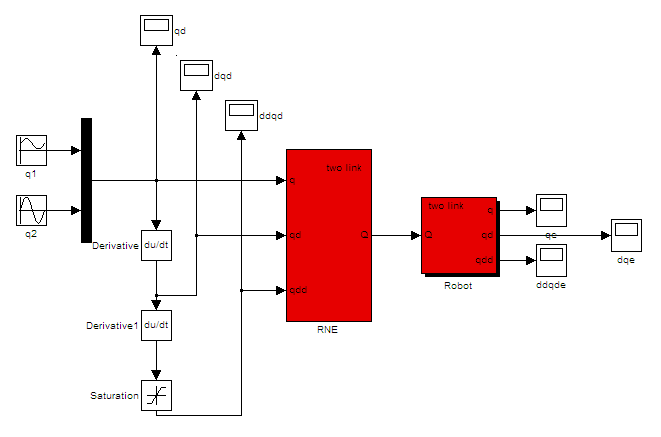
Dear professor, thank you for your warm reply. So now I give up using functions defined by myself. I just simply use some functional modules from the roblocks library. The model is as follows:
The input is desired position generated from sine waves. After two derivators we have velocity and acceleration signals. The saturation is to limit the acceleration. Then input these signals into the inverse dynamic model of 2R arm so we get desired torque. Finally input the torque into the dynamic model of 2R arm so we have actual position, velocity and acceleration. We will see the output signals will be similar to the input signals. Is this model correct as a whole? When I use inverse dynamic model and dynamic model separately, everything goes well. But if I connect them, the simulation will get stuck. The simulation time will start counting from 1E-308 and it proceeds slowly.And I get this warning:"Warning: Using a default value of 0.1 for maximum step size. Thesimulation step size will be equal to or less than this value. You candisable this diagnostic by setting 'Automatic solver parameterselection' diagnostic to 'none' in the Diagnostics page of theconfiguration parameters dialogWarning: Unable to reduce the step size without violating minimum stepsize of 2.2250738585072014E-308 for 1 consecutive times at time2.2250738585072014E-308. Continuing simulation with the step sizerestricted to 2.2250738585072014E-308 and using an effective relativeerror tolerance of 31.316509046860293, which is greater than thespecified relative error tolerance of 0.001. This usually may be causedby the high stiffness of the system. Please check the model 'test' orincrease the Max consecutive min step size violation parameter in thesolver configuration panel "If I wait for some time, finally I will get error message like:At time 1.3941429297564466E-297, simulation hits (1000) consecutive zero crossings. Consecutive zero crossings will slow down the simulation or cause the simulation to hang. To continue the simulation, you may 1) Try using Adaptive zero-crossing detection algorithm or 2) Disable the zero crossing of the blocks shown in the following table.
--------------------------------------------------------------------------------
Number of consecutive zero-crossings : 755
Zero-crossing signal name : UprLim
Block type : Saturate
Block path : 'test/Saturation'
--------------------------------------------------------------------------------
--------------------------------------------------------------------------------
Number of consecutive zero-crossings : 751
Zero-crossing signal name : LwrLim
Block type : Saturate
Block path : 'test/Saturation'
--------------------------------------------------------------------------------
You can turn off this message by using the MATLAB command:
set_param('test','MaxConsecutiveZCsMsg','none');
What's the problem of my model? Is there any endless loop somewhere? Or maybe I can't connect these two functional modules such simply? Maybe you can help me to test it if you got any spare time. Anyway, sorry for so many troubles and thank you very much. Have a nice day.Sincerely yoursYang Yuanzhe
Reply all
Reply to author
Forward
0 new messages