
Some updates to SerialLink.plot and SerialLink.teach
1,466 views
Skip to first unread message

Peter Corke
Mar 23, 2014, 7:01:25 AM3/23/14
to robotics...@googlegroups.com
I've been working slowly on some improvements to the SerialLink class. In particular:
- teach() now is a panel in the side of the robot plot window, rather than a standalone window. It looks a bit nicer, and the code has been pretty thoroughly improved.
- plot() has had a substantial rewrite, and is hopefully easier to follow. The graphical robot also looks a bit more polished, with 3D rendering, tiled floor and so on. It now handles robots specified using modified DH parameters.
I'm working towards a release 9.9 sometime soon, mostly bug fixes, but I'd appreciate feedback anybody might have on these modules. Please reply to this posting.
To install it, unzip the attached file from the rvctools/robot folder on your computer. To be safe, make a copy of everything before you do this, so you can back the changes out if you don't like them.
peter

Wang Yuchi
Mar 23, 2014, 10:43:44 AM3/23/14
to robotics...@googlegroups.com
Hello, Mr coker. I am sorry but something goes wrong after I extracted the file.


Joe M
Mar 23, 2014, 6:56:14 PM3/23/14
to robotics...@googlegroups.com
Does it not work with the same syntax as before? I tried running an old program and it came up with all sorts of errors. It did manage to plot something though and I saw the new tiles but the manipulator was something random.
Error using tb_optparse (line 211)
unknown options: labels
Error in trplot (line 124)
opt = tb_optparse(opt, varargin);
Error in SerialLink/plot>create_robot (line 408)
h.wrist = trplot(eye(4,4), 'labels', upper(opt.wristlabel), 'arrow', 'rgb',
'length', 15*s);
Error in SerialLink/plot (line 241)
handle = create_robot(robot, opt);
Error in irb120FKT (line 65)
R.plot([input(1),input(2),input(3),input(4),input(5),input(6)]);
Error using tb_optparse (line 211)
unknown options: labels
Error in trplot (line 124)
opt = tb_optparse(opt, varargin);
Error in SerialLink/plot>create_robot (line 408)
h.wrist = trplot(eye(4,4), 'labels', upper(opt.wristlabel), 'arrow', 'rgb',
'length', 15*s);
Error in SerialLink/plot (line 241)
handle = create_robot(robot, opt);
Error in irb120FKT (line 65)
R.plot([input(1),input(2),input(3),input(4),input(5),input(6)]);
Peter Corke
Mar 23, 2014, 7:15:04 PM3/23/14
to robotics...@googlegroups.com, Joe M
My bad, there's an updated version of trplot as well. Sorry, it's attached.
peter
--
You received this message because you are subscribed to the Google Groups "Robotics & Machine Vision Toolboxes" group.
To unsubscribe from this group and stop receiving emails from it, send an email to robotics-tool-...@googlegroups.com.
To post to this group, send email to robotics...@googlegroups.com.
Visit this group at http://groups.google.com/group/robotics-tool-box.
For more options, visit https://groups.google.com/d/optout.
Wang Yuchi
Mar 23, 2014, 9:05:14 PM3/23/14
to robotics...@googlegroups.com
I couldn't have to say that the new robot really looks great, but in the teach panel, the textboxes seem to be too short to show full numbers and end effector positon and orientation can not be specified any more.

Peter Corke
Mar 23, 2014, 9:27:54 PM3/23/14
to robotics...@googlegroups.com
On 24/03/2014, at 11:05 AM, Wang Yuchi <wangy...@gmail.com> wrote:
I couldn't have to say that the new robot really looks great, but in the teach panel, the textboxes seem to be too short to show full numbers
OK, the layout doesn't look as nice as what I get. I might need some help to tweak this for Windows.
and end effector positon and orientation can not be specified any more.
Not sure what you mean here. In the old teach, position and orientation were displayed in edit boxes, and you could change them, but nothing happened. If such a mechanism were to work we would need to do inverse kinematics, and that raises all kinds of issues about the configuration of the arm and also whether a solution actually exists, analytic or numerical solution etc.
peter
--
You received this message because you are subscribed to the Google Groups "Robotics & Machine Vision Toolboxes" group.
To unsubscribe from this group and stop receiving emails from it, send an email to robotics-tool-...@googlegroups.com.
To post to this group, send email to robotics...@googlegroups.com.
Visit this group at http://groups.google.com/group/robotics-tool-box.
For more options, visit https://groups.google.com/d/optout.
Wang Yuchi
Mar 23, 2014, 9:53:29 PM3/23/14
to robotics...@googlegroups.com
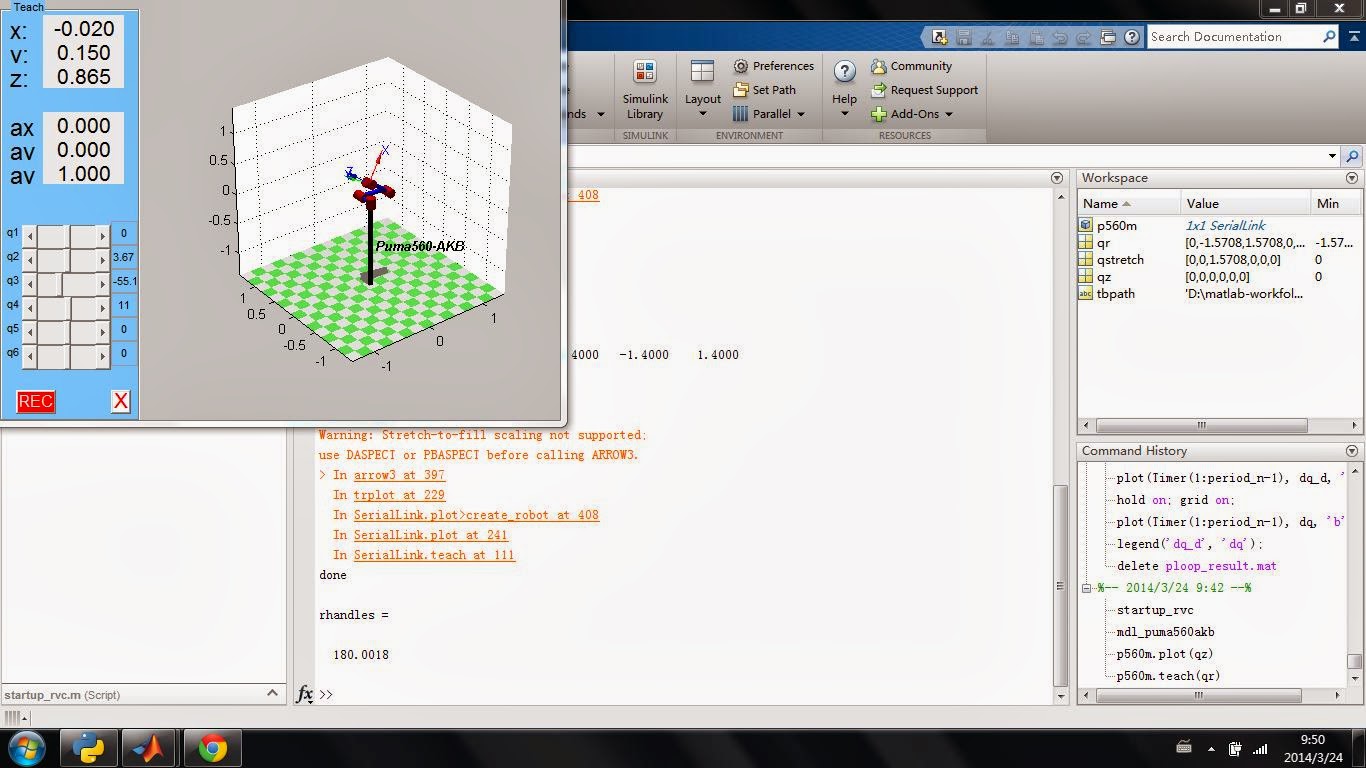
The previous picture was captured in ubuntu. I just tried it in Windows 7, a terrible bug occured: the menu and title of the figure window can not be showed. Isn't matlab not platform depended?
Peter Corke
Mar 24, 2014, 2:00:39 AM3/24/14
to robotics...@googlegroups.com
It should be platform independent.... In both cases the fonts are too big for the bounding box, the tail of the y is getting chopped off. I also note that the label of the 3rd orientation parameter is wrong.
Comment out line 245 of @SerialLink.plot. That tries to put the figure in the top left corner, but clearly something has gone wrong with that.
Thanks for your time with this.
peter
On 24/03/2014, at 11:53 AM, Wang Yuchi <wangy...@gmail.com> wrote:
The previous picture was captured in ubuntu. I just tried it in Windows 7, a terrible bug occured: the menu and title of the figure window can not be showed. Isn't matlab not platform depended?
Wang Yuchi
Mar 24, 2014, 8:09:37 AM3/24/14
to robotics...@googlegroups.com
I really hope I can help you handle this, but I am under great pressure now. Perhaps you can get some under-graduate students to help you, or you can get some financial support from some insitutions or foundations to perfect your toolbox, it is really helpful to students. I can realise that you have made a great effort on this free toolbox. RobotiCAD, also a free robotics tool and finished by Riccardo Falconi perhaps for his phd work, which seems good, is not maintained well as your toolbox. Your efforts are worthy and meaningful.
God Bless You, and your kindness will be rewarded!
Peter Corke
Mar 25, 2014, 7:58:25 AM3/25/14
to robotics...@googlegroups.com
OK, I've made some adjustments to the code with respect to font sizing, using normalised units rather than points. I'd appreciate any feedback that people might offer.
To install it, unzip the attached file from the rvctools/robot folder on your computer. To be safe, make a copy of everything before you do this, so you can back the changes out if you don't like them.
peter

m.nari...@yahoo.com
Mar 28, 2014, 7:36:54 PM3/28/14
to robotics...@googlegroups.com
Hi
this does not work for me :(
Why?
Is this a true file?
Peter Corke
Apr 1, 2014, 2:30:52 AM4/1/14
to robotics...@googlegroups.com
You'd need to unzip it into the rvctools/robot folder.
Message has been deleted

Felipe
Apr 2, 2014, 1:31:06 PM4/2/14
to robotics...@googlegroups.com

Very nice improvement on plot function! Robots are seen much better! Thanks a lot! :-)
Well, I run some code that I had here and I have noticed the following issues:
1. I was not able to plot a robot that has prismatic joints. I run the code bellow:
clear;
L(1) = Link([0, 1, 0 , 0, 1]);
L(2) = Link([0, 2, 0, pi/2, 0]);
L(3) = Link([0, 1.5, 0, 0, 1]);
L(4) = Link([0, 2, 0, -pi/2, 0]);
q = [1, pi/3, 1, pi/4];
robo = SerialLink(L, 'name', 'PRPR')
W = [-2 2 -2 2 -2 2];
robo.plot(q,'workspace', W)
...and got the following error message:
Error using *
Inner matrix dimensions must agree.
Error in SerialLink/plot>create_floor (line 527)
Z = opt.floorlevel*ones( numel(yt), numel(xt));
Error in SerialLink/plot (line 240)
create_floor(opt);
I have tested several different combinations of prismatic joint links, and always got the same error message.
2. In the teach() method, I get the following error message when I click on "Record":
No appropriate method, property, or field record for class SerialLink.
Error in SerialLink/teach>record_callback (line 428)
robot.record(h.q);
Error in SerialLink/teach>@(src,event)record_callback(robot,handles) (line
330)
'CallBack', @(src,event) record_callback(robot, handles), ...
Error while evaluating uicontrol Callback
3. Finally, when using the plot method I saw that some links sometimes are missing from the figures (but you can tell they are there because of their shadow). I have attached some figures that show some examples.
Information of my system is:
MATLAB Version: 8.1.0.604 (R2013a)
MATLAB License Number: 724504
Operating System: Microsoft Windows 8 Version 6.2 (Build 9200)
Java Version: Java 1.6.0_17-b04 with Sun Microsystems Inc. Java HotSpot(TM)
>> startup_rvc
Robotics, Vision & Control: (c) Peter Corke 1992-2011 http://www.petercorke.com
- Robotics Toolbox for Matlab (release 9.8)
- Machine Vision Toolbox for Matlab (release 3.3)
- VGG contributed code (C:\Users\Felipe\Documents\MATLAB\rvctools\contrib\vgg)
- EPnP contributed code (C:\Users\Felipe\Documents\MATLAB\rvctools\contrib\EPnP)
- VLFeat contributed code (C:\Users\Felipe\Documents\MATLAB\rvctools\contrib\vlfeat-0.9.9\toolbox\mex\mexw64)
- VLFeat SIFT wrapper (C:\Users\Felipe\Documents\MATLAB\rvctools\contrib\sift)
- OpenSURF contributed code + wrapper (C:\Users\Felipe\Documents\MATLAB\rvctools\contrib\surf)
- graphseg contributed code (C:\Users\Felipe\Documents\MATLAB\rvctools\contrib\graphseg)
Best regards!
Felipe.


Peter Corke
Apr 3, 2014, 6:38:53 AM4/3/14
to robotics...@googlegroups.com
Thanks Felipe. I am glad you like the improvements, if not the bugs. I'll have a look at these over the weekend, your examples seem very clear.
peter
Felipe
Apr 6, 2014, 4:41:40 PM4/6/14
to robotics...@googlegroups.com
Hello, Peter.
I just tried the new plot function. When I ran "plot" for the Puma 560 I got the following error message:
>> mdl_puma560
>> p560.plot(qn)
create floor
ans =
-1.2000 1.2000 -1.2000 1.2000 -1.2000 1.2000
creating new robot
Current plot held
Error using *
Inner matrix dimensions must agree.
Error in SerialLink/plot>create_robot (line 406)
tool = tool * robot.tool;
Error in SerialLink/plot (line 241)
handle = create_robot(robot, opt);
The plot seems incomplete and is attached to this message.

I find a little strange, but now I am able to plot the robot that has prismatic joints!
clear;
L(1) = Link([0, 1, 0 , 0, 1]);
L(2) = Link([0, 2, 0, pi/2, 0]);
L(3) = Link([0, 1.5, 0, 0, 1]);
L(4) = Link([0, 2, 0, -pi/2, 0]);
q = [1, pi/3, 1, pi/4];
robo = SerialLink(L, 'name', 'PRPR')
W = [-3 3 -3 3 -3 3];
robo.plot(q,'workspace', W)

Best regards,
Felipe.
Reply all
Reply to author
Forward
0 new messages