
Toolbox For Octave
756 views
Skip to first unread message

ramon....@gmail.com
Nov 7, 2018, 9:11:39 AM11/7/18
to Robotics & Machine Vision Toolboxes
Hi! I'm using the toolbox in octave 4.0.0 and toolbox version 9.10. I'm reading your book and trying to fix at least basics compatibilities from matlab to octave code. I'm in page 49 and below I'll put everything I could do so far:
1- Firstly install the toolbox from: http://www.petercorke.com/RTB/
2- Copy/Extract the "rvctools" folder to your octave "m" folder. Here the path is "/usr/share/octave/4.0.0/m"
3- Add the rvctools into octave's search path
Enter in octave program and type:
addpath(genpath("/usr/share/octave/4.0.0/m/rvctools")) % Add rvctools to search path
savepath % save the new path list
exit % We need to restart octave for the modification be updated
With the steps above, all toolbox functions should be recognized but some functions are not implemented or some bugs occurs in it. About it, thats what I got so far:
- hgtransform.m ( To be downloaded )
Thats functions is not available in the toolbox for octave and seems to be used in all plot functions. You can download it in hgtransform.m and put it in anyplace inside "rvctools" folder. I put mine in "common" since I still dont know where else it is used.
- robot/tranimate.m
Somehow when using Quaternions class, Ttraj matrix type becomes complex and its format is not allowed by ctraj function. I had to modify this file and put a "real()" function before Ttraj element loop, to eliminate the complex part if present. The line became:
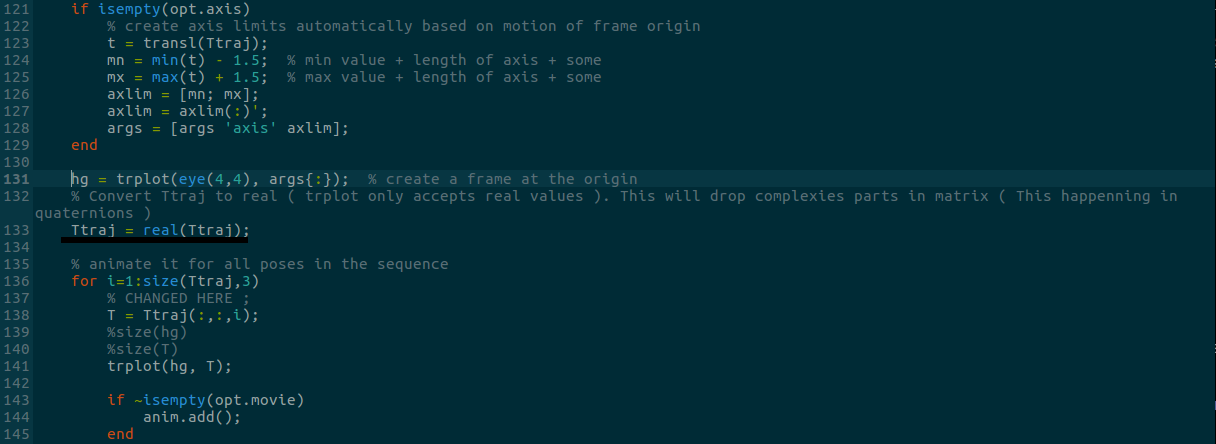
Thats all I got until now. Hope help anyone. I will be updating this thread as I discover news things. My toolbox modified can be downloaded here https://drive.google.com/open?id=1PHwlteldMFSnEr7O7eJjI6Ai9YYnL2k6

Peter Corke
Nov 10, 2018, 4:54:47 PM11/10/18
to Robotics & Machine Vision Toolboxes
Hi Ramon,
thanks for your interest in the book and for having a go with Octave. This is a commonly requested capability but I don't have the time to do this. Some comments below.
On Thursday, 8 November 2018 00:11:39 UTC+10, ramon....@gmail.com wrote:
Hi! I'm using the toolbox in octave 4.0.0 and toolbox version 9.10. I'm reading your book and trying to fix at least basics compatibilities from matlab to octave code. I'm in page 49 and below I'll put everything I could do so far:1- Firstly install the toolbox from: http://www.petercorke.com/RTB/2- Copy/Extract the "rvctools" folder to your octave "m" folder. Here the path is "/usr/share/octave/4.0.0/m"3- Add the rvctools into octave's search pathEnter in octave program and type:addpath(genpath("/usr/share/octave/4.0.0/m/rvctools")) % Add rvctools to search pathsavepath % save the new path listexit % We need to restart octave for the modification be updatedWith the steps above, all toolbox functions should be recognized but some functions are not implemented or some bugs occurs in it. About it, thats what I got so far:- hgtransform.m ( To be downloaded )Thats functions is not available in the toolbox for octave and seems to be used in all plot functions. You can download it in hgtransform.m and put it in anyplace inside "rvctools" folder. I put mine in "common" since I still dont know where else it is used.
hgtransform is a part of the MATLAB handle graphics package. I didn't know Octave had it but my version of Octave 4.4.0 includes it. This is a good thing.
- robot/tranimate.mSomehow when using Quaternions class, Ttraj matrix type becomes complex and its format is not allowed by ctraj function. I had to modify this file and put a "real()" function before Ttraj element loop, to eliminate the complex part if present. The line became:
Thats all I got until now. Hope help anyone. I will be updating this thread as I discover news things. My toolbox modified can be downloaded here https://drive.google.com/open?id=1PHwlteldMFSnEr7O7eJjI6Ai9YYnL2k6

I don't quite understand how that can happen. Do the quaternion elements look sensible?
I hope you can find some people to work with you on this. I'd be more than happy to update the Toolbox Octave support, and acknowledge you, if you can get this to a usable state.
peter
ramon....@gmail.com
Mar 2, 2019, 2:26:14 PM3/2/19
to Robotics & Machine Vision Toolboxes
Sorry for the delay. Now I have octave 5.0.90 and everything works well!!!!!!
Peter Corke
Mar 2, 2019, 4:09:10 PM3/2/19
to Robotics & Machine Vision Toolboxes
Ramon,
thanks for the update, I've been hoping that Octave 5 would help with compatibility but I didn't know it had been released. I see that already we are up to Octave 5.1.
I'm a Mac user and I'd prefer not to build from source so I'm waiting for somebody to put up a home-brew install package.
Do you have any other feedback about RTB and Octave?
peter
Reply all
Reply to author
Forward
0 new messages