
Re: RF Keywords Performance Metrics Report
1,718 views
Skip to first unread message
Message has been deleted
Message has been deleted
Message has been deleted

mantri sri
Aug 6, 2018, 3:18:29 PM8/6/18
to robotframework-users
Hey Shiva Prasad,
It was very good Dashboard it will help to show status to management, I have one Question so once test case run is completed every time I need to run rf_metrics_executer .sh?
right now I'm using robot IDE for execution of test cases, so once test case execution was done automatically rf_metrics_executer.sh should run and once you click the log it should display the dashboard this could be really helpful to me.
I have one final Question right now we are using Jenkins to run the regression test cases, So once the entire test suite is completed it should display the Dashboard? how can we handle this?
Thanks
Manthri
On Saturday, July 28, 2018 at 11:16:48 AM UTC-7, Shiva Prasad Adirala wrote:
On Saturday, July 28, 2018 at 11:16:48 AM UTC-7, Shiva Prasad Adirala wrote:
Hi Experts,Today I want to initiate discussion on "Keywords Performance Metrics Report" in robot framework.I have assigned to track duration took by each keyword (userdefined) in my automation suite. Its something wearied to get duration of each keyword in automation execution report (expand each & every test, keyword and note down its duration from log).So I made a report which gives us a metrics of each keyword used in automation suite.I named it as "Keywords Performance Metrics Report"How it Works:
- Uses simple python code to read output.xml file (which will be created after script execution)
- Get Test Case Name, Keyword Name, Start Time, End Time values from output.xml file
- Convert data to html report using Beautifulsoap (Table format with sorting capability)
How to use in project:
- Checkout the project
- Copy keyword_performance_metrics_report_creator.py and keyword_performance_metrics_executer.bat files to project (where output.xml file is available)
- Install beautifulsoap: pip install beautifulsoup4 (to create html report)
- Install lxml: pip install lxml (to read data from xml file)
- Execute keyword_performance_metrics_executer.bat file
- "Keywords Performance Metrics Report" will be opened in new chrome tab
Intention of sharing this project is to help the guys who are monitoring there keywords performance
- Checkout the project. Git: https://github.com/adiralashiva8/RFKeywordPerformanceMetrics
- Try within your project.
- Suggest your feedback/queries
- Lets improve this report together
I want to check this report with large automation suites (50 + test cases). To verify how the report behaves? and how sorting works?

Message has been deleted

Pekka Klärck
Aug 7, 2018, 12:25:13 PM8/7/18
to adiral...@gmail.com, robotframework-users
Hi,
This looks like a useful tool. I don't have feature ideas, but I have
some comments about the implementation:
- Instead of parsing output.xml using lxml, you could consider using
Robot's result modules. It has a simple API and being highly optimized
is likely also faster and more memory efficient. For more details see
the API docs at
http://robot-framework.readthedocs.io/en/v3.0.4/autodoc/robot.result.html
- I would consider using a template engine like Jinja
(http://jinja.pocoo.org/) for constructing HTML report.
Cheers,
.peke
la 28. heinäk. 2018 klo 21.16 Shiva Prasad Adirala
(adiral...@gmail.com) kirjoitti:
> You received this message because you are subscribed to the Google Groups "robotframework-users" group.
> To unsubscribe from this group and stop receiving emails from it, send an email to robotframework-u...@googlegroups.com.
> To post to this group, send email to robotframe...@googlegroups.com.
> Visit this group at https://groups.google.com/group/robotframework-users.
> For more options, visit https://groups.google.com/d/optout.
--
Agile Tester/Developer/Consultant :: http://eliga.fi
Lead Developer of Robot Framework :: http://robotframework.org
This looks like a useful tool. I don't have feature ideas, but I have
some comments about the implementation:
- Instead of parsing output.xml using lxml, you could consider using
Robot's result modules. It has a simple API and being highly optimized
is likely also faster and more memory efficient. For more details see
the API docs at
http://robot-framework.readthedocs.io/en/v3.0.4/autodoc/robot.result.html
- I would consider using a template engine like Jinja
(http://jinja.pocoo.org/) for constructing HTML report.
Cheers,
.peke
la 28. heinäk. 2018 klo 21.16 Shiva Prasad Adirala
(adiral...@gmail.com) kirjoitti:
>
> Hi Experts,
>
> Today I want to initiate discussion on "Keywords Performance Metrics Report" in robot framework.
>
> I have assigned to track duration took by each keyword (userdefined) in my automation suite. Its something wearied to get duration of each keyword in automation execution report (expand each & every test, keyword and note down its duration from log).
>
> So I made a report which gives us a metrics of each keyword used in automation suite.
>
> I named it as "Keywords Performance Metrics Report"
>
> How it Works:
>
> Uses simple python code to read output.xml file (which will be created after script execution)
> Get Test Case Name, Keyword Name, Start Time, End Time values from output.xml file
> Convert data to html report using Beautifulsoap (Table format with sorting capability)
>
>
> How to use in project:
>
> Checkout the project
> Copy keyword_performance_metrics_report_creator.py and keyword_performance_metrics_executer.bat files to project (where output.xml file is available)
> Install beautifulsoap: pip install beautifulsoup4 (to create html report)
> Install lxml: pip install lxml (to read data from xml file)
> Execute keyword_performance_metrics_executer.bat file
> "Keywords Performance Metrics Report" will be opened in new chrome tab
>
>
> Hi Experts,
>
> Today I want to initiate discussion on "Keywords Performance Metrics Report" in robot framework.
>
> I have assigned to track duration took by each keyword (userdefined) in my automation suite. Its something wearied to get duration of each keyword in automation execution report (expand each & every test, keyword and note down its duration from log).
>
> So I made a report which gives us a metrics of each keyword used in automation suite.
>
> I named it as "Keywords Performance Metrics Report"
>
> How it Works:
>
> Uses simple python code to read output.xml file (which will be created after script execution)
> Get Test Case Name, Keyword Name, Start Time, End Time values from output.xml file
> Convert data to html report using Beautifulsoap (Table format with sorting capability)
>
>
> How to use in project:
>
> Checkout the project
> Copy keyword_performance_metrics_report_creator.py and keyword_performance_metrics_executer.bat files to project (where output.xml file is available)
> Install beautifulsoap: pip install beautifulsoup4 (to create html report)
> Install lxml: pip install lxml (to read data from xml file)
> Execute keyword_performance_metrics_executer.bat file
> "Keywords Performance Metrics Report" will be opened in new chrome tab
>
>
> Intention of sharing this project is to help the guys who are monitoring there keywords performance
>
> Checkout the project. Git: https://github.com/adiralashiva8/RFKeywordPerformanceMetrics
> Try within your project.
> Suggest your feedback/queries
> Lets improve this report together
>
>
>> I want to check this report with large automation suites (50 + test cases). To verify how the report behaves? and how sorting works?
>
> --
>
> Checkout the project. Git: https://github.com/adiralashiva8/RFKeywordPerformanceMetrics
> Try within your project.
> Suggest your feedback/queries
> Lets improve this report together
>
>
>> I want to check this report with large automation suites (50 + test cases). To verify how the report behaves? and how sorting works?
>
> You received this message because you are subscribed to the Google Groups "robotframework-users" group.
> To unsubscribe from this group and stop receiving emails from it, send an email to robotframework-u...@googlegroups.com.
> To post to this group, send email to robotframe...@googlegroups.com.
> Visit this group at https://groups.google.com/group/robotframework-users.
> For more options, visit https://groups.google.com/d/optout.
--
Agile Tester/Developer/Consultant :: http://eliga.fi
Lead Developer of Robot Framework :: http://robotframework.org
Message has been deleted
mantri sri
Aug 8, 2018, 3:52:51 PM8/8/18
to robotframework-users
Thank you so much for your update
On Tuesday, August 7, 2018 at 9:08:20 AM UTC-7, Shiva Prasad Adirala wrote:
On Tuesday, August 7, 2018 at 9:08:20 AM UTC-7, Shiva Prasad Adirala wrote:
Thanks for your feedback Mantri, Hope you loved it.FYI:1. I have fixed to show graphs on page load and now change is available in repo (star repo to get updates)2. This is completely a post processing report generation using output.xml. I will take a look into possibilities of launching report after execution3. Regarding Jenkins, show report after execution - You can include rf_metrics_executer .sh in jenkins which should process report after execution like (Run Suite && Execute rf_metrics_executer .sh)Please correct me if I'm wrongThanks,Shiva

Bug Magnet
Aug 10, 2018, 4:27:37 AM8/10/18
to robotframework-users
Is it possible that the it would be an accumulated test results for the entire week? i.e Aug 6 - 10. Thanks!
Message has been deleted

Shiva Prasad Adirala
Aug 18, 2018, 3:16:55 AM8/18/18
to robotframework-users
Hi Peke,
Note: I have used kw.parent.parent but I feel its not the right way to acheive
As per your suggestion I tried to use robot framework api instead of parsing output.xml using lxml. I like the Performance of fetching results :)
Currently I'm modifying Robot framework Metrics report to use robot framework api. During this I got strucked in Keyword Metrics report generation
Problem: I want to show TestCase_Name and Keyword_Name in report for all types of keywords (user defined or library). When I use kw.parent it returns immediate parent for library keywords but I want test case name
Reference: robot.result.model.Keyword
My Code
Ouput
Problem: I want to show TestCase_Name and Keyword_Name in report for all types of keywords (user defined or library). When I use kw.parent it returns immediate parent for library keywords but I want test case name
Reference: robot.result.model.Keyword
My Code
#!/usr/bin/env pythons
from robot.api import ExecutionResult, ResultVisitor
class KeywordMetrics(ResultVisitor):
    def start_keyword(self, kw):        print str(kw.parent) + "\t" + str(kw.kwname)
result = ExecutionResult("output.xml")metrics = result.visit(KeywordMetrics())
Ouput
TC-001 Launch Chrome Browsercommon.Launch Chrome Browser Open Browsercommon.Launch Chrome Browser Wait Until Element Is VisibleSeleniumLibrary.Wait Until Element Is Visible Capture Page ScreenshotTC-002 Launch Chrome BrowserNote: I have used kw.parent.parent but I feel its not the right way to acheive
Question: Is there any posibility to get TestCase_Name using keyword object. Please suggest if I need to perform this in different way
> To unsubscribe from this group and stop receiving emails from it, send an email to robotframework-users+unsub...@googlegroups.com.
Pekka Klärck
Aug 20, 2018, 9:39:34 AM8/20/18
to Shiva Prasad Adirala, robotframework-users
Hi,
Great to hear that using the result API works fine. I don't think
keyword objects have a direct access to the test they are part of, and
in fact keywords used in suite setups/teardowns are not part of any
test. You could look at `kw.parent`, its parent, and so on until you
find a TestCase (or TestSuite) object, but when you are already using
the visitor interface it's easier to use `start_test`:
class KeywordMetrics(ResultVisitor):
def __init__(self):
self.test = None
def start_test(self, test):
self.test = test
def end_test(self, test):
self.test = None
def start_keyword(self, kw):
test_name = self.test.name if self.test is not None else ''
print '%s\t%s' % test_name, kw.name)
Cheers,
.peke
la 18. elok. 2018 klo 10.16 Shiva Prasad Adirala
>> > To unsubscribe from this group and stop receiving emails from it, send an email to robotframework-u...@googlegroups.com.
Great to hear that using the result API works fine. I don't think
keyword objects have a direct access to the test they are part of, and
in fact keywords used in suite setups/teardowns are not part of any
test. You could look at `kw.parent`, its parent, and so on until you
find a TestCase (or TestSuite) object, but when you are already using
the visitor interface it's easier to use `start_test`:
class KeywordMetrics(ResultVisitor):
def __init__(self):
self.test = None
def start_test(self, test):
self.test = test
def end_test(self, test):
self.test = None
def start_keyword(self, kw):
test_name = self.test.name if self.test is not None else ''
print '%s\t%s' % test_name, kw.name)
Cheers,
.peke
la 18. elok. 2018 klo 10.16 Shiva Prasad Adirala
>> > To post to this group, send email to robotframe...@googlegroups.com.
>> > Visit this group at https://groups.google.com/group/robotframework-users.
>> > For more options, visit https://groups.google.com/d/optout.
>>
>>
>>
>> --
>> Agile Tester/Developer/Consultant :: http://eliga.fi
>> Lead Developer of Robot Framework :: http://robotframework.org
>
>> > Visit this group at https://groups.google.com/group/robotframework-users.
>> > For more options, visit https://groups.google.com/d/optout.
>>
>>
>>
>> --
>> Agile Tester/Developer/Consultant :: http://eliga.fi
>> Lead Developer of Robot Framework :: http://robotframework.org
>
> --
> You received this message because you are subscribed to the Google Groups "robotframework-users" group.
> To unsubscribe from this group and stop receiving emails from it, send an email to robotframework-u...@googlegroups.com.
> You received this message because you are subscribed to the Google Groups "robotframework-users" group.
Shiva Prasad Adirala
Aug 20, 2018, 2:12:25 PM8/20/18
to robotframework-users
Awesome, Thanks a lot Pekke it worked as you mentioned.
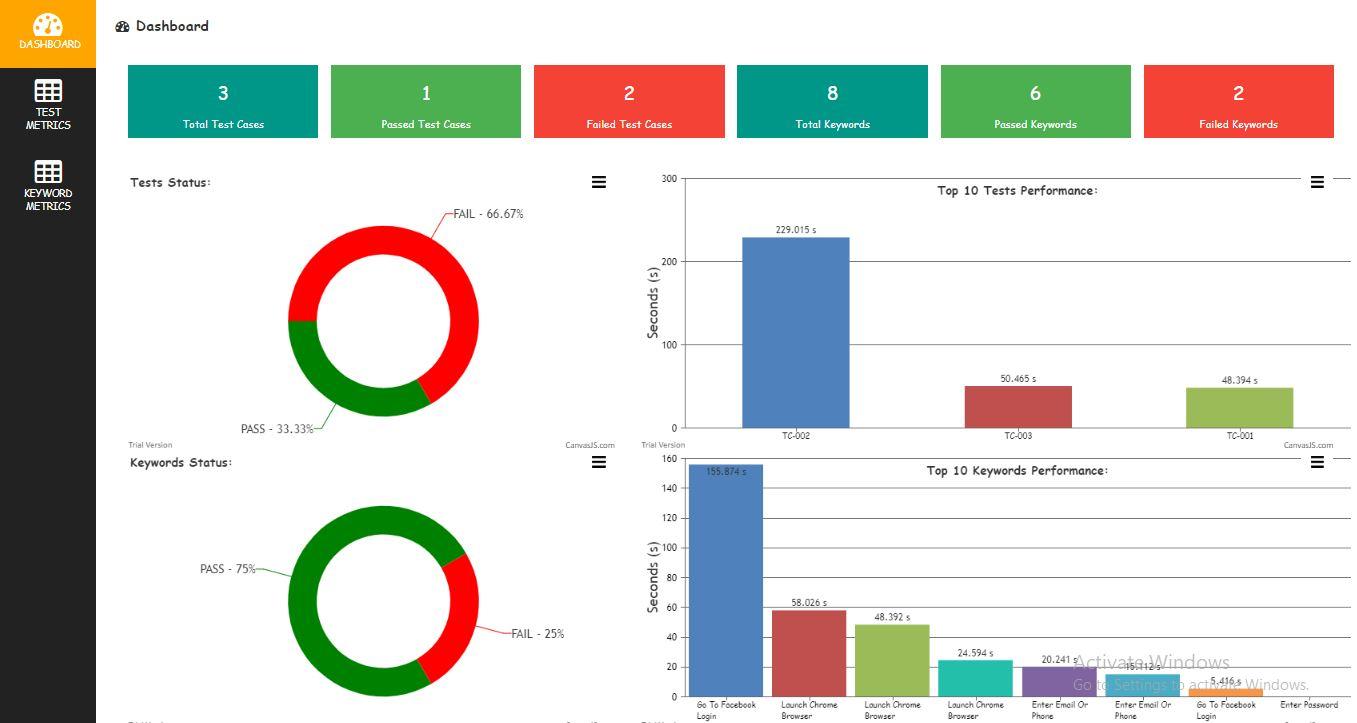
I have modified report and following are the screenshots of report. Guys feel free to use in your projects.
Dashboard

Test Metrics: (same statistics as result.html)

Keyword Metrics

>> > To unsubscribe from this group and stop receiving emails from it, send an email to robotframework-users+unsub...@googlegroups.com.
>> > To post to this group, send email to robotframe...@googlegroups.com.
>> > Visit this group at https://groups.google.com/group/robotframework-users.
>> > For more options, visit https://groups.google.com/d/optout.
>>
>>
>>
>> --
>> Agile Tester/Developer/Consultant :: http://eliga.fi
>> Lead Developer of Robot Framework :: http://robotframework.org
>
> --
> You received this message because you are subscribed to the Google Groups "robotframework-users" group.
> To unsubscribe from this group and stop receiving emails from it, send an email to robotframework-users+unsub...@googlegroups.com.

prasad ozarkar
Aug 21, 2018, 3:37:54 PM8/21/18
to adiral...@gmail.com, robotframework-users
Hi Shiva,
Very good tool.
I will use it and let you know if any comments, enhancements etc.
Thanks,
Prasad.
Thanks,Shiva Adirala
>> > To unsubscribe from this group and stop receiving emails from it, send an email to robotframework-users+unsubscrib...@googlegroups.com.
>> > To post to this group, send email to robotframe...@googlegroups.com.
>> > Visit this group at https://groups.google.com/group/robotframework-users.
>> > For more options, visit https://groups.google.com/d/optout.
>>
>>
>>
>> --
>> Agile Tester/Developer/Consultant :: http://eliga.fi
>> Lead Developer of Robot Framework :: http://robotframework.org
>
> --
> You received this message because you are subscribed to the Google Groups "robotframework-users" group.
> To unsubscribe from this group and stop receiving emails from it, send an email to robotframework-users+unsubscrib...@googlegroups.com.
> To post to this group, send email to robotframe...@googlegroups.com.
> Visit this group at https://groups.google.com/group/robotframework-users.
> For more options, visit https://groups.google.com/d/optout.
--
Agile Tester/Developer/Consultant :: http://eliga.fi
Lead Developer of Robot Framework :: http://robotframework.org
--
You received this message because you are subscribed to the Google Groups "robotframework-users" group.
To unsubscribe from this group and stop receiving emails from it, send an email to robotframework-users+unsub...@googlegroups.com.
To post to this group, send email to robotframework-users@googlegroups.com.
mantri sri
Aug 22, 2018, 3:12:02 AM8/22/18
to robotframework-users
Hi, Shiva, this was really good Dashboard.
>
> I want to use this Dashboard for my Regression test cases in my Project, right now we are running the regression test cases through Ansible and also once the deployment is completed the script call's the Regression test cases.
>
> we are the test cases in Unix server which don't have the Desktop UI.
>
> My intention is to use once Dashboard once the Regression test cases completed it should run the rf_metrics_executer.sh and also need to attach that log and send an email.
>
> Can you please help me with that could be really helpful.
>
> Thanks
> Manthri
>
> I want to use this Dashboard for my Regression test cases in my Project, right now we are running the regression test cases through Ansible and also once the deployment is completed the script call's the Regression test cases.
>
> we are the test cases in Unix server which don't have the Desktop UI.
>
> My intention is to use once Dashboard once the Regression test cases completed it should run the rf_metrics_executer.sh and also need to attach that log and send an email.
>
> Can you please help me with that could be really helpful.
>
> Thanks
> Manthri

Ruud Prijs
Aug 22, 2018, 4:45:06 AM8/22/18
to robotframe...@googlegroups.com
This is very nice done, thx for sharing this. I have only a one minor comment on this.
I use different names for the output.xml (pybot with the --name option)
it would be nice if it is possible to add the name and location of the xml file on the command line as an argument
I use Firefox so for me the rf_metrics_executer.sh is not working, but i can make my own one or change it
Kind regards Ruud
prasad ozarkar
Aug 22, 2018, 10:18:53 AM8/22/18
to ruud....@gmail.com, robotframework-users
Hi Shiva,
I have one comment.. by test cases you mean test steps inside a test suite, right? Is it possible to create matrix for test suites? we run a lot of .robot files as a part of batch (together) and the output.xml has test suites as well as individual test cases (steps in suite).
Thanks,
Prasad.
kind regards Ruud
Op zaterdag 28 juli 2018 20:16:48 UTC+2 schreef Shiva Prasad Adirala:
Hi Experts,Today I want to initiate discussion on "Keywords Performance Metrics Report" in robot framework.I have assigned to track duration took by each keyword (userdefined) in my automation suite. Its something wearied to get duration of each keyword in automation execution report (expand each & every test, keyword and note down its duration from log).So I made a report which gives us a metrics of each keyword used in automation suite.I named it as "Keywords Performance Metrics Report"How it Works:
- Uses simple python code to read output.xml file (which will be created after script execution)
- Get Test Case Name, Keyword Name, Start Time, End Time values from output.xml file
- Convert data to html report using Beautifulsoap (Table format with sorting capability)
How to use in project:
- Checkout the project
- Copy keyword_performance_metrics_report_creator.py and keyword_performance_metrics_executer.bat files to project (where output.xml file is available)
- Install beautifulsoap: pip install beautifulsoup4 (to create html report)
- Install lxml: pip install lxml (to read data from xml file)
- Execute keyword_performance_metrics_executer.bat file
- "Keywords Performance Metrics Report" will be opened in new chrome tab
Intention of sharing this project is to help the guys who are monitoring there keywords performance
- Checkout the project. Git: https://github.com/adiralashiva8/RFKeywordPerformanceMetrics
- Try within your project.
- Suggest your feedback/queries
- Lets improve this report together
I want to check this report with large automation suites (50 + test cases). To verify how the report behaves? and how sorting works?
--
You received this message because you are subscribed to the Google Groups "robotframework-users" group.
Shiva Prasad Adirala
Aug 22, 2018, 10:29:48 AM8/22/18
to robotframework-users
Hi Prasad,
Happy to hear from you. Following is my understanding please correct me if i'm wrong
You want a separate tab for 'Suite' and suite metrics need to be displayed in dashboard.
Shiva Prasad Adirala
Aug 22, 2018, 10:31:46 AM8/22/18
to robotframework-users
Hi Prijs,
Thank for sharing your feedback. I will look into possibility of implementing suggested change.
Shiva Prasad Adirala
Aug 23, 2018, 12:40:08 AM8/23/18
to robotframe...@googlegroups.com
Prasad,
Requested change(show suite metrics) is now available in Metrics Report. Please pull the latest changes and share your feedback.
On Wednesday, August 22, 2018 at 7:48:53 PM UTC+5:30, prasad ozarkar wrote:
To post to this group, send email to robotframe...@googlegroups.com.
prasad ozarkar
Aug 23, 2018, 11:42:47 AM8/23/18
to Shiva Prasad Adirala, robotframework-users
Thanks Shiva !!!
On Thu, Aug 23, 2018 at 12:40 AM, Shiva Prasad Adirala <adiral...@gmail.com> wrote:
Prasad,Requested change(show suite metrics) is now available in Metrics Report. Please pull the latest changes and share your feedback.
I will suggest to star the repo to get latest updates
To unsubscribe from this group and stop receiving emails from it, send an email to robotframework-users+unsubscrib...@googlegroups.com.
To post to this group, send email to robotframe...@googlegroups.com.
Visit this group at https://groups.google.com/group/robotframework-users.
For more options, visit https://groups.google.com/d/optout.
--
You received this message because you are subscribed to the Google Groups "robotframework-users" group.
To unsubscribe from this group and stop receiving emails from it, send an email to robotframework-users+unsub...@googlegroups.com.
To post to this group, send email to robotframework-users@googlegroups.com.
mantri sri
Aug 24, 2018, 4:32:55 AM8/24/18
to robotframework-users
mantri sri
Aug 24, 2018, 4:33:37 AM8/24/18
to robotframework-users
Hi Shiva,
I have one requirement and attach the report Log in Dashboard with a hyperlink like once we click into that it should be open the report.html and show the log.
Is that can done? can you please help me with that, attached the document with screenshots.
Thanks
Manthri

Damodharan Baskaran
Aug 24, 2018, 5:20:09 AM8/24/18
to robotframework-users
Hi Shiva,
Really, it is a good dashboard report. Is it possible to change the font style of the report, instead of comic sans to arial.
Thanks,
Damodharan B
Shiva Prasad Adirala
Aug 25, 2018, 3:20:48 AM8/25/18
to robotframework-users
Sreekanth,
Requested change (show report.html and log.html) in metrics report is available now. Please pull the latest changes.
Requested change (show report.html and log.html) in metrics report is available now. Please pull the latest changes.
- Use git for request feature, create issue and feedback
- Star project to appreciate
Shiva
mantri sri
Aug 25, 2018, 6:16:32 PM8/25/18
to adiral...@gmail.com, robotframework-users
Thank you so much and also i rasied few chages in git.
Manthri
--
You received this message because you are subscribed to a topic in the Google Groups "robotframework-users" group.
To unsubscribe from this topic, visit https://groups.google.com/d/topic/robotframework-users/orPiav7QNDM/unsubscribe.
To unsubscribe from this group and all its topics, send an email to robotframework-u...@googlegroups.com.
To post to this group, send email to robotframe...@googlegroups.com.
Visit this group at https://groups.google.com/group/robotframework-users.
For more options, visit https://groups.google.com/d/optout.
Sent from Gmail Mobile

Drew Jr, Howard L
Aug 26, 2018, 2:16:43 AM8/26/18
to mantris...@gmail.com, adiral...@gmail.com, robotframework-users
what is the git link repository link, thx
You received this message because you are subscribed to the Google Groups "robotframework-users" group.
To unsubscribe from this group and stop receiving emails from it, send an email to robotframework-u...@googlegroups.com.
Damodharan Baskaran
Aug 27, 2018, 4:59:46 AM8/27/18
to robotframework-users
Hi Shiva,
Is it possible to capture system performance and provide a graph in the dashboard report (during robot framework execution time).
Thanks
Shiva Prasad Adirala
Aug 27, 2018, 9:56:57 AM8/27/18
to robotframework-users
Damodharan,
'Metrics Report' is used to post process output.xml result generated by robotframework and display in chart view. So 'Metrics Report' have no scope to get run time system performance statistics. May be you need different tools to get statistics
prasad ozarkar
Aug 28, 2018, 10:40:59 PM8/28/18
to Shiva Prasad Adirala, robotframework-users
Hi Shiva,
One more comment. As you already have done the suite level metrics, will it be possible to update the suite level metrics to include a clickable link to log.html for that individual suite? For example:
Suite 1 < all the current data you already have> plus add a column for clickable log.html for individual suite file?
Suite 2
Suite 3
and so on?
Thanks agin for being so receptive and making changes for new requests, your tool is awesome.
Prasad.
!!! Robot Framework Rocks !!!
--
Shiva Prasad Adirala
Aug 30, 2018, 4:50:43 AM8/30/18
to robotframework-users
Prasad,
Requested change is available in master. Pull the latest changes
- Use git for request feature | create issue | feedback
- Star project to appreciate
To unsubscribe from this group and stop receiving emails from it, send an email to robotframework-users+unsub...@googlegroups.com.
Shiva Prasad Adirala
Aug 31, 2018, 2:09:40 PM8/31/18
to robotframe...@googlegroups.com
Modified Dashboard reports to use Google Charts (open source) instead of CanvasJs (licenced) - Now RF Metrics Report project uses open source contents. Feel free to use in your project and share your feedback to make it more usefull.
Thanks for your support 'Robot Framework' and automation enthusiasts

Jayamurugan Jay
Sep 4, 2018, 2:01:34 AM9/4/18
to robotframework-users
Hi Shiva,
Thanks for such a Beautiful Reports Generation. we have enhanced our reports options by using your files.
I need a help from your side. while executing shell script file, it opens with the help of GIT. I need to Know how we can run the reports without GIT. It is possible to run the Reports without GIT in Windows Machine?
Thanks
Regards,
Jayamurugan
Shiva Prasad Adirala
Sep 4, 2018, 2:11:42 AM9/4/18
to robotframe...@googlegroups.com
Hi Jayamurugan,
Thank for sharing your feedback.
You can directly generate report by executing python file
python rf_metrics_report_creator.py
Jayamurugan Jay
Sep 4, 2018, 2:49:05 AM9/4/18
to robotframework-users
Hi Shiva,
Thanks , Now its fine. we are getting the html reports without help of GIT.
Need to Know whether you have used AngularJS Library in robot framework? we need to know how it works..
Regards,
Jayamurugan
Shiva Prasad Adirala
Sep 7, 2018, 4:17:10 AM9/7/18
to robotframe...@googlegroups.com
RF Metric Report: Added new feature to generate email (.eml) with statistics in tabular format.
Intention: Help the guys one who wants to share there metrics. Following is the screenshot. Have a try

prasad ozarkar
Sep 7, 2018, 7:49:06 AM9/7/18
to Shiva Prasad Adirala, robotframework-users
Awesome feature Shiva. Where is it documented to setup the send to and send from email addresses?
On Fri, Sep 7, 2018 at 4:17 AM Shiva Prasad Adirala <adiral...@gmail.com> wrote:
Added new feature to generate email (.eml) with statistics in tabular format.Intention: Help the guys one who wants to share there metrics. Following is the screenshot. Have a try

--
You received this message because you are subscribed to the Google Groups "robotframework-users" group.
To unsubscribe from this group and stop receiving emails from it, send an email to robotframework-u...@googlegroups.com.
Shiva Prasad Adirala
Sep 7, 2018, 7:59:11 AM9/7/18
to robotframework-users
Prasad,
Metric report won't send emails automatically. I have added a feature to generate statistics email which can be downloaded (.eml file) by user on demand. So user can modify content and send to required persons.
Changes available in master.
On Friday, September 7, 2018 at 5:19:06 PM UTC+5:30, prasad ozarkar wrote:
Awesome feature Shiva. Where is it documented to setup the send to and send from email addresses?
On Fri, Sep 7, 2018 at 4:17 AM Shiva Prasad Adirala <adiral...@gmail.com> wrote:
Added new feature to generate email (.eml) with statistics in tabular format.--Intention: Help the guys one who wants to share there metrics. Following is the screenshot. Have a try
You received this message because you are subscribed to the Google Groups "robotframework-users" group.

To unsubscribe from this group and stop receiving emails from it, send an email to robotframework-users+unsub...@googlegroups.com.
Shiva Prasad Adirala
Sep 18, 2018, 2:30:43 PM9/18/18
to robotframe...@googlegroups.com
Hi RF Users,
I want to know the feedback | suggestions | queries to improve or make robotframework-metrics report to be useful for project.
I feel it's not the right channel to ask for robotframework-metrics feedback but I dont have another option for it. Please send me an email on your feedback | concerns etc.,
Thanks for using robotframework-metrics
Regards,
Shiva
mantri sri
Sep 18, 2018, 5:45:32 PM9/18/18
to Shiva Prasad Adirala, robotframework-users
Hi Shiva,
I have one suggestion for EMAIL STATISTICS, once the Test suite is completed we need to run manually to generate the report right .
Once we run the python script for rf_merticsreport it should an email with all link to open the dashboard, log.hmtl, report.htm and also it should send the email statistics email automatically.
That could be really great if you do that and then it looks completely automation for generating a reporting and sending an email.
Thanks
Manthri
_
On Tue, Sep 18, 2018 at 11:30 AM Shiva Prasad Adirala <adiral...@gmail.com> wrote:
Hi RF Users,I want to know feedback | suggestions | queries to improve and make robotframework-metrics report to be useful for project.I feel it's not the right channel to ask for robotframework-metrics feedback. But I dont have another option for it. Please send out email on your feedback.
--
You received this message because you are subscribed to a topic in the Google Groups "robotframework-users" group.
To unsubscribe from this topic, visit https://groups.google.com/d/topic/robotframework-users/orPiav7QNDM/unsubscribe.
To unsubscribe from this group and all its topics, send an email to robotframework-u...@googlegroups.com.
prasad ozarkar
Sep 18, 2018, 6:51:06 PM9/18/18
to Shiva Prasad Adirala, robotframework-users
Hi Shiva, Very useful report. I have a suggestion.. can you try to include stats about keyword reuse? I mean have a screen where we can see a list of (table) keywords and ranking based on reuse within the test cases/test suite.
Thanks for your hard work on this.
Prasad
On Tue, Sep 18, 2018 at 2:30 PM Shiva Prasad Adirala <adiral...@gmail.com> wrote:
Hi RF Users,
I want to know feedback | suggestions | queries to improve and make robotframework-metrics report to be useful for project.I feel it's not the right channel to ask for robotframework-metrics feedback. But I dont have another option for it. Please send out email on your feedback.
--
You received this message because you are subscribed to the Google Groups "robotframework-users" group.
To unsubscribe from this group and stop receiving emails from it, send an email to robotframework-u...@googlegroups.com.
prasad ozarkar
Sep 19, 2018, 11:29:48 AM9/19/18
to Shiva Prasad Adirala, robotframework-users
Shiva,
One more thing I noticed which could be useful. If I have many XML files (small suite files with few test cases each), how can i use the tool to get the combined statistics of the whole project with many output.xml files?
I tried using rebot to merge the output but it can not merge the output from 2 different suite files
Thanks,
Prasad.
Shiva Prasad Adirala
Sep 19, 2018, 12:59:00 PM9/19/18
to robotframework-users
Prasad,
Can you try like this
Command: rebot --output output.xml file1.xml file2.xml
Suggested approach for generating report:
Create a bat file to rebot and generate metrics report
- Step1: Execute rebot command
- Step2: Execute metrics report.py
Regards,
Shiva
Shiva,One more thing I noticed which could be useful. If I have many XML files (small suite files with few test cases each), how can i use the tool to get the combined statistics of the whole project with many output.xml files?I tried using rebot to merge the output but it can not merge the output from 2 different suite filesThanks,Prasad.
On Tue, Sep 18, 2018 at 6:50 PM prasad ozarkar <pozark...@gmail.com> wrote:
Hi Shiva, Very useful report. I have a suggestion.. can you try to include stats about keyword reuse? I mean have a screen where we can see a list of (table) keywords and ranking based on reuse within the test cases/test suite.Thanks for your hard work on this.Prasad
On Tue, Sep 18, 2018 at 2:30 PM Shiva Prasad Adirala <adiral...@gmail.com> wrote:
Hi RF Users,--I want to know feedback | suggestions | queries to improve and make robotframework-metrics report to be useful for project.I feel it's not the right channel to ask for robotframework-metrics feedback. But I dont have another option for it. Please send out email on your feedback.Thanks for using robotframework-metricsRegards,Shiva
You received this message because you are subscribed to the Google Groups "robotframework-users" group.
To unsubscribe from this group and stop receiving emails from it, send an email to robotframework-users+unsub...@googlegroups.com.

Suresh Parimi
Sep 19, 2018, 1:02:40 PM9/19/18
to robotframework-users
Hello Shiva,
The report is simply cool. It's so visual in presenting the results for a single run.I tried myself. However I am trying to run this report automatically after my test ends using a subprocess.run(['python', 'rf_metrics_report_creator.py']))
The error I am receiving is:
Traceback (most recent call last):  File "C:\development\robot-scripts\NIR\Results\rf_metrics_report_creator.py", line 36, in <module>    result = ExecutionResult(output_file)NameError: name 'output_file' is not defined
Process finished with exit code 0
When I run it manually it generates an html file but not through subprocess module.
Also, Can you please help me in modifying the .py file to generate a new file every time I run it, so that I can maintain the report for previous run and use it for comparison of previous runs to the recent one.
Thank you,
Suresh
On Wednesday, September 19, 2018 at 8:59:48 PM UTC+5:30, prasad ozarkar wrote:
Shiva,One more thing I noticed which could be useful. If I have many XML files (small suite files with few test cases each), how can i use the tool to get the combined statistics of the whole project with many output.xml files?I tried using rebot to merge the output but it can not merge the output from 2 different suite filesThanks,Prasad.
On Tue, Sep 18, 2018 at 6:50 PM prasad ozarkar <pozark...@gmail.com> wrote:
Hi Shiva, Very useful report. I have a suggestion.. can you try to include stats about keyword reuse? I mean have a screen where we can see a list of (table) keywords and ranking based on reuse within the test cases/test suite.Thanks for your hard work on this.Prasad
On Tue, Sep 18, 2018 at 2:30 PM Shiva Prasad Adirala <adiral...@gmail.com> wrote:
Hi RF Users,--I want to know feedback | suggestions | queries to improve and make robotframework-metrics report to be useful for project.I feel it's not the right channel to ask for robotframework-metrics feedback. But I dont have another option for it. Please send out email on your feedback.Thanks for using robotframework-metricsRegards,Shiva
You received this message because you are subscribed to the Google Groups "robotframework-users" group.
To unsubscribe from this group and stop receiving emails from it, send an email to robotframework-users+unsub...@googlegroups.com.
Shiva Prasad Adirala
Sep 23, 2018, 10:58:59 AM9/23/18
to robotframe...@googlegroups.com
Hi Pekke,
- I want to show Generator, Generated value in my report. I tried to get <robot> tag using XmlElementHandler but no luck. Could you please help me on that
- Is there any option in api to get entire execution time so I can display execution time in report (same as report.html)
Thanks in advance
Pekka Klärck
Sep 23, 2018, 11:23:36 AM9/23/18
to Shiva Prasad Adirala, robotframework-users
You use the `robot.api.ExecutionResult`, right? The created result object ought to haveat least the generator information available. If it doesn't have execution times, you can get them from the suite it contains.
Sent from my mobile.
On Monday, August 20, 2018 at 11:42:25 PM UTC+5:30, Shiva Prasad Adirala wrote:Awesome, Thanks a lot Pekke it worked as you mentioned.I have modified report and following are the screenshots of report. Guys feel free to use in your projects.Dashboard
Test Metrics: (same statistics as result.html)
Keyword Metrics
Thanks,Shiva AdiralaRF Metrics Report
On Monday, August 20, 2018 at 7:09:34 PM UTC+5:30, Pekka Klärck wrote:Hi,
Great to hear that using the result API works fine. I don't think
keyword objects have a direct access to the test they are part of, and
in fact keywords used in suite setups/teardowns are not part of any
test. You could look at `kw.parent`, its parent, and so on until you
find a TestCase (or TestSuite) object, but when you are already using
the visitor interface it's easier to use `start_test`:
class KeywordMetrics(ResultVisitor):
def __init__(self):
self.test = None
def start_test(self, test):
self.test = test
def end_test(self, test):
self.test = None
def start_keyword(self, kw):
test_name = self.test.name if self.test is not None else ''
print '%s\t%s' % test_name, kw.name)
Cheers,
.peke
la 18. elok. 2018 klo 10.16 Shiva Prasad Adirala
(adiral...@gmail.com) kirjoitti:
>
> Hi Peke,
>
> As per your suggestion I tried to use robot framework api instead of parsing output.xml using lxml. I like the Performance of fetching results :)
>
> Currently I'm modifying Robot framework Metrics report to use robot framework api. During this I got strucked in Keyword Metrics report generation
>
> Problem: I want to show TestCase_Name and Keyword_Name in report for all types of keywords (user defined or library). When I use kw.parent it returns immediate parent for library keywords but I want test case name
>
> Reference: robot.result.model.Keyword
>
> My Code
>
> #!/usr/bin/env pythons
>
> from robot.api import ExecutionResult, ResultVisitor
>
> class KeywordMetrics(ResultVisitor):
>
> def start_keyword(self, kw):
> print str(kw.parent) + "\t" + str(kw.kwname)
>
> result = ExecutionResult("output.xml")
> metrics = result.visit(KeywordMetrics())
>
> Ouput
> TC-001 Launch Chrome Browser
> common.Launch Chrome Browser Open Browser
> common.Launch Chrome Browser Wait Until Element Is Visible
> SeleniumLibrary.Wait Until Element Is Visible Capture Page Screenshot
> TC-002 Launch Chrome Browser
>
> Note: I have used kw.parent.parent but I feel its not the right way to acheive
>
> Question: Is there any posibility to get TestCase_Name using keyword object. Please suggest if I need to perform this in different way
>
> On Tuesday, August 7, 2018 at 9:55:13 PM UTC+5:30, Pekka Klärck wrote:
>>
>> Hi,
>>
>> This looks like a useful tool. I don't have feature ideas, but I have
>> some comments about the implementation:
>>
>> - Instead of parsing output.xml using lxml, you could consider using
>> Robot's result modules. It has a simple API and being highly optimized
>> is likely also faster and more memory efficient. For more details see
>> the API docs at
>> http://robot-framework.readthedocs.io/en/v3.0.4/autodoc/robot.result.html
>>
>> - I would consider using a template engine like Jinja
>> (http://jinja.pocoo.org/) for constructing HTML report.
>>
>> Cheers,
>> .peke
>> la 28. heinäk. 2018 klo 21.16 Shiva Prasad Adirala
>> (adiral...@gmail.com) kirjoitti:


>> >
>> > Hi Experts,
>> >
>> > Today I want to initiate discussion on "Keywords Performance Metrics Report" in robot framework.
>> >
>> > I have assigned to track duration took by each keyword (userdefined) in my automation suite. Its something wearied to get duration of each keyword in automation execution report (expand each & every test, keyword and note down its duration from log).
>> >
>> > So I made a report which gives us a metrics of each keyword used in automation suite.
>> >
>> > I named it as "Keywords Performance Metrics Report"
>> >
>> > How it Works:
>> >
>> > Uses simple python code to read output.xml file (which will be created after script execution)
>> > Get Test Case Name, Keyword Name, Start Time, End Time values from output.xml file
>> > Convert data to html report using Beautifulsoap (Table format with sorting capability)
>> >
>> >
>> > How to use in project:
>> >
>> > Checkout the project
>> > Copy keyword_performance_metrics_report_creator.py and keyword_performance_metrics_executer.bat files to project (where output.xml file is available)
>> > Install beautifulsoap: pip install beautifulsoup4 (to create html report)
>> > Install lxml: pip install lxml (to read data from xml file)
>> > Execute keyword_performance_metrics_executer.bat file
>> > "Keywords Performance Metrics Report" will be opened in new chrome tab
>> >
>> >
>> > Intention of sharing this project is to help the guys who are monitoring there keywords performance
>> >
>> > Checkout the project. Git: https://github.com/adiralashiva8/RFKeywordPerformanceMetrics
>> > Try within your project.
>> > Suggest your feedback/queries
>> > Lets improve this report together
>> >
>> >
>> >> I want to check this report with large automation suites (50 + test cases). To verify how the report behaves? and how sorting works?
>> >
>> > --
>> > You received this message because you are subscribed to the Google Groups "robotframework-users" group.
>> > To unsubscribe from this group and stop receiving emails from it, send an email to robotframework-u...@googlegroups.com.
>> > To post to this group, send email to robotframe...@googlegroups.com.
>> > Visit this group at https://groups.google.com/group/robotframework-users.
>> > For more options, visit https://groups.google.com/d/optout.
>>
>>
>>
>> --
>> Agile Tester/Developer/Consultant :: http://eliga.fi
>> Lead Developer of Robot Framework :: http://robotframework.org
>
> --
> You received this message because you are subscribed to the Google Groups "robotframework-users" group.
> To unsubscribe from this group and stop receiving emails from it, send an email to robotframework-u...@googlegroups.com.
> To post to this group, send email to robotframe...@googlegroups.com.
> Visit this group at https://groups.google.com/group/robotframework-users.
> For more options, visit https://groups.google.com/d/optout.
--
Agile Tester/Developer/Consultant :: http://eliga.fi
Lead Developer of Robot Framework :: http://robotframework.org
--
You received this message because you are subscribed to the Google Groups "robotframework-users" group.
To unsubscribe from this group and stop receiving emails from it, send an email to robotframework-u...@googlegroups.com.
Shiva Prasad Adirala
Sep 23, 2018, 1:45:23 PM9/23/18
to robotframework-users
Thanks Pekke,
- I got the total suite elapsed time with ExecutionResult object: ExecutionResult('output.xml').suite.elapsedtime
- I tried to get generator, generated attribute values of robot tag by using ExecutionResult object like ExecutionResult('output.xml').generated_by_robot but it returns boolean value.
Could you please help me with example for point 2?
One more query: Is it possible to get more information of test execution like which browser test got executed, browser version, OS, OS version (windows7, windows10 instead of win32) etc., info using robotframework api. If yes could you please guide to get info
-Shiva
Pekka Klärck
Sep 23, 2018, 4:20:21 PM9/23/18
to Shiva Prasad Adirala, robotframework-users
That `generated_by_robot` ought to be what you need if you are interested in is the output.xml created by Robot or Rebot.
Environment specific information needs to first be captured and stored somehow. There's no generic solution for that.
Sent from my mobile.
--
Shiva Prasad Adirala
Sep 24, 2018, 1:53:34 AM9/24/18
to robotframework-users
My bad, I could not communicate my requirement
In output.xml we have this info
In output.xml we have this info
<robot generated="20180914 09:14:02.256" generator="Rebot 3.0.2 (Python 2.7.12 on linux2)">
I want to get this info using api
- generated="20180914 09:14:02.256"
- generator="Rebot 3.0.2 (Python 2.7.12 on linux2)"
So I can display Info in robotframework-metrics report as
- Generated: 20180914 09:14:02.256
- Platform: linux2
- Python version: Python 2.7.12
- Robot version: 3.0.2
- Generated By: Rebot
Please guide me on this
On Monday, September 24, 2018 at 1:50:21 AM UTC+5:30, Pekka Klärck wrote:
That `generated_by_robot` ought to be what you need if you are interested in is the output.xml created by Robot or Rebot.Environment specific information needs to first be captured and stored somehow. There's no generic solution for that.Sent from my mobile.
23.9.2018 20.45 "Shiva Prasad Adirala" <adiral...@gmail.com> kirjoitti:
Thanks Pekke,--
- I got the total suite elapsed time with ExecutionResult object: ExecutionResult('output.xml').suite.elapsedtime
- I tried to get generator, generated attribute values of robot tag by using ExecutionResult object like ExecutionResult('output.xml').generated_by_robot but it returns boolean value.
Could you please help me with example for point 2?One more query: Is it possible to get more information of test execution like which browser test got executed, browser version, OS, OS version (windows7, windows10 instead of win32) etc., info using robotframework api. If yes could you please guide to get info-Shiva
On Sunday, September 23, 2018 at 8:53:36 PM UTC+5:30, Pekka Klärck wrote:You use the `robot.api.ExecutionResult`, right? The created result object ought to haveat least the generator information available. If it doesn't have execution times, you can get them from the suite it contains.Sent from my mobile.su 23. syysk. 2018 klo 17.59 Shiva Prasad Adirala <adiral...@gmail.com> kirjoitti:Hi Pekke,
- I want to show Generator, Generated value in my report. I tried to get <robot> tag using XmlElementHandler but no luck. Could you please help me on that
- Is there any option in api to get entire execution time so I can display execution time in report (same as report.html)
Thanks in advance
You received this message because you are subscribed to the Google Groups "robotframework-users" group.
To unsubscribe from this group and stop receiving emails from it, send an email to robotframework-users+unsub...@googlegroups.com.
Pekka Klärck
Sep 24, 2018, 2:14:22 AM9/24/18
to Shiva Prasad Adirala, robotframework-users
ma 24. syysk. 2018 klo 8.53 Shiva Prasad Adirala
(adiral...@gmail.com) kirjoitti:
>
really need it, then you can use, for example, ElementTree XML parser
to get it.
> So I can display Info in robotframework-metrics report as
>
> Generated: 20180914 09:14:02.256
> Platform: linux2
> Python version: Python 2.7.12
> Robot version: 3.0.2
> Generated By: Rebot
Notice that this information only refers to the tool that has been
used to generate the output.xml file, not to the tool that has been
used to execute tests. For example, if you run tests on Linux today
and then later post-process outputs on Windows tomorrow, this
information will show tomorrows date and Windows as an operating
system. In my opinion showing such information doesn't really make
sens and that's also the primary reason this information isn't
available via Robot's result handling modules. Related to that, if you
generate log and report based on an output.xml file with Rebot, the
information shown in the upper right corner is created by Rebot and
not read from the output.xml tool.
If you want to show the actual OS where tests are executed, the
browser you have used, or any other such environment specific
information, you need to store that information somewhere during
execution, then later read it when processing results, and finally
show to users. Depending on your exact needs there are various
approaches you can use, but I'd recommend you to look at the test
suite metadata first. Robot itself also shows the metadata of the
top-level test suite prominently in the beginning of the test report.
Cheers,
.peke
(adiral...@gmail.com) kirjoitti:
>
> My bad, I could not communicate my requirement
>
> In output.xml we have this info
>
> <robot generated="20180914 09:14:02.256" generator="Rebot 3.0.2 (Python 2.7.12 on linux2)">
>
> I want to get this info using api
>
> generated="20180914 09:14:02.256"
> generator="Rebot 3.0.2 (Python 2.7.12 on linux2)"
This information isn't available via Robot's own modules. If you
>
> In output.xml we have this info
>
> <robot generated="20180914 09:14:02.256" generator="Rebot 3.0.2 (Python 2.7.12 on linux2)">
>
> I want to get this info using api
>
> generated="20180914 09:14:02.256"
> generator="Rebot 3.0.2 (Python 2.7.12 on linux2)"
really need it, then you can use, for example, ElementTree XML parser
to get it.
> So I can display Info in robotframework-metrics report as
>
> Generated: 20180914 09:14:02.256
> Platform: linux2
> Python version: Python 2.7.12
> Robot version: 3.0.2
> Generated By: Rebot
used to generate the output.xml file, not to the tool that has been
used to execute tests. For example, if you run tests on Linux today
and then later post-process outputs on Windows tomorrow, this
information will show tomorrows date and Windows as an operating
system. In my opinion showing such information doesn't really make
sens and that's also the primary reason this information isn't
available via Robot's result handling modules. Related to that, if you
generate log and report based on an output.xml file with Rebot, the
information shown in the upper right corner is created by Rebot and
not read from the output.xml tool.
If you want to show the actual OS where tests are executed, the
browser you have used, or any other such environment specific
information, you need to store that information somewhere during
execution, then later read it when processing results, and finally
show to users. Depending on your exact needs there are various
approaches you can use, but I'd recommend you to look at the test
suite metadata first. Robot itself also shows the metadata of the
top-level test suite prominently in the beginning of the test report.
Cheers,
.peke
Shiva Prasad Adirala
Sep 24, 2018, 2:28:25 AM9/24/18
to Pekka Klärck, robotframework-users
Thanks a lot pekke,
For guiding me in right path.

Deepa Waswani
Sep 24, 2018, 4:23:36 AM9/24/18
to Shiva Prasad Adirala, Pekka Klärck, robotframework-users
Hi All,
Can anyone help me to fetch failure message under failed keyword in log.html file ?
I want to display that failure message on dashboard itself, when the test case is failed.
--
You received this message because you are subscribed to the Google Groups "robotframework-users" group.
To unsubscribe from this group and stop receiving emails from it, send an email to robotframework-u...@googlegroups.com.

magic of colors
May 10, 2019, 1:17:44 AM5/10/19
to robotframework-users
Thankyou Shiva! this is awesome!
Is there a way you can capture this matrix for each keyword/test/suite over time and display it inform of a graph? This way as the developers make changes we can understand the performance impact it has on the system. Particularly i am looking for capturing performance data for APIs over time. We already have the functional API tests written in robot.
Any help regarding this would be highly appreciated!
On Saturday, July 28, 2018 at 11:16:48 AM UTC-7, Shiva Prasad Adirala wrote:
Hi Experts,Today I want to initiate discussion on "Keywords Performance Metrics Report" in robot framework.I have assigned to track duration took by each keyword (userdefined) in my automation suite. Its something wearied to get duration of each keyword in automation execution report (expand each & every test, keyword and note down its duration from log).So I made a report which gives us a metrics of each keyword used in automation suite.I named it as "Keywords Performance Metrics Report"How it Works:
- Uses simple python code to read output.xml file (which will be created after script execution)
- Get Test Case Name, Keyword Name, Start Time, End Time values from output.xml file
- Convert data to html report using Beautifulsoap (Table format with sorting capability)
How to use in project:
- Checkout the project
- Copy keyword_performance_metrics_report_creator.py and keyword_performance_metrics_executer.bat files to project (where output.xml file is available)
- Install beautifulsoap: pip install beautifulsoup4 (to create html report)
- Install lxml: pip install lxml (to read data from xml file)
- Execute keyword_performance_metrics_executer.bat file
- "Keywords Performance Metrics Report" will be opened in new chrome tab

vinay kumar
Nov 11, 2019, 9:59:05 AM11/11/19
to robotframework-users
Can you do favor on changes for failure and success one test case if we clicked on failure or success one case then it redirect to only failure or success one test case result . In very sort DrillDown feature support required .
I checked/worked , it does not support such feature .
Regards,
Vinay Kumar
Software Engineer | QA | Performance Testing/Engineer
Thanks,Shiva Adirala
la 18. elok. 2018 klo 10.16 Shiva Prasad Adirala
(adiral...@gmail.com) kirjoitti:
>
>> la 28. heinäk. 2018 klo 21.16 Shiva Prasad Adirala
>> (adiral...@gmail.com) kirjoitti:
>> >
>> > Hi Experts,
>> >
>> > Today I want to initiate discussion on "Keywords Performance Metrics Report" in robot framework.
>> >
>> > I have assigned to track duration took by each keyword (userdefined) in my automation suite. Its something wearied to get duration of each keyword in automation execution report (expand each & every test, keyword and note down its duration from log).
>> >
>> > So I made a report which gives us a metrics of each keyword used in automation suite.
>> >
>> > I named it as "Keywords Performance Metrics Report"
>> >
>> > How it Works:
>> >
>> > Uses simple python code to read output.xml file (which will be created after script execution)
>> > Get Test Case Name, Keyword Name, Start Time, End Time values from output.xml file
>> > Convert data to html report using Beautifulsoap (Table format with sorting capability)
>> >
>> >
>> > How to use in project:
>> >
>> > Checkout the project
>> > Copy keyword_performance_metrics_report_creator.py and keyword_performance_metrics_executer.bat files to project (where output.xml file is available)
>> > Install beautifulsoap: pip install beautifulsoup4 (to create html report)
>> > Install lxml: pip install lxml (to read data from xml file)
>> > Execute keyword_performance_metrics_executer.bat file
>> > "Keywords Performance Metrics Report" will be opened in new chrome tab
>> >
>> >
>> > Intention of sharing this project is to help the guys who are monitoring there keywords performance
>> >
>> > Checkout the project. Git: https://github.com/adiralashiva8/RFKeywordPerformanceMetrics
>> > Try within your project.
>> > Suggest your feedback/queries
>> > Lets improve this report together
>> >
>> >
>> >> I want to check this report with large automation suites (50 + test cases). To verify how the report behaves? and how sorting works?
>> >
>> > --
>> > You received this message because you are subscribed to the Google Groups "robotframework-users" group.
>> > To unsubscribe from this group and stop receiving emails from it, send an email to robotframework-users+unsub...@googlegroups.com.
>> > To post to this group, send email to robotframe...@googlegroups.com.
>> > Visit this group at https://groups.google.com/group/robotframework-users.
>> > For more options, visit https://groups.google.com/d/optout.
>>
>>
>>
>> --
>> Agile Tester/Developer/Consultant :: http://eliga.fi
>> Lead Developer of Robot Framework :: http://robotframework.org
>
> --
> You received this message because you are subscribed to the Google Groups "robotframework-users" group.
> To unsubscribe from this group and stop receiving emails from it, send an email to robotframework-users+unsub...@googlegroups.com.
> To post to this group, send email to robotframe...@googlegroups.com.
> Visit this group at https://groups.google.com/group/robotframework-users.
> For more options, visit https://groups.google.com/d/optout.
Reply all
Reply to author
Forward
Message has been deleted
0 new messages