
Selenium WebDriver and RobotFramework
4,434 views
Skip to first unread message

Shawn Smith
Aug 19, 2013, 5:21:06 PM8/19/13
to robotframe...@googlegroups.com
Hi, thanks for viewing my post.
Newbie here...Is it possible to marry the selenium web driver and robot framework together? I have the following Java code:
java class:
The Robot test fails because it doesn't acknowledge the already opened browser. So, when the "Search For Cheese" is executed, it fails on the Go To line. Is this even possible for Robot framework to use the existing browser?
Thanks in advance for your help!
Newbie here...Is it possible to marry the selenium web driver and robot framework together? I have the following Java code:
java class:
import org.openqa.selenium.WebDriver;
import org.openqa.selenium.firefox.FirefoxDriver;
import org.openqa.selenium.support.ui.ExpectedCondition;
import org.openqa.selenium.support.ui.WebDriverWait;
import org.robotframework.RobotFramework;
public class FirefoxWebDriver {
public static void main( String args[] )
{
WebDriver driver = new FirefoxDriver();
FirefoxWebDriver.runRobotFramework();
System.out.println( "Page title is: " + driver.getTitle() );
( new WebDriverWait( driver, 10 ) ).until( new ExpectedCondition<Boolean>() {
public Boolean apply( WebDriver d ) {
return d.getTitle().toLowerCase().startsWith( "cheese!" );
}
});
System.out.println("Page title is: " + driver.getTitle());
driver.quit();
}
private static void runRobotFramework()
{
RobotFramework.run(new String[] {"--outputdir", "/tmp",
"--variable", "search_field:cheese",
"C:\\workspace\\RobotSample\\WebContent\\robot\\demoapp\\valid_search.txt"} );
}
}
valid_search.txt:import org.openqa.selenium.firefox.FirefoxDriver;
import org.openqa.selenium.support.ui.ExpectedCondition;
import org.openqa.selenium.support.ui.WebDriverWait;
import org.robotframework.RobotFramework;
public class FirefoxWebDriver {
public static void main( String args[] )
{
WebDriver driver = new FirefoxDriver();
FirefoxWebDriver.runRobotFramework();
System.out.println( "Page title is: " + driver.getTitle() );
( new WebDriverWait( driver, 10 ) ).until( new ExpectedCondition<Boolean>() {
public Boolean apply( WebDriver d ) {
return d.getTitle().toLowerCase().startsWith( "cheese!" );
}
});
System.out.println("Page title is: " + driver.getTitle());
driver.quit();
}
private static void runRobotFramework()
{
RobotFramework.run(new String[] {"--outputdir", "/tmp",
"--variable", "search_field:cheese",
"C:\\workspace\\RobotSample\\WebContent\\robot\\demoapp\\valid_search.txt"} );
}
}
The Robot test fails because it doesn't acknowledge the already opened browser. So, when the "Search For Cheese" is executed, it fails on the Go To line. Is this even possible for Robot framework to use the existing browser?
Thanks in advance for your help!

Ed Manlove
Aug 20, 2013, 8:22:24 PM8/20/13
to robotframe...@googlegroups.com
Shawn,
There is a Robot Framework library for Selenium WebDriver, https://github.com/rtomac/robotframework-selenium2library, that is written in python. Someone has ported it to java [1].
Ed
[1] https://groups.google.com/forum/#!topic/robotframework-users/eD8_iPWjvzk
There is a Robot Framework library for Selenium WebDriver, https://github.com/rtomac/robotframework-selenium2library, that is written in python. Someone has ported it to java [1].
Ed
[1] https://groups.google.com/forum/#!topic/robotframework-users/eD8_iPWjvzk

Kevin O.
Aug 20, 2013, 11:21:15 PM8/20/13
to robotframe...@googlegroups.com
Forgive me if this answer is a little scary as you asked one that is not so simple. If you were using the Python version of Selenium2Library, it would be much easier.
The design of Selenium2Library's Java port makes it kind of difficult because the cache is stored in a protected field.
I answered a similar question on StackOverflow.
In order to do what you want, you have to either violate Java's accessibility controls or subclass Selenium2Library.
I prefer to not have to subclass a "stock" library.
Below you will find a custom library that allows you to put a WebDriver instance into Selenium2Library's cache as well as retrieve the current WebDriver instance. Not thoroughly tested, but it does work. The register method is the one you need.
Hopefully Markus will not be angry at me for posting this.
import java.lang.reflect.Field;
import org.openqa.selenium.WebDriver;
import org.robotframework.selenium2library.keywords.BrowserManagement;
import org.robotframework.selenium2library.utils.WebDriverCache;
import javax.script.ScriptEngine;
import javax.script.ScriptEngineManager;
import javax.script.ScriptException;
public class Misc
{
private static WebDriverCache cache = null;
public static String register(WebDriver webDriver, String alias)
{
return getWebDriverCache().register(webDriver, alias);
}
public static void goToGoogle()
{
getCurrentBrowser().get("http://www.google.com");
}
public static WebDriverCache getWebDriverCache()
{
try
{
if (cache != null)
{
return cache;
}
else
{
BrowserManagement bm = (BrowserManagement) getLibraryInstance("Selenium2Library");
Field cacheField = BrowserManagement.class.getDeclaredField("webDriverCache");
cacheField.setAccessible(true);
return (WebDriverCache) cacheField.get(bm);
}
}
catch (Exception e)
{
throw new RuntimeException(e);
}
}
private static WebDriver getCurrentBrowser() {
return getWebDriverCache().getCurrent();
}
private static Object getLibraryInstance(String library) throws ScriptException
{
ScriptEngine engine = new ScriptEngineManager().getEngineByName("python");
engine.eval("from robot.libraries.BuiltIn import BuiltIn");
engine.eval(String.format("lib = BuiltIn().get_library_instance('%s')", library));
return engine.get("lib");
}
}
Shawn Smith
Aug 21, 2013, 12:04:10 PM8/21/13
to robotframe...@googlegroups.com
Kevin, this is perfect! I have no longer of Python, this rocks! Thanks for the example too.
Shawn Smith
Aug 21, 2013, 12:05:29 PM8/21/13
to robotframe...@googlegroups.com
Thanks Ed for your reply. The solution I am looking for was provided by Kevin, but thanks anyways.
Kevin O.
Aug 21, 2013, 12:44:34 PM8/21/13
to robotframe...@googlegroups.com
Glad to be of help.
You may have already noticed this - cache is never written to.
return (WebDriverCache) cacheField.get(bm);
should be changed to
cache = (WebDriverCache) cacheField.get(bm);
return cache;
I thought this was important because getLibraryInstance is an expensive method and since Selenium2Library's scope is global, the same instance is used throughout the test run.
Kevin O.
Aug 21, 2013, 11:04:46 PM8/21/13
to robotframe...@googlegroups.com
It is possible that different instances of Selenium2Library will be used in a test run.
This would only occur if Selenium2Library was imported with different arguments in different places.
Thus, to be safe, you should consider not caching WebDriverCache.

kamirru
Nov 13, 2013, 2:43:03 AM11/13/13
to robotframe...@googlegroups.com
Hi Kevin,
I have one question regarding seleniumlibrary.
I also try to run this test but have a problem:
In the code you wrote it is not possble to "import org.robotframework.selenium2library.keywords.". At least not possible using eclipse.
I have the robotframework.jar and the selenium-server-standalone.jar both in the libraries and in the lib-folder.
What is wrong?
thanks in advance for your answer.

Markus Bernhardt
Nov 13, 2013, 2:45:07 AM11/13/13
to cami...@gmail.com, robotframe...@googlegroups.com
Try this jar-with-dependencies, instead of selenium-server-standalone.jar.
--
You received this message because you are subscribed to the Google Groups "robotframework-users" group.
To unsubscribe from this group and stop receiving emails from it, send an email to robotframework-u...@googlegroups.com.
To post to this group, send email to robotframe...@googlegroups.com.
Visit this group at http://groups.google.com/group/robotframework-users.
For more options, visit https://groups.google.com/groups/opt_out.
kamirru
Nov 13, 2013, 4:15:24 AM11/13/13
to robotframe...@googlegroups.com
I have downoloaded the jar, but have still the same issue (import org.robotframework.selenium2library.utils.WebDriverCache; - not possible)
Markus Bernhardt
Nov 13, 2013, 5:08:46 AM11/13/13
to cami...@gmail.com, robotframe...@googlegroups.com
Have you added this library to the Build Path in Eclipse?
kamirru
Nov 13, 2013, 5:17:19 AM11/13/13
to robotframe...@googlegroups.com
Hi,
yes, I have.
But when I expand the library-tree I do not see the "org.robotframework.selenium2library" - from org.robotframework there is only org.robotframework.javalib.*
Markus Bernhardt
Nov 13, 2013, 5:24:12 AM11/13/13
to cami...@gmail.com, robotframe...@googlegroups.com
Then something is severely broken in your Eclipse. This is how it looks at my machine:

Markus Bernhardt
Nov 13, 2013, 5:25:36 AM11/13/13
to markus.b...@me.com, cami...@gmail.com, robotframe...@googlegroups.com
Wait a moment. Have you also removed the robotframework.jar?
Am 13.11.2013 um 11:24 schrieb Markus Bernhardt <markus.b...@me.com>:
Then something is severely broken in your Eclipse. This is how it looks at my machine:
<Bildschirmfoto 2013-11-13 um 11.21.35.png>
Am 13.11.2013 um 11:17 schrieb kamirru <cami...@gmail.com>:Hi,yes, I have.But when I expand the library-tree I do not see the "org.robotframework.selenium2library" - from org.robotframework there is only org.robotframework.javalib.*
Markus Bernhardt
Nov 13, 2013, 5:32:45 AM11/13/13
to markus.b...@me.com, cami...@gmail.com, robotframe...@googlegroups.com
Oh man, I read your mail 3 times, but didn't see the real problem.
You don't find the classes under the org.robotframework.selenium2library package, but com.github.markusbernhardt.selenium2library.
Where do you get that org.robotframework.selenium2library from.
Cheers,
Markus
You don't find the classes under the org.robotframework.selenium2library package, but com.github.markusbernhardt.selenium2library.
Where do you get that org.robotframework.selenium2library from.
Cheers,
Markus
kamirru
Nov 13, 2013, 5:36:30 AM11/13/13
to robotframe...@googlegroups.com
:)
No, I only removed the selenium-standalone.
In the libraries I have Rf-2.8.1.jar and seleniu2lib-with-dependiencies.
I have same view in eclipsae - I ment there are a lot packages and there is also a org.robotframework package. But in the org.robotframework package there is no selenium2library. But maybe that is not necassary - I do not know.
Markus Bernhardt
Nov 13, 2013, 5:37:26 AM11/13/13
to cami...@gmail.com, robotframe...@googlegroups.com
> No, I only removed the selenium-standalone.
> In the libraries I have Rf-2.8.1.jar and seleniu2lib-with-dependiencies.
Good. Keep it that way.
> In the libraries I have Rf-2.8.1.jar and seleniu2lib-with-dependiencies.
> I have same view in eclipsae - I ment there are a lot packages and there is also a org.robotframework package. But in the org.robotframework package there is no selenium2library. But maybe that is not necassary - I do not know.
Markus Bernhardt
Nov 13, 2013, 5:39:40 AM11/13/13
to cami...@gmail.com, robotframe...@googlegroups.com
Remove all imports that start with org.robotframework.selenium2library.
Then press Strg+O (Organize Imports)
Then press Strg+O (Organize Imports)
kamirru
Nov 13, 2013, 5:51:32 AM11/13/13
to robotframe...@googlegroups.com
It works - we probably were written at the same time point, so I was not able to see your earlier post...
But still - I created a simple test (or actually copied from stackoverflow):
*** Settings ***
Test Teardown    Close All Browsers
Library    Selenium2Library
Library    Misc

*** Test Cases ***
Get Current Browser Test
    Open Browser    http://slashdot.org
    Go To Google
    Title Should Be    Google
and have got some errors:
Get Current Browser Test
No keyword with name 'Open Browser' found.
Also teardown failed:
No keyword with name 'Close All Browsers' found.
Do you possibly know where the problem is?
kamirru
Nov 13, 2013, 5:52:22 AM11/13/13
to robotframe...@googlegroups.com
Ohh, and I changed the library name to selenium2library to keep it simplier and shorter...
Kevin O.
Nov 13, 2013, 9:29:32 AM11/13/13
to robotframe...@googlegroups.com
Sorry about the confusion. The initial version of Selenium2Library had code under the package org.robotframework.selenium2library. A while back Markus moved all the code to be under com.github.markusbernhardt.selenium2library. I was giving you an example based on the old code.
If you switch to the current version of Selenium2Library, the dirty hack I wrote will no longer work and is no longer necessary.
In the current version, the instance of Selenium2Library can be accessed via static method Selenium2Library.getLibraryInstance()
The current WebDriver can be accessed like this:
WebDriver driver = Selenium2Library.getLibraryInstance().getBrowserManagement().getCurrentWebDriver();
Note should be no import necessary here other than WebDriver since Selenium2Library is in the default package.
kamirru
Nov 14, 2013, 1:16:38 AM11/14/13
to robotframe...@googlegroups.com
Hi,
thanks for your answer.
I try to reorganize the code but what I am getting is: Selenium2Library cannot be resolved. Eclipse want to resolve the problem via importing "Selenium2LibraryFatalException;", which I think is wrong. Personally I do not know how to fix it.
As far I understand you, if I'll correct the code, the selenium key words will be found?
Could you provide an example?
I think I also got the same error when I tried to run your stackoverflow example public class MySelenium2Library extends Selenium2Library...
Kevin O.
Nov 18, 2013, 2:56:08 PM11/18/13
to robotframe...@googlegroups.com
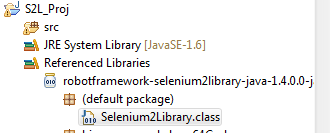
You should be able to see the class under referenced libraries if you configured your build path correctly. It wouldn't hurt to do run Clean... on your project.
kamirru
Nov 20, 2013, 3:07:36 AM11/20/13
to robotframe...@googlegroups.com
Hi,
I can see the external library (althouht not in the referenced library "folder") but the import is still not possible:/
But the .jar is in the built path...
I can neither create an object of the class nor extend it.
Any idea how to solve it?
Markus Bernhardt
Nov 20, 2013, 3:23:08 AM11/20/13
to cami...@gmail.com, robotframe...@googlegroups.com
No, it is not in your build path.
The lib has to show under "Referenced Libraries".
Try to right click on the library and select "Add to build path".
The lib has to show under "Referenced Libraries".
Try to right click on the library and select "Add to build path".
kamirru
Nov 20, 2013, 3:36:12 AM11/20/13
to robotframe...@googlegroups.com
There is no option "add to biuld path"
I have:
Build path ->
- remove from build path
- migrate jar files
- configure build path
In configure build path I have both RF library and the selenium2library.
RF is in the biuld path for sure then eclise recognizes imports, and the RF.jar is not in the "referenced libraries" folder.
Markus Bernhardt
Nov 20, 2013, 3:41:33 AM11/20/13
to cami...@gmail.com, robotframe...@googlegroups.com
Could you please press Strg + Shift + T and search for the Selenium2Library class.
Can you find it?
Can you find it?
kamirru
Nov 20, 2013, 3:59:20 AM11/20/13
to robotframe...@googlegroups.com
Yes,
i have found it.
Selenium2library - (default package)
Markus Bernhardt
Nov 20, 2013, 8:08:50 AM11/20/13
to cami...@gmail.com, robotframe...@googlegroups.com
Is it working now?
If no, could you please post the error reported and the java code line.
Cheers,
Markus
If no, could you please post the error reported and the java code line.
Cheers,
Markus

chaudha...@gmail.com
Jan 1, 2015, 3:53:42 AM1/1/15
to robotframe...@googlegroups.com, cami...@gmail.com
Hi Markus,
Thanks for the help so far...
When I try to run the code as mentioned by Kevin... I get the below error:
"java.lang.ClassCastException: org.python.core.PyObjectDerived incompatible with com.github.markusbernhardt.selenium2library.keywords.BrowserManagement"
Any idea how to resolve this?
Thanks,
Geeta C

Jackie Chen
May 21, 2016, 8:29:03 AM5/21/16
to robotframework-users
Hi Keven - I call "mvn package" and it failed at this line:
WebDriver driver = Selenium2Library.getLibraryInstance().getBrowserManagement().getCurrentWebDriver();
I need to import "import com.github.markusbernhardt.selenium2library.Selenium2Library;" (not the Selenium2Library which is in the default package)...
Please suggest what i need to do to fix this... I have Selenium2Library in both the default package and the com.github.markusbernhardt package.
thank you.
Markus Bernhardt
May 21, 2016, 9:02:13 AM5/21/16
to jackie....@gmail.com, robotframework-users
Could you please use a more recent version of S2L?
For new projects I would suggest to use the python version of S2L, because my java-port is now somewhat outdated, not compatible with RobotFramework 3.0 (I believe) and because of the availability of newer Jython releases also not needed anymore.
Have fun,
Markus
--
You received this message because you are subscribed to the Google Groups "robotframework-users" group.
To unsubscribe from this group and stop receiving emails from it, send an email to robotframework-u...@googlegroups.com.
To post to this group, send email to robotframe...@googlegroups.com.
Visit this group at https://groups.google.com/group/robotframework-users.
For more options, visit https://groups.google.com/d/optout.
Jackie Chen
May 21, 2016, 9:37:56 AM5/21/16
to robotframework-users, jackie....@gmail.com
Hi Markus - What i would like to do is to write robotframework test cases that call java keywords, for example, some test scenarios that Selenium2Library built-in cannot do. So, i need to pass the WebDriver instance to those java methods to be able to automate tests
for example:
@RobotKeyword("selectCalendar")
public static void selectCalendar() {
// need driver instance from Robot test cases
displayedMonthLs = driver.findElements((By.xpath(".....")));
}
Could you please suggest what possible options that allow me to accomplish this? I'm now trying to use RobotFramework with Java keywords. Or i need to use python keywords instead?
Thank you.
On Saturday, 21 May 2016 20:02:13 UTC+7, Markus Bernhardt wrote:
Could you please use a more recent version of S2L?For new projects I would suggest to use the python version of S2L, because my java-port is now somewhat outdated, not compatible with RobotFramework 3.0 (I believe) and because of the availability of newer Jython releases also not needed anymore.Have fun,Markus
Am 21.05.2016 um 14:29 schrieb Jackie Chen <jackie....@gmail.com>:
Hi Keven - I call "mvn package" and it failed at this line:WebDriver driver = Selenium2Library.getLibraryInstance().getBrowserManagement().getCurrentWebDriver();I need to import "import com.github.markusbernhardt.selenium2library.Selenium2Library;" (not the Selenium2Library which is in the default package)...Please suggest what i need to do to fix this... I have Selenium2Library in both the default package and the com.github.markusbernhardt package.thank you.
On Tuesday, 19 November 2013 02:56:08 UTC+7, Kevin O. wrote:You should be able to see the class under referenced libraries if you configured your build path correctly. It wouldn't hurt to do run Clean... on your project.
--
You received this message because you are subscribed to the Google Groups "robotframework-users" group.
To unsubscribe from this group and stop receiving emails from it, send an email to robotframework-users+unsub...@googlegroups.com.
Kevin O.
May 23, 2016, 2:27:03 PM5/23/16
to robotframework-users, jackie....@gmail.com
See this post from Markus.

thanga roja
Apr 1, 2017, 8:02:57 PM4/1/17
to robotframework-users, jackie....@gmail.com
HI,
On Monday, May 23, 2016 at 11:57:03 PM UTC+5:30, Kevin O. wrote:
I followed the above conversation and got into the below error, It seems java Connection issue with server. Kindly help me, how to proceed further.
20170402 04:54:39.583 : INFO : Opening browser 'Chrome' to base url 'https://accounts.google.com/Login#identifier'
20170402 04:54:44.719 : FAIL : java.lang.ClassCastException: org.python.core.PyObjectDerived cannot be cast to com.github.markusbernhardt.selenium2library.keywords.BrowserManagement
20170402 04:54:47.001 : INFO : Got this failure java.net.ConnectException: Connection refused: no further information: localhost/0:0:0:0:0:0:0:1:58737 during connect (<_realsocket at 0x48 type=client open_count=1 channel=[id: 0x05d5f605, 0.0.0.0/0.0.0.0:58766] timeout=1.0>)
Ending test: KCC Automation.TestSuites.TestSeparateWebdriverInstance.Get Current Browser Test
On Monday, May 23, 2016 at 11:57:03 PM UTC+5:30, Kevin O. wrote:
See this post from Markus.
thanga roja
Apr 1, 2017, 8:07:49 PM4/1/17
to robotframework-users, cami...@gmail.com
I have got the same cast Exception. Kindly provide me the solution if you resolved this.
Reply all
Reply to author
Forward
0 new messages