
Selenium IDE to Robot Framework
468 views
Skip to first unread message

Jordan Cloo
Apr 28, 2015, 2:42:19 PM4/28/15
to robotframe...@googlegroups.com
Hello,
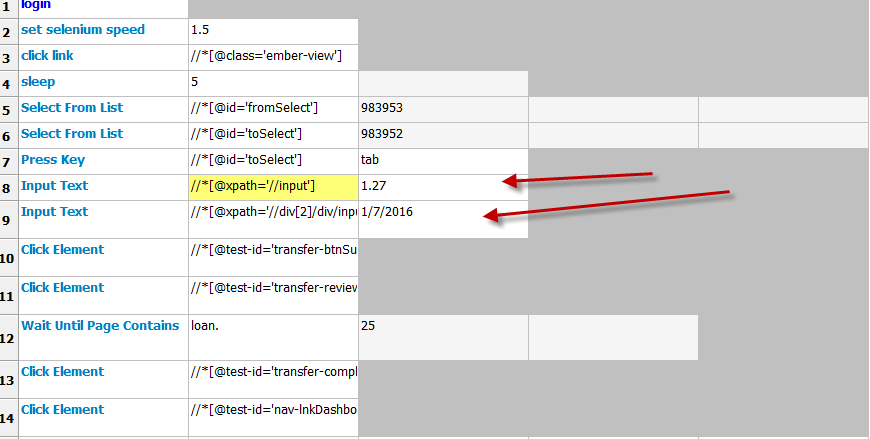
I am fairly new to coding and automation as well and am currently using Selenium IDE recording as a tool to help find elements I cannot find as easily on my own yet for automation. I have been having trouble finding an element to attach an enter text keyword to with selenium2library because the element only contains ember id's which change continuously. I used Selenium IDE to record it and returned a target that works which is
<td>type</td>
<td>//div[2]/div/input</td>
<td>1/27/2016</td>
and
<td>type</td>
<td>//input</td>
<td>1.27</td>
I am trying to convert these into Robot to achieve the same successful result by using the xpath but robot is not recognizing my command. Any help would be greatly appreciated as I am new to automation and trying to learn the ropes.

HelioGuilherme66
Apr 28, 2015, 8:12:52 PM4/28/15
to robotframe...@googlegroups.com
Please see the documentation of Selenium2Library at [1].
Here is the help for 'Input Text':
Name:
Input Text
Source:
Selenium2Library <test library>
Arguments:
[ locator | text ]
Types the given `text` into text field identified by `locator`.
See `introduction` for details about locating elements.
The `introduction` explains how to use xpath as locator. For example: Input Text | xpath=//div[2]/div/input | 1/27/2016
Since you are a SeleniumIDE user, I recommend the use of an exporter from selenese to RobotFramework at [2].
Jordan Cloo
Apr 29, 2015, 5:43:34 PM4/29/15
to robotframe...@googlegroups.com
Thank you so much for the help HelioGuilherme66. I was able to finish my automation and I will continue to look more into the robot framework formatter. Thanks again!
Reply all
Reply to author
Forward
0 new messages