
Screenshots are not generating for failure cases using robot framework if i am doing execution through Jenkins in Linux slave machine
148 views
Skip to first unread message

mani Punnavalli
Aug 19, 2020, 5:49:03 PM8/19/20
to robotframework-users
In Robot framework by default screenshots are generating for failure cases.I tried using Get page screenshot keyword, but still i can't see screenshots. Using the same script i can see screenshots if i am doing the execution in local machine.
I am executing with headless chrome in Linux slave with Jenkins. Same scripts are working in local but failing in Jenkins. I want to see screenshots for failures, but screenshots are not generating.
   Input Text                           ${login_password}    ${password}
capture page screenshot              password.png
click on next                        ${password_next}       ${login_password}
capture page screenshot              next.png
I tried with below script to store the screenshots. It is working in Local. But screenshots are not generating if i m doing execution in Linux slave.
Capture Image
[Arguments] ${imagename}
${path}= Catenate SEPARATOR= ${EXECDIR} / Screenshots / ${imagename} . png
capture page screenshot ${path}

Tatu Aalto
Aug 20, 2020, 1:31:11 AM8/20/20
to mani.pun...@gmail.com, robotframework-users
Hi
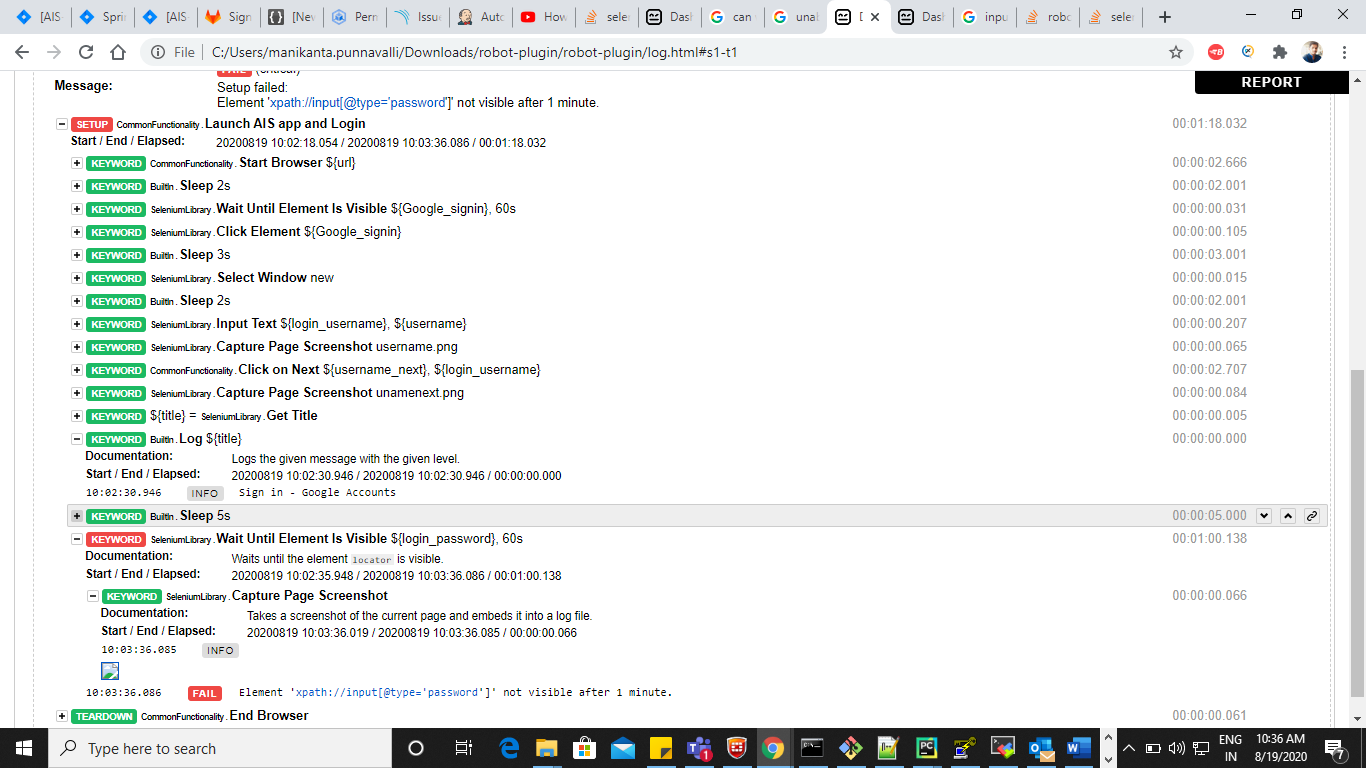
The screenshots are taken, the picture shows that there is empty image location in the log.html. Because Jenkins can be used in many different ways, I am going to assume few things. I think you are using a plugin or something else which copies the report and log files to a new folder/location. But you don't copy the screenshots files to the same folder and therefore log is not able to display the pictures for you. To solve this issue, fix your Jenkins configuration also to copy the screenshots to the new location.
Also, let's fix your assumption. Robot Framework doesn't interact with your application. The libraries you are using does the interaction. Therefore it's not correct to say that Robot Framework is not working, because it's the library that might be miss behaving.
-Tatu
Send from my mobile
Send from my mobile
--
You received this message because you are subscribed to the Google Groups "robotframework-users" group.
To unsubscribe from this group and stop receiving emails from it, send an email to robotframework-u...@googlegroups.com.
To view this discussion on the web visit https://groups.google.com/d/msgid/robotframework-users/4237c6e0-9b16-44f0-9979-5e34630ddbf5o%40googlegroups.com.

Manoj Kumar
Aug 20, 2020, 12:18:53 PM8/20/20
to aalto...@gmail.com, mani.pun...@gmail.com, robotframework-users
Hi
can you try and check once the below details in jenkins.
Post-build Actions -> Publish Robot Framework test results -> Other files to copy
**/*.png,**/*.jpg,**/*.jpeg
Regards
Manoj
To view this discussion on the web visit https://groups.google.com/d/msgid/robotframework-users/CAHWVKXXm1wBenrUR%2B95%2BRy4W8n_-UB-OtPBbU%3D-qZ6UWKrhaGQ%40mail.gmail.com.
mani Punnavalli
Aug 20, 2020, 12:41:08 PM8/20/20
to Manoj Kumar, Tatu Aalto, robotframework-users
Yes Manoj.issue resolved .I did the same thing.
Thanks for your help
Manoj Kumar
Aug 20, 2020, 12:42:54 PM8/20/20
to mani Punnavalli, Tatu Aalto, robotframework-users
Cool
Regards
Manoj
Reply all
Reply to author
Forward
0 new messages