
File Upload vs Choose Folder to upload in Box using Click Element Command in Selenium library in Robot Framework
5,889 views
Skip to first unread message

losersunsong
Feb 15, 2017, 3:52:19 AM2/15/17
to robotframework-users
I am trying to automate the upload process in box.com. Click the Upload Button, two drop down menu: Files and Folders. However, when I use Click Element command in Selenium library in Robot Framework to click Folders, the same "File Upload" windows popped up. It should pop up the "Choose Folder to upload" window.
Here is my robot script:
Click Element xpath=//a[@id='ui-id-3']
Any help will be apreciated.
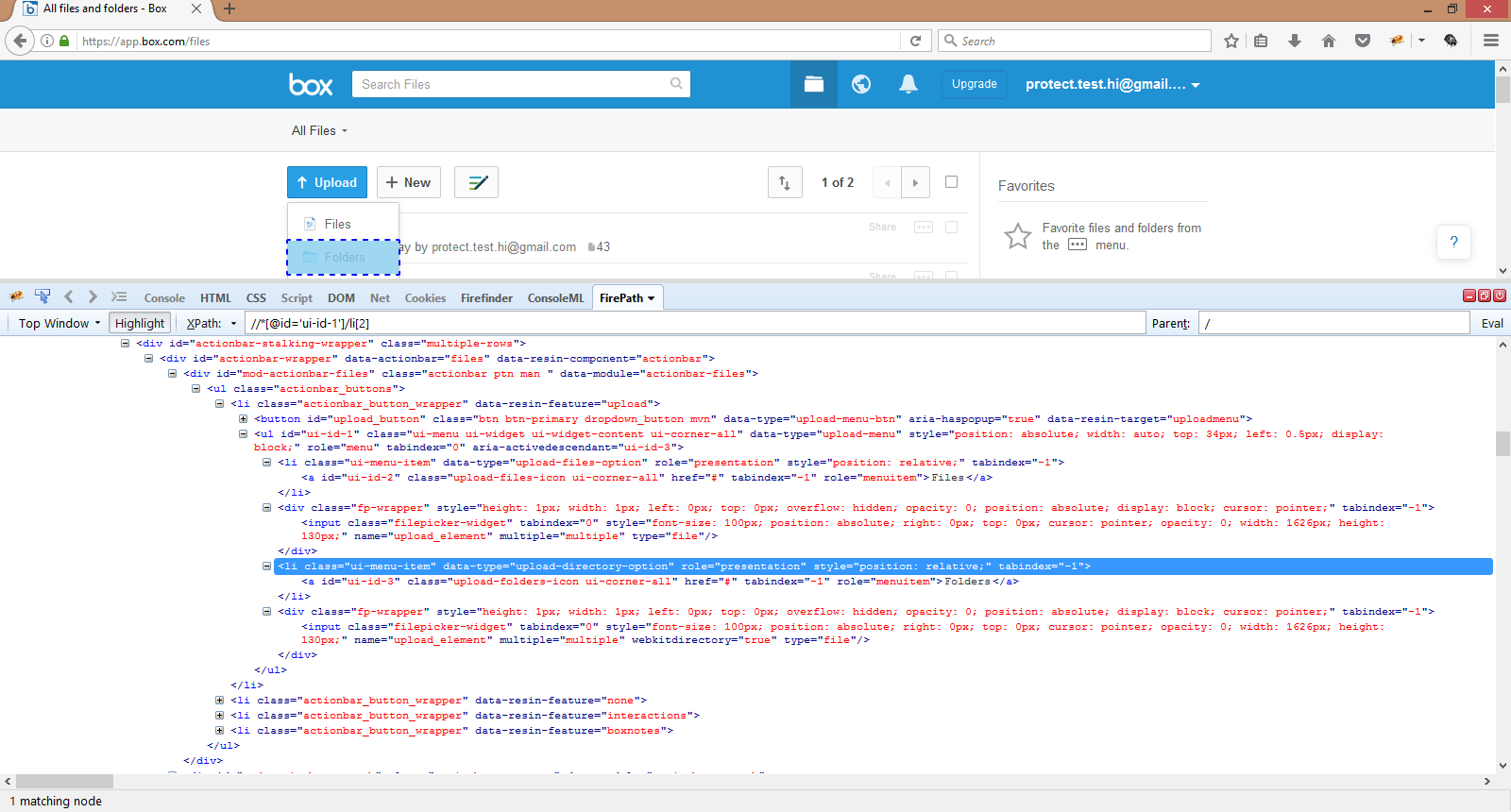
Here is my robot script:
Click Element xpath=//a[@id='ui-id-3']
Any help will be apreciated.

Tatu Aalto
Feb 15, 2017, 11:47:12 AM2/15/17
to losers...@gmail.com, robotframework-users
Ugh
Use only the "Choose File" keyword and do not perform any other actions with the element. Then it should work fine.
-Tatu
Send from my mobile
Send from my mobile
--
You received this message because you are subscribed to the Google Groups "robotframework-users" group.
To unsubscribe from this group and stop receiving emails from it, send an email to robotframework-users+unsub...@googlegroups.com.
To post to this group, send email to robotframework-users@googlegroups.com.
Visit this group at https://groups.google.com/group/robotframework-users.
For more options, visit https://groups.google.com/d/optout.
losersunsong
Feb 15, 2017, 2:57:37 PM2/15/17
to robotframe...@googlegroups.com, losers...@gmail.com
Thank you, Tatu. When I use the folder name as the parameter of "Choose File", it complains the folder"does not exist on the local file system"
Then I tried two approaches by using "Choose File" with a file as the parameter.
(1)
Script:
(2)
Script:
ScreenShot of Result:
Not sure how to input both Folder name and file name.

Thanks,
Song
Then I tried two approaches by using "Choose File" with a file as the parameter.
(1)
Script:
Choose File id=ui-id-3 ${EXECDIR}${/}data${/}incident${/}sample.txt
(2)
Script:
Choose File xpath=//input[@webkitdirectory='true' and @name='upload_element'] ${EXECDIR}${/}data${/}incident${/}sample.txt
ScreenShot of Result:
Not sure how to input both Folder name and file name.
Thanks,
Song
On Wednesday, February 15, 2017 at 8:47:12 AM UTC-8, Tatu Aalto wrote:
UghUse only the "Choose File" keyword and do not perform any other actions with the element. Then it should work fine.-Tatu
Send from my mobile
On Feb 15, 2017 10:52 AM, "losersunsong" <losers...@gmail.com> wrote:
I am trying to automate the upload process in box.com. Click the Upload Button, two drop down menu: Files and Folders. However, when I use Click Element command in Selenium library in Robot Framework to click Folders, the same "File Upload" windows popped up. It should pop up the "Choose Folder to upload" window.
Here is my robot script:
Click Element xpath=//a[@id='ui-id-3']
Any help will be apreciated.

--
You received this message because you are subscribed to the Google Groups "robotframework-users" group.
To unsubscribe from this group and stop receiving emails from it, send an email to robotframework-users+unsub...@googlegroups.com.
To post to this group, send email to robotframe...@googlegroups.com.

David
Feb 15, 2017, 5:56:22 PM2/15/17
to robotframework-users, losers...@gmail.com
Well, choose file was never meant to support "choose folder", so you can't pass a folder that way. I don't think Selenium/WebDriver (and hence Selenium2Library) has a select/upload folder option, only one for files. So even if you could bring up that dialog, you'd have no way to select the folder w/o using an external tool to handle the Selenium shortcoming (e.g. AutoItLibrary, Sikuli, etc.).
You might want to post the question to a Selenium/WebDriver forum, with the exception of the RF keyword and Selenium2Library specifics, it's really a Selenium (not RF) question.
losersunsong
Feb 15, 2017, 7:43:53 PM2/15/17
to robotframework-users
Thank you, David. I will try to use Sikuli.
Song
Tatu Aalto
Feb 16, 2017, 2:15:50 AM2/16/17
to David Luu, losers...@gmail.com, robotframework-users
Ugh
Selenium doesn't have API for Choose File either. Choose File is just a wrapper for Input Text keyword (which is a wrapper for the corresponding method in the selenium API), with a check does the file actually exist. If you replace Choose File with Input Text does it then work?
If it works, would you create issue and ask for enhancement for Choose File to also support folders too.
-Tatu
Send from my mobile
Send from my mobile
To unsubscribe from this group and stop receiving emails from it, send an email to robotframework-users+unsubscrib...@googlegroups.com.
To post to this group, send email to robotframe...@googlegroups.com.
Visit this group at https://groups.google.com/group/robotframework-users.
For more options, visit https://groups.google.com/d/optout.
--
You received this message because you are subscribed to the Google Groups "robotframework-users" group.
To unsubscribe from this group and stop receiving emails from it, send an email to robotframework-users+unsub...@googlegroups.com.
To post to this group, send email to robotframework-users@googlegroups.com.
losersunsong
Feb 16, 2017, 2:32:19 PM2/16/17
to robotframework-users
Hi Tatu,
I just tried the input text. The script is: (there is a folder c:\test with files in it)
Selenium2Library.Input Text xpath=//input[@webkitdirectory='true' and @name='upload_element'] c:${/}test
The running result is:
==============================================================================
Test :: This test script contains the BAT tests
==============================================================================
Testing Environment: Setup | PASS |
------------------------------------------------------------------------------
Test Upload Folder | FAIL |
WebDriverException: Message: File not found: c:\test
------------------------------------------------------------------------------
Test :: This test script contains the BAT tests | FAIL |
2 critical tests, 1 passed, 1 failed
2 tests total, 1 passed, 1 failed
Thanks,
Song
Tatu Aalto
Feb 16, 2017, 2:57:44 PM2/16/17
to losers...@gmail.com, robotframework-users
Ugh
Sorry but I don't understand what the results actually are.
-Tatu
Send from my mobile
Send from my mobile
losersunsong
Feb 22, 2017, 12:28:33 AM2/22/17
to robotframework-users, losers...@gmail.com
Hi Tatu,
Basically it does not recognize the folder I gave it to the command. c:\test is a valid directory, but the command rejected it. I solved the problem by using sikuli. Actually, it is just 2-line of scripts by using sikuli. The robot framework is very well integrated with Sikuli which is a surprise to me.
Thanks,
Song
To post to this group, send email to robotframe...@googlegroups.com.
Reply all
Reply to author
Forward
0 new messages