
How to test the contents of a pop up window using robot framework
20,793 views
Skip to first unread message

sistla bhaskar
May 24, 2012, 6:46:57 AM5/24/12
to robotframework-users
Hie Guys,
Can anyone please help me how to test the contents of a pop up window
that gets opened after clicking a button using robot framework.
Regards,
Bhaskar.
Can anyone please help me how to test the contents of a pop up window
that gets opened after clicking a button using robot framework.
Regards,
Bhaskar.

dschulten
May 24, 2012, 8:41:22 AM5/24/12
to robotframe...@googlegroups.com
Hi Bhaskar,
This is how I test popups:
Select Window ${windowId} # Focus popup window
Wait Until Page Loaded
Location Should Be ${popupUrl}
Comment Return to previous page
Select Window
This is how I test popups:
Select Window ${windowId} # Focus popup window
Wait Until Page Loaded
Location Should Be ${popupUrl}
Comment Return to previous page
Select Window
sistla bhaskar
May 24, 2012, 8:48:42 AM5/24/12
to robotframework-users
Hie,
Firstly Thank u for ur reply.
I have tired using the keyword "Select window" previously and
specified the title of the pop up as window id.
But it didn't work out.
Regards,
Bhaskar.
On May 24, 5:41 pm, dschulten <dietrich.schul...@googlemail.com>
wrote:
Firstly Thank u for ur reply.
I have tired using the keyword "Select window" previously and
specified the title of the pop up as window id.
But it didn't work out.
Regards,
Bhaskar.
On May 24, 5:41 pm, dschulten <dietrich.schul...@googlemail.com>
wrote:

Kevin O.
May 24, 2012, 11:06:28 AM5/24/12
to robotframe...@googlegroups.com
You didn't specify which test library you are using.
There are two keywords in Selenium2Library that are useful for this. They both return the text contents of the pop-up after dismissing it.
http://rtomac.github.com/robotframework-selenium2library/doc/Selenium2Library.html#Get Alert Message
Kevin

mallik swamy
May 25, 2012, 5:38:57 AM5/25/12
to robotframework-users
Hi bhaskar,
If you are using seleniumLibrary then try with GetAlertMessage
keyword.I hoe it works
I did it in the same way.
ClickButton Submit css=input[type="submit"]
GetAlertMessage
If you are using seleniumLibrary then try with GetAlertMessage
keyword.I hoe it works
I did it in the same way.
ClickButton Submit css=input[type="submit"]
GetAlertMessage

ahirraok3
May 15, 2019, 7:01:19 AM5/15/19
to robotframework-users
Hi
Can anyone help me with the below issue?
Sing up page is a pop-up window.
I am quite new to this and don't know how to handle this.
Code used:
Open Browser https://www.happyeasygo.com/ gc
Click Element xpath://body[@class='modal-open']/div[1]/div[1]/div[1]/div[1]/a[1]
Maximize Browser Window
sleep 5
Click Element xpath://a[contains(text(),'Sign in')]
Input Text xpath://input[@id='user_phone'] 959****701
and it is failing with Element with locator 'xpath://input[@id='user_phone']' not found.

Anthony fromtheuk
May 15, 2019, 7:28:44 AM5/15/19
to robotframework-users
Input Text xpath:/html[1]/body[1]/div[13]/div[1]/div[2]/div[1]/div[1]/div[2]/div[1]/div[1]/form[1]/dl[1]/dd[1]/div[2]/input[1] 12345
Robotautomation
May 15, 2019, 8:34:17 AM5/15/19
to robotframework-users
Hello Anthony,
I have tried the evrey solution like XPath, CSS but it is failing with Element not found error.
This is failing because of an element where I am adding text is a part of the pop-up window and that why it is failing.
do you know how to handle you up windows in robot framework?
Anthony fromtheuk
May 15, 2019, 8:39:19 AM5/15/19
to robotframework-users
Exactly what I gave you works, i tried it, you do not have a "pop up" it is just a modal
Robotautomation
May 15, 2019, 9:24:59 AM5/15/19
to robotframe...@googlegroups.com

can you please suggest the solution for this?
Anthony fromtheuk
May 15, 2019, 4:28:21 PM5/15/19
to robotframework-users
Replacing your id selector with that xpath worked for me, only difference is I had no sleep at all. Anyway here is a post on how someone dealt with what you mention - https://stackoverflow.com/questions/54869083/unable-to-handle-notification-pop-up-using-robot-framework

Chompoonuch Rassameeamornrat
May 16, 2019, 1:03:37 AM5/16/19
to robotframework-users
Hi,
I am quite new in Robot Framework as well. I tried following your script and inspected the website.
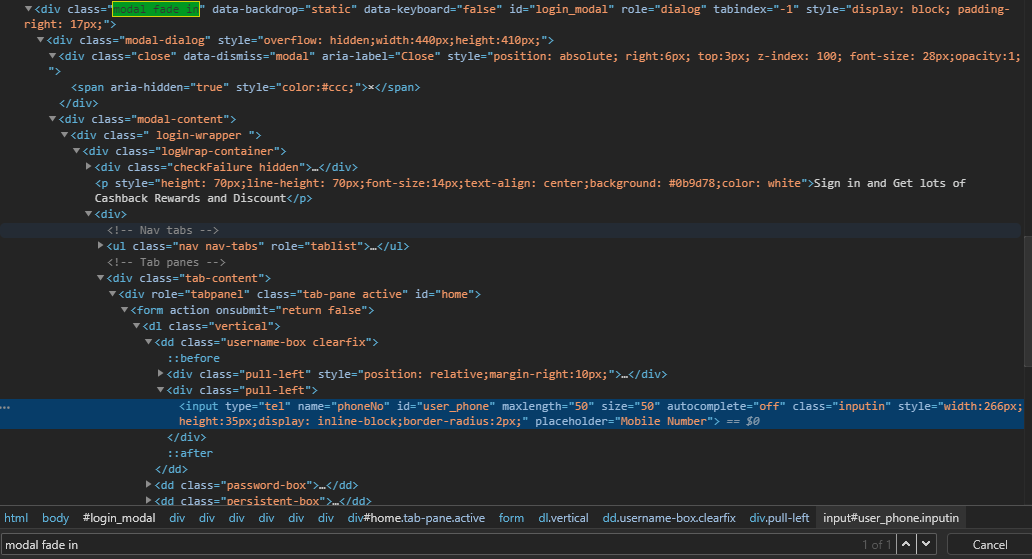
I found that there is a class control the log in dialog called class="modal fade in" when this class is present once, you will able to find the xpath of log in field.
Before you click the Sign in element, the class is class="modal fade" and there is no xpath of log in field in it (the xpath is not present yet until you trigger it once). That why you get the error Element with locator not found.
So, the work around solution, is insert a line of
wait until page contains element //*[@class="modal fade in"]
after you click the Sign in element, before you input the phone number.
It work for me. Hope it will work for you as well :)
Robotautomation
May 16, 2019, 5:19:33 AM5/16/19
to robotframework-users
thanks, both of you.
It is working now used both the solution.
Just one question Chompoonuch could you please share the information- where you find this //*[@class=" modal fade in"], or this class is common for all similar types of the issue (e.g dialog box or sign in the page of other sites ).
If you have any documentation regarding this could you please share with me.
Chompoonuch Rassameeamornrat
May 16, 2019, 5:46:07 AM5/16/19
to robotframework-users
Hi Robotauomation,
Glad that you made it !
I am still new as well but I can share from what I know, this class is not the common. I think it depends on how the website is coded, how the website structure is.
I found this one from inspecting the website element, phone number field, and navigating up to the sign in form.
Then I compared with the new loaded website without clicking 'sign in', I can't find the xpath of phone number field.
So I compared what is the different after clicking 'sign in', and I saw that class is changed.
I am sorry, I don't have the reference for this. I just try to find where is the locator come from, and the order of how things is happening in the website.
I have learnt a course from Udemy with Byran, this course help me a lot about locator, if you are interested.
Robotautomation
May 16, 2019, 7:51:08 AM5/16/19
to robotframework-users
Tried to search same but no luck.
Could you please help me with the steps or screenshot.
Anthony fromtheuk
May 16, 2019, 7:58:45 AM5/16/19
to robotframe...@googlegroups.com
Chompoonuch Rassameeamornrat
May 16, 2019, 11:25:51 AM5/16/19
to robotframe...@googlegroups.com
Hi !,
and this is the class="modal_fade" screenshot, before clicking sign in
You can see both have the id="login_modal" that they refer to the same element but have different class value.

Reply all
Reply to author
Forward
0 new messages