
break point debug in robot

chuny...@alcatel-sbell.com.cn
| Issue 1282: |
Document how to debug execution with `pdb` in User Guide introduced how to break into debugging in robot. |
but I can not make it work.
what I did :
I created a python keyword send_cli_command, and insert syntax "import sys, pdb; pdb.Pdb(stdout=sys.__stdout__).set_trace()" in it.
I run the keyword and expect a break point . but robot did not stop at the point, insteadly, following error was report :
ERROR Error in file '/repo/root/robot/ATS/TEST/test.txt': Importing test library '/repo/root/robot/ATS/TEST/get_var.py' failed: BdbQuit Traceback (most recent call last): File "/repo/root/robot/ATS/TEST/get_var.py", line 8, in <module> pdb.Pdb(stdout=sys.__stdout__).set_trace() File "/opt/robot/Python-2.7/lib/python2.7/bdb.py", line 53, in trace_dispatch return self.dispatch_return(frame, arg) File "/opt/robot/Python-2.7/lib/python2.7/bdb.py", line 91, in dispatch_return if self.quitting: raise BdbQuit
anyone can help to let me know the correct usage ?
thanks in advance.

Kevin O.
GUO Chunyan
Hi:
Thanks for your help. But it didn’t work till now. Any more advice?
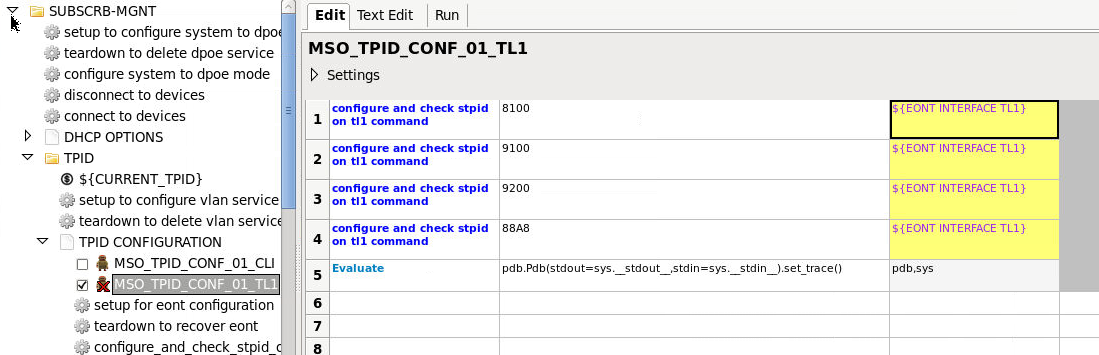
Yes, I am using RIDE. And I attached the test case and error log to display my usage.

--
You received this message because you are subscribed to the Google Groups "robotframework-users" group.
To unsubscribe from this group and stop receiving emails from it, send an email to
robotframework-u...@googlegroups.com.
To post to this group, send email to
robotframe...@googlegroups.com.
Visit this group at
http://groups.google.com/group/robotframework-users.
For more options, visit https://groups.google.com/groups/opt_out.
Kevin O.
GUO Chunyan
I had tried in pybot command mode. Yes, it work.
From: robotframe...@googlegroups.com [mailto:robotframe...@googlegroups.com]
On Behalf Of Kevin O.
Sent: 2013年12月10日
11:26
To: robotframe...@googlegroups.com
Cc: korm...@gmail.com
Subject: Re: break point debug in robot
Have you tried running from the command line? When running from RIDE, there is nowhere to get input. I am sure there is a way to get it to work in RIDE, but not sure if it is worth the extra effort.
I was getting the same problem as you without setting stdin when I wrote that linked post - after adding the stdin arg, it worked. Now, trying again, it is working without setting stdin. Strange.
--