
"Listener" for RIDE Test Runner
380 views
Skip to first unread message

Martin Taylor
Jul 7, 2011, 9:27:01 AM7/7/11
to robotframework-users
From the little I know about the RIDE Test Runner plug-in, it uses a
"Listener" that interfaces with the running pybot command and updates
the display with PASS/FAIL information. At the end of the test run it
enables the Report and Log buttons on the GUI so you can directly
access these HTML files from the RIDE GUI. We use the "Custom Script"
feature of the Test Runner to run a Python script that does the set-up
necessary for our application, before calling "pybot".
On my Win7 Professional PC this works fine, as it does on the PCs of
most of my team here at TI. The problem is that it doesn't seem to
work on my Director's PC! When she runs tests with our Custom Script,
it takes a VERY LONG TIME to get started and, while the tests
eventually run normally and the log.html and report.html are produced
to the RIDE temporary OUTPUT_DIR, the "Listener" doesn't seem to run.
The PASS/FAIL information for each run test case is not set in the
RIDE Test Runner GUI and, at the end of the test, the Report and Log
buttons on the GUI are not enabled.
Does anyone have any idea why the Listener might not run and how to
troubleshoot and fix this problem? I'm guessing that as a Director at
TI she may have some tighter security policy imposed on her PC by our
IT department and that this may be blocking communication between the
Listener and the running pybot. How could I verify this guess and, if
its true, what type of access on what ports would I need get IT to
open up in order to make this work.
Thanks in advance for any tips and suggestions!
Martin
"Listener" that interfaces with the running pybot command and updates
the display with PASS/FAIL information. At the end of the test run it
enables the Report and Log buttons on the GUI so you can directly
access these HTML files from the RIDE GUI. We use the "Custom Script"
feature of the Test Runner to run a Python script that does the set-up
necessary for our application, before calling "pybot".
On my Win7 Professional PC this works fine, as it does on the PCs of
most of my team here at TI. The problem is that it doesn't seem to
work on my Director's PC! When she runs tests with our Custom Script,
it takes a VERY LONG TIME to get started and, while the tests
eventually run normally and the log.html and report.html are produced
to the RIDE temporary OUTPUT_DIR, the "Listener" doesn't seem to run.
The PASS/FAIL information for each run test case is not set in the
RIDE Test Runner GUI and, at the end of the test, the Report and Log
buttons on the GUI are not enabled.
Does anyone have any idea why the Listener might not run and how to
troubleshoot and fix this problem? I'm guessing that as a Director at
TI she may have some tighter security policy imposed on her PC by our
IT department and that this may be blocking communication between the
Listener and the running pybot. How could I verify this guess and, if
its true, what type of access on what ports would I need get IT to
open up in order to make this work.
Thanks in advance for any tips and suggestions!
Martin

Sarah McK
Aug 26, 2014, 1:36:17 PM8/26/14
to robotframe...@googlegroups.com
Did you ever solve this? I am having the same issue using a batch script via custom script -- Pass / Fail counts in the RIDE Gui are not updated and no buttons appear when test is completed. I do see the console output text in the RIDE UI, but the status bar just sort of faintly flashes green.
Environment
Windows 7
RIDE 1.3
python-2.7.8.amd64.msi
The batch script calls our jar file that contains RF, selenium2java and our own internal java library
I see RIDE is creating some initial output that shows an argumentfile (this just points to the auto-gen'd outputdirectory which is empty) and the listener shows a port and then "False". I do not see that port specified anywhere when running netstat so I suspect it does not set up the listener or otherwise fails.
command: "C:\Users\<username>\Desktop\BVT IE11 Three.bat" --argumentfile c:\users\<username>\appdata\local\temp\RIDEzfe5cz.d\argfile.txt --listener C:\Python27\lib\site-packages\robotide\contrib\testrunner\TestRunnerAgent.py:54013:False C:\Users\<username>\Downloads\bvt_ie11_three.tsv
Here is the content of my batch script (we have a bunch of custom flags at the command line):
C:\Users\<username>\Desktop>java -jar c:\Users\<username>\vbot-1.1-SNAPSHOT-execute.jar -reportDir \\QA\V3V10\VBOTQA\reports -file C:\Users\<username>\Downloads\bvt_ie11_three.tsv -remote sauce -platform "win7|ie|11"
Is the listener not getting setup? Is that because I need jybot installed or is something else going on here.
thanks,
Sarah

Kevin O.
Aug 26, 2014, 5:00:19 PM8/26/14
to robotframe...@googlegroups.com
It looks like your batch file is invoking a custom main() in Java that has its own arguments. In order to pass in the listener arguments that are being passed into the batch file, this main would need need a listener argument itself or provide some way to pass through arguments to org.robotframework.RobotFramework.main/run.
You do not need jybot. It is just a wrapper to call org.robotframework.RobotFramework.run, which I believe your Java class is already doing.
What's happening now is the listener argument is passed to your batch file which does nothing with it, so no listener is used.
FYI, here is an example of passing all arguments passed to a batch file (%*) to a different application:
java org.robotframework.RobotFramework run %*
Provide the source code of the main class specified in the JAR and we might be able to help you more.

Neeraj Vora
Aug 27, 2014, 11:47:38 AM8/27/14
to robotframe...@googlegroups.com
Hello Kevin, I am working with Sarah on the issue she reported above. We really appreciate your response and as per what you said I am trying to pass in the listener argument into RobotFramework.
The way we run it is through org.robotframework.RobotRunner.run method and there are some parameters we pass in like --outputdir and --P for user directory. I tried adding --listener passing in the listener coming from RIDE (C:\Python27\lib\site-packages\robotide\contrib\testrunner\TestRunnerAgent.py:54013:False) but that did not seem to make any difference. Is what I am doing correct or is it possible --listener is not the right way to pass this in?
Thanks a bunch again for your help.
Kevin O.
Aug 27, 2014, 12:28:43 PM8/27/14
to robotframe...@googlegroups.com
One possibility is hitting a couple of bugs in RIDE. If you start your test and quickly hit stop, the launched process keeps going. If you press start again, the listener does not connect (uses same port). Ending the processes launched by RIDE fixes this issue.
I would try putting in extra logging or some debug statements.
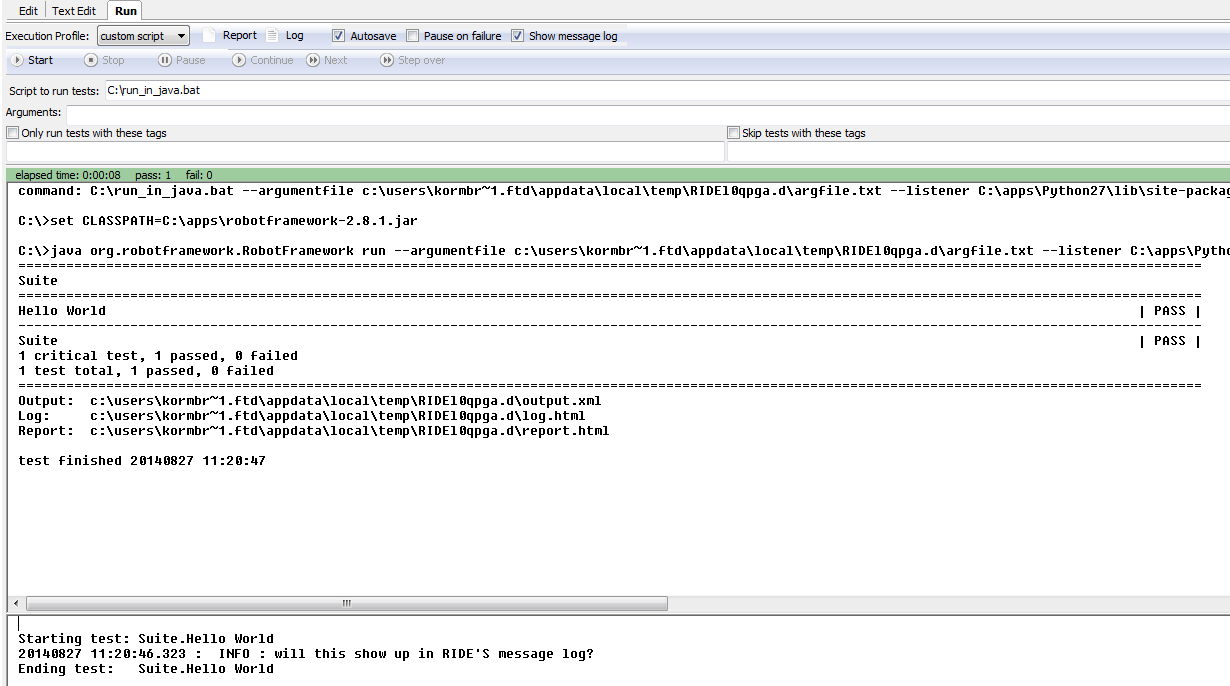
It certainly is possible to get this working. The screenshot was produced using a batch file with this contents:
set CLASSPATH=C:\apps\robotframework-2.8.1.jar
java org.robotframework.RobotFramework run %*
Neeraj Vora
Aug 27, 2014, 2:18:47 PM8/27/14
to robotframe...@googlegroups.com
Thanks a lot Kevin! I have got this to work.
Reply all
Reply to author
Forward
0 new messages