REMIX AS SOLE OS NEED STEP BY STEP

162 views
Skip to first unread message

Larry Underhill

unread,
May 11, 2016, 12:40:36 PM5/11/16
to Remix OS for PC
I have been unable to find working step by step instructions to install Remix OS on internal HD as only OS. I have tried all of the ones that I could find and failed. They are all lacking important steps.

Can't anyone write a procedure with all steps explained? Please?

RASelkirk

unread,
May 11, 2016, 6:46:34 PM5/11/16
to Remix OS for PC
I had to install Linux first, then make a separate partition for OSR, then copy/paste all the OSR files to the new partition, then alter GRUB for the boot menu. Once that's done, the first time you run OSR it will "install" to the new partition and won't require the install again. I now have a triple-boot system with Linux, OSR & Win10...

Russ

penguin1...@yahoo.com

unread,
May 11, 2016, 6:51:02 PM5/11/16
to Remix OS for PC
I tried this on VirtualBox with Legacy BIOS/MBR. You can try to use UEFI/GPT if you want it.
You will need a Linux Live Media (Live CD or Live DVD) or Linux Rescue System (every Linux installation media has it, I believe). You will need it twice, before Remix OS installation and after Remix OS installation, just before Remix OS first boot.

First, you have to boot to Linux Live Media/Linux Recue System. Create a partition with EXT4 filesystem (Windows can't do this, this is why you need Linux). Since you want to install Remix OS as the only operating system, you can make a partition with all available free space on your hard drive.

After you create a EXT4 partition, reboot your PC, then boot to Remix OS disk. At GRUB screen insert 'INSTALL=1' in boot option, this will head you to Remix OS installation procedure. In partition choice, you can choose to format with EXT4 (again) or not (since you already formatted it). In system read/write option, choose no, so, you will be able to get OTA update in future. In GRUB install, hit 'yes'. In GRUB EFI install, hit no (if your system is UEFI/GPT, then you should choose no to install GRUB and choose yes to install GRUB EFI, you know it). Then follow the installation until finished.

After finished installation, reboot your PC again to Linux Live Media or Linux Rescue System, don't boot to your installed Remix OS. In Linux Live Media/Linux Rescue System, open/mount your Remix OS partition, you will find 2 main folder/directory, 'android-YYYY-MM-DD' (YYYY = 4 digit years, MM = 2 digit months and DD = 2 digit dates) and 'grub' folder/directory. You will see another folder/directory called 'lost+found', but that is part of EXT4 filesystem, not Remix OS it self. Rename 'android-YYYY-MM-DD' folder/directory to 'RemixOS'. Then open 'grub' folder/directory, open 'menu.lst' file, edit all 'android-YYYY-MM-DD' strings to 'RemixOS', delete 'CREATE_DATA_IMG=1' string, then add 'DATA=/RemixOS/data/ (this will make Remix OS use all available free space of your EXT4 partition into your Remix OS data). You can edit grub timeout in menu.lst too to 1 or even 0, so you don't have to wail too long on every Remix OS boot. After you edit all necessary strings, save that file. Then reboot to your installed Remix OS.

I hope that is good enough to understand. :D

Larry Underhill

unread,
May 11, 2016, 7:05:16 PM5/11/16
to Remix OS for PC
Thanks but I need a procedure for a bunch of high school kids. Anyone else?

Augusto Ícaro Farias da Cunha

unread,
May 12, 2016, 9:21:55 AM5/12/16
to Remix OS for PC
Ok Lary, tell me about your background first... What other system do you have in other machines? What is your experience with linux or in simple way with ubuntu? Do you know modify hdd partitions?
Thanks,

Larry Underhill

unread,
May 12, 2016, 1:58:37 PM5/12/16
to Remix OS for PC
I'm a pretty technology savvy person. I can do some command line things. I can create and format hdd partitions. I can use vim editor. I am an experienced teacher. I will be working with high school kids this summer and have access to a lot of Lenovo ThinkPad laptops.

Firestar9114

unread,
May 15, 2016, 1:52:19 PM5/15/16
to Remix-O...@googlegroups.com
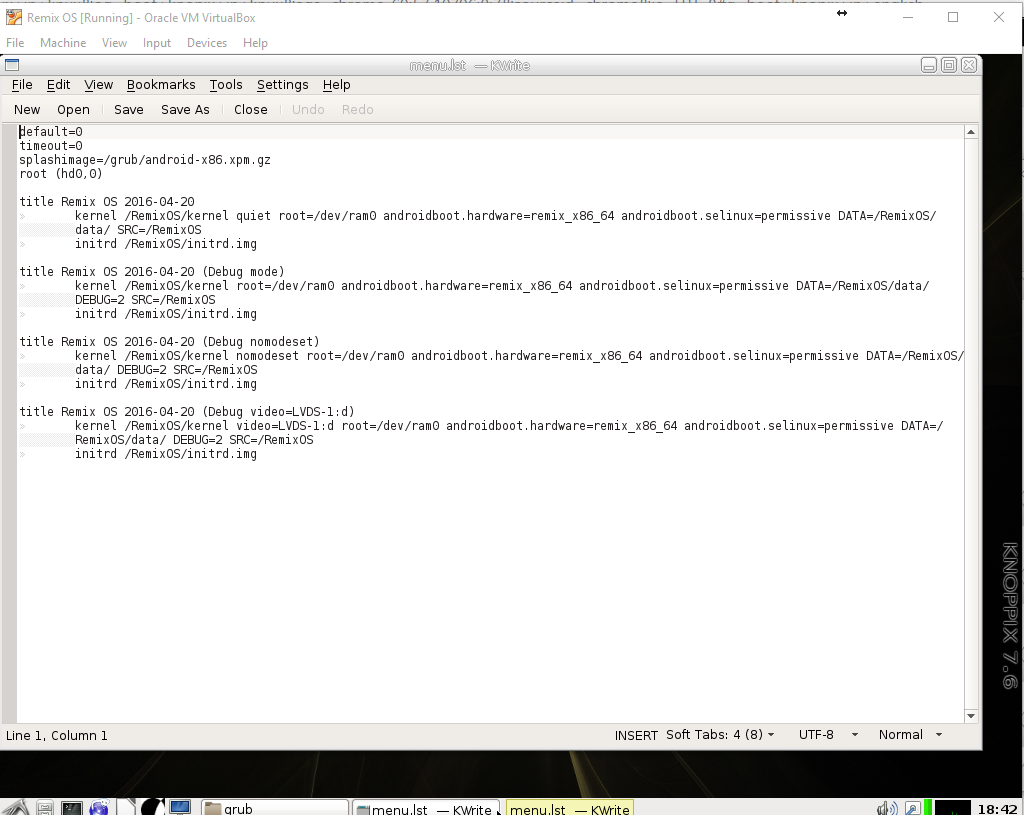
I managed to install it and open the files with knoppix recovery media, but there is some kind of permissions error with changing the name.  when I try to take control of ownership and editing privlages in properties it says I dont have permission again.  I also can't find the CREATE_DATA_IMG=1 string although I did locate menu.lst, but I didn't edit it as I wasn't sure what to change upon failing to find that string.

this is what I see in the menu.lst file:


penguin1...@yahoo.com

unread,
May 15, 2016, 4:48:30 PM5/15/16
to Remix OS for PC
You have to login as root to your Knoppix or open file manager as root to get read and write permission. You can read at Knoppix manual page on their website or forum, maybe, how to do that.

It doesn't matter if you don't find 'CREATE_DATA_IMG' strings, just add '/RemixOS/data/' to 'DATA=' strings, so it would be 'DATA=/RemixOS/data/'.

Firestar9114

unread,
May 15, 2016, 7:58:05 PM5/15/16
to Remix OS for PC
OK, I used gksudo nautilus to get a file browser with root privliges and made those changes, but upon restarting it looks like it failed to boot again.  when I reboot into knoppix and check the files they are still changed so it did indeed save.  Is there something else I need to do to make the VM recognize RemixOS as a OS?  Here are some screenshots of what I'm seeing:


penguin1...@yahoo.com

unread,
May 15, 2016, 8:21:50 PM5/15/16
to Remix OS for PC
Looks like Grub didn't installed correctly.

In above tutorial I used '2.6 / 3.x / 4.x (64-bit)' in version choice, but I increase the RAM to 1 GB. Maybe recreate Virtual Machine with that specific version will help.

range...@gmail.com

unread,
May 15, 2016, 8:48:47 PM5/15/16
to Remix OS for PC
Thank you for helping teach high schoolers the ways of alternate os installation, that is awesome!

I installed remix os on an SSD last night and it worked perfectly and this should work on any hdd though SSD is highly recommended. I had to mount the drive internally then booted into windows. Using windows disk manager, I formatted the drive from NTFS to ex-fat.
Note: If ex-fat is not an option in the format dropdown list, format to NTFS first then ex-fat should be a possibilty. After that I followed the steps in this video and it booted perfectly after I disabled my windows drive in the bios. I haven't tried this ssd in another comp so I don't know if it can change comps once made.

https://youtu.be/izfbWNzUm0Q

If this doesn't work let me know what happens and Ill see if I can come up with a solution. Also note I did not use a usb at any point, just Windows 10 and an empty SSD.

hypot...@gmail.com

unread,
May 15, 2016, 8:59:01 PM5/15/16
to Remix OS for PC
On Monday, 16 May 2016 00:58:05 UTC+1, Firestar9114 wrote:
> OK, I used gksudo nautilus to get a file browser with root privliges and made those changes, but upon restarting it looks like it failed to boot again.  when I reboot into knoppix and check the files they are still changed so it did indeed save.  Is there something else I need to do to make the VM recognize RemixOS as a OS?  Here are some screenshots of what I'm seeing:

What else is inside the grub folder

And @penguin Should the grub folder not be inside a boot folder? I.e. /boot/grub/menu.lst ?

penguin1...@yahoo.com

unread,
May 15, 2016, 10:29:00 PM5/15/16
to Remix OS for PC
No, it's on root of a partition.

But I will try create a Virtual Machine again, to see in case I was wrong. I will update soon.

penguin1...@yahoo.com

unread,
May 15, 2016, 11:07:23 PM5/15/16
to Remix OS for PC
Here it is,

@hypot, what do you think @Firestar9114 was doing wrong?

Firestar9114

unread,
May 15, 2016, 11:08:24 PM5/15/16
to Remix OS for PC
I finally got it.  I had apparently accidentally unchecked a check box in virtual machine that kept things from installing properly "hardware clock in UTC time"  once I fixed that I simply repeated ALL the steps and it works perfectly!  thanks for your help, and after trying knoppix I think I'll install that too.  It's a surprisingly awesome version of linux!  Oh, and I was also able to install the play store and reboot while retaining data even after ejecting the disk.  Thanks for all your help!  I'm so glad this is finally working!

penguin1...@yahoo.com

unread,
May 16, 2016, 12:32:29 AM5/16/16
to Remix OS for PC
Great!

Rodrigue Martin

unread,
May 25, 2016, 12:55:12 PM5/25/16
to Remix OS for PC
which take the linux rescue ? please
opensuse rescue ? exact

hypot...@gmail.com

unread,
May 25, 2016, 3:35:51 PM5/25/16
to Remix OS for PC
I just wasn't sure of the folder structure with legacy; whether it's /boot/grub/... or just /grub/... . And figured that would be something you could easily clear up (which you did).

Legacy grub if anyone is interested comes in two parts afaik; the first part is added to the mbr == i.e first blocks of base partition == which redirects to the second part in the grub folder

penguin1...@yahoo.com

unread,
May 25, 2016, 6:44:41 PM5/25/16
to Remix OS for PC
He already did it.
Thanks anyway. ;)

penguin1...@yahoo.com

unread,
May 25, 2016, 6:46:18 PM5/25/16
to Remix OS for PC
I use openSUSE in that pictures, but you can use any Linux distribution.
Reply all
Reply to author
Forward
0 new messages