
Removing Objects from a Toolbar in a cardView in a RecyclerView
404 views
Skip to first unread message

Eric De Wildt
Mar 27, 2015, 3:33:21 PM3/27/15
to realm...@googlegroups.com
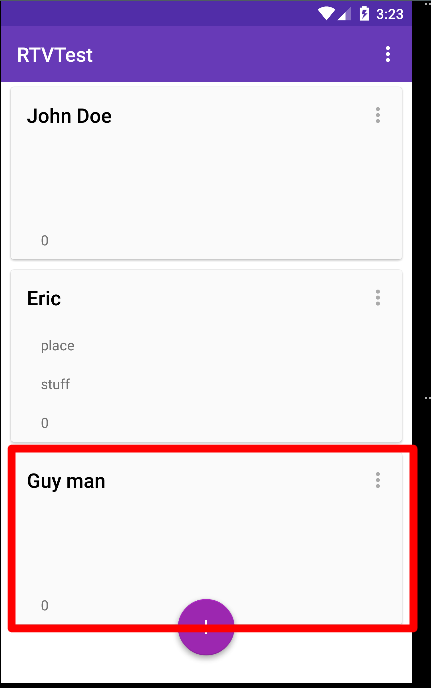
I want to remove the highlighted card above and the realmObject who’s data it contains when I click on the item menu below.

This is my adapters code.
public class ReturnVisitsAdapter extends RealmRecyclerViewAdapter {

 private class ReturnViewHolder extends RecyclerView.ViewHolder {

 public android.support.v7.widget.Toolbar mCardViewToolbar;
 public TextView mEmail;
 public TextView mAddress;
 public TextView mPhone;
 public Context mContext;

 public ReturnViewHolder(View view) {
 super(view);

 mCardViewToolbar = (android.support.v7.widget.Toolbar) view.findViewById(R.id.textViewRecyclerCardViewToolbar);
 mEmail = (TextView) view.findViewById(R.id.textViewRecyclerCardViewEmail);
 mAddress = (TextView) view.findViewById(R.id.textViewRecyclerCardViewAddress);
 mPhone = (TextView) view.findViewById(R.id.textViewRecyclerCardViewPhone);
 }
}

@Override
public RecyclerView.ViewHolder onCreateViewHolder(ViewGroup parent, int i) {
 View view = LayoutInflater.from(parent.getContext()).inflate(R.layout.returnvisit_card_view, parent, false);
 return new ReturnViewHolder(view);
}

@Override
public void onBindViewHolder(final RecyclerView.ViewHolder viewHolder, int i) {
 final ReturnViewHolder returnViewHolder = (ReturnViewHolder) viewHolder;
 final ReturnVisit returnVisit = getItem(i);
 returnViewHolder.mCardViewToolbar.setTitle(returnVisit.getName());
 returnViewHolder.mEmail.setText(returnVisit.getEmail());
 returnViewHolder.mAddress.setText(returnVisit.getAddress());
 returnViewHolder.mPhone.setText(String.valueOf(returnVisit.getPhone()));

 if (returnViewHolder.mCardViewToolbar.getMenu().size() ==0) {
 returnViewHolder.mCardViewToolbar.inflateMenu(R.menu.cardview_menu);
 returnViewHolder.mCardViewToolbar.setOnMenuItemClickListener(new Toolbar.OnMenuItemClickListener() {
 @Override
 public boolean onMenuItemClick(MenuItem menuItem) {


// Handle item selection
 switch (menuItem.getItemId()) {
 case R.id.menuCardViewCall:
// callNumber();
 return true;
 case R.id.menuCardViewMessage:
// sendTextWithDefaultTextApp();
 return true;
 case R.id.menuCardViewEmail:
// sendEmailWithEmailApp();
 return true;
 case R.id.menuCardViewDelete:
// removeReturnVisit();
 return true;
 default:
 return false;
 }
 }
 });
 }
 } /* The inner RealmBaseAdapter
 * view count is applied here.
 *
 * getRealmAdapter is defined in RealmRecyclerViewAdapter.
 */
@Override
public int getItemCount() {
 if (getRealmAdapter() != null) {
 return getRealmAdapter().getCount();
 }
 return 0;
}


}
Please help!

Emanuele Zattin
Mar 30, 2015, 2:33:01 PM3/30/15
to Eric De Wildt, realm...@googlegroups.com
Hello Eric,
the trick here is to remove the item directly from your RealmResults instance. The change will propagate and reach your adapter. For an example you can take a look at our adapterExample (https://github.com/realm/realm-java/tree/master/examples/adapterExample) where a long press deletes an item.
Two notes:
1) The example is about using a RealmBaseAdapter directly, while it looks like you are wrapping it, but the concept remains the same.
2) As you can see we use a worker thread in the example in order not to have writes in the UI thread.
Also, if you didn't already, take a look at the wonderful article on the subject here: http://gradlewhy.ghost.io/realm-results-with-recyclerview/
--
Emanuele Zattin
the trick here is to remove the item directly from your RealmResults instance. The change will propagate and reach your adapter. For an example you can take a look at our adapterExample (https://github.com/realm/realm-java/tree/master/examples/adapterExample) where a long press deletes an item.
Two notes:
1) The example is about using a RealmBaseAdapter directly, while it looks like you are wrapping it, but the concept remains the same.
2) As you can see we use a worker thread in the example in order not to have writes in the UI thread.
Also, if you didn't already, take a look at the wonderful article on the subject here: http://gradlewhy.ghost.io/realm-results-with-recyclerview/
--
Emanuele Zattin
--
You received this message because you are subscribed to the Google Groups "Realm Java" group.
To unsubscribe from this group and stop receiving emails from it, send an email to realm-java+...@googlegroups.com.
To post to this group, send email to realm...@googlegroups.com.
To view this discussion on the web visit https://groups.google.com/d/msgid/realm-java/99e83b3e-925f-4dac-8807-011d3ebd794b%40googlegroups.com.
For more options, visit https://groups.google.com/d/optout.
 {#HS:80505507-778#}
Eric De Wildt
Mar 31, 2015, 6:44:03 PM3/31/15
to realm...@googlegroups.com, dewi...@gmail.com, he...@realm.io
I managed to get the deletion process to work and get notifyDataSetChanged() to run but now I have a new problem. If I open the activity I use to add entries to the data base and then come back to the recyclerView activity and try to delete the new entry I get this error:
java.lang.IllegalStateException: Illegal State: Row/Object is no longer valid to operate on. Was it deleted?
Here is the updated code that fixed the previous issue.
 private class ReturnViewHolder extends RecyclerView.ViewHolder {

 public android.support.v7.widget.Toolbar mCardViewToolbar;
 public TextView mEmail;
 public TextView mAddress;
 public TextView mPhone;
public ReturnViewHolder(View view) {
Context context = returnViewHolder.mCardViewToolbar.getContext();
Realm realm = Realm.getInstance(context);
WorkerThread workerThread = new WorkerThread(context);
workerThread.start();
WorkerHandler handler = new WorkerHandler(realm);
handler.sendMessage(AddRTVActivity.buildMenuMessage(
returnVisit.getName(),
WorkerHandler.DELETE));
notifyDataSetChanged();
 return true;
 default:
 return false;
 }
 }
 });
 }
 }

 /* The inner RealmBaseAdapter
 * view count is applied here.
 *
 * getRealmAdapter is defined in RealmRecyclerViewAdapter.
 */
 @Override
 public int getItemCount() {
 if (getRealmAdapter() != null) {
 return getRealmAdapter().getCount();
 }
 return 0;
 }
}
If it helps I can send you a full copy of my project for inspection.
...
Kenneth Geisshirt
Apr 7, 2015, 10:49:14 AM4/7/15
to Eric De Wildt, realm...@googlegroups.com
Hi Eric,
I think it would be useful if you send us your project. If you cannot do it in public, just email to he...@realm.io.
BR,
Kenneth
--
Kenneth Geisshirt
Member of technical staff
I think it would be useful if you send us your project. If you cannot do it in public, just email to he...@realm.io.
BR,
Kenneth
--
Kenneth Geisshirt
Member of technical staff
--
You received this message because you are subscribed to the Google Groups "Realm Java" group.
To unsubscribe from this group and stop receiving emails from it, send an email to realm-java+...@googlegroups.com.
To post to this group, send email to realm...@googlegroups.com.
To view this discussion on the web visit https://groups.google.com/d/msgid/realm-java/99e83b3e-925f-4dac-8807-011d3ebd794b%40googlegroups.com.
For more options, visit https://groups.google.com/d/optout.
 {#HS:80505507-778#}
Reply all
Reply to author
Forward
0 new messages