
MP/M II for RC2014
2,257 views
Skip to first unread message

Tadeusz Pycio
Oct 9, 2021, 6:20:12 PM10/9/21
to RC2014-Z80
I would like to present the pre-release version of the MP/M II v.2.1 operating system for Z180 computers. The program was created while I was working on CP/Net server, but it's already stable enough to present its binary version.
Requirements:
- SC126 (or any other Z180 computer) with modified SCM S6 firmware which has changed RAM mapping from 0xF0000 to 0x80000,
- CF storage module,
- CF 128MB
- running CP/M 2.2 operating system compatible with SCM.

Mark T
Oct 9, 2021, 8:25:37 PM10/9/21
to RC2014-Z80
I think google groups blocks files with .com, .bat or other executables even if they are inside zip files.

Jay Cotton
Oct 9, 2021, 8:34:35 PM10/9/21
to RC2014-Z80
Maybe you could use github ....
Tadeusz Pycio
Oct 10, 2021, 4:10:33 AM10/10/21
to RC2014-Z80
Maybe you could use github ....
I'll post it there when I'm done. Hopefully I'll make it in time for the 40th anniversary of the creation of this OS. Right now I'm focusing on getting the network up and running: diskless Z80 RC2014s running under CP/NOS and a Z180 server running under MP/M II. I've already come to appreciate the usefulness of SVN as I had to move my work back 2 days. At the same time I'm working on two pieces of this puzzle, CP/NOS (CPNIOS) and the MP/M server module (NETWRKIF). Unfortunately, I've reached a wall as I've been unable to get the arcnet controller to work in sniffer mode. The work is progressing.

positron (Jose L. Collado)
Oct 14, 2021, 2:33:59 PM10/14/21
to RC2014-Z80
Nice job Tadeusz ! Are you considering maybe in future releases, supporting ROMWBW ?
Cheers, JL.
Tadeusz Pycio
Oct 14, 2021, 7:21:35 PM10/14/21
to RC2014-Z80
That was my original intention . My effect of switching to SCM was due to a bug(?) in TASM 3.2, I could not generate the same loader code as is in ROMWBW for the disk image. When I am done running CP/NET for MP/M I will definitely come back to this.
Tadeusz Pycio
Oct 17, 2021, 5:16:27 PM10/17/21
to RC2014-Z80
RC2014 has just created a CP/Net network server running under MP/M. I'm currently testing an environment with two clients already and it's still working ;-)


lordha...@gmail.com
Oct 20, 2021, 8:23:05 PM10/20/21
to RC2014-Z80
Hi Tadeusz - this is fantastic news. I have been waiting for a path to MP/M for years now.
In full disclosure although I have a number of CP/M systems (ALtairduino emulation, Kaypro, Ibex) I lack the technical know-how to truly build my own from scratch so I am very excited to learn what steps you took to do this.
Please can you advise what RC2014 configuration I would need to follow in your footsteps?
I have spent the afternoon browsing Tindie for RC2014 but frankly I am overwhelmed with options!
Any help appreciated!
best wishes
Andy
On Saturday, October 9, 2021 at 6:20:12 PM UTC-4 Tadeusz Pycio wrote:
Tadeusz Pycio
Oct 21, 2021, 3:08:27 AM10/21/21
to RC2014-Z80
Hi Andy,
I have spent the afternoon browsing Tindie for RC2014 but frankly I am overwhelmed with options!
These remarks should be directed to Spencer, that so many people were "infected" with his idea of RC2014. ;-)
Seriously, currently this OS requires Z180 so there is a kit of SC126 on Tindie, there can also be SC203 (built from SC111+SC119 and backplane), #70. You also need a Compact Flash Module and a CF card to complete the set. If you don't have access to a flash memory programmer, then perhaps Steve will be willing to modify his SCM after the requirements of this OS (this change does not affect existing software).
Remember that COMMONBASE is at 20kB, so the user has 44kB of RAM to work with, and this may be a problem with larger programs.
Seriously, currently this OS requires Z180 so there is a kit of SC126 on Tindie, there can also be SC203 (built from SC111+SC119 and backplane), #70. You also need a Compact Flash Module and a CF card to complete the set. If you don't have access to a flash memory programmer, then perhaps Steve will be willing to modify his SCM after the requirements of this OS (this change does not affect existing software).
Remember that COMMONBASE is at 20kB, so the user has 44kB of RAM to work with, and this may be a problem with larger programs.
lordha...@gmail.com
Oct 21, 2021, 1:04:42 PM10/21/21
to RC2014-Z80
Hi Tadeusz - thanks for the info! Would the two items below get me to MP/M nirvana?
SC203
Looks like SC126 is out of stock however SC203 is in stock... 3 left!!
Compact flash
There are some options for COmpact Flash and CP/M ROM - would I just select Blank64MB? (128mb out of stock)
Thanks again for guidance. Apologies for my lack of knowledge!
cheers...Andy

Justin Skists
Oct 21, 2021, 5:10:53 PM10/21/21
to RC2014-Z80
Never apologise for wanting to learn more. It's what we are all here for!
Tadeusz Pycio
Oct 21, 2021, 5:27:34 PM10/21/21
to RC2014-Z80
Hi Andy,
Smaller CF means more RAM for the user, with 8 logical disks you can try to shift COMMONBASE by 4kB, so you can have 48kB. In retro computing, bigger is not always better.
You should buy a blank card and follow the instructions on how to install CP/M for SC111.
Smaller CF means more RAM for the user, with 8 logical disks you can try to shift COMMONBASE by 4kB, so you can have 48kB. In retro computing, bigger is not always better.
You should buy a blank card and follow the instructions on how to install CP/M for SC111.
Never apologise for wanting to learn more. It's what we are all here for!
Exactly. None of us were born with this knowledge.
lordha...@gmail.com
Oct 21, 2021, 8:50:50 PM10/21/21
to RC2014-Z80
Thanks... ok so I am going to throw caution to the wind etc. and go for it!
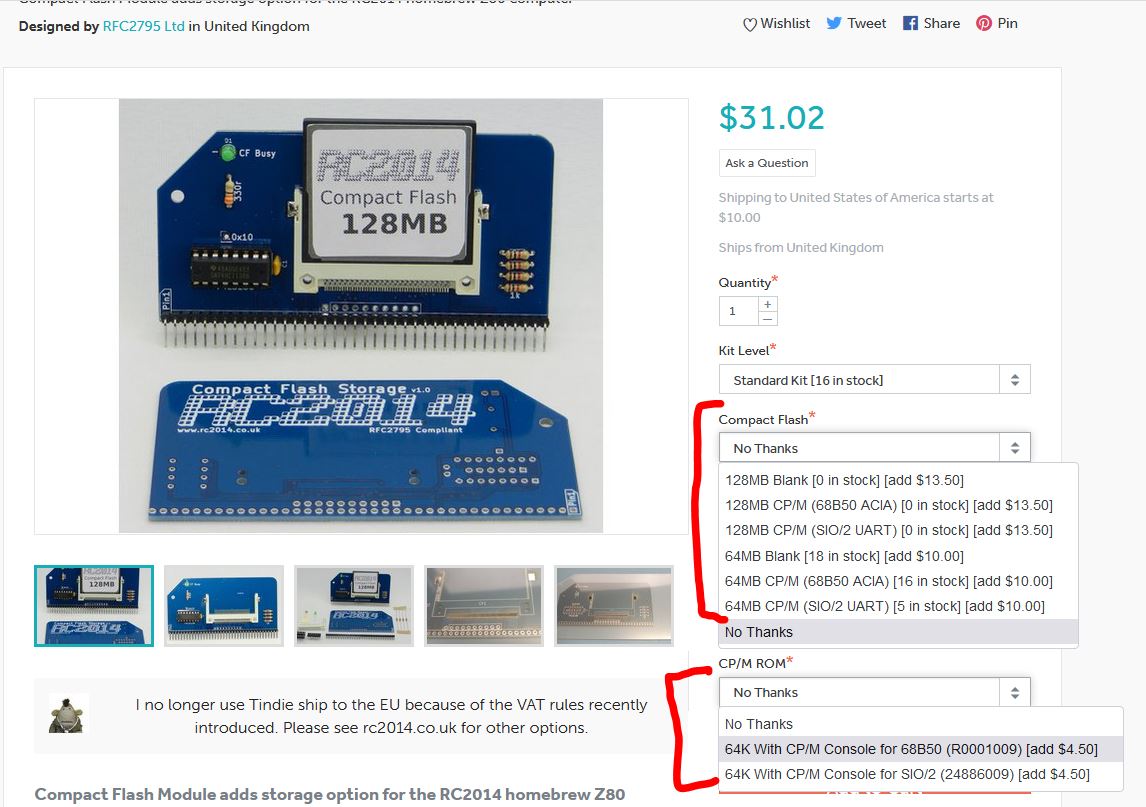
and Compact flash https://www.tindie.com/products/semachthemonkey/compact-flash-module-for-cpm-rc2014-computer/
But before I finalize the order, can you kindly suggest your recommendation from the options (RED below)?
cheers! Andy
Tadeusz Pycio
Oct 22, 2021, 2:38:19 AM10/22/21
to RC2014-Z80
Hi Andy,
You only need a blank CF card, no ROM option. Before finalizing the purchase, check if you have access to the flash memory programmer or send an email to Steve (creator of the SC203 kit) to see if he will make a modified ROM for you. A change to the SCM is required to start the MP/M!
You only need a blank CF card, no ROM option. Before finalizing the purchase, check if you have access to the flash memory programmer or send an email to Steve (creator of the SC203 kit) to see if he will make a modified ROM for you. A change to the SCM is required to start the MP/M!

Bill Shen
Oct 22, 2021, 7:21:33 AM10/22/21
to RC2014-Z80
Hi,
What needs to be modified to run MP/M on RIZ180? The differences between RIZ180 and SC126 are:
* RIZ180 is based on Z80180 which has 1/2meg memory space whereas SC126 can address 1 meg memory space
* RIZ180 serial port is 57600 whereas SC126 is 115200
* RIZ180's RAM is 128K and located at 0x40000 to 0x5FFFF.
Bill
What needs to be modified to run MP/M on RIZ180? The differences between RIZ180 and SC126 are:
* RIZ180 is based on Z80180 which has 1/2meg memory space whereas SC126 can address 1 meg memory space
* RIZ180 serial port is 57600 whereas SC126 is 115200
* RIZ180's RAM is 128K and located at 0x40000 to 0x5FFFF.
Bill
Tadeusz Pycio
Oct 22, 2021, 12:03:19 PM10/22/21
to RC2014-Z80
Hi Bill,
I can generate a test OS. Are you using CP/M 2.2 from this link? You need the same DPB as for the CP/M you are using.
My XIOS MP/M does not change the hardware settings, so the Z180's internal I/O addressing and serial port settings must be defined by the BIOS. For the Z180, the specific registers in use are those supporting the MMU for banked memory.
I hope to clean up the code and be able to post the sources on Github.
My XIOS MP/M does not change the hardware settings, so the Z180's internal I/O addressing and serial port settings must be defined by the BIOS. For the Z180, the specific registers in use are those supporting the MMU for banked memory.
I hope to clean up the code and be able to post the sources on Github.
lordha...@gmail.com
Oct 22, 2021, 2:49:28 PM10/22/21
to RC2014-Z80
Hey
Tadeusz - if I got my hands on one is it something I could do myself? (I can follow instructions!) Second question... if so, do you have a product recommendation?
cheers!!
Andy
lordha...@gmail.com
Oct 22, 2021, 2:50:44 PM10/22/21
to RC2014-Z80
(sorry I was not specific - I was talking about a Flash Memory programmer)
Tadeusz Pycio
Oct 22, 2021, 3:28:58 PM10/22/21
to RC2014-Z80
Hi Andy,
Of course I can help you with how to do this, but isn't it simpler to ask the vendor? Steve is a very nice person. Buying a programmer for one modification of two bytes is an unnecessary expense. You could also try flash programming on a running system, the SC119 memory module has this capability, but it is more difficult.
Of course I can help you with how to do this, but isn't it simpler to ask the vendor? Steve is a very nice person. Buying a programmer for one modification of two bytes is an unnecessary expense. You could also try flash programming on a running system, the SC119 memory module has this capability, but it is more difficult.
lordha...@gmail.com
Oct 22, 2021, 3:50:40 PM10/22/21
to RC2014-Z80
yeah Tadeusz you make a good point!
And just to confirm, I should ask him when I order if he can tweak the firmware and change RAM mapping from 0xF0000 to 0x80000
- that right?
cheers...................andy
lordha...@gmail.com
Oct 22, 2021, 4:56:47 PM10/22/21
to RC2014-Z80
ok cool thank you for the SCM file! OK last clueless question for tonight:
Am I asking this dealer ? (Steve)
Or this chap? (
RFC2795)
Tadeusz Pycio
Oct 22, 2021, 5:20:23 PM10/22/21
to RC2014-Z80
Definitely Steve (SC203), he supplies his kits with this ROM. :)
lordha...@gmail.com
Oct 22, 2021, 9:42:49 PM10/22/21
to RC2014-Z80
Great news, I just ordered the SC203 and the Compact Flash module. i should be getting started in a few weeks - very excited!
Bill Shen
Oct 22, 2021, 10:06:14 PM10/22/21
to RC2014-Z80
On Friday, October 22, 2021 at 10:03:19 AM UTC-6 Tadeusz Pycio wrote:
I can generate a test OS. Are you using CP/M 2.2 from this link? You need the same DPB as for the CP/M you are using.
My XIOS MP/M does not change the hardware settings, so the Z180's internal I/O addressing and serial port settings must be defined by the BIOS. For the Z180, the specific registers in use are those supporting the MMU for banked memory.
Tadeusz,
I can modify DPB of my CP/M2.2 to fit your MP/M requirement. Currently RIZ180 has 4 drives, the DPB definitions are the following:
dpblk0:
; DPB like Tiny68K, BLS 4096, 1024 sector, 64 sectors per block, 62 tracks
; track offset of 1
dw 1024 ;sectors per track (SPT)
db 5 ; block shift factor (BSH)
db 31 ;block mask (BLM)
db 1 ;null mask (EXM)
dw 1983 ;disk size-1 (DSM)
dw 511
db 0f0h ;alloc 0 (AL0)
db 0 ;alloc 1 (AL1))
dw 0 ;check size (CKS)
dw 1 ; track offset (OFF)
dpblk1:
; DPB like Tiny68K, BLS 4096, 1024 sector, 64 sectors per block, 64 tracks
; track offset of 64
dw 1024 ;sectors per track
db 5 ; block shift factor
db 31 ;block mask
db 1 ;null mask
dw 2015 ;disk size-1
dw 511
db 0f0h ;alloc 0 (AL0)
db 0 ;alloc 1 (AL1))
dw 0 ;check size (CKS)
dw 64 ; track offset (OFF)
dpblk2:
; DPB like Tiny68K, BLS 4096, 1024 sector, 64 sectors per block, 64 tracks
; track offset of 128
dw 1024 ;sectors per track
db 5 ; block shift factor
db 31 ;block mask
db 1 ;null mask
dw 2015 ;disk size-1
dw 511
db 0f0h ;alloc 0 (AL0)
db 0 ;alloc 1 (AL1))
dw 0 ;check size (CKS)
dw 128 ; track offset (OFF)
dpblk3:
; DPB like Tiny68K, BLS 4096, 1024 sector, 64 sectors per block, 64 tracks
; track offset of 192
dw 1024 ;sectors per track
db 5 ; block shift factor
db 31 ;block mask
db 1 ;null mask
dw 2015 ;disk size-1
dw 511
db 0f0h ;alloc 0 (AL0)
db 0 ;alloc 1 (AL1))
dw 0 ;check size (CKS)
dw 192 ; track offset (OFF)
The Z180 MMU registera are located at:
CBR equ 0f8h ;MMU common base register
CBAR equ 0fah ;MMU common/bank area reg
ICR equ 3Fh ; I/O control register
Thanks, Bill
I can modify DPB of my CP/M2.2 to fit your MP/M requirement. Currently RIZ180 has 4 drives, the DPB definitions are the following:
dpblk0:
; DPB like Tiny68K, BLS 4096, 1024 sector, 64 sectors per block, 62 tracks
; track offset of 1
dw 1024 ;sectors per track (SPT)
db 5 ; block shift factor (BSH)
db 31 ;block mask (BLM)
db 1 ;null mask (EXM)
dw 1983 ;disk size-1 (DSM)
dw 511
db 0f0h ;alloc 0 (AL0)
db 0 ;alloc 1 (AL1))
dw 0 ;check size (CKS)
dw 1 ; track offset (OFF)
dpblk1:
; DPB like Tiny68K, BLS 4096, 1024 sector, 64 sectors per block, 64 tracks
; track offset of 64
dw 1024 ;sectors per track
db 5 ; block shift factor
db 31 ;block mask
db 1 ;null mask
dw 2015 ;disk size-1
dw 511
db 0f0h ;alloc 0 (AL0)
db 0 ;alloc 1 (AL1))
dw 0 ;check size (CKS)
dw 64 ; track offset (OFF)
dpblk2:
; DPB like Tiny68K, BLS 4096, 1024 sector, 64 sectors per block, 64 tracks
; track offset of 128
dw 1024 ;sectors per track
db 5 ; block shift factor
db 31 ;block mask
db 1 ;null mask
dw 2015 ;disk size-1
dw 511
db 0f0h ;alloc 0 (AL0)
db 0 ;alloc 1 (AL1))
dw 0 ;check size (CKS)
dw 128 ; track offset (OFF)
dpblk3:
; DPB like Tiny68K, BLS 4096, 1024 sector, 64 sectors per block, 64 tracks
; track offset of 192
dw 1024 ;sectors per track
db 5 ; block shift factor
db 31 ;block mask
db 1 ;null mask
dw 2015 ;disk size-1
dw 511
db 0f0h ;alloc 0 (AL0)
db 0 ;alloc 1 (AL1))
dw 0 ;check size (CKS)
dw 192 ; track offset (OFF)
The Z180 MMU registera are located at:
CBR equ 0f8h ;MMU common base register
CBAR equ 0fah ;MMU common/bank area reg
ICR equ 3Fh ; I/O control register
Thanks, Bill
Tadeusz Pycio
Dec 4, 2021, 8:17:22 AM12/4/21
to RC2014-Z80
The project has been made public - https://github.com/tpycio/MPMII-RC2014
lordha...@gmail.com
Feb 28, 2022, 1:24:23 PM2/28/22
to RC2014-Z80
Hey
Tadeusz
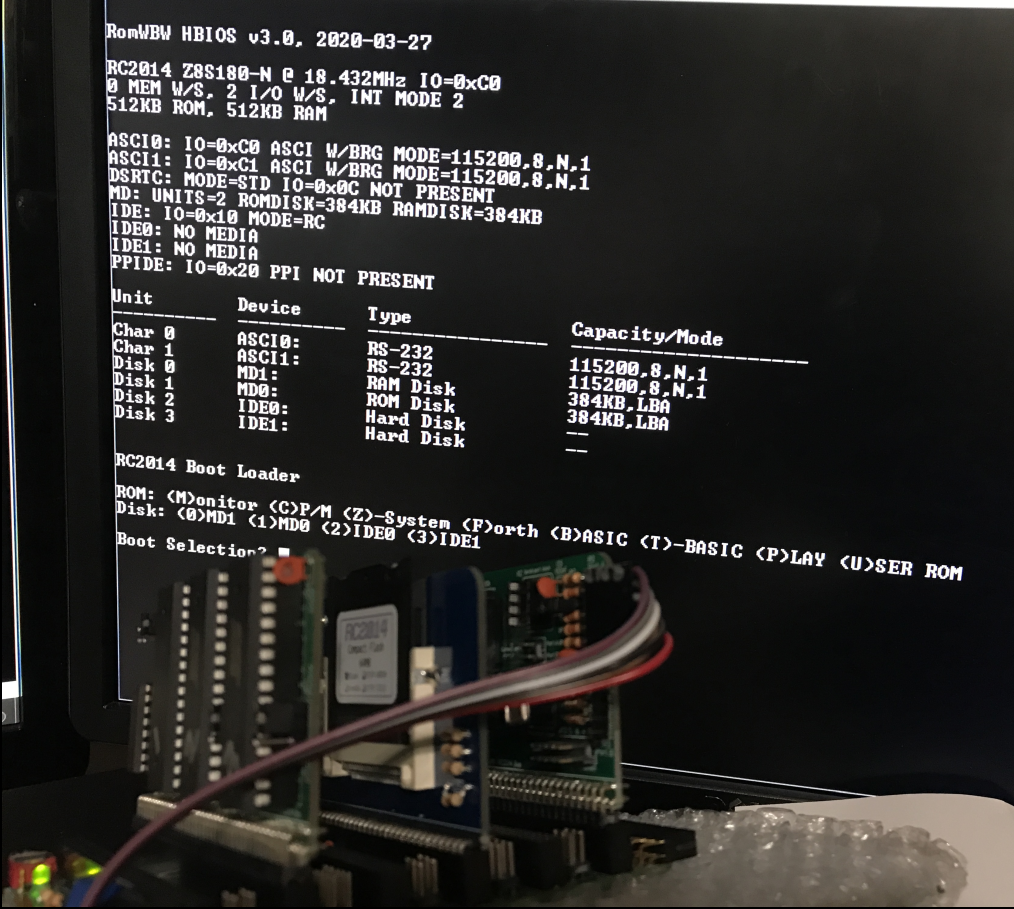
- after a slow start (read: soldering deficiencies), I finally have a functioning Steve Cousins Z180 SC203 with a RC2014 64mb Flash memory module.
Everything seems to power on ok and the SCM comes up nicely. If I select the other boot ROM I get the RC2014 bootloader (i think this is the thing that Steve very kindly flashed for me.)
Please see the two photos showing SCM and RC2014 booted up.
So..... what are my next steps to get MP/M in all it's glory? :-)
cheers... Andy

lordha...@gmail.com
Mar 1, 2022, 5:36:18 PM3/1/22
to RC2014-Z80
I should add that I was able to format the 64MB CF card just fine, and I tried all of the PutSyses below but none of them could run the "cpm" command.
PutSys_RC2014_SIO_CF64_code8000.hex
PutSys_RC2014_ACIA_CF64_code8000.hex
PutSys_LiNC80_SIO_CF64_code8000.hex
PutSys_RC2014_ACIA_CF64_code8000.hex
PutSys_LiNC80_SIO_CF64_code8000.hex
Tadeusz Pycio
Mar 2, 2022, 3:51:37 AM3/2/22
to RC2014-Z80
I'm sorry, but I'm not able to actively help at the moment, I'm involved in helping refugees of the war in Ukraine. I think the community will help you to run CP/M and MP/M according to the information in this thread and available sources.
When this nightmare of war is over I will return to active support.
When this nightmare of war is over I will return to active support.

James Moxham
Mar 2, 2022, 8:18:11 AM3/2/22
to RC2014-Z80
to RC2014-Z80
I'm sorry, but I'm not able to actively help at the moment, I'm involved in helping refugees of the war in Ukraine. I think the community will help you to run CP/M and MP/M according to the information in this thread and available sources.
When this nightmare of war is over I will return to active support."
When this nightmare of war is over I will return to active support."
This is, without a doubt, one of the most inspirational posts I have seen in a long time. Thank-you Tadeusz. I like old computers, I like building things but at the same time, there is the real world and it is about helping people and you are one of the true heroes.
lordha...@gmail.com
Mar 2, 2022, 9:41:31 AM3/2/22
to RC2014-Z80
not really much I can add except I am grateful for people like you, Tadeusz. Please let us know if you have a donation page. Apologies to the moderators if this is considered off-topic
Tadeusz Pycio
Mar 12, 2022, 11:48:05 AM3/12/22
to RC2014-Z80
The recently released SCM version 1.3 allows MP/M II to run without any patches.
lordha...@gmail.com
Mar 12, 2022, 4:44:32 PM3/12/22
to RC2014-Z80
Thanks Tadeusz - I think my SCM is 1.2.0... I don't suppose there's a nice easy way for (someone like) me to upgrade to v1.3? :-)
Small Computer Monitor - SC111
*?
Small Computer Monitor by Stephen C Cousins (www.scc.me.uk)
Configuration S5 20200527, Monitor 1.2.0, SCZ180 BIOS 1.2.0
Monitor commands:
A [<address>] = Assemble | D [<address>] = Disassemble
M [<address>] = Memory display | E [<address>] = Edit memory
R [<name>] = Registers/edit | F [<name>] = Flags/edit
B [<address>] = Breakpoint | S [<address>] = Single step
I <port> = Input from port | O <port> <data> = Output to port
G [<address>] = Go to program
BAUD <device> <rate> | CONSOLE <device>
FILL <start> <end> <byte> | API <function> [<A>] [<DE>]
DEVICES, DIR, HELP, RESET
BASIC Grant Searle's adaptation of Microsoft BASIC
WBASIC Warm start BASIC (retains BASIC program)
CPM Load CP/M from Compact Flash (requires prepared CF card)
*devices
Supported devices:
Z180 ASCI @ C0 detected
Z80 SIO (rc) @ 80 not detected
Z80 SIO @ 80 not detected
Z80 SIO (rc) @ 84 not detected
Z80 SIO @ 84 not detected
SCC @ 00 not detected
SCC @ 20 not detected
Z80 CTC @ 88 not detected
Z80 CTC @ 8C not detected
ACIA @ 80 not detected
ACIA @ A0 not detected
Console devices:
1 = Z180 ASCI @ C0
2 = Z180 ASCI @ C0
*
Tadeusz Pycio
Mar 12, 2022, 5:48:55 PM3/12/22
to RC2014-Z80
The easiest way is to reprogram the flash memory, so access to the programtor is required. Maybe someone in the area has it? In your case you should use SCM-S5-2022-02-27-Monitor-v130-BIOS-v130-SC111.hex image.
lordha...@gmail.com
Mar 12, 2022, 9:27:20 PM3/12/22
to RC2014-Z80
yeah.... hmmm.. I don't have access to one, but perhaps i should get one :-) If you were recommending a programmer to a rank amateur is there a brand/model you would recommend?

ladislau szilagyi
Mar 12, 2022, 11:08:17 PM3/12/22
to RC2014-Z80
Hi,
I use T866II Plus , it works OK, has a decent user manual and the program has an intuitive user interface...
Ladislau
lordha...@gmail.com
Mar 13, 2022, 8:22:31 AM3/13/22
to RC2014-Z80
hey Ladislau - something like this?
Do you recommend getting a kit with additional sockets and whatnot?
Not planning on burning too many ROMs - but there again you never know!
cheers
Andy
ladislau szilagyi
Mar 13, 2022, 8:36:15 AM3/13/22
to RC2014-Z80
Hi Andy,
I use the following:
https://www.amazon.com/XGecu-TL866II-Plus-Programmer-Support/dp/B098MBHQ75?ref_=ast_sto_dp (unfortunately, currently unavailable)
I really do not know if these two models are compatible...
I am not an expert in using EEPROM burners... maybe someone who knows better can give you an advice.
I know only that half an year ago I was advised to buy the model I use currently.
regards,
Ladislau
ladislau szilagyi
Mar 14, 2022, 1:30:37 AM3/14/22
to RC2014-Z80
Hi Andy,
I found a XGecu TL866II Plus seller: https://www.aliexpress.com/item/32992209964.html
Ladislau
lordha...@gmail.com
Mar 15, 2022, 1:21:37 PM3/15/22
to RC2014-Z80
thanks Ladislau - so I probably don't need all the big collection of adapters for now? My RC2014 ROMs should be fine with this socket yeah?

Dylan Hall
Mar 15, 2022, 3:10:40 PM3/15/22
to rc201...@googlegroups.com
That’s the model I brought a couple of months ago and it worked nicely the couple times I’ve used it so far. The basic programmer without adapters seems fine for roms for the rc2014 systems. I also like that there’s open source Linux software available so I don’t need to go looking for a windows box.
I’m thinking about exploring pld’s so in hindsight some plcc adapters may be useful but given I don’t know which ones I’d need it’s easier to wait and order the adapters separately when I need them.
I think it’s worth ordering from the official XGecu store on aliexpress as there are a lot of poor copies of that programmer being sold.
Dylan
--
You received this message because you are subscribed to the Google Groups "RC2014-Z80" group.
To unsubscribe from this group and stop receiving emails from it, send an email to rc2014-z80+...@googlegroups.com.
To view this discussion on the web, visit https://groups.google.com/d/msgid/rc2014-z80/1e991474-a106-48d9-a6ce-c79d19dbc449n%40googlegroups.com.
lordha...@gmail.com
Mar 15, 2022, 3:26:14 PM3/15/22
to RC2014-Z80
ordered! thanks guys.
lordha...@gmail.com
Mar 16, 2022, 6:18:55 PM3/16/22
to RC2014-Z80
QQ regarding the MP/M server: any thoughts regarding what RC2014 interface(s) I can/should use for supporting multiple serial users?
thanks :-)
lordha...@gmail.com
Apr 7, 2022, 5:33:31 PM4/7/22
to RC2014-Z80
Hey folks...I took delivery of my "black edition" Ali express programmer. I also grabbed some SST 39SD040 70-4C-PHE chips.I programmed using the SCM-S5-2022-02-27-Monitor-v130-BIOS-v130-SC111.hex and guess what? I now have a fresh SCM 1.3.0 running!
So to run MP/M... what do I need to do?
I still have CP/M loaded on the Flash.
Any clues regarding my next steps?
cheers! Andy
lordha...@gmail.com
Apr 7, 2022, 8:41:50 PM4/7/22
to RC2014-Z80
I see Tadeusz' files on git hub and here
Presumably I copy them over to the existing CPM flash folder? But what about the github files, these seem totally different....
thanks again for your patience... and any pointers!
Andy

Douglas Miller
Apr 7, 2022, 10:47:23 PM4/7/22
to RC2014-Z80
In case Tadeusz is not available to respond, I looked over the files in the zip. MPM.COM is the MPMLDR program. It appears to be built to run under CP/M 2.2, so you should copy all the files over to a CP/M drive, boot CP/M, then type "MPM". I'm not sure how this was all constructed, so you may have to put all this on drive A:, as implied by the ZIP paths. I'm not sure whether the SCM ROM image in there is mandatory or optional. I don't know if SCM must be custom-built for a given platform, or whether it can discover hardware and configure itself on the fly. It only seems to contain 32K (actually, more like 17K) of actual data, so not sure what it is intended to do. I'm not fluent in SCM. Since the MPM does not need to be directly booted (you boot CP/M 2.2 and then run MPM), I suspect your existing ROM is fine.
Douglas Miller
Apr 7, 2022, 10:52:39 PM4/7/22
to RC2014-Z80
As I recall, the github repo was for the network PCB. I don't recall much in the way of software there, and not enough to make MP/M.
Come to think of it, though, I'm not sure if this MPM.SYS contains the network server RSPs or not. If it does, you may have trouble running on a system without the network hardware. I don't see immediate evidence of the network RSPs in MPM.SYS, so maybe it will be fine.
Come to think of it, though, I'm not sure if this MPM.SYS contains the network server RSPs or not. If it does, you may have trouble running on a system without the network hardware. I don't see immediate evidence of the network RSPs in MPM.SYS, so maybe it will be fine.
lordha...@gmail.com
Apr 10, 2022, 8:25:20 AM4/10/22
to RC2014-Z80
Thanks Douglas for the pointers. I just spent quite a bit of time figuring out why xmodem wasn;t working for me (in summary: I needed to run @ 9600 with 1ms delay and 50ms for end of line delays) so my next step will be to try copy things over and see if I can get it up and running. I see online that MP/M distributions do seem quite a bit bigger that these files so maybe this is just the bare basics? I've never used MP/M so this is all one great adventure :-)
cheers
Andy
Tadeusz Pycio
Apr 10, 2022, 10:34:57 AM4/10/22
to RC2014-Z80
If you already have CP/M running, you can copy the entire "DriveA" folder from the archive to drive A: , there are all files from the MP/M distribution, the MPM.COM operating system loader and the MPM.SYS system kernel. Remember that it was prepared for a 128MB CF, so the final drives will not be available for a smaller card. The system kernel in the archive and the content on GitHub are prepared as a universal operating system, there are no network specific modules. It is worth to read the documentation, as the MP/M console programs work differently than in the familiar CP/M environment. Of course, all CP/M programs will work correctly, excluding specific ones that refer to the hardware (e.g. XMODEM). This is the main reason for leaving this way of running MP/M via CP/M, as I haven't tested the communication software running under MP/M. Unexpectedly, my plans have been changed by the current situation, so the announced release of CP/Net and making MP/M more friendly has been put on hold, hopefully not for long.
PS. Try using CTS/RTS for file transfers
PS. Try using CTS/RTS for file transfers
Douglas Miller
Apr 10, 2022, 11:01:33 AM4/10/22
to RC2014-Z80
As Tadeusz mentions, running things like XMODEM under MP/M is problematic, since MP/M will be constantly checking serial ports. You'd have to configure MP/M to not use the serial port that XMODEM uses, which kind of defeats the purpose of MP/M. I would recommend either using something like cpmtools to directly add files to your image, or else perform the XMODEM downloads under CP/M and then start MP/M (since both are using the same drive A:).

Alan Cox
Apr 10, 2022, 11:13:18 AM4/10/22
to rc201...@googlegroups.com
On Sun, 10 Apr 2022 at 16:01, Douglas Miller <durga...@gmail.com> wrote:
As Tadeusz mentions, running things like XMODEM under MP/M is problematic, since MP/M will be constantly checking serial ports. You'd have to configure MP/M to not use the serial port that XMODEM uses, which kind of defeats the purpose of MP/m
You would normally just start an xmodem or kermit server on that port from the other end and then transfer to/from it on the console port not on another device.
MP/M really comes into its own if you've got a keyboard interface and video because you can then have multiple consoles switchable by hotkey Linux style. It's possible to arrange that with a serial port and some hackery in the BIOS but it's not the same feel.
Alan
lordha...@gmail.com
Apr 10, 2022, 4:06:28 PM4/10/22
to RC2014-Z80
Well I think i've had some success! MPM runs .. but if I press any key I get pages of Bs printing out. Progress!
A>DIR *.COM
A: DOWNLOAD COM : MBASIC COM : LOAD COM : PIP COM
A: DISPLAY COM : DUMP COM : ED COM : ASM COM
A: STAT COM : SUBMIT COM : DDT COM : DEPKG COM
A: XMODEM COM : MPM COM
A>MPM
MP/M II V2.1 Loader
Copyright (C) 1981, Digital Research
Nmb of consoles = 2
Breakpoint RST # = 6
Memory Segment Table:
SYSTEM DAT FF00H 0100H
TMPD DAT FE00H 0100H
USERSYS STK FC00H 0200H
XIOSJMP TBL FB00H 0100H
RESBDOS SPR EF00H 0C00H
XDOS SPR CD00H 2200H
MPMSTAT RSP CC00H 0100H
BNKXIOS SPR B300H 1900H
BNKBDOS SPR 9000H 2300H
BNKXDOS SPR 8E00H 0200H
TMP SPR 8A00H 0400H
Mpmstat BRS 7C00H 0E00H
LCKLSTS DAT 7900H 0300H
CONSOLE DAT 7700H 0200H
-------------------------
MP/M II Sys 7700H 8900H Bank 0
Memseg Usr 0000H B000H Bank 1
Memseg Usr 0000H B000H Bank 2
Memseg Usr 0000H B000H Bank 3
Memseg Usr 0000H B000H Bank 4
Memseg Usr 0000H B000H Bank 5
Memseg Usr 0000H B000H Bank 6
Memseg Usr 0000H B000H Bank 7
Banked XIOS (V0.6) for RC2014 by T.Pycio 2021
MP/M II V2.1
Copyright (C) 1982, Digital Research
0A>BaBBBBBBBBBBBBBBBBBBBBBBBBBBBBBBBBBBBBBBBBBBBBBBBBBBBBBBBBBBBBBBBBBBBBBBBBBBBBBBBBBBBBBBBBBBBBBBBBBBBBBBBBBBBBBBBBBBBBBBBBBBBBBBBBBBBBBBBBBBBBBBBBBBBBBBBBBBBBBBBBBBBBBBBBBBBBBBBBBBBBBBBBBBBBBBBBBBBBBBBBBBBBBBBBBBBBBBBBBBBBBBBBBBBBBBBBBBBBBBBBBBBBBBBBBBBBBBBBBBBBBBBBBBBBBBBBBBBBBBBBBBBBBBBBBBBBBBBBBBBBBBBBBBBBBBBBBBBBBBBBBBBBBBBBBBBBBBBBBBBBBBBBBBBBBBBBBBBBBBBBBBBBBBBBBBBBBBBBBBBBBBBBBBBBBBBBBBBBBBBBBBBBBBBBBBBBBBBBBBBBBBBBBBBBBBBBBBBBBBBBBBBBBBBBBBBBBBBBBBBBBBBBBBBBBBBBBBBBBBBBBBBBBBBBBBBBBBBBBBBBBBBBBBBBBBBBBBBBBBBBBBBBBBBBBBBBBBBBBBBBBBBBBBBBBBBBBBBBBBBBBBBBBBBBBBBBBBBBBBBBBBBBBBBBBBBBBBBBBBBBBBBBBBBBBBBBBBBBBBBBBBBBBBBBBBBBBB
A: DOWNLOAD COM : MBASIC COM : LOAD COM : PIP COM
A: DISPLAY COM : DUMP COM : ED COM : ASM COM
A: STAT COM : SUBMIT COM : DDT COM : DEPKG COM
A: XMODEM COM : MPM COM
A>MPM
MP/M II V2.1 Loader
Copyright (C) 1981, Digital Research
Nmb of consoles = 2
Breakpoint RST # = 6
Memory Segment Table:
SYSTEM DAT FF00H 0100H
TMPD DAT FE00H 0100H
USERSYS STK FC00H 0200H
XIOSJMP TBL FB00H 0100H
RESBDOS SPR EF00H 0C00H
XDOS SPR CD00H 2200H
MPMSTAT RSP CC00H 0100H
BNKXIOS SPR B300H 1900H
BNKBDOS SPR 9000H 2300H
BNKXDOS SPR 8E00H 0200H
TMP SPR 8A00H 0400H
Mpmstat BRS 7C00H 0E00H
LCKLSTS DAT 7900H 0300H
CONSOLE DAT 7700H 0200H
-------------------------
MP/M II Sys 7700H 8900H Bank 0
Memseg Usr 0000H B000H Bank 1
Memseg Usr 0000H B000H Bank 2
Memseg Usr 0000H B000H Bank 3
Memseg Usr 0000H B000H Bank 4
Memseg Usr 0000H B000H Bank 5
Memseg Usr 0000H B000H Bank 6
Memseg Usr 0000H B000H Bank 7
Banked XIOS (V0.6) for RC2014 by T.Pycio 2021
MP/M II V2.1
Copyright (C) 1982, Digital Research
0A>BaBBBBBBBBBBBBBBBBBBBBBBBBBBBBBBBBBBBBBBBBBBBBBBBBBBBBBBBBBBBBBBBBBBBBBBBBBBBBBBBBBBBBBBBBBBBBBBBBBBBBBBBBBBBBBBBBBBBBBBBBBBBBBBBBBBBBBBBBBBBBBBBBBBBBBBBBBBBBBBBBBBBBBBBBBBBBBBBBBBBBBBBBBBBBBBBBBBBBBBBBBBBBBBBBBBBBBBBBBBBBBBBBBBBBBBBBBBBBBBBBBBBBBBBBBBBBBBBBBBBBBBBBBBBBBBBBBBBBBBBBBBBBBBBBBBBBBBBBBBBBBBBBBBBBBBBBBBBBBBBBBBBBBBBBBBBBBBBBBBBBBBBBBBBBBBBBBBBBBBBBBBBBBBBBBBBBBBBBBBBBBBBBBBBBBBBBBBBBBBBBBBBBBBBBBBBBBBBBBBBBBBBBBBBBBBBBBBBBBBBBBBBBBBBBBBBBBBBBBBBBBBBBBBBBBBBBBBBBBBBBBBBBBBBBBBBBBBBBBBBBBBBBBBBBBBBBBBBBBBBBBBBBBBBBBBBBBBBBBBBBBBBBBBBBBBBBBBBBBBBBBBBBBBBBBBBBBBBBBBBBBBBBBBBBBBBBBBBBBBBBBBBBBBBBBBBBBBBBBBBBBBBBBBBBBBBBBB
Tadeusz Pycio
Apr 10, 2022, 5:20:48 PM4/10/22
to RC2014-Z80
Interesting case, I restored the kernel to the version that was in the archive and I don't have this symptom. What modules do you have installed?

lordha...@gmail.com
Apr 10, 2022, 7:34:28 PM4/10/22
to RC2014-Z80
Hey Tadeusz, I just copied the files from the "DriveA" folder into my CP/M 2.2 A drive on my 128MB CF card.
The files came from folder MPMII\DriveA
... which I downloaded from
here
cheers
lordha...@gmail.com
Apr 10, 2022, 7:36:26 PM4/10/22
to RC2014-Z80
should mention - I just copied the files over. I didnt do any configuration or anything prior to typing "MPM" at the A prompt
Tadeusz Pycio
Apr 11, 2022, 3:46:02 AM4/11/22
to RC2014-Z80
should mention - I just copied the files over. I didnt do any configuration or anything prior to typing "MPM" at the A prompt
Hey Tadeusz, I just copied the files from the "DriveA" folder into my CP/M 2.2 A drive on my 128MB CF card.
So you have done everything correctly. We need to look for hardware differences, clock, serial baud rate. What hardware are you using?
A minor note, CP/M system applications will not work properly under MP/M (PIP, DDT, STAT), they have their replacements in the form of PRL files.
A minor note, CP/M system applications will not work properly under MP/M (PIP, DDT, STAT), they have their replacements in the form of PRL files.
lordha...@gmail.com
Apr 11, 2022, 10:16:34 AM4/11/22
to RC2014-Z80
Hey Tadeusz - here's my info:
1. Hardware - Steve's SC203 Kit - consisting of
- SC111, Z180 CPU module (18.432 MHz)
- SC119, Z180 Memory module (512k RAM + 512k ROM)
- SC112, Backplane with power input
2. Storage - RC2014 Compact Flash module - and an amazon 128MB card
3. ROM - I flashed Steve new firmware SCM BIOS v1.3 using my fun new XGecu "TL866II Plus" programmer
4. Clock speed - out-of-the-box Z180 mode, presumably 18.432MHz?
5. Serial port - 115200/8N1/RTS/CTS - Tera Term
6. Configuration - all pretty standard I think? (I didn't configure anything really)

Tadeusz Pycio
Apr 11, 2022, 12:07:27 PM4/11/22
to RC2014-Z80
You have exactly the same configuration as me. I do not understand this. Maybe try putting the cards side by side in that order, ROM/RAM, CPU, CF module. If it doesn't help, then read the CF card on the PC with CPMTOOLS and compare the MPM.SYS file. There may be a CF read issue here, or this kernel version was incorrectly polling the CF_BUSY status (I don't remember how it was in version 0.6). If the proposed changes don't improve anything, I will try to generate the current kernel from sources on GitHub.
Bill Shen
Apr 11, 2022, 4:19:16 PM4/11/22
to RC2014-Z80
The yellow flag for me is using RC2014 CF module with CF disk purchased from Amazon. It may not work with any brands of CF disk. The easiest way of checking CF disk compatibility is in CP/M do a PIP with verify. E.g.,
pip d:=a:*.*[v]
This assume drive D is available and drive A contains many files. This operation should complete without errors.
Bill
lordha...@gmail.com
Apr 11, 2022, 5:23:22 PM4/11/22
to RC2014-Z80
I also have an large pile of 64mb Ciscos which are great.. but I understand I need to use 128mb for this? I only have one 128mb cisco and for some reason that will not (for love nor money) successfully boot CP/M!
I will do the PIP operation as advised and report back - cheers
Andy
Tadeusz Pycio
Apr 11, 2022, 6:23:37 PM4/11/22
to RC2014-Z80
Hi Andy,
For testing purposes you can use a 64MB card, just don't exceed the first 7 drives. If it is successful, I will prepare a kernel for such a card. It is quite possible that you will get more RAM space available. I used 128MB cards because this system was going to be a CP/Net server and I did not care about free memory space.
lordha...@gmail.com
Apr 11, 2022, 7:40:55 PM4/11/22
to RC2014-Z80
lordha...@gmail.com
Apr 12, 2022, 10:00:00 PM4/12/22
to RC2014-Z80
OK.. so here's my latest.
With my Amazon 128MB - I did Bill's recommended test of my CF:
pip d:=a:*.*[v]
That ran perfectly.
But still have the problem below (see image) if I run MPM.COM
So to eliminate things:
1. Abandoned my Amazon CF card
2. Grabbed a fresh 64mb cisco
3. Followed Steve's CPM-D build steps for formatting and copying CP/M files.
5. Able to download and run all the Zork games
6. Able to download all the MP/M from Tadeusz's DriveA" folder
7. Load CP/M, Run "MPM.COM"
** EXACT SYMPTOM - PAGES OF THE LETTER B PRINTING!! **
8. Restarted CP/M
9. Did Bill's PIP
10. Machine spontaneously reboots after about 5 files so clearly my Cisco 64MB has a problem?
11.Then finally I repositioned all my cards, keeping CF close to processor, but moving them all along --> NO IMPROVEMENT same MP/M message below
Anyway...... I'm out of ideas so will call it a night :-)
cheers y'all
Andy

Douglas Miller
Apr 12, 2022, 10:21:59 PM4/12/22
to RC2014-Z80
First question I have is whether you typed both the first 'B' and the 'a' (of the BaBBBBB... sequence)? Or did the 'a' spontaneously appear (like noise)? Also, how are you connected to the console (I presume this is ASCI0 of the Z180): so are you connected to some USB adapter like the ones made from FTDI chips? How long are the leads between the Z180 and the chip? Have you confirmed that it is functioning reliably (I've heard of some of those misbehaving). There's some talk about how the DCD0 modem control input affects things, so maybe verify how that pin is connected on your system?
I'm guessing you have been running CP/M without incident, so we probably need to look somewhere else other than hardware. I do notice that the XIOS does a POLL in order to check status, and assumes that a return from POLL means a character is ready. If something were causing POLL to return under other conditions, you'd get the behavior you see. However, I'm not sure why that would be happening.
Tadeusz Pycio
Apr 13, 2022, 3:03:36 AM4/13/22
to RC2014-Z80
At this stage, it is worth checking if you have the same symptom on the other console.
Today I will prepare a current version of operating system kernel for 64MB and 128MB cards, it will be easier to analyse this problem and we will exclude a possible bug of 0.6 version, which is unlikely, because this version was intensively used during my work on CP/Net server. Which is not impossible :-)
Today I will prepare a current version of operating system kernel for 64MB and 128MB cards, it will be easier to analyse this problem and we will exclude a possible bug of 0.6 version, which is unlikely, because this version was intensively used during my work on CP/Net server. Which is not impossible :-)
lordha...@gmail.com
Apr 13, 2022, 12:50:51 PM4/13/22
to RC2014-Z80
Hey Douglas - yeah, so when I run MPM.COM the screen is fine. As long as I don't touch the keyboard. If I press ANY key (and I have literally tried every key) ... I get mostly "BaBBBBB.... etc" or sometimes "BadBBBBBBBBB" - maybe it is trying to tell me "Bad!"
FTDI adapter - Genuine Steve Cousins Edition :-)
Distance from Chip to FTDI - maybe 5"? Dupont-style Genuine Steve cable
ASCI0 - yes I believe so. If I list devices "
Supported devices: Z180 ASCI @ C0 detected
"
DCD0 pin - On my FTDI it is not wired up to anything - would that make sense?
Tried 64mb cisco, 128mb cisco and amazon "extreme 128mb" with identical MPM.COM results.
Douglas Miller
Apr 13, 2022, 1:01:59 PM4/13/22
to RC2014-Z80
That may be an important clue (always getting "BaBBB..." or "BadBBBBB..."). I see this message in the XIOS:
bintm: db "BadInt",0
and the associated handler called "badint". Perhaps something is triggering an interrupt storm, and there is nothing in the XIOS to handle the interrupt.
Douglas Miller
Apr 13, 2022, 2:09:06 PM4/13/22
to RC2014-Z80
Could ASCI interrupts be getting enabled (maybe in CP/M), and then MP/M does not turn them off explicitly? Maybe the XIOS needs to do a more-thorough re-init of the Z180 ASCI ports?
Tadeusz Pycio
Apr 13, 2022, 3:16:05 PM4/13/22
to RC2014-Z80
and the associated handler called "badint". Perhaps something is triggering an interrupt storm, and there is nothing in the XIOS to handle the interrupt.
Hi, Douglas
Bingo! I have just checked the sources and XIOS initialises INT1 which is not used in this case. It looks like there is no correct pull up via RP1. It might be worth checking the correct soldering?
Bingo! I have just checked the sources and XIOS initialises INT1 which is not used in this case. It looks like there is no correct pull up via RP1. It might be worth checking the correct soldering?
Douglas Miller
Apr 13, 2022, 3:46:03 PM4/13/22
to RC2014-Z80
The other half of the problem is that 'badint' allows interrupts to be enabled, which you cannot do in an interrupt handler. It calls conout which ends up doing a POLL, which then dispatches and enables interrupts, and goes right back into 'badint'. I think the only XDOS call you can make from an interrupt is FLAG SET - and even then I think you have to take special precautions. I think you will have to do a special conout that spins instead of POLL, or else somehow "background" the message output to some other process.
Douglas Miller
Apr 13, 2022, 4:00:46 PM4/13/22
to RC2014-Z80
I think the problem is that 'systeminit' doesn't appear to re-initialize the ASCI registers, so if the OS running before MPMLDR has console input interrupts enabled, they will still be enabled and the XIOS will get a 'badint'. This would explain why it only happens when a key is pressed.
Tadeusz Pycio
Apr 13, 2022, 4:08:29 PM4/13/22
to RC2014-Z80
That's right, through this call "putmsg" the procedure "badint" has no chance to reach the HALT instruction. I have to do it differently, the case of the interrupt storm I did not foresee.
In the case of ASCII, I assumed that the MP/M startup would be in a known environment that does not use interrupts, but you are right, this should be changed, as it can lead to unexpected results when interrupts are initiated earlier by another program.
Douglas Miller
Apr 13, 2022, 4:13:26 PM4/13/22
to RC2014-Z80
You might also need to use a special 'putmsg' for the Welcome message in 'systeminit'. It might be working, but it's probably risky to starting doing polling and dispatching before you complete 'systeminit' - and you also end up enabling interrupts too soon there.
Tadeusz Pycio
Apr 13, 2022, 5:40:19 PM4/13/22
to RC2014-Z80
Hi Douglas,
Yes, the "putmsg" procedure needs to be corrected, this will be a fairly easy task as it is only used in the "badint" and "systeminit" procedures, which should not refer to the Dispatcher process. Thanks for these comments, which will improve XIOS and which I missed while writing the code.
Yes, the "putmsg" procedure needs to be corrected, this will be a fairly easy task as it is only used in the "badint" and "systeminit" procedures, which should not refer to the Dispatcher process. Thanks for these comments, which will improve XIOS and which I missed while writing the code.
lordha...@gmail.com
Apr 13, 2022, 6:28:58 PM4/13/22
to RC2014-Z80
so how does it work in your setup Tadeusz, what's the difference in your hardware? The CPM/Net stuff?
Tadeusz Pycio
Apr 13, 2022, 7:20:40 PM4/13/22
to RC2014-Z80
Hi Andy,
There are no differences, we have the same hardware and software configuration. It looks like you have a problem with the connection to the pull-up resistors for the interrupt signals (No connection, soldering problem, reversed RP1). The easiest way to check this is to modify the MPM.SYS file with a hex editor by searching for 3E 01 ED 39 F4, the byte you are looking for is 0x01 at address 0x4730 and replace it with 0x00 (you will get 3E 00 ED 39 F4), then run this modified file.
lordha...@gmail.com
Apr 13, 2022, 7:49:14 PM4/13/22
to RC2014-Z80
Hi Tadeusz - I edited it but same problem .... lots of BBBBBBBBBBBBBBs

Tadeusz Pycio
Apr 14, 2022, 3:22:37 AM4/14/22
to RC2014-Z80
Oddly enough, this seemed to be the source of the problem, but we're not giving up. One other unknown that we didn't check: what kind of processor do you have? If you have RomWBW, it checks for the version at boot time or the CPU photo. This is unlikely, but needs clarification since our kits are no different.
Douglas Miller
Apr 14, 2022, 5:45:08 AM4/14/22
to RC2014-Z80
Before giving up on the patched MPM.SYS, I'd suggest editing MPM.SYS and also changing the Welcome message, so you can verify that you are running the modified MPM.SYS. For example, change the byte at 4680 from '6' to 'A', making the Welcome string "Banked XIOS V0.A for RC2014 by T.Pycio 2021".
The patch should have disabled all interrupts, and while that prevents the time-of-day clock from advancing and means that CPU-bound tasks will hog the machine, it should have at least prevented the 'badint' routine from being entered.
I do see that the XIOS in the github repo is currently "v1.0" and that you are running "V0.6", so will take a look at the earlier version as well.
Douglas Miller
Apr 14, 2022, 6:04:47 AM4/14/22
to RC2014-Z80
Update: the github repo does not contain V0.6 of the XIOS - the initial checkin is v1.0 - so I can't see what is different about the code.
On Thursday, April 14, 2022 at 4:45:08 AM UTC-5 Douglas Miller wrote:
...
Tadeusz Pycio
Apr 14, 2022, 6:29:50 AM4/14/22
to RC2014-Z80
I'm in the process of changing the software which takes into account Douglas's correct comments about the interrupt system and the 'putmsg' procedure. It's possible that ASCII uses interrupts which results in this erroneous message. I'll try to make the changes as soon as possible.
Yes, version 0.6 was my internal one and not made public. Currently available on GitHub, it includes performance fixes for CF card support, memory bank switching, and context switching security during reads/writes to storage. The interrupt subsystem was unchanged.
Yes, version 0.6 was my internal one and not made public. Currently available on GitHub, it includes performance fixes for CF card support, memory bank switching, and context switching security during reads/writes to storage. The interrupt subsystem was unchanged.
lordha...@gmail.com
Apr 14, 2022, 10:49:20 AM4/14/22
to RC2014-Z80
Hey Douglas - yeah I was able to edit MPM.SYS and change the 6 -> A

lordha...@gmail.com
Apr 14, 2022, 11:18:54 AM4/14/22
to RC2014-Z80
Gents forgive my continued ignorance but when I go to the github https://github.com/tpycio/MPMII-RC2014 I cannot seem to find the MPM.SYS and related files. Am I looking totally in the wrong place?
Douglas Miller
Apr 14, 2022, 11:26:36 AM4/14/22
to RC2014-Z80
That's disappointing. Occam's razor tells us that 'badint' is probably the cause of the problem, but I don't understand why the patched MPM.SYS did not "fix" it. This evening, I'll add a CF emulation to my RC2014 simulator and try this out. If I can reproduce it, I'll have more tools to figure out what is going on.
Message has been deleted
lordha...@gmail.com
Apr 14, 2022, 3:35:41 PM4/14/22
to RC2014-Z80
Nice Tadeusz!

Tadeusz Pycio
Apr 14, 2022, 3:44:07 PM4/14/22
to RC2014-Z80
I'm glad it works, but... I still don't know what was causing this error, because there must have been some kind of interrupt to which the wrong 'badint' routine was assigned. I have no idea what the source of the interrupt could be.
Douglas Miller
Apr 14, 2022, 3:47:39 PM4/14/22
to RC2014-Z80
I would assume that the version of CP/M that was used to run the MPMLDR has console input interrupts enabled. With previous versions of MP/M (that did not disable that) you'd get the behavior seen (badint).
Tadeusz Pycio
Apr 14, 2022, 3:59:19 PM4/14/22
to RC2014-Z80
Hi Douglas,
I analyzed the SCM and CBIOS sources used to run MP/M and found no place where interrupts could be activated. There must have been some condition that triggered the 'badint'. I just don't know what it is.
I analyzed the SCM and CBIOS sources used to run MP/M and found no place where interrupts could be activated. There must have been some condition that triggered the 'badint'. I just don't know what it is.
lordha...@gmail.com
Apr 14, 2022, 4:18:04 PM4/14/22
to RC2014-Z80
I realise you've hardly had time to catch your breath - - so if you're ready for another question :-)
Adding serial ports for my MP/M users - what would you recommend?

Tadeusz Pycio
Apr 14, 2022, 5:10:48 PM4/14/22
to RC2014-Z80
Adding serial ports for my MP/M users - what would you recommend?
You currently have two consoles available, on both serial ports of the Z180. Expansion by another 6 is possible (MP/M supports up to 8) on any serial chip. In MP/M the consoles work on a polling basis, so adding more serial ports is not a big problem.
lordha...@gmail.com
Apr 14, 2022, 5:30:00 PM4/14/22
to RC2014-Z80
awesome. Eight should do nicely!
Douglas Miller
Apr 14, 2022, 6:41:46 PM4/14/22
to RC2014-Z80
Regarding what was causing the problem before, we can be pretty certain that whatever CP/M was being used to run MPMLDR had console input interrupts enabled. I don't think we know exactly what that was. We see pictures of lordhailsham's SC203 showing both SCM and RomWBW being run, and I checked the CP/M that comes with RomWBW and it *does* enable console input interrupts. If MP/M was being added to the RomWBW CP/M image, and run from there, that would explain exactly what we saw.
lordha...@gmail.com
Apr 14, 2022, 7:28:09 PM4/14/22
to RC2014-Z80
I do have RomWBW in the other (second) socket, but I only enable the chip (first socket) with the newest Steve SCM ROM 1.3. As burned last week using my brand new XGEcu programmer :-)
I can remove the RomWBW but frankly I would be surprised if it was interacting in any way

Douglas Miller
Apr 14, 2022, 8:20:18 PM4/14/22
to RC2014-Z80
I'm trying to recreate your system on my simulator, can you share the CP/M image you put on the CF card? Is it something pre-fab in the SCM 1.3 ZIP file?
Thanks,
lordha...@gmail.com
Apr 14, 2022, 8:27:21 PM4/14/22
to RC2014-Z80
Hi Douglas - i followed the general procedure from Steve site https://smallcomputercentral.wordpress.com/installing-cp-m-2-2-with-scm/
The specific download was the "CPM-D" - here
cheers!
Douglas Miller
Apr 15, 2022, 7:47:13 AM4/15/22
to RC2014-Z80
I followed this setup procedure, and fixed a couple bugs in my CF emulation, and got CP/M booted:
CP/M 2.2 Copyright 1979 (c) by Digital Research, BIOS-D (2022-03-23)
Checked the Z180 ASCI registers and found that interrupts *are* enabled for ASCI0 and ASCI1 receive. So, this confirms what was going on: This version of CP/M does use console input interrupts and certainly would leave them enabled when MPMLDR takes over.
Tadeusz Pycio
Apr 15, 2022, 8:08:55 AM4/15/22
to RC2014-Z80
Checked the Z180 ASCI registers and found that interrupts *are* enabled for ASCI0 and ASCI1 receive.
And that explains everything. Sending a character from the console caused an interrupt storm through a bug in the 'badint' prodcedure.
Tadeusz Pycio
Apr 15, 2022, 11:42:10 AM4/15/22
to RC2014-Z80
On GitHub, I've posted all the files that allow you to build the MP/M kernel yourself, as well as the utility applications that come with the distribution.
It is loading more messages.
0 new messages