Got some feedback on installing a new RavenDb onto a new windows server
Install Wizard
Ok - I'm still surprised I've not really done this before - but this is the first -real- time i've actually had to
install ravendb onto a server.
up until now (.. what this .. 2 years? around the 3xx versions?) i've been using the zip download (run raven.server.exe on my personal computer) or RavenHQ for any !dev stuff.
So I created a new windows server 2012 VM with nothing on it.
I then *manually* added IIS (tick the components etc) instead of using WebPI. I've done it heaps of times so I'm pretty ok at it (famous last words...)
Installed RavenDb .. and fail. RavenDB said i need to include Windows Authentication - WOOT! TICK! thanks Installer :) (Good help so far - me happy).
I went back, ticked it, came back and restarted.
Installed RavenDb again .. and fail again. This time, it took me a while to see why the installation failed. (i was actually thinking the first fail'd message in the log file was the real error, but it wasn't).
Anyways, it was because i didn't installed the
ASP.NET 4.5 features which is -always- really fraking tricky to find and a rookie mistake. (it's a few levels down in the check lists).

SO -> is it possible that this component could also be checked at the start of the install process please? The error was that aspnet_iisreg or something was failing cause the parts weren't installed (which is a legit failure :) )
Next .. this image...
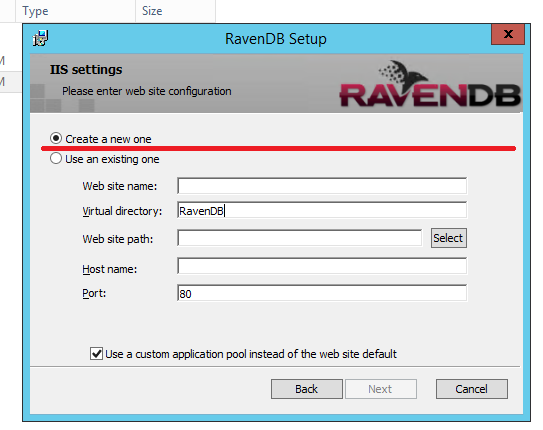
I find this image (and the other wizards, after this) *VERY* unintuitive. I've added the red line in there to highlight what I see/understand that GUI to do.
When i normally see a screen like that, I see all that data entry to be related to the 2nd checkbox -only-. I stumbled around to finally see that it's do to with both or something. At the very least, when i have the first item checked, it doesn't look like those data boxes related to that IMO.
Next -> why a virtual directory? I've always made a normal website and linked it to the Website folder of the ravendb download (when I manually made an IIS RavenDb 'site'). I never use the *default* site .. in fact, i delete that horrid thing. And the port 80 by default??? if people leave the evil default website there (which is for port 80) and then try to install this .. i'm scared to think what could happen ...
I would love to see it populated like this...
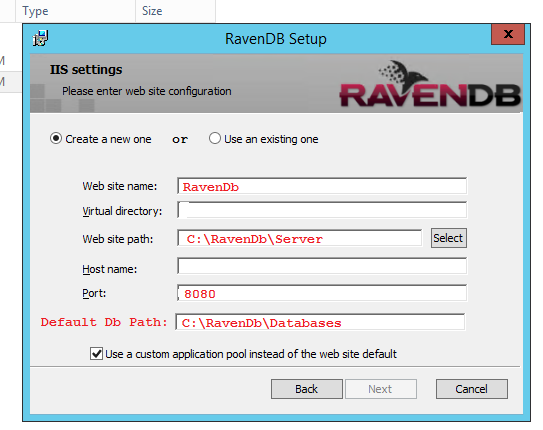
1. The options are side by side. The bottom section changes based on the option chosen.
2. Website is a new dedicated site, not a Virtual.
3. Path is hardcoded but of course can be changed by the user.
4. Port - don't like 80 and 8080 is what's used by localhost dev server and by RavenHQ.
5. **NEW** - I've added this in -> the default location for the DATA folder. By default, it's (urgh) "~/Data" in the web.config which is relative to the exe. Maybe offer the option to say where this value goes and then manually update the web.config file that is copied during the install. So this is where the System tenant goes, along with your own custom tenants.
6. **BONUS** - the option to place the indexes and logs somewhere (eg. C:\RavenDb\Indexes). By default, it's the same path as the Default DB path.
The idea about items #5 and #6 are because I hate installing the data onto the OS. in fact, I never do that. From my Sql experience, I throw the data onto one disk and the logs onto another. OS HD dies - the data/logs aren't effected. I would love to do the same here.
Importing initial data
Urgh. I swear i've never had any luck with this.
Ok, So i exported 500k docs from my localhost. connected to new RavenDb test server and ... IMPORT DATA ... and boom. Maximum Request Length exceeded. *sigh*.
I'm not sure what the *best* solution here is right now :( I know WHAT the solution is and what i did quickly but i find that this error goes against everything that is what RavenDb is about - making life easier and to get things running in minutes. Sure, it's easy to add a value in the install wizard for the request max size (eg. 500MB, 1GB, whatever) -if- a new textbox was added, but i feel that this something we (the consumers/developers) shouldn't really need to be dealing with?
Like can't it just accept the data chunked or something. This is a problem beyond my limit intelligence :/
I just know it's always biting me and pains me so much :( I just want my data to be uploaded to a temp location and then RavenDb to just import it in as it needs.
---
once all this got working -> things are good again! woot!
Now i can finally do my tests -> what's the network traffic between my website VM and a RavenDB VM in the same hosting platform :)
cheers!
-J-


