
Issue when enable wss in RabbitMQ
535 views
Skip to first unread message

ri...@datalkz.com
Apr 25, 2018, 9:44:08 AM4/25/18
to rabbitmq-users
Installed RabbitMQ In Same Network machine as a single instance.
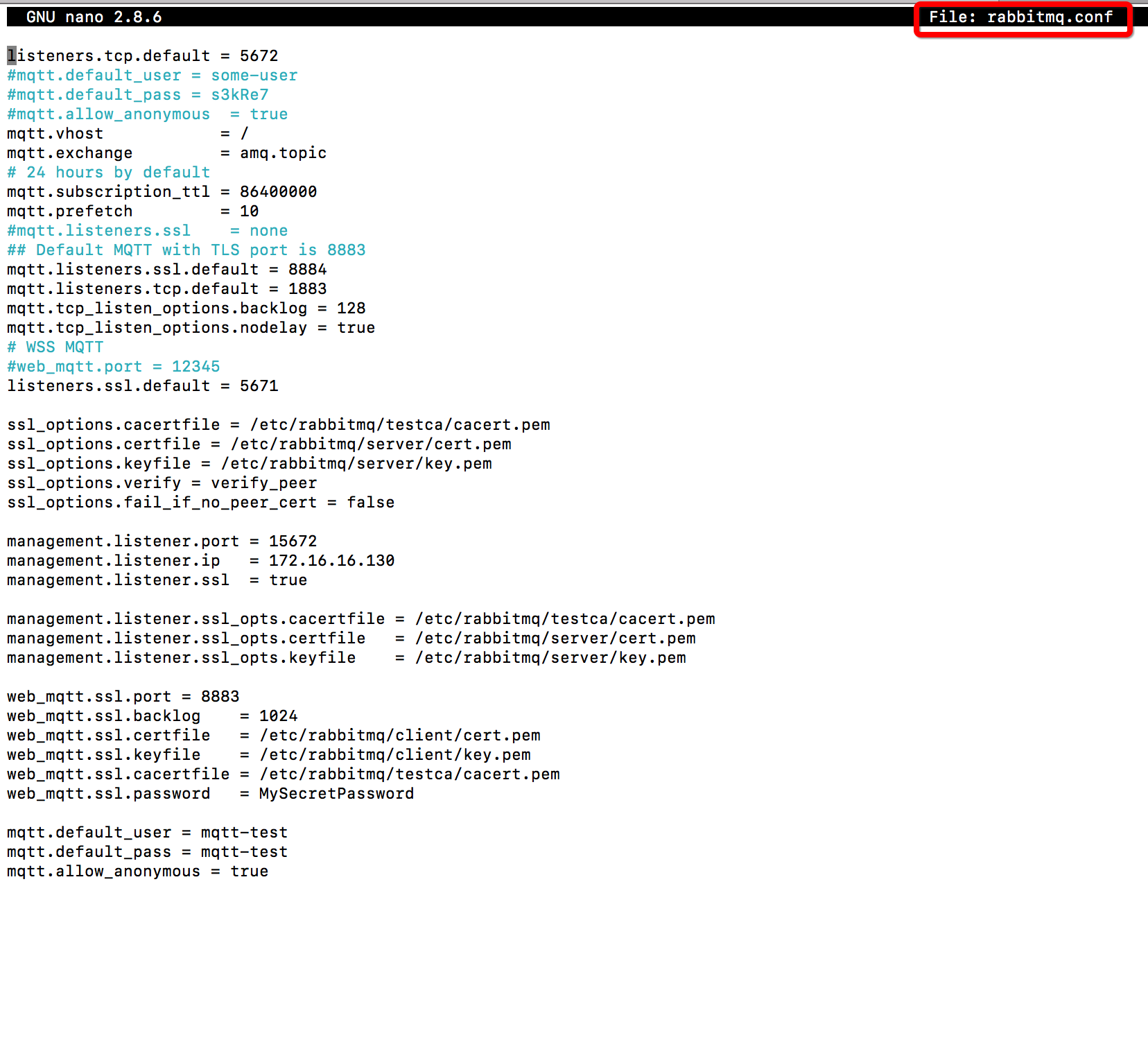
Enabled SSL (Self Certificate ) as mentioned in https://www.rabbitmq.com/ssl.htmlBut not able to connect https://172.16.16.130:8883/ws, giving invalid error certificate invalid error
Machine details
Distributor ID: Ubuntu
Description: Ubuntu 17.10
Release: 17.10
Codename: artful
Please go through attachments for more details
Please help me to identify the mistake i have done in configuration


Michael Klishin
Apr 25, 2018, 10:03:39 AM4/25/18
to rabbitm...@googlegroups.com
Start with inspecting server logs and http://www.rabbitmq.com/troubleshooting-ssl.html.
Chances are there is nothing invalid about the certificates but they are self-signed you merely have to add them to the trusted store.
Feel free to use the basic tls-gen profile to compare: https://github.com/michaelklishin/tls-gen.
--
You received this message because you are subscribed to the Google Groups "rabbitmq-users" group.
To unsubscribe from this group and stop receiving emails from it, send an email to rabbitmq-users+unsubscribe@googlegroups.com.
To post to this group, send email to rabbitmq-users@googlegroups.com.
For more options, visit https://groups.google.com/d/optout.
--
MK
Staff Software Engineer, Pivotal/RabbitMQ
ri...@datalkz.com
Apr 25, 2018, 10:14:58 AM4/25/18
to rabbitmq-users
Thank you for Quick response.
Have already done TLS/SSL Troubleshooting, the test are passed it seems.
Please find attachments for more info.
Servier log seems fine and it is attached.


Michael Klishin
Apr 25, 2018, 10:25:46 AM4/25/18
to rabbitm...@googlegroups.com
There are handshake timeouts on port 5671 in the log. Are there more clients than your Web browser involved?
How were the certificates generated? Were they added to the trusted certificate store on both server and client (e.g. Web browser) end?
Can you please post *all* output from openssl s_client and s_server that you conclude was successful? Please help others help you,
we work with data and not guesses on this list.
--
You received this message because you are subscribed to the Google Groups "rabbitmq-users" group.
To unsubscribe from this group and stop receiving emails from it, send an email to rabbitmq-users+unsubscribe@googlegroups.com.
To post to this group, send email to rabbitmq-users@googlegroups.com.
For more options, visit https://groups.google.com/d/optout.
ri...@datalkz.com
Apr 26, 2018, 4:25:52 AM4/26/18
to rabbitmq-users
Sorry for the inconvenience caused.
No other clients are involved other than my browser.
Created Certificates using : https://github.com/michaelklishin/tls-gen
Certificate generate logs and certificates are attached.
RabbitMQ log is also attached.
When i troubleshoot with http://www.rabbitmq.com/troubleshooting-ssl.html added the attachments s_client and s_server
Error in browser is -> stream.js:64 WebSocket connection to 'wss://172.16.16.133:8883/ws' failed: Error in connection establishment: net::ERR_CERT_INVALID
In client side i didn't add any certificate. Infact i dont have any idea about it.
Please let me know any more details i do need to provided.
Michael Klishin
Apr 26, 2018, 7:26:19 AM4/26/18
to rabbitm...@googlegroups.com
So OpenSSL s_client DOES NOT succeed in the provided case:
> Verify return code: 21 (unable to verify the first certificate)
This stands out as a red flag:
> TLS server: In state certify received CLIENT ALERT: Fatal - Certificate Unknown
this means that the client's CA is not trusted on the server's end.
So something is almost certainly wrong with the [CA] certificate management. In order for the server to successfully verify
a client certificate chain, there must be a certificate in the chain (in the case of self-signed certificates, usually the CA one) that
is marked as trusted on the server's host. On Linux this is done by placing it with the secure read permissions into
a standard directory, which, sadly varies a lot between distributions: http://gagravarr.org/writing/openssl-certs/others.shtml.
Lastly, you have
> ssl_options.verify = verify_peer
which is fine and generally a good idea for messaging protocol connections but for *browser*-based clients it will be problematic
unless you are sure your client provides a correct certificate [chain]. Does it?
I'd recommend getting things to work with an AMQP 0-9-1/regular RabbitMQ client first, e.g. Bunny or Pika, then, say, STOMP
and management UI and lastly WebSockets-based protocols.
--
You received this message because you are subscribed to the Google Groups "rabbitmq-users" group.
To unsubscribe from this group and stop receiving emails from it, send an email to rabbitmq-users+unsubscribe@googlegroups.com.
To post to this group, send email to rabbitmq-users@googlegroups.com.
For more options, visit https://groups.google.com/d/optout.
Reply all
Reply to author
Forward
0 new messages