
Rabbitmq problems with beam.smp process (high cpu and memory usage)
10,778 views
Skip to first unread message

Raul Kaubi
Aug 9, 2018, 10:59:22 AM8/9/18
to rabbitmq-users
Hi
OS centos7, 4GB of memory, 4 CPU's, HDD 40GB.
We upgraded our production rabbitmq two node cluster 3.6.6 to 3.7.7 and also erlang from 20.3 to 21.0.3 a few weeks ago.
After the upgrade, I started using rabbitmq.conf and advanced.config instead on rabbitmq.config.
Memory parameters were set like this:
vm_memory_high_watermark.relative = 0.5
vm_memory_high_watermark_paging_ratio = 0.5
disk_free_limit.relative = 2.0
About a week or so, we had our first problem. Looks like some close to 700MB message was posted to a certain queue, and since then we noticed heavy swapping. Cluster was seriously halted, all the clients get timeouts.
Ofcourse at start I did not know, what was causing the issue. Restarting cluster nodes did not help at all, it took almost 10 minutes for cluster node to come up after service restart.
Then at some point I started investigating, and I noticed a beam.smp process (runs under rabbitmq) that was responsible for using all that memory and beyond that.
Also I noticed quite big ..rdq file inside the following directory:
/var/lib/rabbitmq/mnesia/rabbit@<<hostname>>/msg_stores/vhosts/628WB79CIFDYO9LJI6DKMI09L/msg_store_persistent
total 692M
-rw-r----- 1 rabbitmq rabbitmq 692M Jul 26 16:53 1911.rdq
-rw-r----- 1 rabbitmq rabbitmq 0 Jul 26 16:53 1912.rdq
If I have understood correctly, the files inside this directory are splitted to a certain size, or not..?
Anyway, even after I had purged this certain queue, where this close to 700MB message was, the ..rdq file still was present and restarting cluster node still took several minutes. Only after I had manually deleted this huge ..rdq file, the cluster returned to normal state and beam.smp process also returned to normal state.
But how can ~700MB message eat away ~2GB of memory +4gb of swap..? - that is something that I do not understand until today.
From rabbitmq management, I did see that "Memory high watermark was close to 2GB (0.5 * 4GB)", during that time, memory was used a lot more (memory limit alarms were fired all the time).
I can tell you also that all the other message bytes were max 5-10MB. So this memory high watermark could not have been exceeded in any way.
This all took me several hours to figure out and to return cluster to normal state. Luckily I had another single node rabbitmq backup host present and I managed to move all the publishers and consumers to that host, and then started investigating futher. Later on I moved all the messages (except that ~700mb message) to new host using shovel plugin.
Rabbitmq backup host configuration:
OS centos7, 4GB of memory, 4 CPU's.
rabbitmq 3.6.6, erlang 20.3
{disk_free_limit, "50MB"},
{vm_memory_high_watermark, 0.7}, -> Memory high watermark = 2.6GB
{vm_memory_high_watermark_paging_ratio, 0.5}]},
Since today, our services were against that backup host. And today we had another incident. Strange thing is, that I still don't know what happened today, since, I have no useful entries in rabbitmq.log file also, this is the messages that were in log files, since this problem arised today:
=INFO REPORT==== 9-Aug-2018::14:18:14 ===
accepting AMQP connection <0.12132.2015> (XXXXXXX:52771 -> YYYYYYYY:5672)
=INFO REPORT==== 9-Aug-2018::14:18:14 ===
accepting AMQP connection <0.12849.2015> (XXXXXXX:52772 -> YYYYYYYY:5672)
=INFO REPORT==== 9-Aug-2018::14:18:15 ===
accepting AMQP connection <0.13235.2015> (XXXXXXX:52773 -> YYYYYYYY:5672)
=INFO REPORT==== 9-Aug-2018::14:18:28 ===
accepting AMQP connection <0.15639.2015> (XXXXXXX:52784 -> YYYYYYYY:5672)
=INFO REPORT==== 9-Aug-2018::14:25:12 ===
accepting AMQP connection <0.5010.2017> (ZZZZZZZZZ:63771 -> YYYYYYYY:5672)
=INFO REPORT==== 9-Aug-2018::14:25:12 ===
closing AMQP connection <0.5010.2017> (ZZZZZZZZZ:63771 -> YYYYYYYY:5672)
=INFO REPORT==== 9-Aug-2018::14:32:48 ===
accepting AMQP connection <0.5019.2019> (CCCCCCCCCCC:53562 -> YYYYYYYY:5672)
Clients connected to that rabbitmq server, all got timeouts. Memory usage was very low (200MB max), only thing that I noticed was that cpu usage was 100%, and this time again beam.smp process was responsible for that. Only this time cpu was 100%, memory was all good today.
After the today's incident, we moved all our services back to 3.7.7 rabbitmq cluster nodes.
Any idea where to look the culprit for today's problem..?
Or any help with the prevous incident.
These problems are very strange, since we had "rabbit 3.6.6/erlang 20.3" for close to 2 years basically, and we never had a such problem with rabbitmq. Very strange that these things happen now in a row.
Any help would be appreciated..:)
I can post some log files or sth, that would let you investigate this matter somehow..
Regards
Raul

Michael Klishin
Aug 9, 2018, 12:03:05 PM8/9/18
to rabbitm...@googlegroups.com
There is a dedicated documentation guide for that [1].
Please collect and share data, we do not guess on this list.
--
You received this message because you are subscribed to the Google Groups "rabbitmq-users" group.
To unsubscribe from this group and stop receiving emails from it, send an email to rabbitmq-users+unsubscribe@googlegroups.com.
To post to this group, send email to rabbitmq-users@googlegroups.com.
For more options, visit https://groups.google.com/d/optout.
--
MK
Staff Software Engineer, Pivotal/RabbitMQ
Michael Klishin
Aug 9, 2018, 12:10:31 PM8/9/18
to rabbitm...@googlegroups.com
> how can ~700MB message eat away ~2GB of memory +4gb of swap
messages are not the only thing that uses memory. Connections (primarily TCP buffers [1]), channels, queue state and so on all do.
There is no need to guess as to what consumes memory; the node can tell you that [2] if you care to know,
with a reasonably detailed and precise breakdown, and even a per-process breakdown in rabbitmq-top.
Instead of wiping a queue with a lot of data you should have visited its page in the management UI and discovered
a breakdown of where the messages are kept: in RAM, on disk or both. Clients can *instruct* RabbitMQ to keep messages in RAM
by publishing them as transient (delivery mode = 1).
Please use the tools that ship with RabbitMQ and inspect/explain what your applications do. Freaking out is not how you arrive
at informed conclusions.
On Thu, Aug 9, 2018 at 2:59 PM, Raul Kaubi <raul...@gmail.com> wrote:
--
You received this message because you are subscribed to the Google Groups "rabbitmq-users" group.
To unsubscribe from this group and stop receiving emails from it, send an email to rabbitmq-users+unsubscribe@googlegroups.com.
To post to this group, send email to rabbitmq-users@googlegroups.com.
For more options, visit https://groups.google.com/d/optout.
Michael Klishin
Aug 9, 2018, 12:27:46 PM8/9/18
to rabbitm...@googlegroups.com
Another change that some 3.6 users now on 3.7 have reported to make a difference is a periodic background GC [1].
It is disabled by default in 3.7 as it makes no significant difference on most workloads and introduces a lot
of additional latency.
I doubt binary heaps will be a major contributor but since we know nothing about the workload
it was worth mentioning.
To post to this group, send email to rabbitm...@googlegroups.com.
For more options, visit https://groups.google.com/d/optout.
--MKStaff Software Engineer, Pivotal/RabbitMQ
Raul Kaubi
Aug 10, 2018, 3:38:45 AM8/10/18
to rabbitmq-users
Hi
I have enabled rabbitmq_top, a few weeks ago, but, in my opinion, this does not give me any hints, since when I order by memory descending, then it shows that top1 process uses 9.1 MB, but on the other hand management UI reports that 500+MB is used. Queues total bytes were also quite low at that time (under 1MB)

rabbitmqctl_status
[root@XXXXXXXX ~]# rabbitmqctl status
Status of node rabbit@XXXXXXXX ...
[{pid,921},
{running_applications,
[{rabbitmq_top,"RabbitMQ Top","3.7.7"},
{rabbitmq_shovel_management,
"Management extension for the Shovel plugin","3.7.7"},
{rabbitmq_management,"RabbitMQ Management Console","3.7.7"},
{rabbitmq_shovel,"Data Shovel for RabbitMQ","3.7.7"},
{rabbitmq_delayed_message_exchange,"RabbitMQ Delayed Message Exchange",
"20171201-3.7.x"},
{rabbitmq_web_dispatch,"RabbitMQ Web Dispatcher","3.7.7"},
{rabbitmq_management_agent,"RabbitMQ Management Agent","3.7.7"},
{rabbitmq_amqp1_0,"AMQP 1.0 support for RabbitMQ","3.7.7"},
{rabbitmq_auth_backend_ldap,"RabbitMQ LDAP Authentication Backend",
"3.7.7"},
{rabbit,"RabbitMQ","3.7.7"},
{amqp_client,"RabbitMQ AMQP Client","3.7.7"},
{rabbit_common,
"Modules shared by rabbitmq-server and rabbitmq-erlang-client",
"3.7.7"},
{jsx,"a streaming, evented json parsing toolkit","2.8.2"},
{cowboy,"Small, fast, modern HTTP server.","2.2.2"},
{amqp10_client,"AMQP 1.0 client from the RabbitMQ Project","3.7.7"},
{ranch_proxy_protocol,"Ranch Proxy Protocol Transport","1.5.0"},
{ranch,"Socket acceptor pool for TCP protocols.","1.5.0"},
{ssl,"Erlang/OTP SSL application","9.0"},
{public_key,"Public key infrastructure","1.6.1"},
{asn1,"The Erlang ASN1 compiler version 5.0.6","5.0.6"},
{xmerl,"XML parser","1.3.17"},
{amqp10_common,
"Modules shared by rabbitmq-amqp1.0 and rabbitmq-amqp1.0-client",
"3.7.7"},
{recon,"Diagnostic tools for production use","2.3.2"},
{cowlib,"Support library for manipulating Web protocols.","2.1.0"},
{eldap,"Ldap api","1.2.4"},
{os_mon,"CPO CXC 138 46","2.4.5"},
{mnesia,"MNESIA CXC 138 12","4.15.4"},
{inets,"INETS CXC 138 49","7.0"},
{crypto,"CRYPTO","4.3"},
{lager,"Erlang logging framework","3.6.3"},
{goldrush,"Erlang event stream processor","0.1.9"},
{compiler,"ERTS CXC 138 10","7.2.2"},
{syntax_tools,"Syntax tools","2.1.5"},
{syslog,"An RFC 3164 and RFC 5424 compliant logging framework.","3.4.2"},
{sasl,"SASL CXC 138 11","3.2"},
{stdlib,"ERTS CXC 138 10","3.5.1"},
{kernel,"ERTS CXC 138 10","6.0"}]},
{os,{unix,linux}},
{erlang_version,
"Erlang/OTP 21 [erts-10.0.3] [source] [64-bit] [smp:4:4] [ds:4:4:10] [async-threads:64] [hipe]\n"},
{memory,
[{connection_readers,2106912},
{connection_writers,462596},
{connection_channels,1766956},
{connection_other,10773664},
{queue_procs,10485040},
{queue_slave_procs,0},
{plugins,25316964},
{other_proc,20864808},
{metrics,1191932},
{mgmt_db,17925216},
{mnesia,1162664},
{other_ets,3441280},
{binary,44119136},
{msg_index,116872},
{code,24318244},
{atom,1180881},
{other_system,12742059},
{allocated_unused,49184840},
{reserved_unallocated,343666688},
{strategy,rss},
{total,[{erlang,177975224},{rss,570826752},{allocated,227160064}]}]},
{alarms,[]},
{listeners,[{clustering,25672,"::"},{amqp,5672,"::"},{http,15672,"::"}]},
{vm_memory_calculation_strategy,rss},
{vm_memory_high_watermark,0.5},
{vm_memory_limit,3044067328},
{disk_free_limit,12176269312},
{disk_free,34663190528},
{file_descriptors,
[{total_limit,924},
{total_used,79},
{sockets_limit,829},
{sockets_used,58}]},
{processes,[{limit,1048576},{used,2005}]},
{run_queue,1},
{uptime,1195779},
{kernel,{net_ticktime,60}}]
Enabled plugins:
rabbitmq_auth_backend_ldap 3.7.7
rabbitmq_delayed_message_exchange 20171201-3.7.x
rabbitmq_management 3.7.7
rabbitmq_shovel 3.7.7
rabbitmq_shovel_management 3.7.7
rabbitmq_top 3.7.7
About GC, isn't this enabled by default..?
In rabbitmq.conf (so commented out)
# background_gc_enabled = false
# background_gc_target_interval = 60000
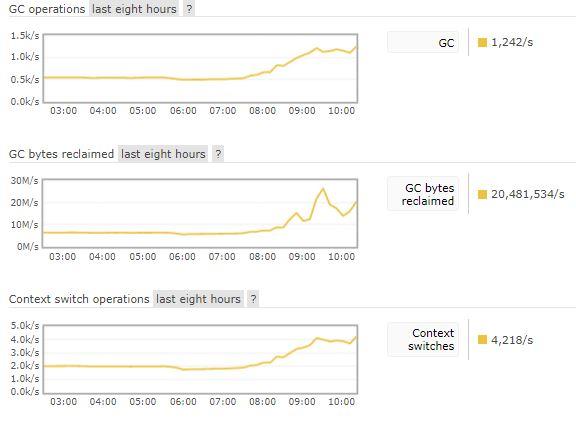
At least it shows me that it is active:
To unsubscribe from this group and stop receiving emails from it, send an email to rabbitmq-user...@googlegroups.com.
To post to this group, send email to rabbitm...@googlegroups.com.
For more options, visit https://groups.google.com/d/optout.
--MKStaff Software Engineer, Pivotal/RabbitMQ
Michael Klishin
Aug 10, 2018, 5:11:50 AM8/10/18
to rabbitm...@googlegroups.com
According to the breakdown your node at the time of `rabbitmqctl status` invocation used
570826752 bytes (0,57 GB) and 343666688 bytes of which (0,34 GB) are preallocated by the runtime but not
yet used. That's a high % ratio but not an excessive number.
Memory allocator flags can be configured [1] (and there are more discussions in the searchable list archive) but I don't see any real reason to worry with the data provided.
> About GC, isn't this enabled by default..?
From my earlier response:
> It is disabled by default in 3.7 as it makes no significant difference on most workloads and introduces a lot
> of additional latency.
I don't see any reason to enable it since the Binaries section uses 0,044 GB in the provided breakdown.
rabbitmq-top is NOT meant to be the primary tool here, the breakdown provides is.
In general, there is nothing in this report that would warrant posts in bold and with underlined text.
Either you collected this data from the wrong node or it is clearly not under any kind of stress at the moment.
If you want to understand the behavior of the system, deploy a separate node/cluster and run experiments with it,
e.g. shut down your consumers and see where the enqueued messages are stored and what `rabbitmqctl status` reports
when/if the node hits a memory alarm.
On an unrelated note, your node runs with the limit of ~ 1K file descriptors, which is way under the recommended minimum [2].
To unsubscribe from this group and stop receiving emails from it, send an email to rabbitmq-users+unsubscribe@googlegroups.com.
To post to this group, send email to rabbitmq-users@googlegroups.com.
Raul Kaubi
Aug 10, 2018, 5:23:30 AM8/10/18
to rabbitm...@googlegroups.com
Hi
The breakdown was done this morning, I was just truying to figure out what causes sudden memory usage from 200mb to 500+mb, since total messages bytes were eay under 1mb at that time.
But the GC picture, that I posted, it looks like it is enabled in my cluster.
About bold and underlined text, I was just trying to separate questions, there was no frustration there.
We are using delivery_mode = 2, so all mesaages are persistent.
Raul
Sent from my iPhone
According to the breakdown your node at the time of `rabbitmqctl status` invocation used570826752 bytes (0,57 GB) and 343666688 bytes of which (0,34 GB) are preallocated by the runtime but notyet used. That's a high % ratio but not an excessive number.Memory allocator flags can be configured [1] (and there are more discussions in the searchable list archive) but I don't see any real reason to worry with the data provided.> About GC, isn't this enabled by default..?From my earlier response:> It is disabled by default in 3.7 as it makes no significant difference on most workloads and introduces a lot> of additional latency.I don't see any reason to enable it since the Binaries section uses 0,044 GB in the provided breakdown.rabbitmq-top is NOT meant to be the primary tool here, the breakdown provides is.In general, there is nothing in this report that would warrant posts in bold and with underlined text.Either you collected this data from the wrong node or it is clearly not under any kind of stress at the moment.If you want to understand the behavior of the system, deploy a separate node/cluster and run experiments with it,e.g. shut down your consumers and see where the enqueued messages are stored and what `rabbitmqctl status` reportswhen/if the node hits a memory alarm.On an unrelated note, your node runs with the limit of ~ 1K file descriptors, which is way under the recommended minimum [2].
On Fri, Aug 10, 2018 at 7:38 AM, Raul Kaubi <raul...@gmail.com> wrote:
HiI have enabled rabbitmq_top, a few weeks ago, but, in my opinion, this does not give me any hints, since when I order by memory descending, then it shows that top1 process uses 9.1 MB, but on the other hand management UI reports that 500+MB is used. Queues total bytes were also quite low at that time (under 1MB)
--
You received this message because you are subscribed to a topic in the Google Groups "rabbitmq-users" group.
To unsubscribe from this topic, visit https://groups.google.com/d/topic/rabbitmq-users/CGRBhIxbn-s/unsubscribe.
To unsubscribe from this group and all its topics, send an email to rabbitmq-user...@googlegroups.com.
Michael Klishin
Aug 10, 2018, 5:32:45 AM8/10/18
to rabbitm...@googlegroups.com
I don't see any evidence of the claim that background GC is enabled in your cluster.
`background_gc_enabled` in the posted sample is commented out.
There is no need to guess, however, since RabbitMQ tooling can help answer this question.
There are two documentation sections that explain how to verify effective configuration [1].
Memory usage and breakdown are point-in-time metrics, so running them today to understand
what might have used the memory yesterday makes little sense. Set up an identical cluster,
run an experiment (e.g. overload your consumers) and once the system is under a certain amount of stress
(e.g. hits an alarm), run it and work with that data. There is no harm in running it multiple times (just like
multiple measurements in a scientific experiment tend to be useful more often than not).
In fact, that's the primary job of monitoring [2]: collecting such data and making it available for inspection continuously [2].
There is no shortage of tools [5] available for that, from DataDog [3] to the recently popular Prometheus/Graphana [4] combination.
Our Production Checklist guide explicitly calls out for the need of monitoring of production systems [6].
--
You received this message because you are subscribed to a topic in the Google Groups "rabbitmq-users" group.
To unsubscribe from this topic, visit https://groups.google.com/d/topic/rabbitmq-users/CGRBhIxbn-s/unsubscribe.
To unsubscribe from this group and all its topics, send an email to rabbitmq-users+unsubscribe@googlegroups.com.
To post to this group, send email to rabbitmq-users@googlegroups.com.
For more options, visit https://groups.google.com/d/optout.
--
You received this message because you are subscribed to the Google Groups "rabbitmq-users" group.
To unsubscribe from this group and stop receiving emails from it, send an email to rabbitmq-users+unsubscribe@googlegroups.com.
To post to this group, send email to rabbitmq-users@googlegroups.com.
For more options, visit https://groups.google.com/d/optout.
Raul Kaubi
Aug 13, 2018, 1:58:43 AM8/13/18
to rabbitmq-users
Hi
I noticed this morning that erlang processes count keeps increasing, on Friday, this metric was about 2k, at the moment it's 9k + and rising.

Regards
Raul
--
You received this message because you are subscribed to a topic in the Google Groups "rabbitmq-users" group.
To unsubscribe from this topic, visit https://groups.google.com/d/topic/rabbitmq-users/CGRBhIxbn-s/unsubscribe.
To unsubscribe from this group and all its topics, send an email to rabbitmq-user...@googlegroups.com.
To post to this group, send email to rabbitm...@googlegroups.com.
For more options, visit https://groups.google.com/d/optout.
--
You received this message because you are subscribed to the Google Groups "rabbitmq-users" group.
To unsubscribe from this group and stop receiving emails from it, send an email to rabbitmq-user...@googlegroups.com.
To post to this group, send email to rabbitm...@googlegroups.com.
For more options, visit https://groups.google.com/d/optout.
Raul Kaubi
Aug 13, 2018, 4:36:34 AM8/13/18
to rabbitmq-users
Hi
This morning I also have had several memory alarms fired in 3.7.7 cluster:
I managed to collect metrics, and again "reserved_unallocated" is very high, about 1.6GB
I think that this sudden memory fluctuation (and memory alarms) is happening due to this.
Is there something to do that can reduce this memory fluctuation..?
"memory":
"allocated_unused": 127544624
"atom": 1180881
"binary": 77607128
"code": 24318244
"connection_channels": 2217796
"connection_other": 21600824
"connection_readers": 2469528
"connection_writers": 736216
"metrics": 1470428
"mgmt_db": 17428024
"mnesia": 1153232
"msg_index": 174528
"other_ets": 3486264
"other_proc": 20049508
"other_system": 12919067
"plugins": 25417968
"queue_procs": 20882636
"queue_slave_procs": 0
"reserved_unallocated": 1724469248 ~ 1.6GB
"strategy": "rss"
"total":
"allocated": 360656896
"erlang": 233112272
"rss": 2085126144 ~ 1.9GB
Also, do I need to worry about erlang processes increasing..?
Regards
Raul
Michael Klishin
Aug 13, 2018, 6:52:52 AM8/13/18
to rabbitm...@googlegroups.com
Increase in the number of Erlang processes can be attributed to the increase in the number of connections,
channels and queues (also Shovel connections and Federation links). Check your monitoring charts
for correlation.
If "reserved_unallocated" value is high you can try a different Erlang version and possibly a different set of allocator flags. [1]
provides a starting point. Finding optimal allocator flags is a matter of trial and error.
To unsubscribe from this group and stop receiving emails from it, send an email to rabbitmq-users+unsubscribe@googlegroups.com.
To post to this group, send email to rabbitmq-users@googlegroups.com.
Raul Kaubi
Aug 14, 2018, 5:01:09 AM8/14/18
to rabbitmq-users
Hmm, how can I adjust these erlang runtime parameters..?
Writing the following row to the rabbitmq-env.conf file and restarting rabbitmq has no effect.
RABBITMQ_SERVER_ADDITIONAL_ERL_ARGS='+MHas ageffcbf +MBas ageffcbf +MHlmbcs 512 +MBlmbcs 512'
Also, what would be the best way of running series of tests in rabbitmq cluster..?
Perhaps there is special application that can be configured to publish and consume given amount of messages.
Regards
Raul

Petteri Vaarala
Aug 14, 2018, 9:21:48 AM8/14/18
to rabbitmq-users
Hi,
I'm seeing quite similar issue in multiple of our environments.
First we noticed this on Aug 6th with RabbitMQ 3.7.5 (Erlang 20.1.7).
Upgraded to RabbitMQ 3.7.7 (Erlang 20.3.4) with background GC enabled but issue remains.
bash-4.4# rabbitmqctl environment|grep gc
{background_gc_enabled,true},
{background_gc_target_interval,60000},
{lazy_queue_explicit_gc_run_operation_threshold,1000},
{queue_explicit_gc_run_operation_threshold,1000},
{process_stats_gc_timeout,300000},
We have 5 node clusters and it seems that memory is increasing on 2 nodes. Most of our queues are mirrored on master + 2 slaves. I have tried to pinpoint whether memory usage is related on some specific queue but I don't see it. Issue is most prominent on the busiest environment.
Unfortunately we don't have long enough performance metrics history to see when this started but at least since 27th July.
Statistics for one affected node:
bash-4.4# rabbitmqctl status
Status of node rabbit@rabbitmq-3...
[{pid,638},
{running_applications,
[{rabbitmq_management,"RabbitMQ Management Console","3.7.7"},
{rabbitmq_peer_discovery_k8s,
"Kubernetes-based RabbitMQ peer discovery backend","3.7.7"},
{amqp_client,"RabbitMQ AMQP Client","3.7.7"},
{rabbitmq_peer_discovery_common,
"Modules shared by various peer discovery backends","3.7.7"},
{rabbitmq_web_dispatch,"RabbitMQ Web Dispatcher","3.7.7"},
{rabbitmq_management_agent,"RabbitMQ Management Agent","3.7.7"},
{rabbit,"RabbitMQ","3.7.7"},
{rabbit_common,
"Modules shared by rabbitmq-server and rabbitmq-erlang-client",
"3.7.7"},
{cowboy,"Small, fast, modern HTTP server.","2.2.2"},
{ranch_proxy_protocol,"Ranch Proxy Protocol Transport","1.5.0"},
{ranch,"Socket acceptor pool for TCP protocols.","1.5.0"},
{ssl,"Erlang/OTP SSL application","8.2.5"},
{public_key,"Public key infrastructure","1.5.2"},
{asn1,"The Erlang ASN1 compiler version 5.0.5","5.0.5"},
{xmerl,"XML parser","1.3.16"},
{inets,"INETS CXC 138 49","6.5.1"},
{mnesia,"MNESIA CXC 138 12","4.15.3"},
{recon,"Diagnostic tools for production use","2.3.2"},
{os_mon,"CPO CXC 138 46","2.4.4"},
{cowlib,"Support library for manipulating Web protocols.","2.1.0"},
{crypto,"CRYPTO","4.2.1"},
{jsx,"a streaming, evented json parsing toolkit","2.8.2"},
{lager,"Erlang logging framework","3.6.3"},
{goldrush,"Erlang event stream processor","0.1.9"},
{compiler,"ERTS CXC 138 10","7.1.5"},
{syntax_tools,"Syntax tools","2.1.4"},
{syslog,"An RFC 3164 and RFC 5424 compliant logging framework.","3.4.2"},
{sasl,"SASL CXC 138 11","3.1.2"},
{stdlib,"ERTS CXC 138 10","3.4.5"},
{kernel,"ERTS CXC 138 10","5.4.3"}]},
{os,{unix,linux}},
{erlang_version,
"Erlang/OTP 20 [erts-9.3] [source] [64-bit] [smp:16:16] [ds:16:16:10] [async-threads:256] [hipe] [kernel-poll:true]\n"},
{memory,
[{connection_readers,3191136},
{connection_writers,1173136},
{connection_channels,5654424},
{connection_other,5426776},
{queue_procs,17067256},
{queue_slave_procs,221874552},
{plugins,10136112},
{other_proc,30518720},
{metrics,1456472},
{mgmt_db,12906176},
{mnesia,663936},
{other_ets,3531888},
{binary,269206888},
{msg_index,6451448},
{code,28681182},
{atom,1164497},
{other_system,30803601},
{allocated_unused,2430443544},
{reserved_unallocated,0},
{strategy,rss},
{total,[{erlang,649908200},{rss,2995699712},{allocated,3080351744}]}]},
{alarms,[]},
{listeners,
[{clustering,25672,"::"},
{amqp,5672,"::"},
{'amqp/ssl',5671,"::"},
{https,15671,"::"}]},
{vm_memory_calculation_strategy,rss},
{vm_memory_high_watermark,0.66},
{vm_memory_limit,5669356830},
{disk_free_limit,500000000},
{disk_free,49821687808},
{file_descriptors,
[{total_limit,1048476},
{total_used,136},
{sockets_limit,943626},
{sockets_used,98}]},
{processes,[{limit,1048576},{used,2470}]},
{run_queue,0},
{uptime,445080},
{kernel,{net_ticktime,60}}]
Unaffected node memory stats:
{memory,
[{connection_readers,2145752},
{connection_writers,957864},
{connection_channels,8458184},
{connection_other,3523392},
{queue_procs,746832},
{queue_slave_procs,21765704},
{plugins,3777984},
{other_proc,31090688},
{metrics,1150704},
{mgmt_db,10289960},
{mnesia,675912},
{other_ets,3435384},
{binary,44598704},
{msg_index,3183808},
{code,28681182},
{atom,1164497},
{other_system,30378873},
{allocated_unused,304350128},
{reserved_unallocated,0},
{strategy,rss},
{total,[{erlang,196025424},{rss,492494848},{allocated,500375552}]}]},
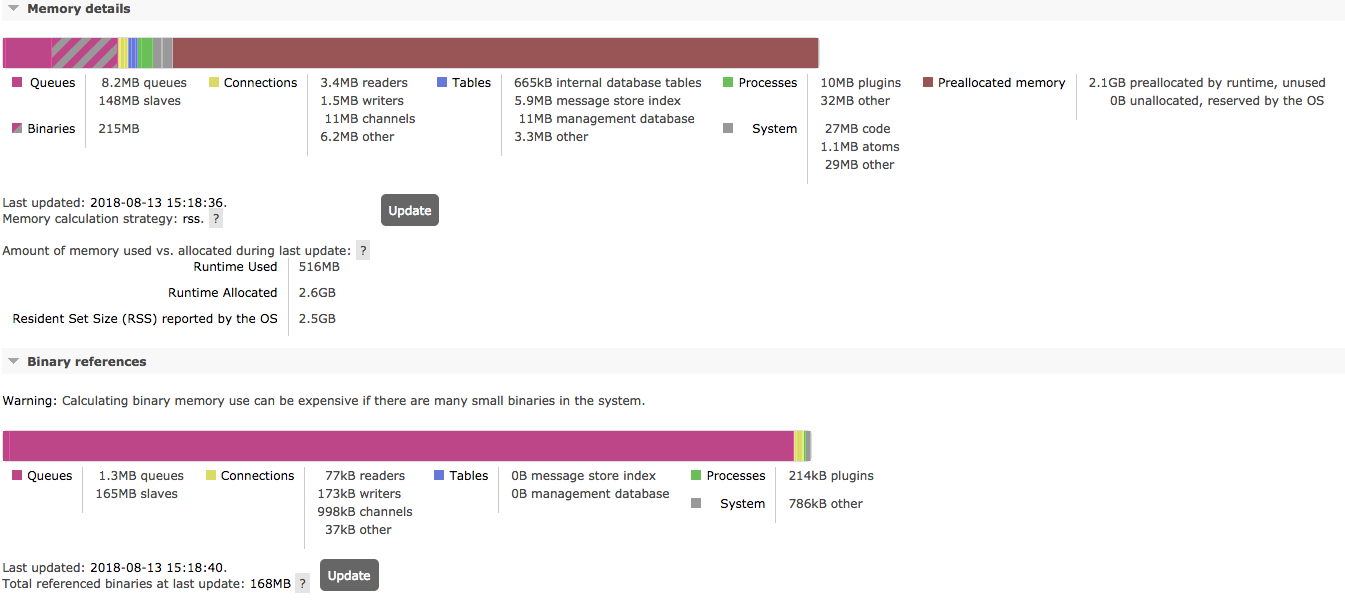
Memory preallocated by runtime is very high:
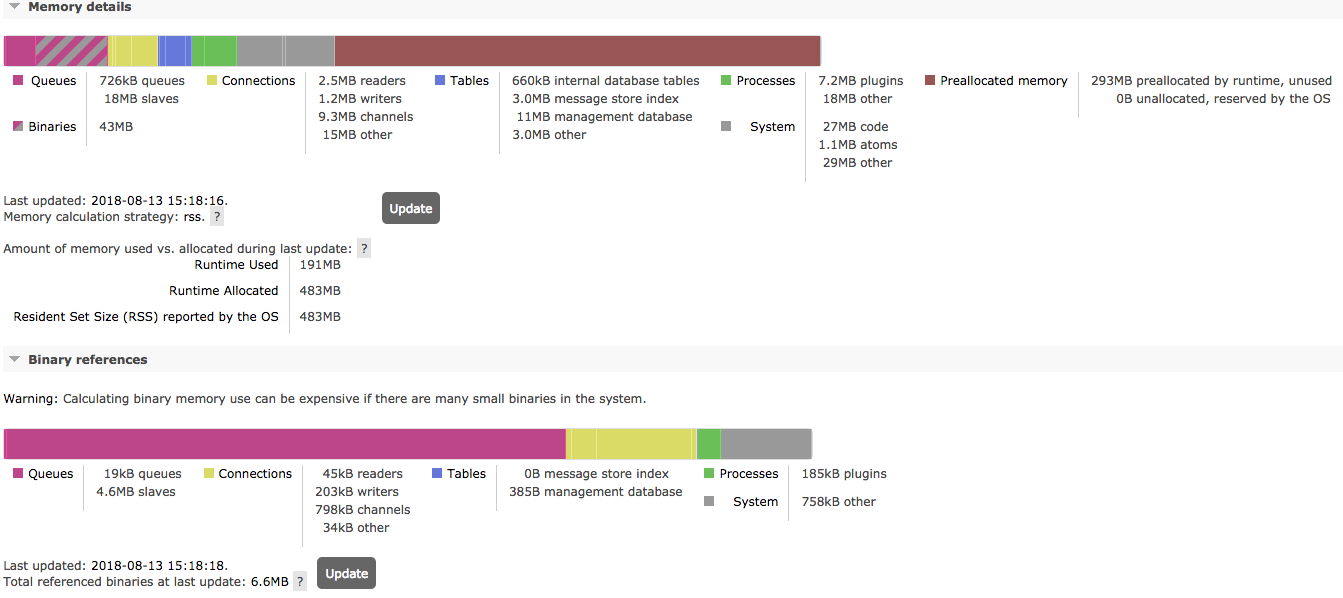
Memory details of unaffected node:
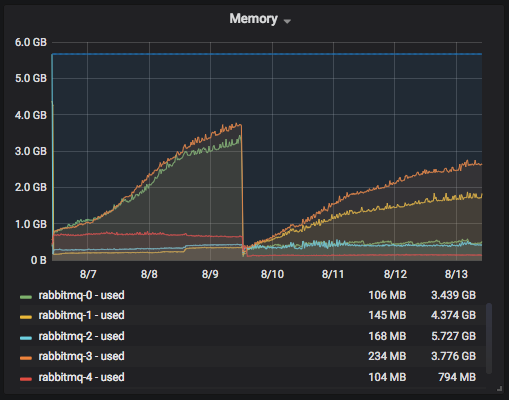
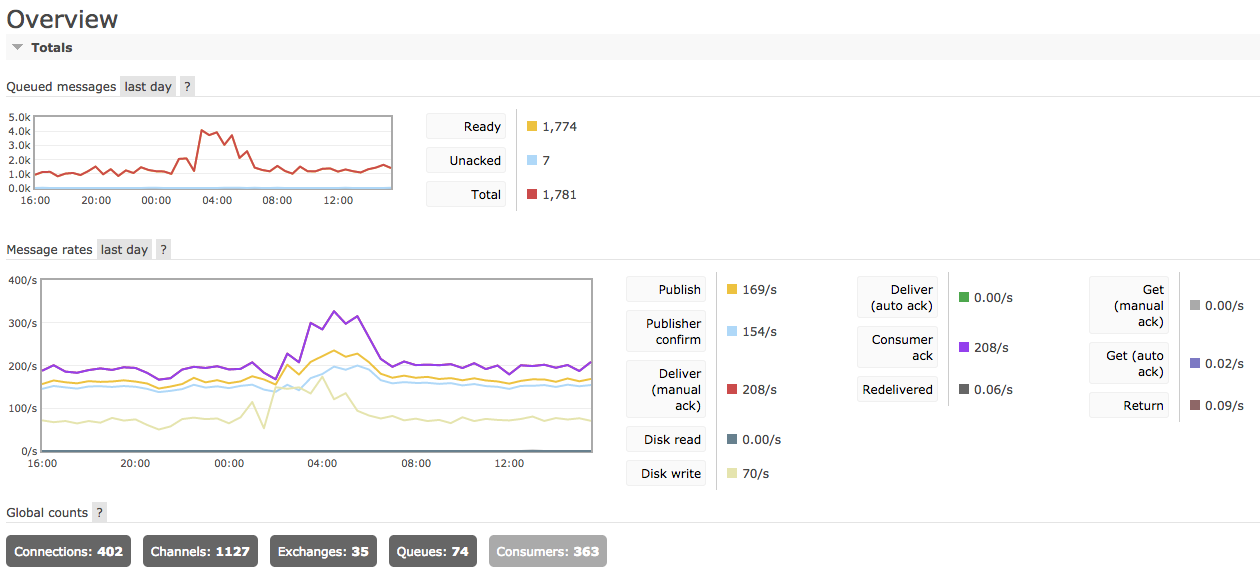
Memory usage is constantly increasing:
Node stats:

Cluster overview:
--
Petteri Vaarala
Raul Kaubi
Aug 14, 2018, 9:42:36 AM8/14/18
to rabbitmq-users
Hi
Ok, I have gc disabled:
{background_gc_enabled,false},
You have allocated_unused quite high.
I have reserved_unallocated very high on busy hours, on both nodes, often getting memory alarms in production.
Since I would not rather go back to rabbitmq 3.6.6, so I have decided to switch back to old memory calculation strategy "legacy" (alias erlang), because looks like I have too many problems with "rss" at present time.
I have added more memory to host, but there seems to be no change, still memory is exceeding the limit.
At the moment:
rabbitmq 3.7.7
erlang 21.0.3 (zero dependency rpm from github)
centos 7.5
Hope that memory calculation strategy "legacy" helps at the moment (because before upgrade I had no such problems), otherwise I don't know what to do next.
Regards
Raul
Michael Klishin
Aug 14, 2018, 2:25:40 PM8/14/18
to rabbitm...@googlegroups.com
Environment variables listed in rabbitmq-env.conf must be listed without the RABBITMQ_ prefix [1].
There is an application that can publish a certain number of messages, or at a certain rate, with a certain message
size and so on. It's called PerfTest [2].
To unsubscribe from this group and stop receiving emails from it, send an email to rabbitmq-users+unsubscribe@googlegroups.com.
To post to this group, send email to rabbitmq-users@googlegroups.com.
Michael Klishin
Aug 14, 2018, 2:26:56 PM8/14/18
to rabbitm...@googlegroups.com
Hi Petteri,
This list uses one thread per one question. Please start a new thread.
We cannot suggest much from a single chart, even with a memory breakdown.
See what other metrics in your system that might correlate with.
To unsubscribe from this group and stop receiving emails from it, send an email to rabbitmq-users+unsubscribe@googlegroups.com.
To post to this group, send email to rabbitmq-users@googlegroups.com.
Michael Klishin
Aug 14, 2018, 2:28:23 PM8/14/18
to rabbitm...@googlegroups.com
I hope you understand that by using the "legacy" strategy you are greatly UNDERREPORTING the actual memory usage of the node.
In other words, you make things look like they are better when in reality they are no different.
This is a dangerous and misleading "solution".
To unsubscribe from this group and stop receiving emails from it, send an email to rabbitmq-users+unsubscribe@googlegroups.com.
To post to this group, send email to rabbitmq-users@googlegroups.com.
Raul Kaubi
Aug 14, 2018, 3:06:28 PM8/14/18
to rabbitm...@googlegroups.com
Hi
Well, I assume that current “legacy” is the same compared to versions before 3.6.11.
And since we had been using 3.6.6 for almost a year, without problems, I don’t see any other quick fix for this, unfortunately.
Ofourse, it would be my main goal to get this to work with rss, but at the moment I changed it back to legacy.
Tuning erlang runtime parameters is whole new ball game for me, since I do not understand what these parameters do exactly.
I just can’t seem to figure out why I am amongst the few, that have certain problems, I haven’t changed any erlang runtime parameters yet, so using all the defaults, shouldn’t the defaults run the cluster without major issues.
Or are we doing something really wrong here.
Regards
Raul
Sent from my iPhone
Michael Klishin
Aug 14, 2018, 3:18:45 PM8/14/18
to rabbitm...@googlegroups.com
"Without issues" here means "without alarms". That possibly happened due because the amount of memory the node actually
uses was underreported, possibly by double digit %.
If you want a workaround, bump the VM high memory watermark instead. At the very least it would feed your monitoring
data with more realistic numbers.
On 14 August 2018 at 22:06:32, Raul Kaubi (raul...@gmail.com) wrote:
> Hi
>
> Well, I assume that current “legacy” is the same compared to versions before 3.6.11.
> And since we had been using 3.6.6 for almost a year, without problems, I don’t see any other
> quick fix for this, unfortunately.
>
> Ofourse, it would be my main goal to get this to work with rss, but at the moment I changed
> it back to legacy.
>
> Tuning erlang runtime parameters is whole new ball game for me, since I do not understand
> what these parameters do exactly.
>
> I just can’t seem to figure out why I am amongst the few, that have certain problems, I haven’t
> changed any erlang runtime parameters yet, so using all the defaults, shouldn’t the
> defaults run the cluster without major issues.
> Or are we doing something really wrong here.
>
> Regards
> Raul
> Sent from my iPhone
>
> >>>
> >>>
> >>>
> >>>
> >>> Cluster overview:
> >>>>>>>>>>>>>>> /var/lib/rabbitmq/mnesia/rabbit@<>/msg_stores/vhosts/628WB79CIFDYO9LJI6DKMI09L/msg_store_persistent
> To post to this group, send an email to rabbitm...@googlegroups.com.
uses was underreported, possibly by double digit %.
If you want a workaround, bump the VM high memory watermark instead. At the very least it would feed your monitoring
data with more realistic numbers.
On 14 August 2018 at 22:06:32, Raul Kaubi (raul...@gmail.com) wrote:
> Hi
>
> Well, I assume that current “legacy” is the same compared to versions before 3.6.11.
> And since we had been using 3.6.6 for almost a year, without problems, I don’t see any other
> quick fix for this, unfortunately.
>
> Ofourse, it would be my main goal to get this to work with rss, but at the moment I changed
> it back to legacy.
>
> Tuning erlang runtime parameters is whole new ball game for me, since I do not understand
> what these parameters do exactly.
>
> I just can’t seem to figure out why I am amongst the few, that have certain problems, I haven’t
> changed any erlang runtime parameters yet, so using all the defaults, shouldn’t the
> defaults run the cluster without major issues.
> Or are we doing something really wrong here.
>
> Regards
> Raul
> Sent from my iPhone
>
> >>> Memory details of unaffected node:
> >>>
> >>>
> >>>
> >>>
> >>>
> >>>
> >>>
> >>>
> >>> Memory usage is constantly increasing:
> >>>
> >>>
> >>>
> >>>
> >>> Node stats:
> >>>
> >>>
> >>>
> >>>
> >>>
> >>>
> >>>
> >>>
> >>> Cluster overview:
> >>>>>>>>>>>> On Thursday, August 9, 2018 at 7:27:46 PM UTC+3, Michael Klishin wrote:
> >>>>>>>>>>>> Another change that some 3.6 users now on 3.7 have reported to make a difference
> is a periodic background GC [1].
> >>>>>>>>>>>> It is disabled by default in 3.7 as it makes no significant difference on
> most workloads and introduces a lot
> >>>>>>>>>>>> of additional latency.
> >>>>>>>>>>>>
> >>>>>>>>>>>> I doubt binary heaps will be a major contributor but since we know nothing
> about the workload
> >>>>>>>>>>>> it was worth mentioning.
> >>>>>>>>>>>>
> >>>>>>>>>>>> 1. https://github.com/rabbitmq/rabbitmq-server/blob/master/docs/rabbitmq.conf.example#L427
> >>>>>>>>>>>>
> >>>>>>>>>>>>> On Thu, Aug 9, 2018 at 4:10 PM, Michael Klishin
> >>>>>>>>>>>> Another change that some 3.6 users now on 3.7 have reported to make a difference
> is a periodic background GC [1].
> >>>>>>>>>>>> It is disabled by default in 3.7 as it makes no significant difference on
> most workloads and introduces a lot
> >>>>>>>>>>>> of additional latency.
> >>>>>>>>>>>>
> >>>>>>>>>>>> I doubt binary heaps will be a major contributor but since we know nothing
> about the workload
> >>>>>>>>>>>> it was worth mentioning.
> >>>>>>>>>>>>
> >>>>>>>>>>>> 1. https://github.com/rabbitmq/rabbitmq-server/blob/master/docs/rabbitmq.conf.example#L427
> >>>>>>>>>>>>
> >>>>>>>>>>>>> On Thu, Aug 9, 2018 at 4:10 PM, Michael Klishin
Raul Kaubi
Aug 14, 2018, 3:42:46 PM8/14/18
to rabbitm...@googlegroups.com
Hi
Well that would mean that I’d have to set high watermark to 0.8 or 0.9, since today I noticed 5.2.. gb usage(rss), ofcourse reserved_unallocated was close to 5gb itself.
But high watermark higher than 0.66 (if I remember correctly), was also dangerous.
At the moment I have given rabbitmq host 6gb of memory, and it is dedicated rabbitmq node.
I know it is difficult to guess, but is the 4xCPU and 6gb of ram for dedicated rabbitmq node close to enough.
Or I just should pump up the host ram way more.
Regards
Raul
Sent from my iPhone
Well that would mean that I’d have to set high watermark to 0.8 or 0.9, since today I noticed 5.2.. gb usage(rss), ofcourse reserved_unallocated was close to 5gb itself.
But high watermark higher than 0.66 (if I remember correctly), was also dangerous.
At the moment I have given rabbitmq host 6gb of memory, and it is dedicated rabbitmq node.
I know it is difficult to guess, but is the 4xCPU and 6gb of ram for dedicated rabbitmq node close to enough.
Or I just should pump up the host ram way more.
Regards
Raul
Sent from my iPhone
Raul Kaubi
Aug 22, 2018, 4:57:26 AM8/22/18
to rabbitmq-users
Hi
I tried setting different erlang memory management values, and I have discovered something strange.
SERVER_ADDITIONAL_ERL_ARGS='+MHas ageffcbf +MBas ageffcbf +MHlmbcs 512 +MBlmbcs 64'
Restarted rabbitmq-server.
ps -ef | grep beam
rabbitmq 9057 1 3 10:53 ? 00:01:48 /usr/lib64/erlang/erts-9.3.3.3/bin/beam.smp -W w -A 64 -MBas ageffcbf -MHas ageffcbf -MBlmbcs 512 -MHlmbcs 512 -MMmcs 30 -P 1048576 -t 5000000 -stbt db -zdbbl 1280000 -K true -MHas ageffcbf -MBas ageffcbf -MHlmbcs 512 -MBlmbcs 64 -- -root
But looks like this -MBlmbcs reports 256KB, whereas I set it to 64.
rabbitmqctl eval 'erlang:system_info({allocator, binary_alloc}).' | egrep '{as,ageffcbf}|{lmbcs'
{lmbcs,262144},
{as,ageffcbf}]},
{lmbcs,262144},
{as,ageffcbf}]},
{lmbcs,262144},
{as,ageffcbf}]},
{lmbcs,262144},
{as,ageffcbf}]},
{lmbcs,262144},
{as,ageffcbf}]},
While eheap_alloc reports correctly 512KB.
rabbitmqctl eval 'erlang:system_info({allocator, eheap_alloc}).' | egrep '{as,ageffcbf}|{lmbcs'
{lmbcs,524288},
{as,ageffcbf}]},
{lmbcs,524288},
{as,ageffcbf}]},
{lmbcs,524288},
{as,ageffcbf}]},
{lmbcs,524288},
{as,ageffcbf}]},
{lmbcs,524288},
{as,ageffcbf}]},
Since I do not have a clue of what different values actually mean, have you any recommendations for:
- +MHas
- +MBas
- +MHlmbcs
- +MBlmbcs
My problem is still with extremely high reserved_unallocated value at times. I have added more RAM for the host (10GB) but it still eats up all of it at times, so adding more RAM does not seem to fix the problem here.
Regards
Raul
Raul
>>>> To unsubscribe from this group and stop receiving emails from it, send an email to rabbitmq-users+unsubscribe@googlegroups.com.
>>>> To post to this group, send email to rabbitmq-users@googlegroups.com.
>>>> For more options, visit https://groups.google.com/d/optout.
>>>
>>>
>>>
>>> --
>>> MK
>>>
>>> Staff Software Engineer, Pivotal/RabbitMQ
>>> --
>>> You received this message because you are subscribed to a topic in the Google Groups
>> "rabbitmq-users" group.
>>> To unsubscribe from this topic, visit https://groups.google.com/d/topic/rabbitmq-users/CGRBhIxbn-s/unsubscribe.
>>> To unsubscribe from this group and all its topics, send an email to rabbitmq-users+unsubscribe@googlegroups.com.
>>> To post to this group, send email to rabbitmq-users@googlegroups.com.
>>> For more options, visit https://groups.google.com/d/optout.
>>
>> --
>> You received this message because you are subscribed to the Google Groups "rabbitmq-users"
>> group.
>> To unsubscribe from this group and stop receiving emails from it, send an email to rabbitmq-users+unsubscribe@googlegroups.com.
>> To post to this group, send an email to rabbitmq-users@googlegroups.com.
>> For more options, visit https://groups.google.com/d/optout.
>>
>
> --
> MK
>
> Staff Software Engineer, Pivotal/RabbitMQ
>
>
> --
> You received this message because you are subscribed to a topic in the Google Groups "rabbitmq-users" group.
> To unsubscribe from this topic, visit https://groups.google.com/d/topic/rabbitmq-users/CGRBhIxbn-s/unsubscribe.
> To unsubscribe from this group and all its topics, send an email to rabbitmq-users+unsubscribe@googlegroups.com.
> To post to this group, send an email to rabbitmq-users@googlegroups.com.
Raul Kaubi
Aug 22, 2018, 5:14:16 AM8/22/18
to rabbitmq-users
Just noting, that most of the time (99% of busy hours 7AM to 6PM) our memory usage is between 150 - 400MB (rss), so no problem at all.
But this 1% is worrying, when this reserved_unallocated keeps rising at alarming rate, and since our application is dependent on rabbitmq process, so when all publishers get blocked, all queries get timeouts.
Raul
Michael Klishin
Aug 22, 2018, 8:46:27 AM8/22/18
to rabbitm...@googlegroups.com
I tried `SERVER_ADDITIONAL_ERL_ARGS` (well, I used `RABBITMQ_SERVER_ADDITIONAL_ERL_ARGS` on the command line)
and it did have an effect for me.
So did `SERVER_ADDITIONAL_ERL_ARGS` in a file I pointed the node to via `RABBITMQ_CONF_ENV_FILE`.
>>> To unsubscribe from this group and all its topics, send an email to rabbitmq-users+unsubscribe@googlegroups.com.
>>> To post to this group, send email to rabbitm...@googlegroups.com.
>>> For more options, visit https://groups.google.com/d/optout.
>>
>> --
>> You received this message because you are subscribed to the Google Groups "rabbitmq-users"
>> group.
>> To unsubscribe from this group and stop receiving emails from it, send an email to rabbitmq-users+unsubscribe@googlegroups.com.
>> To post to this group, send an email to rabbitm...@googlegroups.com.
>> For more options, visit https://groups.google.com/d/optout.
>>
>
> --
> MK
>
> Staff Software Engineer, Pivotal/RabbitMQ
>
>
> --
> You received this message because you are subscribed to a topic in the Google Groups "rabbitmq-users" group.
> To unsubscribe from this topic, visit https://groups.google.com/d/topic/rabbitmq-users/CGRBhIxbn-s/unsubscribe.
> To unsubscribe from this group and all its topics, send an email to rabbitmq-users+unsubscribe@googlegroups.com.
> To post to this group, send an email to rabbitm...@googlegroups.com.
> For more options, visit https://groups.google.com/d/optout.
--
You received this message because you are subscribed to the Google Groups "rabbitmq-users" group.
To unsubscribe from this group and stop receiving emails from it, send an email to rabbitmq-users+unsubscribe@googlegroups.com.
To post to this group, send email to rabbitmq-users@googlegroups.com.
For more options, visit https://groups.google.com/d/optout.
Luke Bakken
Aug 22, 2018, 9:42:05 AM8/22/18
to rabbitmq-users
Hi Raul,
At this point I think it would be helpful if you remove all custom allocator flags to see if this resolves your issue. To do so, you'll have to edit the rabbitmq-server start script and set this line to be an empty string:
In other words:
RABBITMQ_DEFAULT_ALLOC_ARGS=""
On Ubuntu, this script is located at /usr/lib/rabbitmq/lib/rabbitmq_server-3.7.7/sbin/rabbitmq-server - please make a backup first before editing, then restart RabbitMQ after editing and double-check that those flags were not passed to the beam.smp process.
I realize this is a bit of a pain and we will be making this value configurable in a future release.
If this resolves your issue it will be helpful for us to know that.
Thanks!
Luke
Raul Kaubi
Aug 22, 2018, 2:03:05 PM8/22/18
to rabbitm...@googlegroups.com
Hi
I removed default allocator flags from : /usr/lib/rabbitmq/lib/rabbitmq_server-3.7.7/sbin/rabbitmq-server
And looks like binary_alloc just won't go below 256KB, here is a test, when I changed it to 300, then it will report this value.
[root@XXXXXXXXXXX ~]# vi /etc/rabbitmq/rabbitmq-env.conf
[root@XXXXXXXXXXX ~]# cat /etc/rabbitmq/rabbitmq-env.conf
SERVER_ADDITIONAL_ERL_ARGS='+MHas ageffcbf +MBas ageffcbf +MHlmbcs 512 +MBlmbcs 128'
[root@XXXXXXXXXXX ~]#
[root@XXXXXXXXXXX ~]# systemctl restart rabbitmq-server
[root@XXXXXXXXXXX ~]# ps -ef | grep beam
rabbitmq 12408 1 73 20:48 ? 00:00:10 /usr/lib64/erlang/erts-9.3.3.3/bin/beam.smp -W w -A 64 -P 1048576 -t 5000000 -stbt db -zdbbl 1280000 -K true -MHas ageffcbf -MBas ageffcbf -MHlmbcs 512 -MBlmbcs 128 -- -root /usr/lib64/erlang -progname erl -- -home /var/lib/rabbitmq -- -pa /usr/lib/rabbitmq/lib/rabbitmq_server-3.7.7/ebin -noshell -noinput -s rabbit boot -sname rabbit@XXXXXXXXXXX -boot start_sasl -conf /etc/rabbitmq/rabbitmq -conf_dir /var/lib/rabbitmq/config -conf_script_dir /usr/lib/rabbitmq/bin -conf_schema_dir /var/lib/rabbitmq/schema -conf_advanced /etc/rabbitmq/advanced -config /etc/rabbitmq/advanced -kernel inet_default_connect_options [{nodelay,true}] -sasl errlog_type error -sasl sasl_error_logger false -rabbit lager_log_root "/var/log/rabbitmq" -rabbit lager_default_file "/var/log/rabbitmq/rab...@XXXXXXXXXXX.log" -rabbit lager_upgrade_file "/var/log/rabbitmq/rabbit@XXXXXXXXXXX_upgrade.log" -rabbit enabled_plugins_file "/etc/rabbitmq/enabled_plugins" -rabbit plugins_dir "/usr/lib/rabbitmq/plugins:/usr/lib/rabbitmq/lib/rabbitmq_server-3.7.7/plugins" -rabbit plugins_expand_dir "/var/lib/rabbitmq/mnesia/rabbit@XXXXXXXXXXX-plugins-expand" -os_mon start_cpu_sup false -os_mon start_disksup false -os_mon start_memsup false -mnesia dir "/var/lib/rabbitmq/mnesia/rabbit@XXXXXXXXXXX" -kernel inet_dist_listen_min 25672 -kernel inet_dist_listen_max 25672
root 12825 1394 0 20:48 pts/0 00:00:00 grep --color=auto beam
[root@XXXXXXXXXXX ~]# rabbitmqctl eval 'erlang:system_info({allocator, binary_alloc}).' | egrep '{as,ageffcbf}|{lmbcs'
{lmbcs,262144},
{as,ageffcbf}]},
{lmbcs,262144},
{as,ageffcbf}]},
{lmbcs,262144},
{as,ageffcbf}]},
{lmbcs,262144},
{as,ageffcbf}]},
{lmbcs,262144},
{as,ageffcbf}]},
[root@XXXXXXXXXXX ~]# vi /etc/rabbitmq/rabbitmq-env.conf
[root@XXXXXXXXXXX ~]# cat /etc/rabbitmq/rabbitmq-env.conf
SERVER_ADDITIONAL_ERL_ARGS='+MHas ageffcbf +MBas ageffcbf +MHlmbcs 512 +MBlmbcs 300'
[root@XXXXXXXXXXX ~]#
[root@XXXXXXXXXXX ~]# systemctl restart rabbitmq-server
[root@XXXXXXXXXXX ~]# ps -ef | grep beam
rabbitmq 13155 1 5 20:49 ? 00:00:19 /usr/lib64/erlang/erts-9.3.3.3/bin/beam.smp -W w -A 64 -P 1048576 -t 5000000 -stbt db -zdbbl 1280000 -K true -MHas ageffcbf -MBas ageffcbf -MHlmbcs 512 -MBlmbcs 300 -- -root /usr/lib64/erlang -progname erl -- -home /var/lib/rabbitmq -- -pa /usr/lib/rabbitmq/lib/rabbitmq_server-3.7.7/ebin -noshell -noinput -s rabbit boot -sname rabbit@XXXXXXXXXXX -boot start_sasl -conf /etc/rabbitmq/rabbitmq -conf_dir /var/lib/rabbitmq/config -conf_script_dir /usr/lib/rabbitmq/bin -conf_schema_dir /var/lib/rabbitmq/schema -conf_advanced /etc/rabbitmq/advanced -config /etc/rabbitmq/advanced -kernel inet_default_connect_options [{nodelay,true}] -sasl errlog_type error -sasl sasl_error_logger false -rabbit lager_log_root "/var/log/rabbitmq" -rabbit lager_default_file "/var/log/rabbitmq/rab...@XXXXXXXXXXX.log" -rabbit lager_upgrade_file "/var/log/rabbitmq/rabbit@XXXXXXXXXXX_upgrade.log" -rabbit enabled_plugins_file "/etc/rabbitmq/enabled_plugins" -rabbit plugins_dir "/usr/lib/rabbitmq/plugins:/usr/lib/rabbitmq/lib/rabbitmq_server-3.7.7/plugins" -rabbit plugins_expand_dir "/var/lib/rabbitmq/mnesia/rabbit@XXXXXXXXXXX-plugins-expand" -os_mon start_cpu_sup false -os_mon start_disksup false -os_mon start_memsup false -mnesia dir "/var/lib/rabbitmq/mnesia/rabbit@XXXXXXXXXXX" -kernel inet_dist_listen_min 25672 -kernel inet_dist_listen_max 25672
[root@XXXXXXXXXXX ~]# rabbitmqctl eval 'erlang:system_info({allocator, binary_alloc}).' | egrep '{as,ageffcbf}|{lmbcs'
{lmbcs,307200},
{as,ageffcbf}]},
{lmbcs,307200},
{as,ageffcbf}]},
{lmbcs,307200},
{as,ageffcbf}]},
{lmbcs,307200},
{as,ageffcbf}]},
{lmbcs,307200},
{as,ageffcbf}]},
I did these memory allocator tests in my own testbed rabbit cluster.
But regarding production problems, I will try and downgrade erlang tonight from 21.0.3 to 20.3.8.6, and see if this will make any difference. I would rather not downgrade rabbitmq back to 3.6.6.
Regards
Raul Kaubi
--
Luke Bakken
Aug 22, 2018, 2:06:01 PM8/22/18
to rabbitmq-users
Hi Raul,
I should have been a bit more clear. I wanted you to remove the flags from rabbitmq-server (like you did) and from rabbitmq-env.conf, so that the end result is that no allocator flags are used.
Before downgrading production, it would be great to know if removing all allocator flags solves your issue.
Thanks,
Luke
On Wednesday, August 22, 2018 at 11:03:05 AM UTC-7, Raul Kaubi wrote:
HiI removed default allocator flags from : /usr/lib/rabbitmq/lib/rabbitmq_server-3.7.7/sbin/rabbitmq-serverAnd looks like binary_alloc just won't go below 256KB, here is a test, when I changed it to 300, then it will report this value.
[root@XXXXXXXXXXX ~]# vi /etc/rabbitmq/rabbitmq-env.conf
[root@XXXXXXXXXXX ~]# cat /etc/rabbitmq/rabbitmq-env.conf
SERVER_ADDITIONAL_ERL_ARGS='+MHas ageffcbf +MBas ageffcbf +MHlmbcs 512 +MBlmbcs 128'
[root@XXXXXXXXXXX ~]#
[root@XXXXXXXXXXX ~]# systemctl restart rabbitmq-server
[root@XXXXXXXXXXX ~]# ps -ef | grep beam
rabbitmq 12408 1 73 20:48 ? 00:00:10 /usr/lib64/erlang/erts-9.3.3.3/bin/beam.smp -W w -A 64 -P 1048576 -t 5000000 -stbt db -zdbbl 1280000 -K true -MHas ageffcbf -MBas ageffcbf -MHlmbcs 512 -MBlmbcs 128 -- -root /usr/lib64/erlang -progname erl -- -home /var/lib/rabbitmq -- -pa /usr/lib/rabbitmq/lib/rabbitmq_server-3.7.7/ebin -noshell -noinput -s rabbit boot -sname rabbit@XXXXXXXXXXX -boot start_sasl -conf /etc/rabbitmq/rabbitmq -conf_dir /var/lib/rabbitmq/config -conf_script_dir /usr/lib/rabbitmq/bin -conf_schema_dir /var/lib/rabbitmq/schema -conf_advanced /etc/rabbitmq/advanced -config /etc/rabbitmq/advanced -kernel inet_default_connect_options [{nodelay,true}] -sasl errlog_type error -sasl sasl_error_logger false -rabbit lager_log_root "/var/log/rabbitmq" -rabbit lager_default_file "/var/log/rabbitmq/rabbit@XXXXXXXXXXX.log" -rabbit lager_upgrade_file "/var/log/rabbitmq/rabbit@XXXXXXXXXXX_upgrade.log" -rabbit enabled_plugins_file "/etc/rabbitmq/enabled_plugins" -rabbit plugins_dir "/usr/lib/rabbitmq/plugins:/usr/lib/rabbitmq/lib/rabbitmq_server-3.7.7/plugins" -rabbit plugins_expand_dir "/var/lib/rabbitmq/mnesia/rabbit@XXXXXXXXXXX-plugins-expand" -os_mon start_cpu_sup false -os_mon start_disksup false -os_mon start_memsup false -mnesia dir "/var/lib/rabbitmq/mnesia/rabbit@XXXXXXXXXXX" -kernel inet_dist_listen_min 25672 -kernel inet_dist_listen_max 25672
root 12825 1394 0 20:48 pts/0 00:00:00 grep --color=auto beam
[root@XXXXXXXXXXX ~]# rabbitmqctl eval 'erlang:system_info({allocator, binary_alloc}).' | egrep '{as,ageffcbf}|{lmbcs'
{lmbcs,262144},
{as,ageffcbf}]},
{lmbcs,262144},
{as,ageffcbf}]},
{lmbcs,262144},
{as,ageffcbf}]},
{lmbcs,262144},
{as,ageffcbf}]},
{lmbcs,262144},
{as,ageffcbf}]},
[root@XXXXXXXXXXX ~]# vi /etc/rabbitmq/rabbitmq-env.conf
[root@XXXXXXXXXXX ~]# cat /etc/rabbitmq/rabbitmq-env.conf
SERVER_ADDITIONAL_ERL_ARGS='+MHas ageffcbf +MBas ageffcbf +MHlmbcs 512 +MBlmbcs 300'
[root@XXXXXXXXXXX ~]#
[root@XXXXXXXXXXX ~]# systemctl restart rabbitmq-server
[root@XXXXXXXXXXX ~]# ps -ef | grep beam
rabbitmq 13155 1 5 20:49 ? 00:00:19 /usr/lib64/erlang/erts-9.3.3.3/bin/beam.smp -W w -A 64 -P 1048576 -t 5000000 -stbt db -zdbbl 1280000 -K true -MHas ageffcbf -MBas ageffcbf -MHlmbcs 512 -MBlmbcs 300 -- -root /usr/lib64/erlang -progname erl -- -home /var/lib/rabbitmq -- -pa /usr/lib/rabbitmq/lib/rabbitmq_server-3.7.7/ebin -noshell -noinput -s rabbit boot -sname rabbit@XXXXXXXXXXX -boot start_sasl -conf /etc/rabbitmq/rabbitmq -conf_dir /var/lib/rabbitmq/config -conf_script_dir /usr/lib/rabbitmq/bin -conf_schema_dir /var/lib/rabbitmq/schema -conf_advanced /etc/rabbitmq/advanced -config /etc/rabbitmq/advanced -kernel inet_default_connect_options [{nodelay,true}] -sasl errlog_type error -sasl sasl_error_logger false -rabbit lager_log_root "/var/log/rabbitmq" -rabbit lager_default_file "/var/log/rabbitmq/rabbit@XXXXXXXXXXX.log" -rabbit lager_upgrade_file "/var/log/rabbitmq/rabbit@XXXXXXXXXXX_upgrade.log" -rabbit enabled_plugins_file "/etc/rabbitmq/enabled_plugins" -rabbit plugins_dir "/usr/lib/rabbitmq/plugins:/usr/lib/rabbitmq/lib/rabbitmq_server-3.7.7/plugins" -rabbit plugins_expand_dir "/var/lib/rabbitmq/mnesia/rabbit@XXXXXXXXXXX-plugins-expand" -os_mon start_cpu_sup false -os_mon start_disksup false -os_mon start_memsup false -mnesia dir "/var/lib/rabbitmq/mnesia/rabbit@XXXXXXXXXXX" -kernel inet_dist_listen_min 25672 -kernel inet_dist_listen_max 25672
[root@XXXXXXXXXXX ~]# rabbitmqctl eval 'erlang:system_info({allocator, binary_alloc}).' | egrep '{as,ageffcbf}|{lmbcs'
{lmbcs,307200},
{as,ageffcbf}]},
{lmbcs,307200},
{as,ageffcbf}]},
{lmbcs,307200},
{as,ageffcbf}]},
{lmbcs,307200},
{as,ageffcbf}]},
{lmbcs,307200},
{as,ageffcbf}]},
Raul Kaubi
Aug 22, 2018, 2:38:23 PM8/22/18
to rabbitm...@googlegroups.com
Hi
Ok, I will try both:
- downgrade erlang from 21.0.3 to 20.3.8.6 with default allocator flags
- removing all allocator flags (with both erlang 21 and 20.3)
First I will downgrade, since I managed to get this done already tonight.
But this will take some time, since I do these changes in production environment and within few days I should get some feedback of how it will perform, then I can report back.
Thanks in advance.
Regards
Raul Kaubi
Kontakt Luke Bakken (<lba...@pivotal.io>) kirjutas kuupäeval K, 22. august 2018 kell 21:06:
Hi Raul,I should have been a bit more clear. I wanted you to remove the flags from rabbitmq-server (like you did) and from rabbitmq-env.conf, so that the end result is that no allocator flags are used.Before downgrading production, it would be great to know if removing all allocator flags solves your issue.Thanks,Luke
On Wednesday, August 22, 2018 at 11:03:05 AM UTC-7, Raul Kaubi wrote:
HiI removed default allocator flags from : /usr/lib/rabbitmq/lib/rabbitmq_server-3.7.7/sbin/rabbitmq-serverAnd looks like binary_alloc just won't go below 256KB, here is a test, when I changed it to 300, then it will report this value.
[root@XXXXXXXXXXX ~]# vi /etc/rabbitmq/rabbitmq-env.conf
[root@XXXXXXXXXXX ~]# cat /etc/rabbitmq/rabbitmq-env.conf
SERVER_ADDITIONAL_ERL_ARGS='+MHas ageffcbf +MBas ageffcbf +MHlmbcs 512 +MBlmbcs 128'
[root@XXXXXXXXXXX ~]#
[root@XXXXXXXXXXX ~]# systemctl restart rabbitmq-server
[root@XXXXXXXXXXX ~]# ps -ef | grep beam
rabbitmq 12408 1 73 20:48 ? 00:00:10 /usr/lib64/erlang/erts-9.3.3.3/bin/beam.smp -W w -A 64 -P 1048576 -t 5000000 -stbt db -zdbbl 1280000 -K true -MHas ageffcbf -MBas ageffcbf -MHlmbcs 512 -MBlmbcs 128 -- -root /usr/lib64/erlang -progname erl -- -home /var/lib/rabbitmq -- -pa /usr/lib/rabbitmq/lib/rabbitmq_server-3.7.7/ebin -noshell -noinput -s rabbit boot -sname rabbit@XXXXXXXXXXX -boot start_sasl -conf /etc/rabbitmq/rabbitmq -conf_dir /var/lib/rabbitmq/config -conf_script_dir /usr/lib/rabbitmq/bin -conf_schema_dir /var/lib/rabbitmq/schema -conf_advanced /etc/rabbitmq/advanced -config /etc/rabbitmq/advanced -kernel inet_default_connect_options [{nodelay,true}] -sasl errlog_type error -sasl sasl_error_logger false -rabbit lager_log_root "/var/log/rabbitmq" -rabbit lager_default_file "/var/log/rabbitmq/rab...@XXXXXXXXXXX.log" -rabbit lager_upgrade_file "/var/log/rabbitmq/rabbit@XXXXXXXXXXX_upgrade.log" -rabbit enabled_plugins_file "/etc/rabbitmq/enabled_plugins" -rabbit plugins_dir "/usr/lib/rabbitmq/plugins:/usr/lib/rabbitmq/lib/rabbitmq_server-3.7.7/plugins" -rabbit plugins_expand_dir "/var/lib/rabbitmq/mnesia/rabbit@XXXXXXXXXXX-plugins-expand" -os_mon start_cpu_sup false -os_mon start_disksup false -os_mon start_memsup false -mnesia dir "/var/lib/rabbitmq/mnesia/rabbit@XXXXXXXXXXX" -kernel inet_dist_listen_min 25672 -kernel inet_dist_listen_max 25672
root 12825 1394 0 20:48 pts/0 00:00:00 grep --color=auto beam
[root@XXXXXXXXXXX ~]# rabbitmqctl eval 'erlang:system_info({allocator, binary_alloc}).' | egrep '{as,ageffcbf}|{lmbcs'
{lmbcs,262144},
{as,ageffcbf}]},
{lmbcs,262144},
{as,ageffcbf}]},
{lmbcs,262144},
{as,ageffcbf}]},
{lmbcs,262144},
{as,ageffcbf}]},
{lmbcs,262144},
{as,ageffcbf}]},
[root@XXXXXXXXXXX ~]# vi /etc/rabbitmq/rabbitmq-env.conf
[root@XXXXXXXXXXX ~]# cat /etc/rabbitmq/rabbitmq-env.conf
SERVER_ADDITIONAL_ERL_ARGS='+MHas ageffcbf +MBas ageffcbf +MHlmbcs 512 +MBlmbcs 300'
[root@XXXXXXXXXXX ~]#
[root@XXXXXXXXXXX ~]# systemctl restart rabbitmq-server
[root@XXXXXXXXXXX ~]# ps -ef | grep beam
rabbitmq 13155 1 5 20:49 ? 00:00:19 /usr/lib64/erlang/erts-9.3.3.3/bin/beam.smp -W w -A 64 -P 1048576 -t 5000000 -stbt db -zdbbl 1280000 -K true -MHas ageffcbf -MBas ageffcbf -MHlmbcs 512 -MBlmbcs 300 -- -root /usr/lib64/erlang -progname erl -- -home /var/lib/rabbitmq -- -pa /usr/lib/rabbitmq/lib/rabbitmq_server-3.7.7/ebin -noshell -noinput -s rabbit boot -sname rabbit@XXXXXXXXXXX -boot start_sasl -conf /etc/rabbitmq/rabbitmq -conf_dir /var/lib/rabbitmq/config -conf_script_dir /usr/lib/rabbitmq/bin -conf_schema_dir /var/lib/rabbitmq/schema -conf_advanced /etc/rabbitmq/advanced -config /etc/rabbitmq/advanced -kernel inet_default_connect_options [{nodelay,true}] -sasl errlog_type error -sasl sasl_error_logger false -rabbit lager_log_root "/var/log/rabbitmq" -rabbit lager_default_file "/var/log/rabbitmq/rab...@XXXXXXXXXXX.log" -rabbit lager_upgrade_file "/var/log/rabbitmq/rabbit@XXXXXXXXXXX_upgrade.log" -rabbit enabled_plugins_file "/etc/rabbitmq/enabled_plugins" -rabbit plugins_dir "/usr/lib/rabbitmq/plugins:/usr/lib/rabbitmq/lib/rabbitmq_server-3.7.7/plugins" -rabbit plugins_expand_dir "/var/lib/rabbitmq/mnesia/rabbit@XXXXXXXXXXX-plugins-expand" -os_mon start_cpu_sup false -os_mon start_disksup false -os_mon start_memsup false -mnesia dir "/var/lib/rabbitmq/mnesia/rabbit@XXXXXXXXXXX" -kernel inet_dist_listen_min 25672 -kernel inet_dist_listen_max 25672
[root@XXXXXXXXXXX ~]# rabbitmqctl eval 'erlang:system_info({allocator, binary_alloc}).' | egrep '{as,ageffcbf}|{lmbcs'
{lmbcs,307200},
{as,ageffcbf}]},
{lmbcs,307200},
{as,ageffcbf}]},
{lmbcs,307200},
{as,ageffcbf}]},
{lmbcs,307200},
{as,ageffcbf}]},
{lmbcs,307200},
{as,ageffcbf}]},
I did these memory allocator tests in my own testbed rabbit cluster.But regarding production problems, I will try and downgrade erlang tonight from 21.0.3 to 20.3.8.6, and see if this will make any difference. I would rather not downgrade rabbitmq back to 3.6.6.RegardsRaul Kaubi
--
Luke Bakken
Aug 22, 2018, 2:40:14 PM8/22/18
to rabbitmq-users
Hi Raul,
Please, take your time. We tested those allocator flags in various performance environments but there's a chance there is something different with your workload that is triggering too many allocations.
Thanks!
Luke
Luke
On Wednesday, August 22, 2018 at 11:38:23 AM UTC-7, Raul Kaubi wrote:
Hi
Raul Kaubi
Oct 1, 2018, 2:56:02 AM10/1/18
to rabbitmq-users
Hi
With 3.7.7 and erlang 20.3.8.6, problem still exists.
At the mean time, I see that there is 3.7.8 is released, and from changelog, I see:
Inter-node communication port (a.k.a. distribution port) unintentionally used an excessively large
buffer size (1.2 GB instead of 128 MB). Kudos to Chris Friesen for noticing and reporting this.
Could this perhaps have caused these memory issues to my rabbitmq cluster..?
Regards
Raul
Reply all
Reply to author
Forward
0 new messages