
RabbitMQ Server does not start
1,583 views
Skip to first unread message

medley
Jan 13, 2016, 5:42:25 AM1/13/16
to rabbitmq-users
Hello,
RabbitMQ : 3.6.0
OS : Redhat 6.x
Erlang : 18.1
When I want to start RabbitMQ server, I get the following error :
Thanks for help
M.
RabbitMQ : 3.6.0
OS : Redhat 6.x
Erlang : 18.1
When I want to start RabbitMQ server, I get the following error :
{
    error_logger, {
        {
            2016, 1, 13
        }, {
            11, 32, 58
        }
    }, "Error in process ~p with exit value:~n~p~n", [ < 0.6.0 > , {
        {
            case_clause, {
                'EXIT', {
                    function_clause, [{
                        application_controller, '-check_conf/0-fun-0-', [
                            ["/home/rabbitmq/etc/rabbitmq/rabbitmq", "1048576"],
                            []
                        ], [{
                            file, "application_controller.erl"
                        }, {
                            line, 1809
                        }]
                    }, {
                        lists, foldl, 3, [{
                            file, "lists.erl"
                        }, {
                            line, 1262
                        }]
                    }, {
                        application_controller, check_conf, 0, [{
                            file, "application_controller.erl"
                        }, {
                            line, 1808
                        }]
                    }, {
                        application_controller, init, 2, [{
                            file, "application_controller.erl"
                        }, {
                            line, 485
                        }]
                    }]
                }
            }
        }, [{
            application_controller, init, 2, [{
                file, "application_controller.erl"
            }, {
                line, 485
            }]
        }]
    }]
} {
    "could not start kernel pid", application_controller, "{{case_clause,{'EXIT',{function_clause,[{application_controller,'-check_conf/0-fun-0-',[[\"/home/rabbitmq/etc/rabbitmq/rabbitmq\",\"1048576\"],[]],[{file,\"application_controller.erl\"},{line,1809}]},{lists,foldl,3,[{file,\"lists.erl\"},{line,1262}]},{application_controller,check_conf,0,[{file,\"application_controller.erl\"},{line,1808}]},{application_controller,init,2,[{file,\"application_controller.erl\"},{line,485}]}]}}},[{application_controller,init,2,[{file,\"application_controller.erl\"},{line,485}]}]}"
}
/home/rabbitmq / sbin / rabbitmq - server: line 165: 29357 User defined signal 2 start_rabbitmq_server "$@"
Thanks for help
M.

Michael Klishin
Jan 13, 2016, 6:12:33 AM1/13/16
to rabbitm...@googlegroups.com, medley
On 13 January 2016 at 13:42:28, medley (khail....@gmail.com) wrote:
> When I want to start RabbitMQ server, I get the following error
> :
Your config cannot be loaded and the reason seems fairly unusual. I recall seeing
> When I want to start RabbitMQ server, I get the following error
> :
this when config file was passed using RABBITMQ_SERVER_ERL_ARGS or
RABBITMQ_SERVER_ADDITIONAL_ERL_ARGS and there were missing
arguments and/or shell quoting issues.
--
MK
Staff Software Engineer, Pivotal/RabbitMQ

Daniil Fedotov
Jan 13, 2016, 6:14:22 AM1/13/16
to rabbitmq-users
Hi,
Looks like there are errors when loading config file. Can you check /home/rabbitmq/etc/rabbitmq/rabbitmq.config file to exist, be valid and accessible for user, starting server?
It will be also good to know RabbitMQ version, way you installed server and how do you run it.
medley
Jan 13, 2016, 9:52:25 AM1/13/16
to rabbitmq-users
Hi,
The RabbitMQ server version is 3.6.0.
The /home/rabbitmq/etc/rabbitmq/rabbitmq.config file exists. The file has the right owners properties.
I start the server with the following command : rabbitmq-server -detached
All environment variables are exported.
The RabbitMQ server version is 3.6.0.
The /home/rabbitmq/etc/rabbitmq/rabbitmq.config file exists. The file has the right owners properties.
I start the server with the following command : rabbitmq-server -detached
All environment variables are exported.
Daniil Fedotov
Jan 14, 2016, 5:34:15 AM1/14/16
to rabbitmq-users
Hi,
Can you tell what distribution do you use?
medley
Jan 14, 2016, 9:34:54 AM1/14/16
to rabbitmq-users
I am using RedHat 6 and RedHat 7.
Daniil Fedotov
Jan 14, 2016, 11:06:43 AM1/14/16
to rabbitmq-users
Sorry, I meant which rabbitmq distribution (RPM, source, etc.)
medley
Jan 14, 2016, 11:30:10 AM1/14/16
to rabbitmq-users
I used the binary file (rabbitmq_server-3.6.0.tar.xz)
Daniil Fedotov
Jan 14, 2016, 1:16:09 PM1/14/16
to rabbitmq-users
It is most likely env variable problem. Please check variables mentioned above.
You can also check RABBITMQ_CONFIG_FILE and CONFIG_FILE variables.
Or you can edit sbin/rabbitmq-server script and add 'echo' to print erlang execution command (line 103, right after start_rabbitmq_server() )
medley
Jan 15, 2016, 3:19:45 AM1/15/16
to rabbitmq-users
Hi,
Here is the result of the echo command :
Here is the result of the echo command :
/opt/foundry/runtime/erlang/18.1-ep-01/bin/erl -pa /home/rabbitmq/ebin -noinput -s boot -name rabbit@testserver -boot start_sasl -config /home/rabbitmq/etc/rabbitmq/rabbitmq +W w +A +P 1048576 +K true -kernel inet_default_connect_options [{nodelay,true}] -rabbit tcp_listeners [{"auto",5672}] -sasl errlog_type error -sasl sasl_error_logger false -rabbit error_logger {file,"/home/rabbitmq/logs/rabbit@testserver.log"} -rabbit sasl_error_logger {file,"/home/rabbitmq/logs/rabbit@testserver-sasl.log"} -rabbit enabled_plugins_file "/home/rabbitmq/etc/rabbitmq/enabled_plugins" -rabbit plugins_dir "/home/rabbitmq/plugins" -rabbit plugins_expand_dir "/home/rabbitmq/var/lib/rabbitmq/mnesia/rabbit@testserver-plugins-expand" -os_mon start_cpu_sup false -os_mon start_disksup false -os_mon start_memsup false -mnesia dir "/home/rabbitmq/var/lib/rabbitmq/mnesia/rabbit@testserver" -kernel inet_dist_listen_min 25672 -kernel inet_dist_listen_max 25672 -detached
Daniil Fedotov
Jan 15, 2016, 5:21:02 AM1/15/16
to rabbitmq-users
Ok. There are RABBITMQ_IO_THREAD_POOL_SIZE env variable, which is missing for some reason. By default it is set from IO_THREAD_POOL_SIZE variable, which should be set in rabbitmq-defaults file.
medley
Jan 15, 2016, 7:40:59 AM1/15/16
to rabbitmq-users
Hi,
I added the RABBITMQ_IO_THREAD_POOL_SIZE env variable with value 30.
Here is the erl_crash.dump content :
I added the RABBITMQ_IO_THREAD_POOL_SIZE env variable with value 30.
Here is the erl_crash.dump content :
Slogan: init terminating in do_boot ()
System version: Erlang/OTP 18 [erts-7.1] [source] [64-bit] [smp:2:2] [async-threads:30] [hipe] [kernel-poll:true]
medley
Jan 15, 2016, 8:03:53 AM1/15/16
to rabbitmq-users
If I start the server without the option "-detached", I receive the following error :
{"init terminating in do_boot",{undef,[{boot,start,[],[]},{init,start_it,1,[]},{init,start_em,1,[]}]}}Daniil Fedotov
Jan 15, 2016, 9:10:04 AM1/15/16
to rabbitmq-users
Looks like you missing entire rabbitmq-defaults file, where lot of env variable defaults is defined.
Can you look for it in your rabbitmq installation (it should be in sbin directory)?
It is loaded from RABBITMQ_SCRIPTS_DIR, maybe this variable is wrong for some reason.
medley
Jan 15, 2016, 9:43:44 AM1/15/16
to rabbitmq-users
Before starting the server, all env variables are exported :
Here is the list :
Here is the list :
RABBITMQ_HOME
RABBITMQ_INSTANCE_HOME

RABBITMQ_MANAGEMENT_PORT
RABBITMQ_DIST_PORT

RABBITMQ_NODENAME
RABBITMQ_USE_LONGNAME
RABBITMQ_MNESIA_BASE
RABBITMQ_MNESIA_DIR
RABBITMQ_LOG_BASE
RABBITMQ_LOGS
RABBITMQ_SASL_LOGS
RABBITMQ_CONFIG_FILE
RABBITMQ_EBIN_ROOT
RABBITMQ_PLUGINS_DIR
RABBITMQ_PLUGINS_EXPAND_DIR
RABBITMQ_ENABLED_PLUGINS_FILE
RABBITMQ_PID_FILE
RABBITMQ_IO_THREAD_POOL_SIZE

ERL_DIR
ERL_EPMD_PORT
medley
Jan 15, 2016, 9:46:41 AM1/15/16
to rabbitmq-users
The rabbitmq-defaults is present in the folder sbin
Daniil Fedotov
Jan 15, 2016, 10:23:07 AM1/15/16
to rabbitmq-users
What do you mean by 'exported'?
And what is the values of this variables?
medley
Jan 15, 2016, 10:59:16 AM1/15/16
to rabbitmq-users
I mean that before launching the server, a script is executed to set the value of the variables and to export them.
The content of the variables :
The content of the variables :
RABBITMQ_HOME="$HOME"
RABBITMQ_INSTANCE_HOME="$HOME"

RABBITMQ_MANAGEMENT_PORT=15672
RABBITMQ_DIST_PORT=25672

RABBITMQ_NODENAME=rabbit@$HOSTNAME
RABBITMQ_USE_LONGNAME=true
RABBITMQ_MNESIA_BASE=$RABBITMQ_HOME/var/lib/rabbitmq/mnesia
RABBITMQ_MNESIA_DIR=$RABBITMQ_MNESIA_BASE/rabbitmq
RABBITMQ_LOG_BASE=$RABBITMQ_HOME/logs
RABBITMQ_LOGS=$RABBITMQ_LOG_BASE/rabbitmq.log
RABBITMQ_SASL_LOGS=$RABBITMQ_LOG_BASE/rabbitmq-sasl.log
RABBITMQ_CONFIG_FILE=$RABBITMQ_HOME/etc/rabbitmq/rabbitmq
RABBITMQ_EBIN_ROOT=$RABBITMQ_HOME/ebin
RABBITMQ_PLUGINS_DIR=$RABBITMQ_HOME/plugins
RABBITMQ_PLUGINS_EXPAND_DIR=$RABBITMQ_MNESIA_BASE/rabbitmq-plugins-expand
RABBITMQ_ENABLED_PLUGINS_FILE=$RABBITMQ_HOME/etc/rabbitmq/enabled_plugins
RABBITMQ_PID_FILE=$RABBITMQ_MNESIA_DIR.pid
RABBITMQ_IO_THREAD_POOL_SIZE=30

ERL_EPMD_PORT=12222
ERL_EPMD_RELAXED_COMMAND_CHECK="TRUE"

RABBITMQ_NODE_PORT=5672
Daniil Fedotov
Jan 15, 2016, 12:16:17 PM1/15/16
to rabbitmq-users
So you have script, which is something like this:
. env.sh
/home/rabbitmq/sbin/rabbitmq-server
While env.sh contain specified env variables.
Your installation is in /home/rabbitmq
And you have files /home/rabbitmq/sbin/rabbitmq-defaults and /home/rabbitmq/sbin/rabbitmq-env
Is that correct?
medley
Jan 18, 2016, 7:14:58 AM1/18/16
to rabbitmq-users
Yes, the installation is in /home/rabbitmq
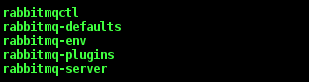
In /home/rabbitmq/sbin/ folder, I have the following files
The scripts to start and stop RabbitMQ are in the bin folder.
In /home/rabbitmq/sbin/ folder, I have the following files
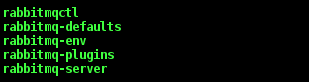
The scripts to start and stop RabbitMQ are in the bin folder.
Daniil Fedotov
Jan 18, 2016, 1:03:50 PM1/18/16
to rabbitmq-users
If you start rabbitmq-server directly, without exporting variables, does it run?
Reply all
Reply to author
Forward
0 new messages