
Fwd: Support in QZ print installation
382 views
Skip to first unread message

Janneth Moreno
Jun 23, 2018, 7:23:37 AM6/23/18
to qz-p...@googlegroups.com
Hi support team,
I am installing QZ print in my PC when the installation is finished the QZ Tray is not able to use. When I try to do the sample demo I´am getting the following errors:
qz-tray.js:120 WebSocket connection to 'ws://localhost:8182/' failed: Error in connection establishment: net::ERR_CONNECTION_REFUSED
findConnection @ qz-tray.js:120
qz-tray.js:120 WebSocket connection to 'ws://localhost:8283/' failed: Error in connection establishment: net::ERR_CONNECTION_REFUSED
findConnection @ qz-tray.js:120
qz-tray.js:120 WebSocket connection to 'ws://localhost:8384/' failed: Error in connection establishment: net::ERR_CONNECTION_REFUSED
findConnection @ qz-tray.js:120
qz-tray.js:120 WebSocket connection to 'ws://localhost:8485/' failed: Error in connection establishment: net::ERR_CONNECTION_REFUSED
findConnection @ qz-tray.js:120
qz-tray.js:120 WebSocket connection to 'ws://localhost.qz.io:8182/' failed: Error in connection establishment: net::ERR_NAME_NOT_RESOLVED
findConnection @ qz-tray.js:120
qz-tray.js:120 WebSocket connection to 'ws://localhost.qz.io:8283/' failed: Error in connection establishment: net::ERR_NAME_NOT_RESOLVED
findConnection @ qz-tray.js:120
qz-tray.js:120 WebSocket connection to 'ws://localhost.qz.io:8384/' failed: Error in connection establishment: net::ERR_NAME_NOT_RESOLVED
findConnection @ qz-tray.js:120
deeper @ qz-tray.js:108
_qz.websocket.connection.onerror @ qz-tray.js:164
qz-tray.js:120 WebSocket connection to 'ws://localhost.qz.io:8485/' failed: Error in connection establishment: net::ERR_NAME_NOT_RESOLVED
findConnection @ qz-tray.js:120
deeper @ qz-tray.js:108
_qz.websocket.connection.onerror @ qz-tray.js:164
sample.html:1767 Error: Unable to establish connection with QZ
at deeper (qz-tray.js:99)
at WebSocket._qz.websocket.connection.onerror (qz-tray.js:164)

Hope you can help me.
Regards.

Tres Finocchiaro
Jun 23, 2018, 9:31:40 AM6/23/18
to Janneth Moreno, qz-print
Is QZ Tray running? Is the tray icon green?
Does the sample.html that gets installed inside "Program Files/QZ Tray/demo"/ working?
Are there any errors in the installation log? You can run it again and expand the log.
There are only a few things that can cause this and they should be rather easy to resolve. Most common problems are solved by reinstalling Java from the offline installer, and then reinstalling QZ Tray.
Janneth Moreno
Jun 23, 2018, 10:08:16 AM6/23/18
to Tres Finocchiaro, qz-print
Hi Tres, Thanks for your soon answer.
1. QZ Tray icon is not appear in the bar task after the installation, I just have it on the program menu

2. When I try the sample.html inside the
Program Files/QZ Tray/demo I´m getting the following errors:


3. I don´t see errors on the installation log
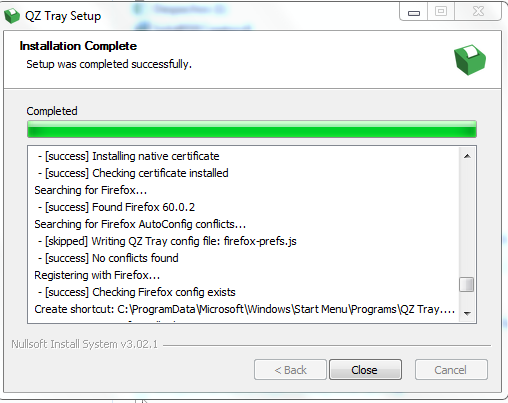
4. I have uninstall the Java and reinstall it with the offline version, and then I installed again teh QZ tray but the error persist.
Thanks for your help.
Tres Finocchiaro
Jun 25, 2018, 12:35:54 AM6/25/18
to Janneth Moreno, qz-print
If port 8182 is being blocked and the installation is happening properly, I would suspect something is blocking ports on that PC without your permission. Do you have a 3rd party firewall or antivirus that may be blocking 8181 and 8182?
-Tres
--
You received this message because you are subscribed to the Google Groups "qz-print" group.
To unsubscribe from this group and stop receiving emails from it, send an email to qz-print+u...@googlegroups.com.
For more options, visit https://groups.google.com/d/optout.
Reply all
Reply to author
Forward
0 new messages