
Sending raw data to POS 5802DD printer
537 views
Skip to first unread message

Paul Ferguson
Jan 9, 2019, 1:55:31 PM1/9/19
to qz-print
Hello,
Here is the printer I am using:
I am able to find and select my printer from the QZ Demo:
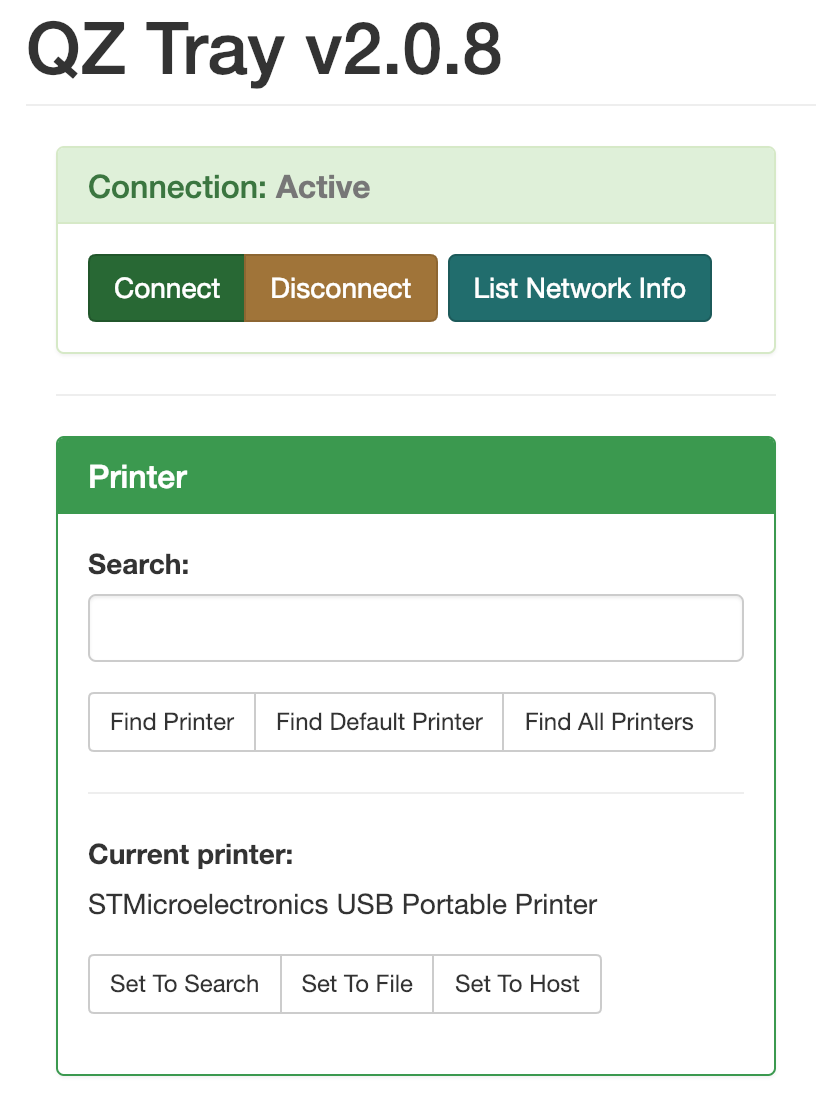
If I test the "raw" print method, and click, "epl_sample.txt" it's starts printing a LONG file of what looks like code.

How can I send my own raw code, something like "hello world" or the custom data I need to print? Is there a receipt template I can use and modify to fit my company name, logo and transaction data? Not sure how to send it.
When trying to use the "USB" method, instead of "raw"

I'm able to find few value that work, but I'm unable to "claim" the device
- Vendor ID: 0x05ac
- Product ID: 0x027a
- Device interface: 0x00
- Interface endpoint: 0x81

Thank you in advance!

Lite Finocchiaro
Jan 9, 2019, 3:23:55 PM1/9/19
to Paul Ferguson, qz-print
Paul:
1. Continue to use the RAW tab to complete your testing.
2. You will want to set the printer up as a RAW printer in your Operating System using one of our tutorials:
https://qz.io/wiki/setting-up-a-raw-printer-in-osx (this should work for many Linux distros as well using the CUPS browser interface)
3. This printer does not understand EPL, but (taken from the Amazon link you provided) ESC/POS or Star Line Mode command:
Emulation: ESC/POS/STAR Command
I would recommend using the ESC/POS function in sample.html to test, and feel free to modify this function to simply say "hello world"
We have more ESC/POS documentation here:
Please note: The image logic is geared toward an Epson thermal printer and may not work with your make/model printer.
Kind regards,
Lite
--
You received this message because you are subscribed to the Google Groups "qz-print" group.
To unsubscribe from this group and stop receiving emails from it, send an email to qz-print+u...@googlegroups.com.
For more options, visit https://groups.google.com/d/optout.
Paul Ferguson
Jan 9, 2019, 11:13:58 PM1/9/19
to Lite Finocchiaro, qz-print
Thank you, Lite.
The link in step 2 helped me get going, I am now able to print the QZ Tray test receipt using the RAW tab (Mac OS using CUPS)
But I'm having trouble locating the sample.html file that you referenced. Is that one my machine as a result of installing QZ Tray?
Regards,
Paul
Lite Finocchiaro
Jan 10, 2019, 12:20:31 AM1/10/19
to Paul Ferguson, qz-print
Paul:
Yes. The sample.html file is located in Applications >> QZ-Tray >> demo >> sample.html on MacOS.
I would recommend copying the entire demo folder to your user space (i.e.: Desktop) and working from there. Sample.html is an exact copy of https://demo.qz.io on version 2.0.8, and while it's a big file, you can just focus on the ESC/POS function. If you want to create a smaller html file for testing, we have outlined a bare-bones example here:
Let me know if you run into any problems, and I'll be happy to help.
Kind regards,
Lite

Tres Finocchiaro
Jan 10, 2019, 8:28:02 AM1/10/19
to Lite Finocchiaro, Paul Ferguson, qz-print
Clarification:
Paul Ferguson
Jan 13, 2019, 10:10:56 PM1/13/19
to Lite Finocchiaro, qz-print, Tres Finocchiaro
Thank you for these notes and the clarification, they were very helpful getting me to the next point!
I'm clearly doing something wrong with this change.
I was able to complete the "getting started" tutorial, and I have the raw ZPL example being sent to my Zebra printer over USB.
Now I am trying to test the printFile() function (~line 1201 in sample.html), and want to make sure I understand how this works.
I would like to generate the raw ZPL on my web server, and then reference that file from the HTML I send to the end users browser. I'm assuming the QZ Tray javascript files leverage AJAX or something to accomplish this? (Or does this file need to live on the end users computer already?)
I added two functions from the sample.html that the printFile() function appears to depend on:
getUpdatedConfig()
updateConfig()
My test HTML file is attached if you are able to view it.
You will see I have commented out the two lines from your example, and added the "return printFile()" to print from a file (this file contains valid ZPL inside the assets/ directory on my web server):
qz.websocket.connect().then(function() {
return qz.printers.find("zebra") // Pass the printer name into the next Promise
}).then(function(printer) {
var config = qz.configs.create(printer); // Create a default config for the found printer
// var data = ['^XA^FO50,50^ADN,36,20^FDRAW ZPL EXAMPLE^FS^XZ']; // Raw ZPL
// return qz.print(config, data);
return printFile('zebra_label.zpl');
}).catch(function(e) { console.error(e); });
I'm clearly doing something wrong with this change.
Thank you kindly in advance!
--Paul
Tres Finocchiaro
Jan 14, 2019, 9:49:32 AM1/14/19
to Paul Ferguson, Lite Finocchiaro, qz-print
return printFile('zebra_label.zpl');
Since our API uses promises, you'll want to avoid calling any functions within the chain. Here's how you'd do this....
   var config = qz.configs.create("zebra");

   var data = [
      {
         type: 'raw',
         format: 'file',
         data: 'zebra_label.zpl'
      }
   ];

   qz.print(config, data).catch(function(e) { console.error(e); });

Tres Finocchiaro
Jan 14, 2019, 9:50:53 AM1/14/19
to Paul Ferguson, Lite Finocchiaro, qz-print
I would like to generate the raw ZPL on my web server, and then reference that file from the HTML I send to the end users browser. I'm assuming the QZ Tray javascript files leverage AJAX or something to accomplish this? (Or does this file need to live on the end users computer already?)
Not yet. We need to add AJAX because our technique has security issues with some environments. What we do is, we ask Java to visit that URL anonymously. We will be adding an AJAX library in the future to the base API. However, probably not until 2.2.0.
Paul Ferguson
Jan 14, 2019, 3:40:36 PM1/14/19
to Tres Finocchiaro, Lite Finocchiaro, qz-print
Thank you for the example, I'll give that a go.
Just to be clear, can the file I reference live on the webserver?
Tres Finocchiaro
Jan 14, 2019, 9:49:13 PM1/14/19
to Paul Ferguson, Lite Finocchiaro, qz-print
Just to be clear, can the file I reference live on the webserver?
Yes, assuming Java has anonymous access. If you can't do that, you can fetch it using you own AJAX method and base64 encode it and append it using base64 syntax.
Paul Ferguson
Jan 14, 2019, 10:23:27 PM1/14/19
to Tres Finocchiaro, Lite Finocchiaro, qz-print
Thank you, I can confirm its working!
So far so good. Thanks for all the help so far. Looks like the critical flow is working.
Will continue with development and test a couple more printer models.
Paul
Reply all
Reply to author
Forward
0 new messages