
I am unable to get the printer to print automatically via a website.
723 views
Skip to first unread message

Joacir Junior
Jun 8, 2021, 1:27:02 PM6/8/21
to qz-print

Using an online dashboard in Google Chrome. Every time I print a command it asks me to click allow.


By clicking on details. It shows these errors.
These certificates that came when downloading and installing the printer have been configured.
This certificate was also installed.
.
.
.
I want to print automatically without having to click every time there to print. If you can explain to me how do I configure this certificate and how do I configure it to print automatically.
Message has been deleted

Tres Finocchiaro
Jun 9, 2021, 11:39:42 AM6/9/21
to Lite Finocchiaro, Joacir Junior, qz-print
Joacir,
To use QZ Tray with a demo certificate, you need to create a new certificate, install it as override.crt, and then provide it for the signing functions.
Since QZ Tray 2.1.3, everything except signing can be one using the Site Manager dialog.
The remaining portion will be to provide the files to the signing steps: https://qz.io/wiki/signing
Specifically the JavaScript functions setCertificatePromise and setSignaturePromise.
A demo of how these can be used is available here: https://youtu.be/X72y6ZZTWzE


On Tue, Jun 8, 2021 at 3:54 PM Lite Finocchiaro <lite.m.fi...@gmail.com> wrote:
Joacir:Greetings. My name is Lite, and I am the Vice President of QZ Industries, the company behind QZ-Tray.These Allow/Block warnings are by design. The only way to get QZ-Tray to print silently is with a certificate and private key from QZ Industries (available for purchase at https://buy.qz.io ) or by creating a self-signed certificate.Since we are responsible for 99% of the code and technical support of QZ-Tray, we do not assist with the creation or installation of self-signed certificates, as it takes time and revenue away from our business. If our business fails, the software will eventually die as well, so I'm sure you see the logic here.If you'd like to get a trial certificate and private key from QZ Industries, feel free to reach out to sa...@qz.io and we'll be happy to help.Kind regards,Lite Finocchiaro
----
You received this message because you are subscribed to the Google Groups "qz-print" group.
To unsubscribe from this group and stop receiving emails from it, send an email to qz-print+u...@googlegroups.com.
To view this discussion on the web visit https://groups.google.com/d/msgid/qz-print/b02f19f9-f2ba-43ca-b7d4-adbf683388e6n%40googlegroups.com.
You received this message because you are subscribed to the Google Groups "qz-print" group.
To unsubscribe from this group and stop receiving emails from it, send an email to qz-print+u...@googlegroups.com.
To view this discussion on the web visit https://groups.google.com/d/msgid/qz-print/CAPnxpeC0M2GPfQjPBzQx5q1SqJ9ast7bBMvpmb0Gkpo7Fc-jsQ%40mail.gmail.com.
Joacir Junior
Jun 11, 2021, 4:07:38 PM6/11/21
to qz-print

I went through the setup process.

Even so, it's giving an error. Not letting me print silently. Can you help me do I need to buy a certificate?

Lite Finocchiaro
Jun 12, 2021, 12:12:27 PM6/12/21
to Joacir Junior, qz-print
Joacir:
It looks like you have "Use strict certificate mode" checked, which will only allow one certificate (and no others) to work with the application.
Please uncheck this box and see if it will trust your self-signed cert. If you continue to have trouble, let us know.
Regards,
Lite
To view this discussion on the web visit https://groups.google.com/d/msgid/qz-print/b671fa54-77a3-4d87-bbc7-e5976bdeb0a6n%40googlegroups.com.
Joacir Junior
Jun 14, 2021, 10:30:23 AM6/14/21
to qz-print
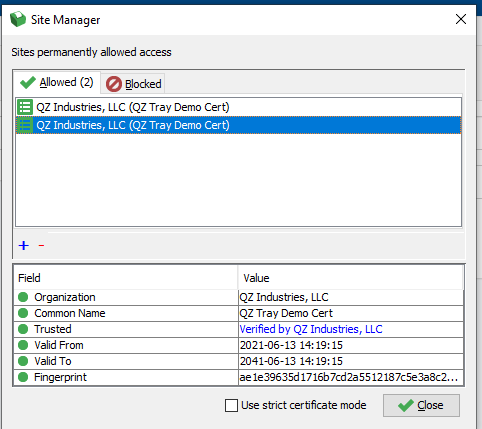
Configured this way I couldn't print silently.

Configured this way is also not working.


Configured this way is also not working.
It keeps giving the same mistakes. I've done everything you said, could you help me?
Lite Finocchiaro
Jun 14, 2021, 11:05:41 AM6/14/21
to Joacir Junior, qz-print
Joacir:
I see two certificates in the Site Manager, but you should only have one. The reason this is important is that the private key is linked to the certificate with which it's generated, and it will not work with a different certificate.
Second, if your signature is coming through blank, then you need to get signing working properly with the appropriate sign-message file or script.
If you need help with this, I can join a screenshare. Feel free to contact me off-list with TeamViewer credentials or your preferred support application. I'm generally available from 8am to 4pm Monday through Friday, New York time.
Kind regards,
Lite
To view this discussion on the web visit https://groups.google.com/d/msgid/qz-print/6e89094c-fa3f-456c-b66e-0be52489481fn%40googlegroups.com.
Tres Finocchiaro
Jun 14, 2021, 12:17:33 PM6/14/21
to Lite Finocchiaro, Joacir Junior, qz-print
As Lite has illustrated, you need to setup setSignaturePromise to sign the messages, I've already linked the video tutorial here: https://youtu.be/X72y6ZZTWzE
Joacir Junior
Jun 14, 2021, 1:06:14 PM6/14/21
to qz-print
In case I didn't even buy a Qz certificate. I wanted to know if only with this Demo certificate I can do silent printing?
How can I get in touch with you so we can make a call to fix this problem?
Tres Finocchiaro
Jun 14, 2021, 1:25:31 PM6/14/21
to Joacir Junior, qz-print
Starting with QZ Tray 2.1.3, you don't need to buy a certificate, the files can be created using QZ Tray and following the tutorials.
Remote help is only offered for free to fix bugs or to prospecting customers.
Joacir Junior
Jun 14, 2021, 1:40:36 PM6/14/21
to qz-print
How do I get support to make a call I'll explain the bug here? You speak Portuguese?
Tres Finocchiaro
Jun 14, 2021, 2:56:45 PM6/14/21
to Joacir Junior, qz-print
--
You received this message because you are subscribed to the Google Groups "qz-print" group.
To unsubscribe from this group and stop receiving emails from it, send an email to qz-print+u...@googlegroups.com.
To view this discussion on the web visit https://groups.google.com/d/msgid/qz-print/816d983a-1234-4a07-9f5b-edff84f469ben%40googlegroups.com.
Joacir Junior
Jun 15, 2021, 2:28:39 PM6/15/21
to qz-print
Translate can we schedule a call to help me? Do you have to send an E-mail?
Em segunda-feira, 14 de junho de 2021 às 15:56:45 UTC-3, tres.fin...@gmail.com escreveu:
On Mon, Jun 14, 2021 at 1:40 PM Joacir Junior <joacirjunior.profissional@gmail.com> wrote:
How do I get support to make a call I'll explain the bug here? You speak Portuguese?Em segunda-feira, 14 de junho de 2021 às 14:25:31 UTC-3, tres.fin...@gmail.com escreveu:Starting with QZ Tray 2.1.3, you don't need to buy a certificate, the files can be created using QZ Tray and following the tutorials.Remote help is only offered for free to fix bugs or to prospecting customers.--
You received this message because you are subscribed to the Google Groups "qz-print" group.
To unsubscribe from this group and stop receiving emails from it, send an email to qz-print+unsubscribe@googlegroups.com.
Lite Finocchiaro
Jun 15, 2021, 2:47:37 PM6/15/21
to Joacir Junior, qz-print
Joacir:
We have given you directions to create a key pair and install them. This should be enough information for you to get things working.
Our wiki is a good point of reference, as is our YouTube channel.
As Tres said, we do not take support calls for self-signed certificates. Please stop asking.
Kind regards,
On Tue, Jun 15, 2021 at 2:28 PM Joacir Junior <joacirjunior...@gmail.com> wrote:
Translate can we schedule a call to help me? Do you have to send an E-mail?
Em segunda-feira, 14 de junho de 2021 às 15:56:45 UTC-3, tres.fin...@gmail.com escreveu:
On Mon, Jun 14, 2021 at 1:40 PM Joacir Junior <joacirjunior...@gmail.com> wrote:
How do I get support to make a call I'll explain the bug here? You speak Portuguese?Em segunda-feira, 14 de junho de 2021 às 14:25:31 UTC-3, tres.fin...@gmail.com escreveu:Starting with QZ Tray 2.1.3, you don't need to buy a certificate, the files can be created using QZ Tray and following the tutorials.Remote help is only offered for free to fix bugs or to prospecting customers.--
You received this message because you are subscribed to the Google Groups "qz-print" group.
To unsubscribe from this group and stop receiving emails from it, send an email to qz-print+u...@googlegroups.com.
To view this discussion on the web visit https://groups.google.com/d/msgid/qz-print/816d983a-1234-4a07-9f5b-edff84f469ben%40googlegroups.com.
--
You received this message because you are subscribed to the Google Groups "qz-print" group.
To unsubscribe from this group and stop receiving emails from it, send an email to qz-print+u...@googlegroups.com.
To view this discussion on the web visit https://groups.google.com/d/msgid/qz-print/ee39a76c-fe76-4bf6-a16e-1cc5fdd45123n%40googlegroups.com.
Joacir Junior
Jun 15, 2021, 3:06:52 PM6/15/21
to qz-print
Okay thank you very much.
Reply all
Reply to author
Forward
0 new messages