
Qubes Networking 101
2,024 views
Skip to first unread message

Lance Meredith
Mar 3, 2016, 9:30:14 PM3/3/16
to qubes...@googlegroups.com
Hi, student playing with Qubes as my capstone project.
Networking documentation really needs an upgrade and consolidation. Maybe the devs can be alerted for future users, but I'd like a more immediate form of help right now.- http://theinvisiblethings.blogspot.com/2011/09/playing-with-qubes-networking-for-fun.html
- https://www.qubes-os.org/doc/networking/
- any relevent links in the official documentation (maybe missed one?)
Yet I am running in circles trying to get networking for any VM up and running. Could someone provide a step by step tutorial for getting networking working for any AppVM's sitting behind the sys-firewall and sys-net? Please, speak slowly and don't leave "obvious" things out.
I do understand the default topology works like this:
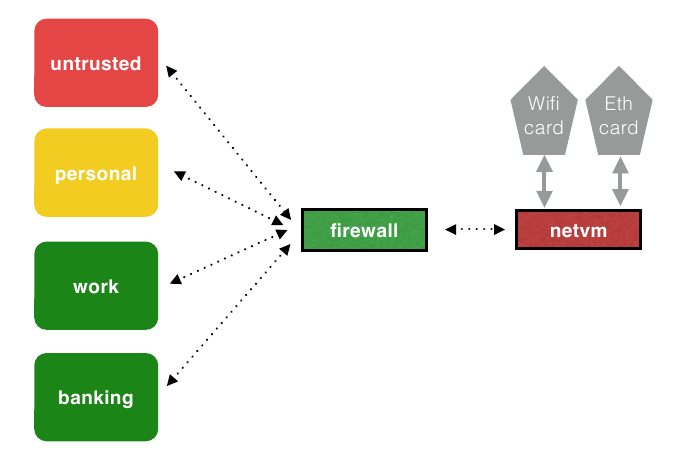
Please help the newbies... we need adults.

Chris Laprise
Mar 4, 2016, 1:55:10 AM3/4/16
to Lance Meredith, qubes...@googlegroups.com
On 03/03/2016 09:30 PM, Lance Meredith wrote:
> Hi, student playing with Qubes as my capstone project.
>
> Networking documentation really needs an upgrade and consolidation.
> Maybe the devs can be alerted for future users, but I'd like a more
> immediate form of help right now.
>
> I have read:
>
> * https://www.qubes-os.org/doc/networking/
> * any relevent links in the official documentation (maybe missed one?)
>
> Yet I am running in circles trying to get networking for /any/ VM up
> and running. Could someone provide a step by step tutorial for getting
> networking working for any AppVM's sitting behind the sys-firewall and
> sys-net? Please, speak slowly and don't leave "obvious" things out.
>
> I do understand the default topology works like this:
>
> networking working for any AppVM's sitting behind the sys-firewall and
> sys-net? Please, speak slowly and don't leave "obvious" things out.
>
> I do understand the default topology works like this:
>
> (I know dom0 is separated from networking, though the command to
> temporarily enable for updates "qvm-dom0-network-via-netvm up" returns
> "command not found")
>
> Please help the newbies... we need adults.
>
Hi Lance,
> temporarily enable for updates "qvm-dom0-network-via-netvm up" returns
> "command not found")
>
> Please help the newbies... we need adults.
>
The physical connection to your LAN and the Internet is done in sys-net;
you can use network manager for that (a network manager icon should be
visible in the systray on your desktop). Once you think the connection
is established, you can try testing it in a sys-net CLI with a command
like 'ping www.yahoo.com'.
If you don't have a connection in sys-net, you should check in the VM
Manager settings for sys-net that your network devices are assigned to
that vm (see the 'devices' tab). You can also look at dmesg and other
standard Linux means of troubleshooting; the lspci command should list
your network devices. One Qubes-specific thing to check is that
VT-d/IOMMU is available in your system: Run qubes-hcl-report in dom0...
the IOMMU should be active.
From there, you can also test the connection from a sys-firewall CLI,
and from an appvm using the CLI or a browser.
IIRC, sometimes a vm's firewall settings will drop to the most
restrictive mode (i.e. blocking traffic) if you play around with related
settings in VM Manager. For instance, setting the 'netvm' on an appvm to
'none' and then changing it back to 'sys-firewall' later will still
leave you with firewall settings set to 'deny' (or at least it used to
do this). So I would check the 'netvm' setting for each vm, ex: In appvm
settings the netvm property is set to sys-firewall, and in sys-firewall
settings the netvm property is set to sys-net. But also check that the
firewall settings for appvm are set to 'allow' on the left and 'allow
ICMP' and 'allow DNS' on the right.
Chris
John Doe
Mar 5, 2016, 4:21:24 PM3/5/16
to qubes-users, lancem...@gmail.com, tas...@openmailbox.org
Oh good, a quick reply :D Much appreciated sir. I should mention I am running the latest "stable" version, 3.0.
Is there a way to get [sys-net] Network Connections to automatically recognize the machine's NIC? Ethernet connection 1 > Ethernet (tab) only sees a MAC for the virtual interface assigned to sys-firewall. I don't know how to find the physical NIC's MAC address. All networks are unreachable without this configured.
Also, I ran a hardware check:
egrep -c '(vmx|svm)' /proc/cpuinfoThe command returns a '0', but the processor I am using (Intel Core i7-860 @ 2.80GHz Lynnfield 45nm Technology) is listed on ark.intel.com as supporting vPro Technology, Hyper-Threading Technology, Virtualization Technology (VT-x), ibid for Directed I/O (VT-d), and VT-x with Extended Page Tables (EPT). Why then does qubes not see my system's true character?
(If 0 it means that your CPU doesn't support hardware virtualization. If 1 or more it does - but you still need to make sure that virtualization is enabled in the BIOS.)

JPL
Mar 5, 2016, 5:50:11 PM3/5/16
to qubes-users, lancem...@gmail.com, tas...@openmailbox.org
On Saturday, March 5, 2016 at 9:21:24 PM UTC, John Doe wrote:
I do not think I have messed with firewall settings in VM Manager, only the curious "look and hit cancel when finished" perusing.Oh good, a quick reply :D Much appreciated sir. I should mention I am running the latest "stable" version, 3.0.I do not see a "Devices" tab in Qubes VM Manager. Output from says that HVM is active, I/O MMU is not active. How do I activate the I/O MMU?
Is there a way to get [sys-net] Network Connections to automatically recognize the machine's NIC? Ethernet connection 1 > Ethernet (tab) only sees a MAC for the virtual interface assigned to sys-firewall. I don't know how to find the physical NIC's MAC address. All networks are unreachable without this configured.
Also, I ran a hardware check:egrep -c '(vmx|svm)' /proc/cpuinfoThe command returns a '0', but the processor I am using (Intel Core i7-860 @ 2.80GHz Lynnfield 45nm Technology) is listed on ark.intel.com as supporting vPro Technology, Hyper-Threading Technology, Virtualization Technology (VT-x), ibid for Directed I/O (VT-d), and VT-x with Extended Page Tables (EPT). Why then does qubes not see my system's true character?
(If 0 it means that your CPU doesn't support hardware virtualization. If 1 or more it does - but you still need to make sure that virtualization is enabled in the BIOS.)Running 16GB of DDR3 RAM and a SSD as well.
> I do not see a "Devices" tab in Qubes VM Manager.
Right click on Sys-Net then VM Settings - its the fourth tab
John Doe
Mar 6, 2016, 9:58:41 PM3/6/16
to qubes-users, lancem...@gmail.com, tas...@openmailbox.org
Found the devices tab, and lspci listed the ethernet controller as already added. Also ifconfig only lists the lo and vif, no eth0.
Network Connections > Edit Ethernet connection 1 > Ethernet (No MAC address)
How do I get Qubes Network Connections to see the onboard Ethernet that lspci and VM Manager say are connected to sys-net?
Also, Output from qubes-hcl-report says that HVM is active, I/O MMU is not active. How do I activate the I/O MMU?
Network Connections > Edit Ethernet connection 1 > Ethernet (No MAC address)
How do I get Qubes Network Connections to see the onboard Ethernet that lspci and VM Manager say are connected to sys-net?
Also, Output from qubes-hcl-report says that HVM is active, I/O MMU is not active. How do I activate the I/O MMU?
John Doe
Mar 7, 2016, 2:36:44 PM3/7/16
to qubes-users, lancem...@gmail.com, tas...@openmailbox.org
Please help...
Is this a driver issue?
Is this a driver issue?

Adrian Rocha
Mar 7, 2016, 11:59:37 PM3/7/16
to qubes-users, lancem...@gmail.com, tas...@openmailbox.org
Hi John,
Maybe is a driver issue. But check this things first:
Can you see the ethernet card in net-vm with lspci command?
You have to see some like this (in sys-net):
$ lspci
00:00.0 Network controller: Intel Corporation Wireless ....
Review the configuration of the net-vm from dom0 with:
$qvm-prefs sys-net
Check this parameters:
type : NetVM
kernelopts : nopat iommu=soft swioltb=8192 (default)
Regards
John Doe
Mar 9, 2016, 9:28:40 AM3/9/16
to qubes-users, lancem...@gmail.com, tas...@openmailbox.org
Yes, as earlier, lspci does list the ethernet card: 00:00.0 Ethernet controller [0200]: Broadcom Corporation NetLink BCM57789 Gigabit Ethernet PCIe [14e4:1692] (rev 01)
qvm-prefs sys-net
type: NetVM
kernelopts: nopat iommu=soft swiotlb=8192 (default)
qvm-prefs sys-net
type: NetVM
kernelopts: nopat iommu=soft swiotlb=8192 (default)
John Doe
Mar 11, 2016, 11:05:48 PM3/11/16
to qubes-users, tas...@openmailbox.org
I have now installed Qubes 3.1, this has not fixed my problem. All command outputs and configuration settings appear to be the same.
The sys-net VM can see the ethernet controller in the "devices" tab from VM manager, but I don't know how to utilize it.
I/O MMU is Not Active, though I have verified my hardware does support it.
Please help, I am getting very behind on this project and can't find solutions anywhere.
The sys-net VM can see the ethernet controller in the "devices" tab from VM manager, but I don't know how to utilize it.
I/O MMU is Not Active, though I have verified my hardware does support it.
Please help, I am getting very behind on this project and can't find solutions anywhere.
John Doe
Mar 16, 2016, 3:01:38 PM3/16/16
to qubes-users, tas...@openmailbox.org
Can someone at least tell me where to start?
Axon
Mar 16, 2016, 5:00:47 PM3/16/16
to John Doe, qubes-users, tas...@openmailbox.org
-----BEGIN PGP SIGNED MESSAGE-----
Hash: SHA512
John Doe:
installing it or running it from a live CD). That way you can see if
your network adapter works at all, and whether it's a Qubes-specific
problem or not.
-----BEGIN PGP SIGNATURE-----
iQIcBAEBCgAGBQJW6clpAAoJEJh4Btx1RPV8KAcP/Aqwv1pefzCItljEMNHiTJvC
Vmj+J++BOPI+H6urgVWrYWXjeq1HE2rSvpSBT660MeW8iCmYduMfjoBtI4eCE4EK
iH2VwozU0K8iXCP0l7mCdNV8W8WP4SPs2yeN3MBmrMad4eJUZtT1Ytu0jlmMoY/w
pam1l5W8chcZBA6aY6KOjFsitqZfD2deEHMAbuWXqB/XLFIQnDVXe6trsfPGKOXU
SrXeBHOOFudimODLpRE21HXucQJOuyA7y1Sk0uKx3NsxLBQZlK+5dsWP72V1kwjk
GwGqILGomgRtEeeXP6u/cxrTEn8pRn4N/e3CG/A72qJYtR2VJXE03SKkuBCGmu/r
4++q9anOkvu1uQC4H6VtnKMw/DPJKTfeaup6CeNRJ2+NPdPymdX2PcmYweqywqZE
2JnaHjV9t7lDKZg2TsE/v4RWHLz4BDN7QHkUIOTwIox5tTythkLgQyIhkZS4tZSG
lnI3rdy8qqm+zPiWOc4O5kJWePTDcqFz+VDdq3pePZfB5DUIqgR06MclivDOWisf
a5UMM+TgEmMYNOMKcJN/ikwqVmhtHvikM4peae7XG4QqnEB4AjEX5G8tVet07aBh
HUQm2W/RzzPk3sW3ixjqnLI2CBRcwH7KC3bfbShbhUHR0ppzJzp6rGnDD9UptO5C
xZMSczvgauS8keGm7/4h
=a/4K
-----END PGP SIGNATURE-----
Hash: SHA512
John Doe:
> Can someone at least tell me where to start?
>
If you haven't already, you may want to try baremetal Fedora (either
>
installing it or running it from a live CD). That way you can see if
your network adapter works at all, and whether it's a Qubes-specific
problem or not.
iQIcBAEBCgAGBQJW6clpAAoJEJh4Btx1RPV8KAcP/Aqwv1pefzCItljEMNHiTJvC
Vmj+J++BOPI+H6urgVWrYWXjeq1HE2rSvpSBT660MeW8iCmYduMfjoBtI4eCE4EK
iH2VwozU0K8iXCP0l7mCdNV8W8WP4SPs2yeN3MBmrMad4eJUZtT1Ytu0jlmMoY/w
pam1l5W8chcZBA6aY6KOjFsitqZfD2deEHMAbuWXqB/XLFIQnDVXe6trsfPGKOXU
SrXeBHOOFudimODLpRE21HXucQJOuyA7y1Sk0uKx3NsxLBQZlK+5dsWP72V1kwjk
GwGqILGomgRtEeeXP6u/cxrTEn8pRn4N/e3CG/A72qJYtR2VJXE03SKkuBCGmu/r
4++q9anOkvu1uQC4H6VtnKMw/DPJKTfeaup6CeNRJ2+NPdPymdX2PcmYweqywqZE
2JnaHjV9t7lDKZg2TsE/v4RWHLz4BDN7QHkUIOTwIox5tTythkLgQyIhkZS4tZSG
lnI3rdy8qqm+zPiWOc4O5kJWePTDcqFz+VDdq3pePZfB5DUIqgR06MclivDOWisf
a5UMM+TgEmMYNOMKcJN/ikwqVmhtHvikM4peae7XG4QqnEB4AjEX5G8tVet07aBh
HUQm2W/RzzPk3sW3ixjqnLI2CBRcwH7KC3bfbShbhUHR0ppzJzp6rGnDD9UptO5C
xZMSczvgauS8keGm7/4h
=a/4K
-----END PGP SIGNATURE-----
Reply all
Reply to author
Forward
0 new messages