
Installer crash: IO-APIC + timer doesn't work (Dell XPS 7390)
296 views
Skip to first unread message

Aaron Janse
Dec 25, 2019, 5:25:41 PM12/25/19
to qubes-users
Hello all,
I'm trying to install Qubes on a Dell XPS 7390 (the XPS 13 developer edition).
I've found someone else with similar issues in a reddit thread [1] made a few
days ago. I'm u/qubes-xps13.
# Hardware
Dell XPS 13 (7390)
- Intel i7 (10th generation)
- 16GB RAM
- all the necessary virtualization features (according to Qubes docs)
- only UEFI boot; afaik there isn't a way to boot in legacy mode
# Software Version
Qubes 4.0.2-rc3
# Problem
I've been unable to get to the GUI installer screen.
# Things I've tried
The original cause of the crash:
```
IO-APIC + timer doesn’t work
```
Following [2], I decided to tinker with the boot options on the USB installer
medium.
I first tried `noapic`, got an `x2apic` error, then added `x2apic=off`.
My options line so far looks like this:
```
options=console=vga efi=attr=uc noapic x2apic=off
```
At this point, I got the black screen described in issue #5165 (3). Following
the advice there, I updated my options line to the following:
```
options=console=vga efi=attr=uc noapic x2apic=off loglvl=all efi=no-rs iommu=no-igfx dom0_mem=min:1024M dom0_mem=max:4096M ucode=scan vga=current,keep guest_loglvl=all
```
With the newly verbose output, it looks like I'm back to square one:
```
Kernel panic - not syncing: The noapic parameter is incompatible with Xen
```
# Ideas I have
- try with a newer kernel version (I don't know how to go about trying this,
and it sounds like a lot of work)
---
[1] https://www.reddit.com/r/Qubes/comments/edqrab/qubes_and_ice_lake/
[2] https://groups.google.com/forum/#!searchin/qubes-users/noapic%7Csort:date/qubes-users/PIyz7BEV1mg/0SBJTnoAAwAJ
[3] https://github.com/QubesOS/qubes-issues/issues/5165
I'm trying to install Qubes on a Dell XPS 7390 (the XPS 13 developer edition).
I've found someone else with similar issues in a reddit thread [1] made a few
days ago. I'm u/qubes-xps13.
# Hardware
Dell XPS 13 (7390)
- Intel i7 (10th generation)
- 16GB RAM
- all the necessary virtualization features (according to Qubes docs)
- only UEFI boot; afaik there isn't a way to boot in legacy mode
# Software Version
Qubes 4.0.2-rc3
# Problem
I've been unable to get to the GUI installer screen.
# Things I've tried
The original cause of the crash:
```
IO-APIC + timer doesn’t work
```
Following [2], I decided to tinker with the boot options on the USB installer
medium.
I first tried `noapic`, got an `x2apic` error, then added `x2apic=off`.
My options line so far looks like this:
```
options=console=vga efi=attr=uc noapic x2apic=off
```
At this point, I got the black screen described in issue #5165 (3). Following
the advice there, I updated my options line to the following:
```
options=console=vga efi=attr=uc noapic x2apic=off loglvl=all efi=no-rs iommu=no-igfx dom0_mem=min:1024M dom0_mem=max:4096M ucode=scan vga=current,keep guest_loglvl=all
```
With the newly verbose output, it looks like I'm back to square one:
```
Kernel panic - not syncing: The noapic parameter is incompatible with Xen
```
# Ideas I have
- try with a newer kernel version (I don't know how to go about trying this,
and it sounds like a lot of work)
---
Where should I go from here?
Thanks!
[1] https://www.reddit.com/r/Qubes/comments/edqrab/qubes_and_ice_lake/
[2] https://groups.google.com/forum/#!searchin/qubes-users/noapic%7Csort:date/qubes-users/PIyz7BEV1mg/0SBJTnoAAwAJ
[3] https://github.com/QubesOS/qubes-issues/issues/5165

awokd
Dec 26, 2019, 8:31:50 AM12/26/19
to qubes...@googlegroups.com
Aaron Janse:
> At this point, I got the black screen described in issue #5165 (3).
> Following
> the advice there, I updated my options line to the following:
> ```
> options=console=vga efi=attr=uc noapic x2apic=off loglvl=all efi=no-rs
> iommu=no-igfx dom0_mem=min:1024M dom0_mem=max:4096M ucode=scan
> vga=current,keep guest_loglvl=all
> ```
>
> With the newly verbose output, it looks like I'm back to square one:
> ```
> Kernel panic - not syncing: The noapic parameter is incompatible with Xen
What happens if you use an options line like the following?
options=console=vga loglvl=all efi=no-rs
--
- don't top post
Mailing list etiquette:
- trim quoted reply to only relevant portions
- when possible, copy and paste text instead of screenshots
> At this point, I got the black screen described in issue #5165 (3).
> Following
> the advice there, I updated my options line to the following:
> ```
> options=console=vga efi=attr=uc noapic x2apic=off loglvl=all efi=no-rs
> iommu=no-igfx dom0_mem=min:1024M dom0_mem=max:4096M ucode=scan
> vga=current,keep guest_loglvl=all
> ```
>
> With the newly verbose output, it looks like I'm back to square one:
> ```
> Kernel panic - not syncing: The noapic parameter is incompatible with Xen
options=console=vga loglvl=all efi=no-rs
--
- don't top post
Mailing list etiquette:
- trim quoted reply to only relevant portions
- when possible, copy and paste text instead of screenshots
Aaron Janse
Dec 27, 2019, 1:40:35 AM12/27/19
to qubes-users
On Thursday, December 26, 2019 at 5:31:50 AM UTC-8, awokd wrote:
What happens if you use an options line like the following?
options=console=vga loglvl=all efi=no-rs
```
(XEN) Platform timer is 23.999MHz HPET
(XEN) [...]
(XEN) CPU0: No irq handler for vector 40 (IRC -2147483648, LAPIC)
(XEN) PCI: MCFG configuration 0: base e0000000 segment 0000 buses 00 - ff
(XEN) PCI: Not using MCFG for segment 0000 bus 00-ff
(XEN) [...]
(XEN) Interrupt remapping enabled
(XEN) nr_sockets: 2
(XEN) Enabled directed EOI with ioapic_ack_old on!
(XEN) ENABLING IO_APIC IRQs
(XEN) -> Using old ACK method
(XEN) ..TIMER: vector=0xF0 apic1=0 pin1=2 apic2=-1 pin2=-1
(XEN) ..MP-BIOS bug: 8254 timer not connected to IO-APIC
(XEN) ...trying to set up timer (IRQ0) through 8259A ,,,
(XEN) ...trying to set up timer as Virtual Wire IRQ... failed.
(XEN) ...trying to set up timer as ExtINT IRQ...spurious 8259A interrupt: IRQ7.
(XEN) CPU0: no irq handler for vector e7 (IRQ -8)
(XEN) IRQ7 a=0001[0001,0000] v=60[ffffffff] t=IO-APIC-edge s=00000002
(XEN) failed :(.
(XEN)
(XEN) ***************************************
(XEN) Panic on CPU 0:
(XEN) IO-APIC + timer doesn't work! Boot with apic_verbosity=debug and send a report. Then try booting with the 'noapic' option
(XEN) ***************************************
(XEN)
(XEN) Reboot in five seconds...
(XEN) [...]
(XEN) CPU0: No irq handler for vector 40 (IRC -2147483648, LAPIC)
(XEN) PCI: MCFG configuration 0: base e0000000 segment 0000 buses 00 - ff
(XEN) PCI: Not using MCFG for segment 0000 bus 00-ff
(XEN) [...]
(XEN) Interrupt remapping enabled
(XEN) nr_sockets: 2
(XEN) Enabled directed EOI with ioapic_ack_old on!
(XEN) ENABLING IO_APIC IRQs
(XEN) -> Using old ACK method
(XEN) ..TIMER: vector=0xF0 apic1=0 pin1=2 apic2=-1 pin2=-1
(XEN) ..MP-BIOS bug: 8254 timer not connected to IO-APIC
(XEN) ...trying to set up timer (IRQ0) through 8259A ,,,
(XEN) ...trying to set up timer as Virtual Wire IRQ... failed.
(XEN) ...trying to set up timer as ExtINT IRQ...spurious 8259A interrupt: IRQ7.
(XEN) CPU0: no irq handler for vector e7 (IRQ -8)
(XEN) IRQ7 a=0001[0001,0000] v=60[ffffffff] t=IO-APIC-edge s=00000002
(XEN) failed :(.
(XEN)
(XEN) ***************************************
(XEN) Panic on CPU 0:
(XEN) IO-APIC + timer doesn't work! Boot with apic_verbosity=debug and send a report. Then try booting with the 'noapic' option
(XEN) ***************************************
(XEN)
(XEN) Reboot in five seconds...
```
I've been transcribing these logs by hand, otherwise I'd include more.
I also suspect that maybe these issues could be solved by using a newer kernel for the installer?
My understanding is that R4.1 will soon feature a 5.4.x kernel [1]. Are there more things to try in the meantime?
Thanks!
awokd
Dec 27, 2019, 3:41:35 AM12/27/19
to qubes...@googlegroups.com
Aaron Janse:
See if you can turn off the HPET timer in your UEFI config, and include
that "apic_verbosity=debug" option. That might make more combinations
available to Xen and provide more detail. The messages are coming from
Xen before it even loads the Linux kernel, but yes- a newer version of
Xen such as in R4.1 might also help. If you have a serial port
available, you can set Xen to log to it, but that is often a hassle with
newer machines.
that "apic_verbosity=debug" option. That might make more combinations
available to Xen and provide more detail. The messages are coming from
Xen before it even loads the Linux kernel, but yes- a newer version of
Xen such as in R4.1 might also help. If you have a serial port
available, you can set Xen to log to it, but that is often a hassle with
newer machines.
Aaron Janse
Dec 27, 2019, 12:35:32 PM12/27/19
to qubes-users
On Friday, December 27, 2019 at 12:41:35 AM UTC-8, awokd wrote:
See if you can turn off the HPET timer in your UEFI config, and include
that "apic_verbosity=debug" option. That might make more combinations
available to Xen and provide more detail.
I wasn't sure where to put the hpet=disable line, but my UEFI options line now looks like this:
```
options=console=vga loglvl=all efi=no-rs hpet=disable apic_verbosity=debug
```
And the boot output looks like this:
```
(XEN) [...]
(XEN) CPU0: No irq handler for vector 40 (IRC -2147483648, LAPIC)
(XEN) PCI: MCFG configuration 0: base e0000000 segment 0000 buses 00 - ff
(XEN) PCI: Not using MCFG for segment 0000 bus 00-ff
(XEN) CPU0: No irq handler for vector 40 (IRC -2147483648, LAPIC)
(XEN) PCI: MCFG configuration 0: base e0000000 segment 0000 buses 00 - ff
(XEN) PCI: Not using MCFG for segment 0000 bus 00-ff
(XEN) Intel VT-d iommu 0 supported page sizes: 4kB, 2MB, 1GB.
(XEN) Intel VT-d iommu 1 supported page sizes: 4kB, 2MB, 1GB.
(XEN) Intel VT-d Snoop Control not enabled.
(XEN) Intel VT-d Dom0 DMA Passthrough not enabled.
(XEN) Intel VT-d Queued Invalidation enabled.
(XEN) Intel VT-d Posted Interrupt not enabled.
(XEN) Intel VT-d Shared EPT tables enabled.
(XEN) I/O virtualization enabled.
(XEN) - Dom0 mode: Relaxed
(XEN) Intel VT-d iommu 1 supported page sizes: 4kB, 2MB, 1GB.
(XEN) Intel VT-d Snoop Control not enabled.
(XEN) Intel VT-d Dom0 DMA Passthrough not enabled.
(XEN) Intel VT-d Queued Invalidation enabled.
(XEN) Intel VT-d Posted Interrupt not enabled.
(XEN) Intel VT-d Shared EPT tables enabled.
(XEN) I/O virtualization enabled.
(XEN) - Dom0 mode: Relaxed
(XEN) Interrupt remapping enabled
(XEN) nr_sockets: 2
(XEN) Getting VERSION: 1060015
(XEN) Getting VERSION: 1060015
(XEN) Getting VERSION: 1060015
(XEN) Enabled directed EOI with ioapic_ack_old on!
(XEN) Getting ID: 0
(XEN) Getting LVT0: 700
(XEN) Getting LVT1: 400
(XEN) Suppress EOI broadcast on CPU#0
(XEN) enabled ExtINT on CPU#0
(XEN) Getting LVT0: 700
(XEN) Getting LVT1: 400
(XEN) Suppress EOI broadcast on CPU#0
(XEN) enabled ExtINT on CPU#0
(XEN) ENABLING IO_APIC IRQs
(XEN) -> Using old ACK method
(XEN) init IO_APIC IRQs
(XEN) IO-APIC (apicid-pin) 2-0, 2-16, 2-17, 2-18, 2-19, 2-20, 2-21, 2-22, 2-23, 2-24, 2-25, [...], 2-115, 2-116, 2-117, 2-118, 2-119 not connected.
(XEN) IO-APIC (apicid-pin) 2-0, 2-16, 2-17, 2-18, 2-19, 2-20, 2-21, 2-22, 2-23, 2-24, 2-25, [...], 2-115, 2-116, 2-117, 2-118, 2-119 not connected.
(XEN) ..TIMER: vector=0xF0 apic1=0 pin1=2 apic2=-1 pin2=-1
(XEN) ..MP-BIOS bug: 8254 timer not connected to IO-APIC
(XEN) ...trying to set up timer (IRQ0) through 8259A ,,,
(XEN) ...trying to set up timer as Virtual Wire IRQ... failed.
(XEN) ...trying to set up timer as ExtINT IRQ...spurious 8259A interrupt: IRQ7.
(XEN) CPU0: no irq handler for vector e7 (IRQ -8)
(XEN) IRQ7 a=0001[0001,0000] v=60[ffffffff] t=IO-APIC-edge s=00000002
(XEN) failed :(.
(XEN)
(XEN) ***************************************
(XEN) Panic on CPU 0:
(XEN) IO-APIC + timer doesn't work! Boot with apic_verbosity=debug and send a report. Then try booting with the 'noapic' option
(XEN) ***************************************
(XEN)
(XEN) Reboot in five seconds...
```
Thanks!
Aaron Janse
Dec 28, 2019, 7:14:43 PM12/28/19
to qubes-users
Correction: according to the boot logs, Xen is still using HPET despite hpet=disable.
My Googling/DuckDuckGoing skills have failed me. Any advice for how to disable HPET? I couldn't find it anywhere in the BIOS settings.
Also, maybe this is relevant, or maybe it's why you brought up HPET in the first place:
Thanks!
Aaron Janse
Dec 28, 2019, 7:44:34 PM12/28/19
to qubes-users
On Saturday, December 28, 2019 at 4:14:43 PM UTC-8, Aaron Janse wrote:
My Googling/DuckDuckGoing skills have failed me. Any advice for how to disable HPET? I couldn't find it anywhere in the BIOS settings.
Of course the rubber-duck effect kicks in right after I click send. I was able to disable hpet using the `clocksource` flag, but I still got the same panic.
I did, however, get a picture of the stack trace I've been getting (which in hindsight I should have shared much earlier). I think that this might be a different issue, though, considering that it only happens a split second after the five-second restart countdown.
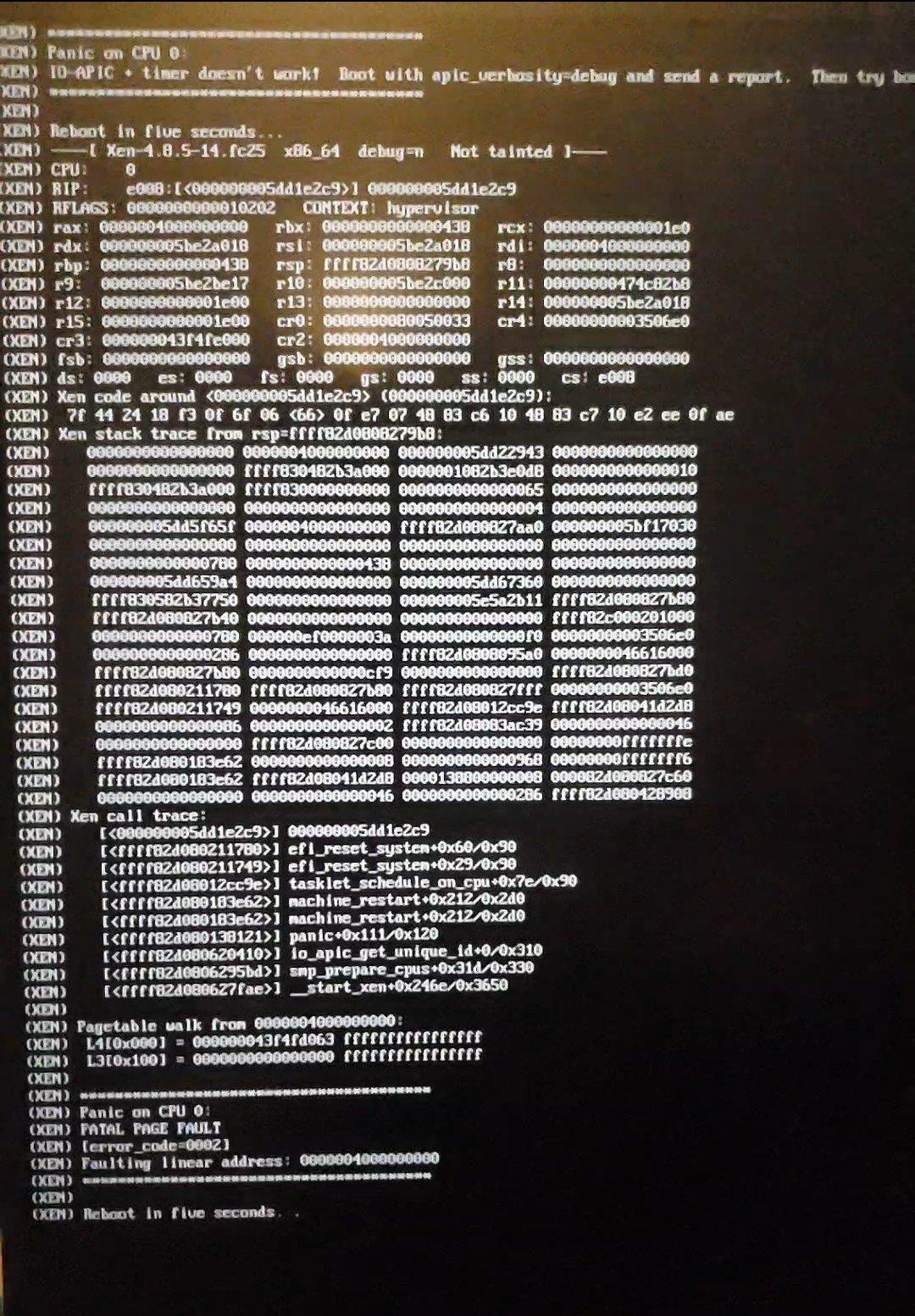
I also tried the 5.4 kernel build compiled yesterday for fedora 31, but I unfortunately got the same error. But maybe that only meant 5.4 kernel in the installed version instead of the installer.
awokd
Dec 31, 2019, 2:26:49 PM12/31/19
to qubes...@googlegroups.com
Aaron Janse:
> Of course the rubber-duck effect kicks in right after I click send. I was
> able to disable hpet using the `clocksource` flag, but I still got the same
> panic.
>
> I did, however, get a picture of the stack trace I've been getting (which
> in hindsight I should have shared much earlier). I think that this might be
> a different issue, though, considering that it only happens a split second
> after the five-second restart countdown.
>
> [image: 20191228-stack-trace.jpeg]
>
>
>
> I also tried the 5.4 kernel build compiled yesterday for fedora 31, but I
> unfortunately got the same error. But maybe that only meant 5.4 kernel in
> the installed version instead of the installer.
>
I don't think kernel version is relevant, because the crash is happening
in Xen before it even loads a Linux kernel. You could possibly try a
test copy of Qubes R4.1 which has a newer Xen version, but not sure what
else to suggest.
> On Saturday, December 28, 2019 at 4:14:43 PM UTC-8, Aaron Janse wrote:
>
>> My Googling/DuckDuckGoing skills have failed me. Any advice for how to
>> disable HPET? I couldn't find it anywhere in the BIOS settings.
BIOS settings was what I had in mind, unfortunately.
>
>> My Googling/DuckDuckGoing skills have failed me. Any advice for how to
>> disable HPET? I couldn't find it anywhere in the BIOS settings.
> Of course the rubber-duck effect kicks in right after I click send. I was
> able to disable hpet using the `clocksource` flag, but I still got the same
> panic.
>
> I did, however, get a picture of the stack trace I've been getting (which
> in hindsight I should have shared much earlier). I think that this might be
> a different issue, though, considering that it only happens a split second
> after the five-second restart countdown.
>
> [image: 20191228-stack-trace.jpeg]
>
>
>
> I also tried the 5.4 kernel build compiled yesterday for fedora 31, but I
> unfortunately got the same error. But maybe that only meant 5.4 kernel in
> the installed version instead of the installer.
>
in Xen before it even loads a Linux kernel. You could possibly try a
test copy of Qubes R4.1 which has a newer Xen version, but not sure what
else to suggest.
Message has been deleted
Message has been deleted

Harry K
Mar 14, 2021, 9:54:10 AM3/14/21
to qubes-users
Getting this error now still, was a solution to this ever found?
Reply all
Reply to author
Forward
0 new messages