
Quad stick not working with PlayStation4
140 views
Skip to first unread message

Sheldon Derr
May 1, 2017, 7:52:01 PM5/1/17
to QuadStick
I've set up my Quad Stick with the Original Quad Stick - PC - CronusMAX setup (with limited touchpad support). I followed the instructions very closely, but I'm not getting any output to my PS4. However, when I plug my Quad Stick into the CronusMAX (plugged into PS4), it works fine. Can someone try and offer some advice as to how I can fix this? I would much rather prefer the PC setup.

Richard Kramer
May 1, 2017, 8:46:48 PM5/1/17
to QuadStick
hi Sheldon,
how I connect to my PS4 is through the PC loading up the QMP program once I'm connected, then I run a USB cable from another USB port on my laptop through to the side of the CM & then having my PS4 controller connected through the back of the CM.
I can play for hours without any timeouts or anything

Jeff Paradee
May 2, 2017, 1:12:45 AM5/2/17
to QuadStick
I haven't had to re-do my setup ever since I got it working the first time with the PS4, so I'll help the best that I can.
Make sure the Cronusmax has the ps4 touch pad program installed in it, when you stick it in the ps4 make sure you press the button until the program is selected, mine glows a purple/blueish color. It should be slot 1 I believe.
Get the Quadstick working with the PS4 first, Do Not plug the pc-prog cord to the Computer until you can use the PS4 with the Quadstick!
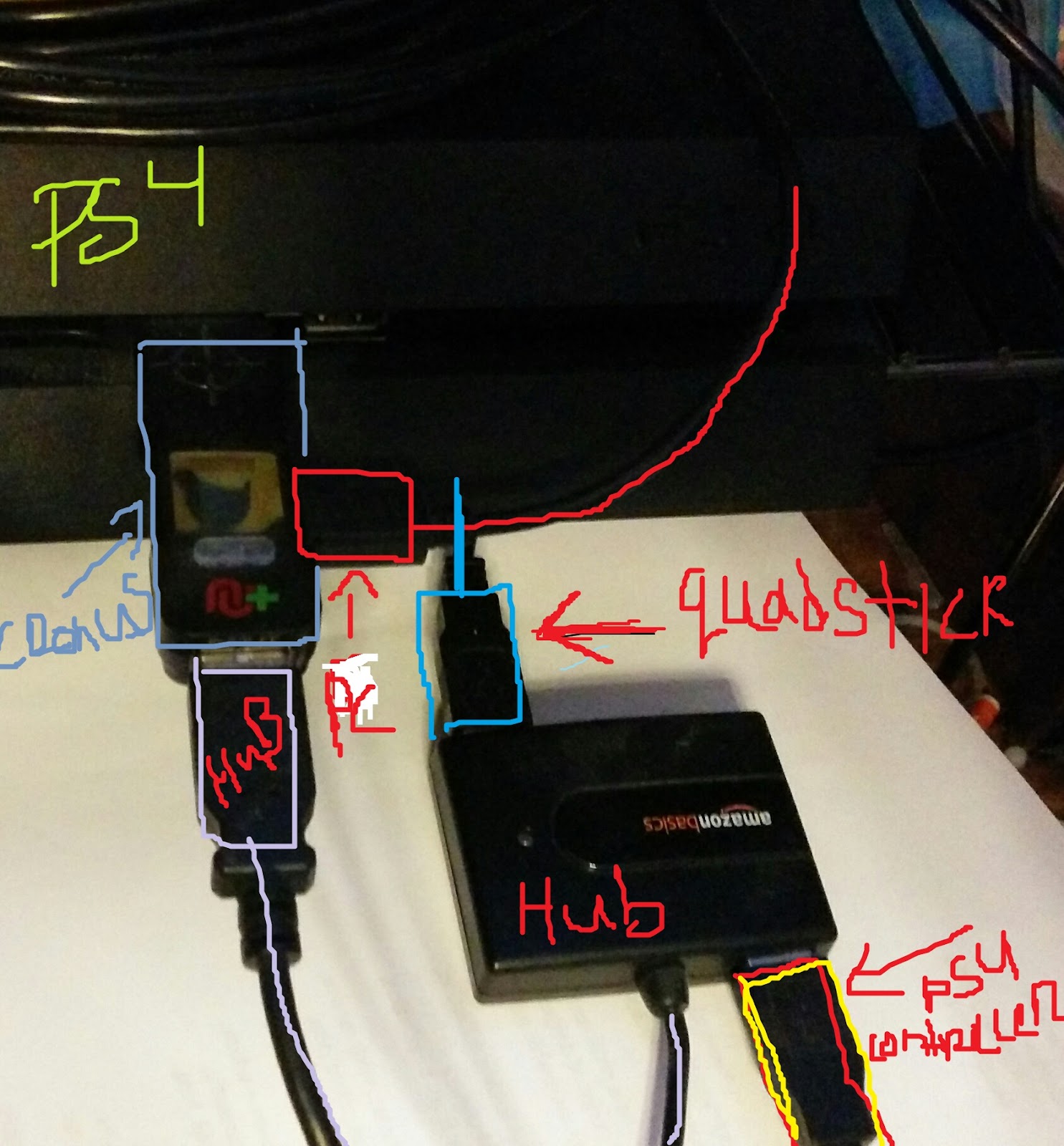
Your setup should look like this at the end: I do the full cross over, I know others who just plug straight to the PS4, but I can use 2 mouse buttons and 3 keyboard keys this way! And add switches later!
PS4 Controller_________
|
Quadstick----------------------------HUB
|_____Cronus-----PS4
PC_______________________________|
You need a usb hub with this setup, The Usb Hub I use--> https://www.amazon.com/AmazonBasics-4-Port-USB-2-0-Ultra-Mini/dp/B003M0NURK/ref=sr_1_1?s=pc&ie=UTF8&qid=1493700478&sr=1-1&keywords=usb+hub+amazon+basics I don't know if a 2 port hub will work or work better.
It does matter what slots you plug the ps4 controller and Quadstick into the hub, if it doesn't work one way then switch the order. I attached a picture of my hub.
Make sure the Cronusmax has the ps4 touch pad program installed in it, when you stick it in the ps4 make sure you press the button until the program is selected, mine glows a purple/blueish color. It should be slot 1 I believe.
Get the Quadstick working with the PS4 first, Do Not plug the pc-prog cord to the Computer until you can use the PS4 with the Quadstick!
Your setup should look like this at the end: I do the full cross over, I know others who just plug straight to the PS4, but I can use 2 mouse buttons and 3 keyboard keys this way! And add switches later!
PS4 Controller_________
|
Quadstick----------------------------HUB
|_____Cronus-----PS4
PC_______________________________|
You need a usb hub with this setup, The Usb Hub I use--> https://www.amazon.com/AmazonBasics-4-Port-USB-2-0-Ultra-Mini/dp/B003M0NURK/ref=sr_1_1?s=pc&ie=UTF8&qid=1493700478&sr=1-1&keywords=usb+hub+amazon+basics I don't know if a 2 port hub will work or work better.
It does matter what slots you plug the ps4 controller and Quadstick into the hub, if it doesn't work one way then switch the order. I attached a picture of my hub.

Fred Davison
May 2, 2017, 1:33:18 AM5/2/17
to Sheldon Derr, QuadStick
Hi Sheldon:
If you want to use the PCPROG port method you have two choices: use QMP 2.01 (Not the current 3.0 Beta) or X-Aim (part of CronusPro). If you are going to use QMP to bridge the connection, then CronusPro MUST NOT BE RUNNING. The two programs will interfere with each other.Version: 2.01
Loaded preferences OK
QuadStick drive letter: H:
QuadStick Game Controller interface successfully opened
CronusMax connected
Console type: PS4 Controller type: PS4

Sheldon Derr
May 2, 2017, 5:33:53 PM5/2/17
to QuadStick
Thank you everyone for the help, I eventually figured it out and I believe it was a problem with my game profile.
Reply all
Reply to author
Forward
0 new messages