
2x2 grid for one image in QLAB???
131 views
Skip to first unread message

Micah Hensley
Aug 25, 2016, 11:19:45 AM8/25/16
to QLab
Hey all!
So i've done projection in qlab before but only with 1 projector or 3 straight across on a th2g. But i'm trying to fill my cyc with one image and with the projectors I have it's going to take creating a 2x2 grid to do so. Has anyone done something like this and what's the best way to make it happen that won't break the bank? I'm planning to do projection for our scenery for our fall musical. Does Matrox make something like this? I've heard someone say the datapath x4? HELP!! :)
CONFIDENTIALITY NOTICE AND DISCLAIMER: This e-mail and any attachments may be confidential and may contain privileged or copyright information. If you are not the intended recipient, please call (816) 986-1444 and inform us that you have received this message in error. Please do not copy, distribute or use this e-mail or the information contained in it for any purpose.

micpool
Aug 25, 2016, 11:36:32 AM8/25/16
to QLab
Datapath X4 is the way to go.
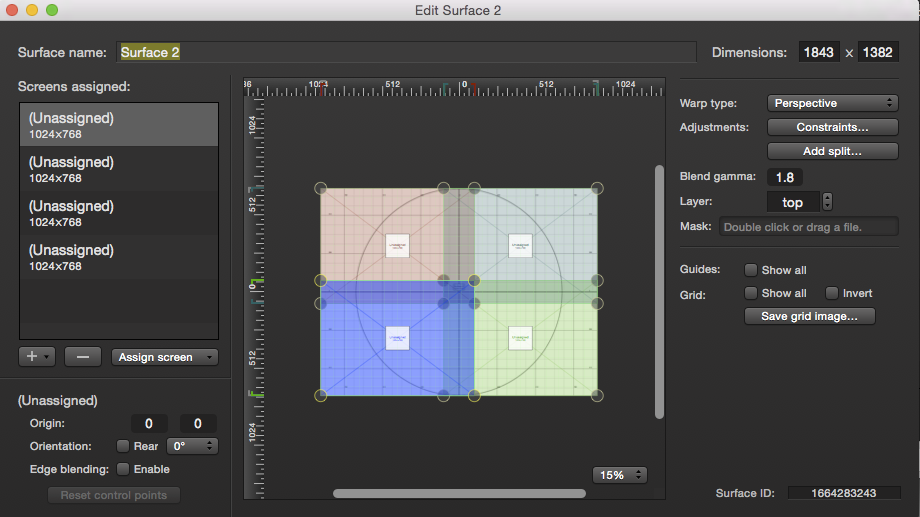
If you go into QLab/ settings/ video and create a new multiscreen surface like this

you will see exactly how the video is arranged
Mic
Micah Hensley
Aug 25, 2016, 11:40:30 AM8/25/16
to QLab
Does the datapath do the blending or does that still need to be done in qlab? Know where you can get a good deal on one? lol
micpool
Aug 25, 2016, 1:09:40 PM8/25/16
to QLab
On Thursday, August 25, 2016 at 4:40:30 PM UTC+1, Micah Hensley wrote:
Does the datapath do the blending or does that still need to be done in qlab?
No Qlab does the blending. The Datapath appears to your mac like a single hi resolution monitor
This shot shows the setup for 4 1280x720 projectors fed from a data path set up as a 2560x1440 screen (I don't have a Datapath in the studio so where it would say datapath it displays the device I am using which is a PA271W)

So you set up your projectors so they overlap by 20 percent which means the frame size of your video is actually 2304 x 1296
Your data path is set up as 2x2 your projector resolution of 1280x720 (2560x1440) and you use the partial screens to feed each quarter of the 2x2 Datapath with the correct image. Each of the blended edges will appear on 2 projectors. Here is the Bottom left partial screen feed

Mic
Micah Hensley
Aug 25, 2016, 1:32:15 PM8/25/16
to QLab
Ok what about processing power. Does the data path push it as much as if you were to do say the double Dual Head 2 go route? I'm currently on the 13inch macbook pro or mac mini.
micpool
Aug 25, 2016, 1:41:53 PM8/25/16
to QLab
Now you are in the realm of what can only be determined by experimentation. There is a Mac processing overhead to do the edge blending but the Mac doesn't know you have a Datapath connected, it's just a big monitor as far as it's concerned.
It all depends on which 13inch mac spec you have or which mac mini (there are loads of different ones) The resolution of your video, the codec you use, the frame rate and how many layers of video you want to run simultaneously will all determine what is feasible on your current equipment or if you need to go to a more powerful MacBook Pro or a Mac Pro.
Mic
Reply all
Reply to author
Forward
0 new messages