
Trigger cues from stage
921 views
Skip to first unread message

Tracy Evans
May 29, 2014, 12:26:48 AM5/29/14
to ql...@googlegroups.com
Can someone recommend a pocket device or system that would allow a performer onstage to trigger cue sequences? This would be for a presenting speaker, so it doesn't have to be hidden. It could be a small hand-held wireless device. Interested to hear what others might be using.

Eoin O'Grady
May 29, 2014, 6:38:24 AM5/29/14
to ql...@googlegroups.com
Have I missed something huge, or would the QLab remote on iPhone or iPad not do the magic for you?

Drew Schmidt
May 29, 2014, 7:12:03 AM5/29/14
to ql...@googlegroups.com
QLab remote would be the simplest, most reliable (as reliable as wireless can get) solution for you.
Another option would be TouchOSC. With this you could customize your interface.

micpool
May 29, 2014, 8:27:07 AM5/29/14
to ql...@googlegroups.com
The trouble with the iPad/iphone devices is you have to look at them to operate them.
If you just want something in your hand that you can locate the buttons by touch then the Kensington 3347 presenter remote or similar would work This sends F5, B, Page up, Page Down.
F5 and B are straightforward key maps
I think Page up and down are too. Except they operate as page up or page down paging the scroll through the cue list until you assign something in the Qlab keymap. I don't know if this is the intended behaviour or if there are any cases where they would do something unexpected.
Some presentation remotes can be totally reprogrammed to send any key you want. Some others are fixed but give you arrow up and arrow down.
There are some previous threads on this subject as well google 'Qlab presenter remote' or similar.
Mic

Lucas Krech
May 29, 2014, 8:40:30 AM5/29/14
to ql...@googlegroups.com
Touch OSC could allow for one big button so you don't need to look at the device.
-L
*insert witty mobile device advertising here*
-L
*insert witty mobile device advertising here*

Joshua Langman
May 29, 2014, 9:23:14 AM5/29/14
to ql...@googlegroups.com
I'm a big fan of the Honeywell PowerPresenter. Cheap as remotes go and all buttons can be reprogrammed to send any keystroke.

Andy Dolph
May 29, 2014, 10:31:34 AM5/29/14
to ql...@googlegroups.com
I second that recommendation - I've also found them to be quite reliable
Sent from my iPhone
I'm a big fan of the Honeywell PowerPresenter. Cheap as remotes go and all buttons can be reprogrammed to send any keystroke.
--
--
Change your preferences or unsubscribe here:
http://groups.google.com/group/qlab
Follow Figure 53 on Twitter: http://twitter.com/Figure53
---
You received this message because you are subscribed to the Google Groups "QLab" group.
To unsubscribe from this group and stop receiving emails from it, send an email to qlab+uns...@googlegroups.com.
For more options, visit https://groups.google.com/d/optout.

El Armstrong
May 29, 2014, 11:30:35 AM5/29/14
to ql...@googlegroups.com
+1 for the Honeywell. Been using them in shows for years.
Best,
Best,
El
Spel chekt by Aple.
I'm a big fan of the Honeywell PowerPresenter. Cheap as remotes go and all buttons can be reprogrammed to send any keystroke.
--

Jeremy Lee
May 29, 2014, 3:15:02 PM5/29/14
to ql...@googlegroups.com
iPod w/ QLab Remote?
On May 29, 2014, at 12:26 AM, Tracy Evans <tr...@tracyevansproductions.com> wrote:
Can someone recommend a pocket device or system that would allow a performer onstage to trigger cue sequences? This would be for a presenting speaker, so it doesn't have to be hidden. It could be a small hand-held wireless device. Interested to hear what others might be using.
Tracy Evans
May 29, 2014, 5:24:25 PM5/29/14
to ql...@googlegroups.com
Thanks for all the great advice everyone.
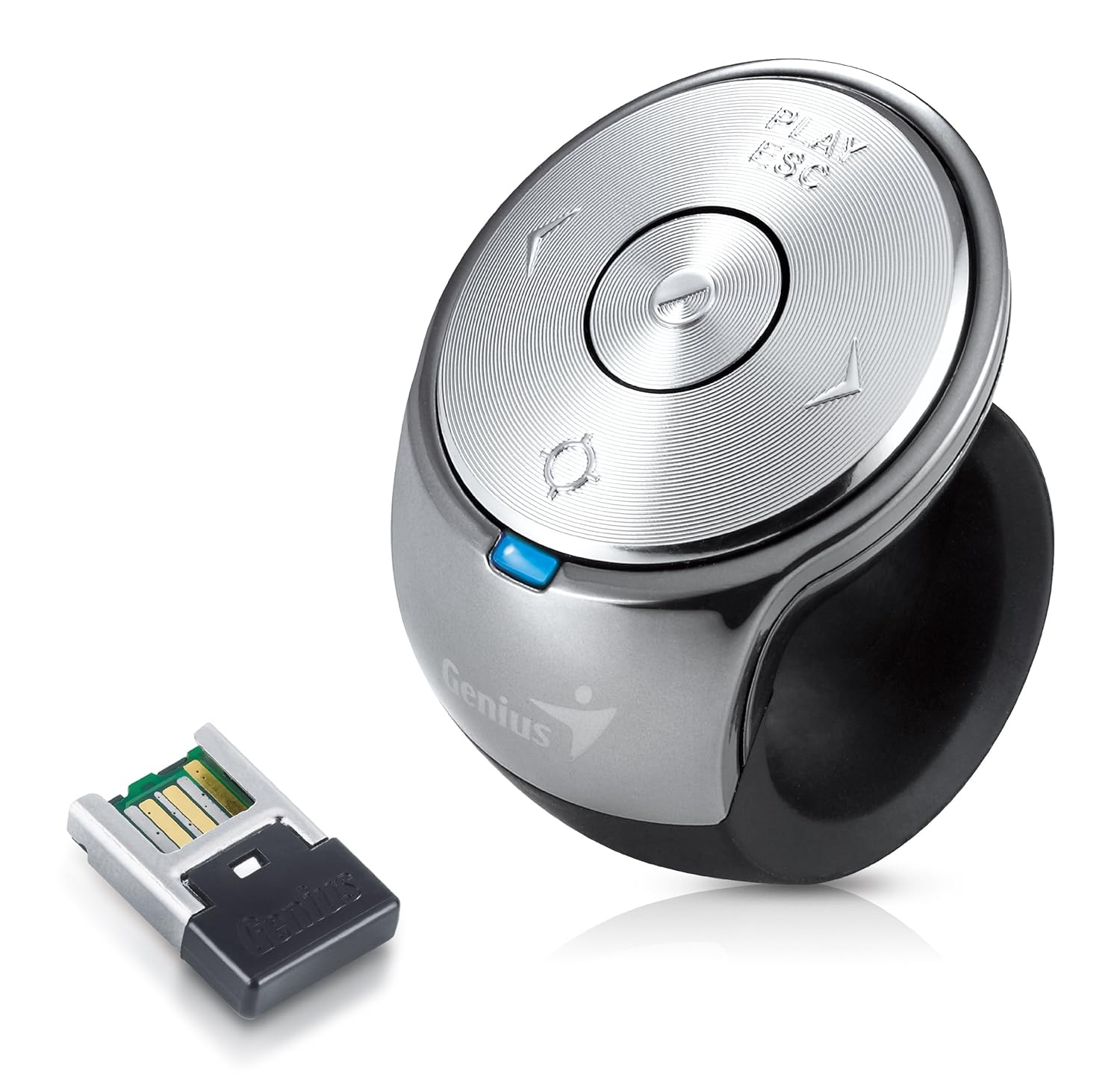
I love using my iPhone to trigger cues, but now that I am the speaker I need something a bit more stealth than a glowing phone. Here is a tiny controller I ordered. Looking forward to trying it. I will let you know how it works out.

Gunther J. Kibelkstis
May 30, 2014, 9:28:26 AM5/30/14
to ql...@googlegroups.com
With a WIFI router:
In Android you can use GPAD app or Remote Droid app.
GPAD you can create and customize the application.
With Remote Droid (JAVA) you have the keyboard to trigger the cues.
nizer
May 31, 2014, 9:42:23 PM5/31/14
to ql...@googlegroups.com
The Honeywell remote is no longer in stock at all the places I looked.
I love the Satechi-MediaRemote-Bluetooth with a bluetooth range extender and Quickeys to change the keys to what ever you want, I can control my computer/Qlab from 2 kilometers away and have conditional buttons and triggers as needed.

Johan
Jun 1, 2014, 3:51:35 PM6/1/14
to ql...@googlegroups.com
The Honeywell Power remote
Its still the smallest (easiest to hide) and with best range!
I bought mine at B&H in NY and still have 2 unopened packages with receiver & sender plus 3 brand new unopened packages with extra remotes.
They´re for sale ;-)
www.distingo.nu
Tracy Evans
Jun 3, 2014, 4:17:04 PM6/3/14
to ql...@googlegroups.com
Nizer,
Can you provide some detail on how you remapped the Satechi remote please? I can't figure out what it is sending in order to remap. Basically I just want an "advance to next que" button. Ideally I would like to disable other buttons on it so I don't accidentally send some unwanted command.
Tracy Evans
Jun 3, 2014, 4:20:01 PM6/3/14
to ql...@googlegroups.com
Also, what kind of BT range extender are you using? All I can find are ones for streaming music.
nizer
Jun 3, 2014, 9:56:43 PM6/3/14
to ql...@googlegroups.com
Use this.
http://www.aircable.net/products/host-xr3.php
For reprogramming the buttons use this.
http://startly.com/products/quickeys/mac/4/
Make the remote a "device" and then u can set the keys for what ever you want.
Tracy Evans
Jun 3, 2014, 10:48:11 PM6/3/14
to ql...@googlegroups.com
Thanks! Back in the day (20+ years ago?) my workflow depended on QuicKeys. Then it got kinda wonky and overcomplicated and I stopped using it. Looking forward to revisiting an old friend.
nizer
Jun 4, 2014, 3:17:56 AM6/4/14
to ql...@googlegroups.com
It's still here and although they are in a development pause due to the main coders death it has still been chugging along and works well. The only issue I have is that when I go to logout or restart you I have to manually quit it. Their support page also discusses some work around with apples latest Os mavericks.

mic
Jun 5, 2014, 5:24:51 AM6/5/14
to ql...@googlegroups.com
Hi Nizer,
do you have experience of the use of the remote during shows? Is bluetooth reliable, never had communications break?
Also: any suggestion for a foot-switch to trigger QLab? Also with cable could work for me.
ciao
michele

craig k
Jun 5, 2014, 10:03:49 AM6/5/14
to ql...@googlegroups.com
depending on your interface, there may be a foot switch in already. I have a MOTU 828 with a foot switch connection - I use a FS-5U foot switch and set QLab to listen for it. There are a few things to note: The polarity of the foot switch ( the FS-5U has a switch to set this) and that depending on the interface, the computer might recognize a seperate "down" and "up" action. make sure you are sure that you don't get double triggers from this. (It's kinda nice though, that you could have your "GO" triggered by the relese of the foot switch).
If your interface doesn't have a foot switch connection, there are several contact closure to midi interfaces available as well.
Craig K.
freeun...@gmail.com
Jun 5, 2014, 5:18:36 PM6/5/14
to ql...@googlegroups.com
I've been using my system for many years and the only time I had a problem was the battery on the Remote had gotten very low But I always keep two remotes handy so I just swoped it out and it was fine.
Mark Nizer/Neisser
Mark Nizer/Neisser
--
--
Change your preferences or unsubscribe here:
http://groups.google.com/group/qlab
Follow Figure 53 on Twitter: http://twitter.com/Figure53
---
You received this message because you are subscribed to a topic in the Google Groups "QLab" group.
To unsubscribe from this topic, visit https://groups.google.com/d/topic/qlab/uVJhDgOMkdQ/unsubscribe.
To unsubscribe from this group and all its topics, send an email to qlab+uns...@googlegroups.com.
Tracy Evans
Jun 23, 2014, 8:38:34 PM6/23/14
to ql...@googlegroups.com
I tried the Satechi remote and QuickKeys. It worked great, until right before showtime. It started acting up; unreliable button presses.
I did not have the Host XR3 extender (I could not get it in time), but I was well within range of the computer; about half the distance to loosing the signal.
I am guessing that the Host will not only extend the signal, but also makes the signal stronger and more reliable at close range. Is this the case?
Paul Gotch
Jun 23, 2014, 9:01:50 PM6/23/14
to ql...@googlegroups.com
On 24/06/2014 01:38, Tracy Evans wrote:
> I am guessing that the Host will not only extend the signal, but also
> makes the signal stronger and more reliable at close range. Is this the
> case?
I'm afraid RF is voodoo and a theatre is a very noisy RF environment due
> I am guessing that the Host will not only extend the signal, but also
> makes the signal stronger and more reliable at close range. Is this the
> case?
to a roomful of punters a lot of which will have one or more items on
their person transmitting Wifi and or Bluetooth on 2.4GHz.
Just throwing power at the problem does not necessarily help, at close
range you run the risk of overloading the input stage of the receiver.
This is *exactly* the same mechanism as audio clipping.
-p

Jonny Burns
Jun 24, 2014, 1:04:06 PM6/24/14
to ql...@googlegroups.com
Craig - what a legend. After reading this I ran to our theatre and checked our 828, it has a punch in/out connection so I ran a standard yamaha keyboard sustain pedal through our audio tie line down to the stage ... It triggers qlab like a charm!
freeun...@gmail.com
Jun 24, 2014, 1:14:29 PM6/24/14
to ql...@googlegroups.com
It has NEVER failed me on stage, except after 6 month the battery needed to be replaced. I DO NOT recommend using it without the Host XR3 extender as the range varies greatly.
Tracy Evans
Jun 24, 2014, 1:22:34 PM6/24/14
to ql...@googlegroups.com
I have an XR3 on order.
craig k
Jun 24, 2014, 10:23:40 PM6/24/14
to ql...@googlegroups.com
Glad it works for you !
Craig K.
nizer
Jun 25, 2014, 2:09:44 PM6/25/14
to ql...@googlegroups.com
I have used the bluetooth extender with my Mac and the remote all over the world, in arenas, colleges, theaters, cruise ships, Kuwait, china and India all with zero issues. I do keep a second remote paired and ready for emergencies as well as a bluetooth keyboard in case I need to go to a back up. Are you including bluetooth in the RF BUBBLE?
Reply all
Reply to author
Forward
0 new messages